

Beschrijving

StifLi Flex MCP
Beschrijving
StifLi Flex MCP transforms your WordPress site into a powerful Model Context Protocol (MCP) server, exposing 117 tools that AI agents like ChatGPT, Claude, and LibreChat can use to manage your WordPress and WooCommerce site.
Key Features:
- 55 WordPress tools (posts, pages, comments, media, taxonomies, options)
- 61 WooCommerce tools (products, orders, coupons, shipping, taxes, webhooks)
- Custom Tools – Turn any WordPress plugin into an AI tool in minutes, no coding expertise required
- JSON-RPC 2.0 compliant REST endpoint
- Server-Sent Events (SSE) support for real-time streaming
- Profile-based tool management (8 predefined profiles + custom profiles)
- WordPress Application Passwords authentication (recommended by WordPress.org)
- Compatible with ChatGPT Custom Connectors, Claude Desktop, LibreChat
- Granular permissions control
🚀 NEW: Custom Tools – Unlimited AI Capabilities
Transform ANY WordPress plugin into an AI tool! Custom Tools lets you write simple PHP snippets that expose plugin functionality to AI agents. Examples:
- Query Contact Form 7 submissions through AI conversations
- Get Yoast SEO scores and recommendations via ChatGPT
- Control WP Super Cache settings with natural language
- Access Advanced Custom Fields data through AI agents
- Build custom WooCommerce reports for AI analysis
No coding experience required for basic tools – use our examples as templates. Advanced users can create sophisticated integrations with full WordPress/plugin API access.
Demo & Installation Tutorial:
Predefined Profiles:
- WordPress Read Only – Safe read-only access to WordPress data
- WordPress Full Management – Complete WordPress CRUD operations
- WooCommerce Read Only – Query WooCommerce data without modifications
- WooCommerce Store Management – Full store management capabilities
- Complete E-commerce – All WooCommerce tools including advanced settings
- Complete Site – All 117 tools enabled
- Safe Mode – Non-sensitive read-only access
- Development/Debug – Diagnostic and configuration tools
Use Cases:
- Automate content publishing with AI assistants
- Manage WooCommerce stores through conversational interfaces
- Build AI-powered WordPress dashboards
- Create automated workflows for content management
- Enable AI agents to query and modify WordPress data
Security Features:
- WordPress Application Passwords (native WordPress 5.6+ feature)
- HTTP Basic Authentication (industry standard)
- Tool-level capability checks
- Profile-based tool restrictions
Schermafbeeldingen
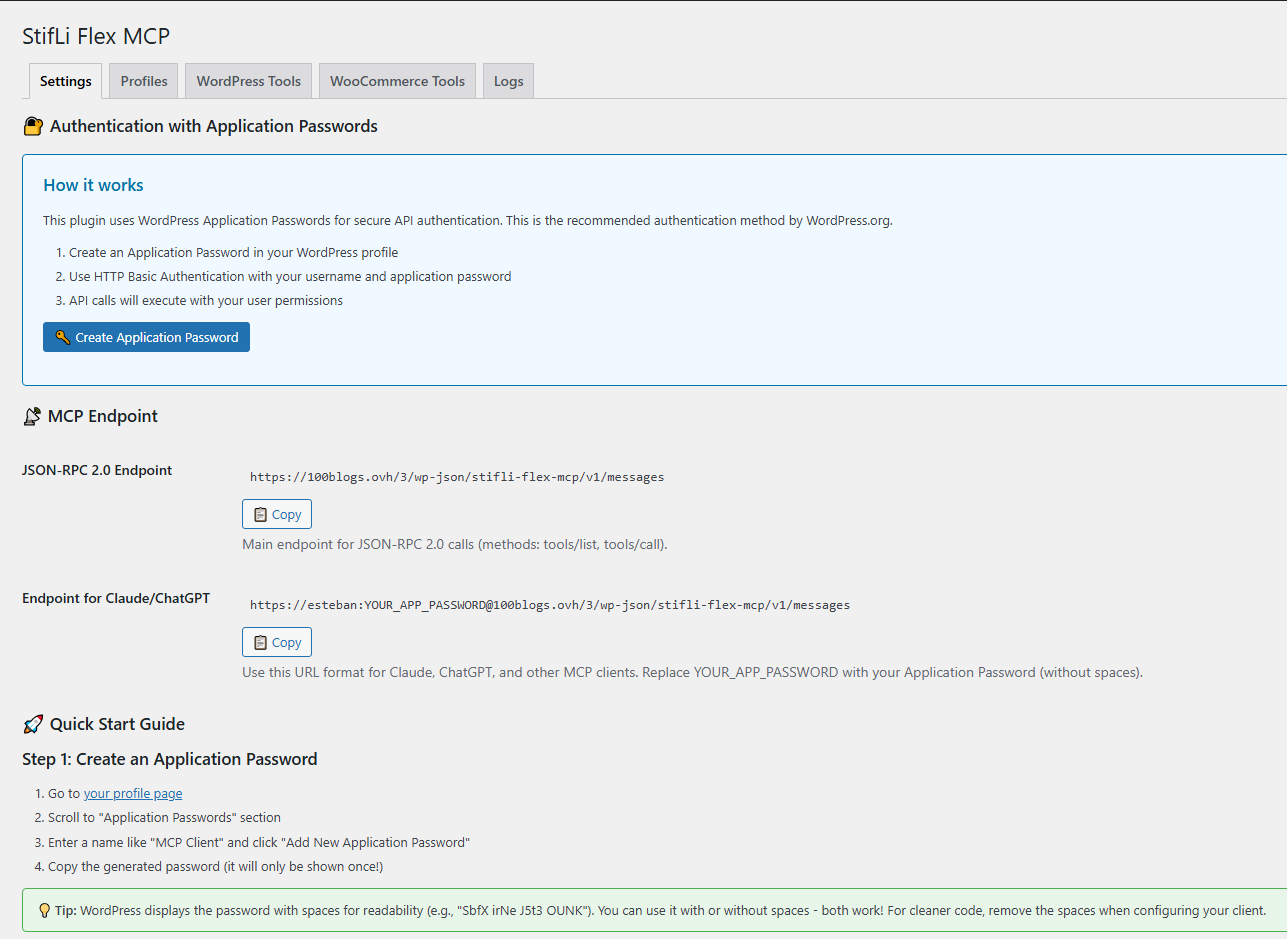
Settings tab – Setup instructions and endpoint URLs 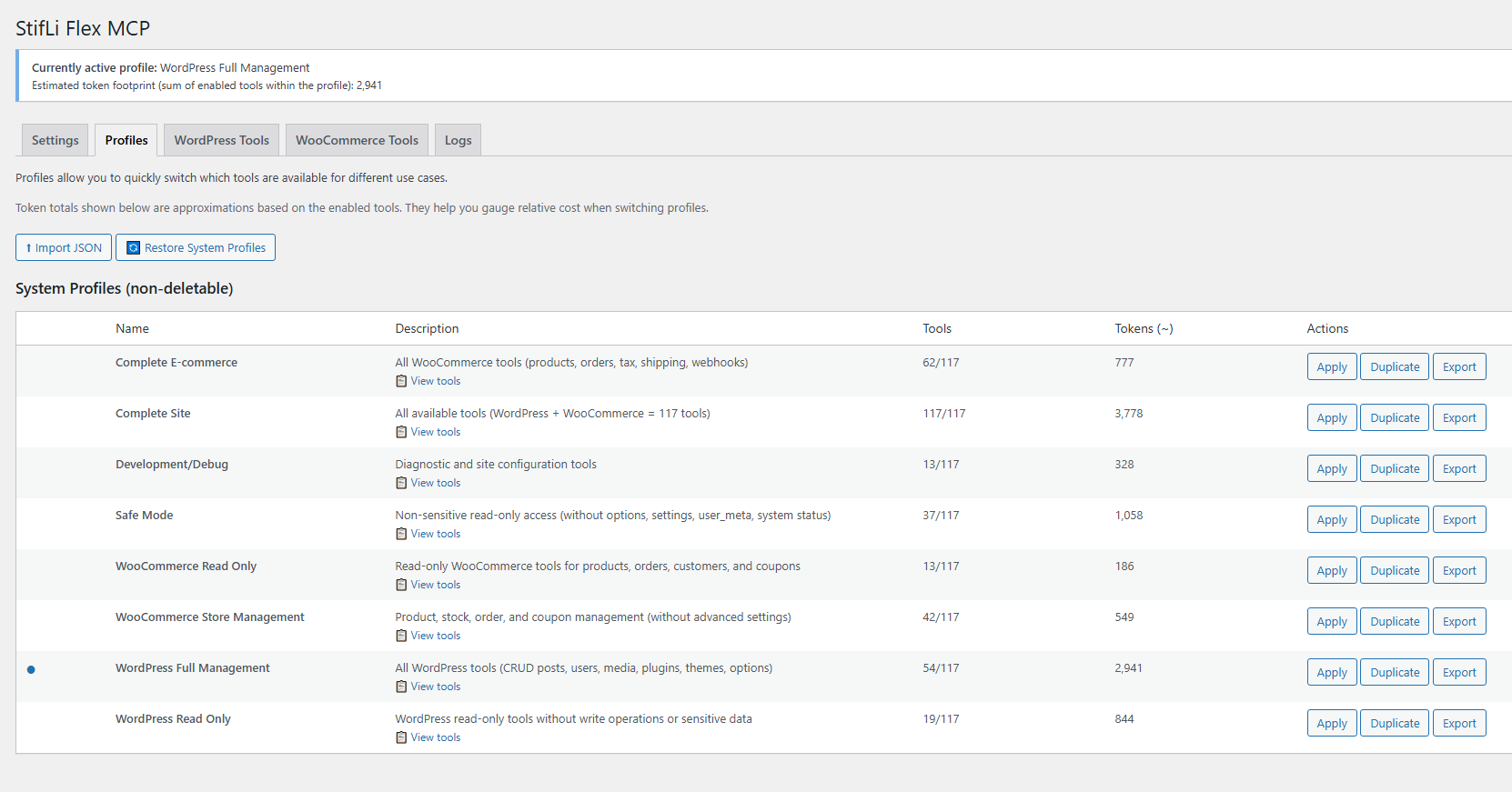
Profiles tab – Manage tool configurations 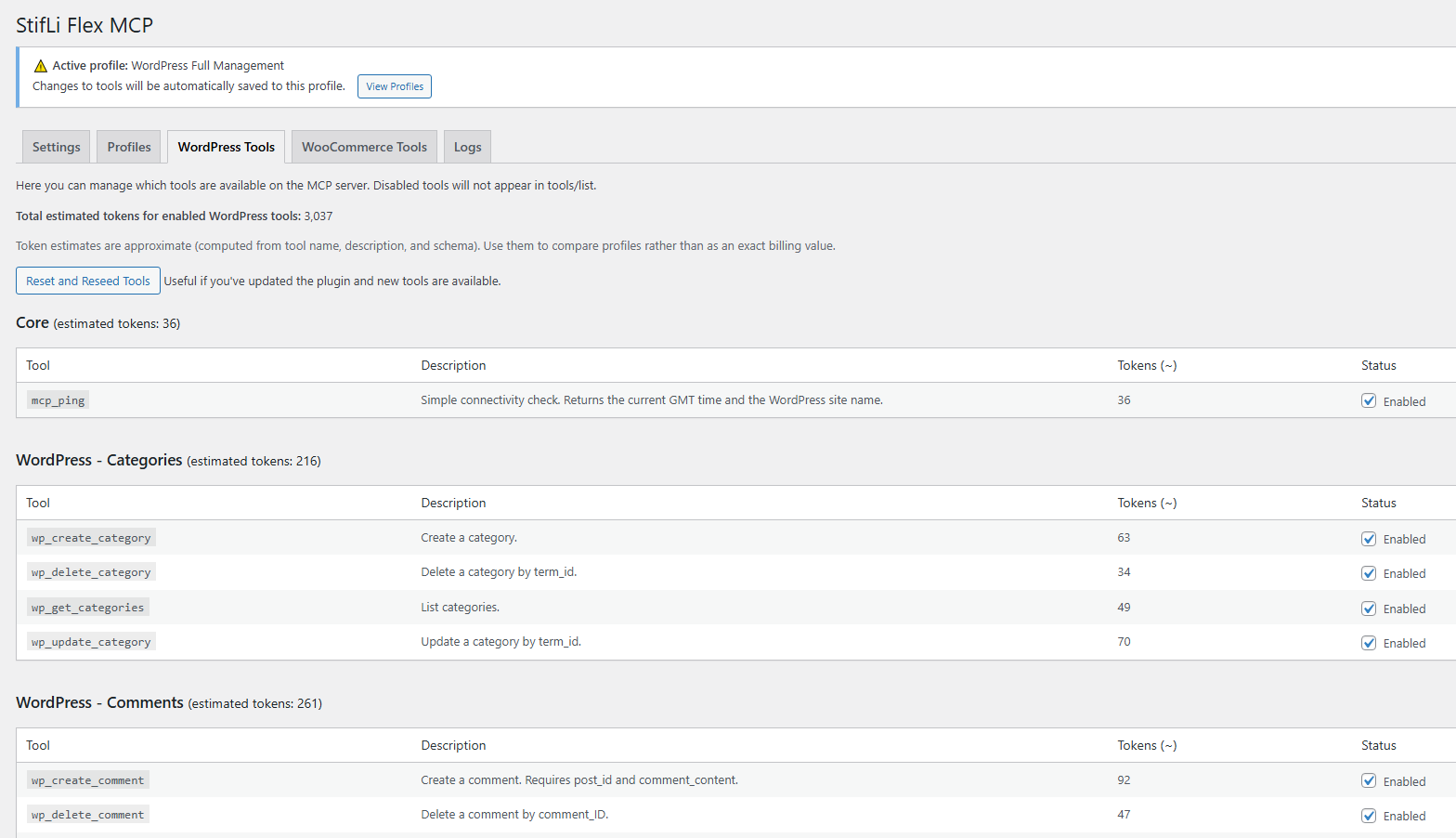
WordPress Tools tab – Enable/disable WordPress tools 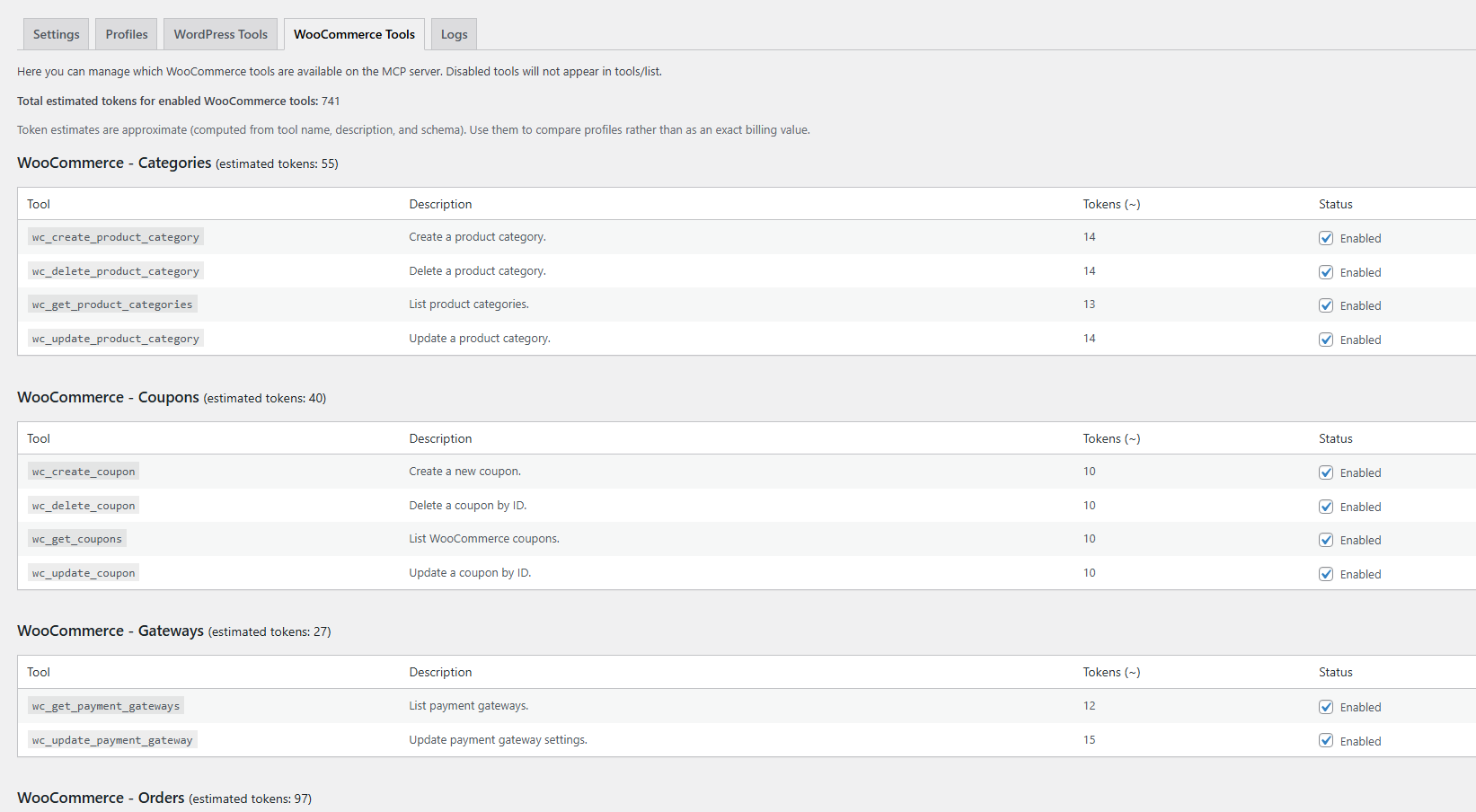
WooCommerce Tools tab – Manage WooCommerce tools


Installatie
- Upload the
stifli-flex-mcpfolder to/wp-content/plugins/directory - Activate the plugin through the ‘Plugins’ menu in WordPress
- Go to StifLi Flex MCP Settings for setup instructions
- Create an Application Password in your WordPress profile (Users Profile Application Passwords)
- Use HTTP Basic Authentication with your username and application password
Endpoints:
- HTTP JSON-RPC:
https://yoursite.com/wp-json/stifli-flex-mcp/v1/messages - SSE Streaming:
https://yoursite.com/wp-json/stifli-flex-mcp/v1/sse
FAQ
What is MCP?
Model Context Protocol (MCP) is a standard protocol for exposing tools and data to AI agents. This plugin implements an MCP-compatible server for WordPress.
How do I connect ChatGPT?
- Create an Application Password in your WordPress profile (Users Profile)
- Create a custom connector in ChatGPT
- Use the SSE endpoint URL with HTTP Basic Authentication
- ChatGPT will discover all available tools automatically
Is this safe for production sites?
Yes, when configured properly:
* Uses WordPress Application Passwords (native security feature)
* Each Application Password is tied to a WordPress user with specific permissions
* Use profile-based restrictions (e.g., “WordPress Read Only”)
* Review enabled tools in the Tools Management tab
* You can revoke Application Passwords at any timeWhat permissions do AI agents have?
Permissions are determined by:
1. The WordPress user’s Application Password used for authentication
2. The active profile (which tools are enabled)
3. Individual tool capability requirementsCan I customize which tools are available?
Yes! You can:
* Apply predefined profiles
* Manually enable/disable individual tools
* Create custom profiles
* Export/import profile configurationsDoes this work with WooCommerce?
Yes! The plugin includes 61 WooCommerce-specific tools. WooCommerce tools will only function when WooCommerce is installed and active.
How do I troubleshoot connection issues?
- Check the Settings tab for test commands
- Test with PowerShell scripts (included in examples/)
- Verify your hosting doesn’t block SSE connections
- Check WAF/CDN settings (may block long-lived connections)
- Review debug.log with WP_DEBUG enabled
Can I use this without WooCommerce?
Absolutely! The 55 WordPress tools work independently. WooCommerce tools are optional.
What are Custom Tools?
Custom Tools is a powerful feature that lets you create your own AI tools using PHP code. This means you can expose ANY plugin’s functionality to AI agents – from querying Contact Form 7 submissions to controlling cache plugins. Each Custom Tool has a name, description, optional input schema, and PHP code that executes when called.
How do I create a Custom Tool?
- Go to StifLi Flex MCP Custom Tools
- Click “Add New Tool”
- Enter a name (e.g., “custom_my_feature”)
- Write a description that helps AI understand when to use the tool
- Add your PHP code (the code receives
$argswith any input parameters) - Optionally define an input schema for structured parameters
- Save and enable the tool
The plugin includes several examples to get you started!
Beoordelingen

Bijdragers & ontwikkelaars
“StifLi Flex MCP” is open source software. De volgende personen hebben bijgedragen aan deze plugin.
Bijdragers
Vertaal “StifLi Flex MCP” in je eigen taal.
Interesse in ontwikkeling?
Bekijk de code, haal de SVN repository op, of abonneer je op het ontwikkellog via RSS.
Changelog
1.0.5
- New: Custom Tools – Turn any WordPress plugin into an AI tool! Copy-paste examples included, no coding expertise required.
- New: Custom Tools management tab with code editor, enable/disable toggle, and built-in examples
- New: Pre-built Custom Tool examples (WooCommerce product lookup, CF7 forms, Yoast SEO, WP Super Cache)
- New: Custom Tools support input schemas for structured AI interactions
- Improved: All admin styles externalized for WordPress.org compliance
- Fix: Resolved object persistence issue in PHP 8.1+ causing 404 errors on API endpoints
- Fix: Deferred WooCommerce detection to ensure tools load correctly regardless of plugin load order
- Fix: WooCommerce module dispatch now correctly handles tool routing
1.0.4
- New: Debug logging system with dedicated log file (wp-content/uploads/sflmcp-logs/)
- New: Logs tab in admin UI to enable/disable logging and view debug logs
- New: Clear logs and refresh functionality from admin panel
- New: “WordPress Full Management” profile now active by default on fresh installs
- Security: Log directory protected with .htaccess and index.php
1.0.3
- Security: Replaced custom token authentication with WordPress Application Passwords
- Security: Removed wp_set_current_user calls for compliance with WordPress.org guidelines
- Removed: User management tools (wp_create_user, wp_update_user, wp_delete_user)
- Removed: Customer management tools (wc_get_customers, wc_create_customer, wc_update_customer, wc_delete_customer)
- Updated: Settings page now guides users to create Application Passwords
- Improved: Authentication uses native WordPress security features
1.0.0
- Initial public release
- 55 WordPress management tools (posts, pages, comments, media, taxonomies, options)
- 61 WooCommerce tools (products, orders, coupons, shipping, taxes, webhooks)
- Profile-based tool management with 8 predefined profiles
- WordPress Application Passwords authentication
- JSON-RPC 2.0 compliant REST API endpoint
- Server-Sent Events (SSE) support for real-time streaming
- Full internationalization support (i18n/l10n ready)
- Granular permission control per tool
- Profile import/export functionality
- Compatible with ChatGPT Custom Connectors, Claude Desktop, LibreChat

