

Beschrijving
Deze plugin is niet getest met de laatste 3 grotere versies van WordPress. Mogelijk wordt het niet meer onderhouden of ondersteund. Ook kunnen er compatibiliteitsproblemen ontstaan wanneer het wordt gebruikt met recentere versies van WordPress.

Multisite Dashboard Broadcast
Beschrijving
NOTE: ONLY works with multisite (aka WordPress Network) mode for now.
A super-easy-to-use Multisite WordPress news broadcasting tool for the Super Admin of the Network.
This plugin can be helpful for the Super Admins to push a notification, some kind of messages, even some Ads if they like, to every site admins who registered under your Multisite WordPress network. The added widget will go to the first place of all widgets, unless the site admins move it elsewhere.
This is a very simple task but yet no plugins ever met my simple need, so I made one for myself, and hope it helps you too.
Key Features:
- Add a widget to every site admin’s dashboard (by Super Admin only)
- Support HTML content
- Comes at the top of all widgets
- Site admins can move or hide it as they wish
- Multi languages support (available in English and Chinese till now)
You can find the configuration page at Manage Network -> Settings -> Dashbaord Broadcast.
Schermafbeeldingen
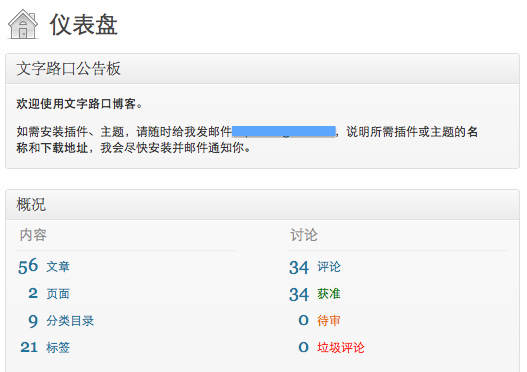
The way it shows up in the dashboard 
The configuration page


Installatie
- Upload all contents inside the “multisite-dashboard-broadcast” folder to the “/wp-content/plugins/multisite-dashboard-broadcast” directory. Create the folder if it doesn’t exist.
- Activate the plugin through the ‘Plugins’ menu in WordPress.
- Go to Manage Network -> Settings -> Dashbaord Broadcast to modify the contents.
Beoordelingen
Er zijn geen beoordelingen voor deze plugin.
Bijdragers & ontwikkelaars
“Multisite Dashboard Broadcast” is open source software. De volgende personen hebben bijgedragen aan deze plugin.
Bijdragers
Vertaal “Multisite Dashboard Broadcast” in je eigen taal.
Interesse in ontwikkeling?
Bekijk de code, haal de SVN repository op, of abonneer je op het ontwikkellog via RSS.
Changelog
0.1
- Initial beta release

