

Beschrijving
Deze plugin is niet getest met de laatste 3 grotere versies van WordPress. Mogelijk wordt het niet meer onderhouden of ondersteund. Ook kunnen er compatibiliteitsproblemen ontstaan wanneer het wordt gebruikt met recentere versies van WordPress.
Multilang Block
Beschrijving
Not every site needs 1:1 multilanguage experience. Sometimes you want to give your visitors from a certain country a piece of information like “check my other site in your language”, or provide a brief introduction.
Multilang block was created with this idea. Of course, nothing prevents you from wrapping all the content in Multilang block, because it’s the best block out there!
Schermafbeeldingen
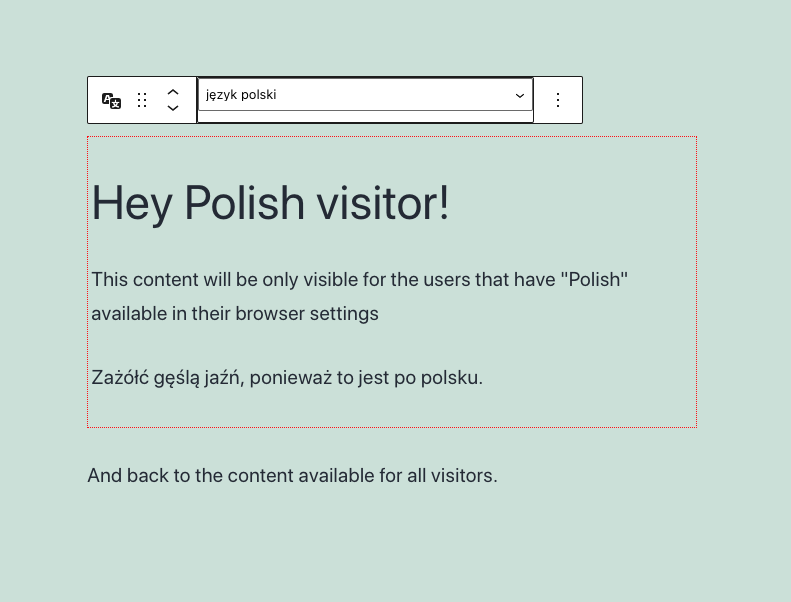
An example of the Multilang block wrapping an introduction for Polish visitors.

Blokken
Deze plugin heeft 1 blok.
- Multilang Block Create hidden content visible only for speakers of other languages
Installatie
- Upload the plugin files to the
/wp-content/plugins/multilang-blockdirectory, or install the plugin through the WordPress plugins screen directly. - Activate the plugin through the ‘Plugins’ screen in WordPress
- Insert “Multilang block” into your post or page
- Select a language for the block
- Every block INSIDE the multilang block will be visible only for people who have the selected language in
navigator.languagesof their browsers.
FAQ
What can I put inside the Multilang block?
Everything. Except donuts, they get squished and the filling will be all over the place.
The block is functionally identical to the group block.How does multilang block know what languages users speak?
Users can set up languages in the browser settings. They are passed to
navigator.languagesproperty.
Multilang block reads this list and if the language you selected is on there – block is displayed.
It stays hidden for users that don’t have that language set in browser settings.In JavaScript. Post Content has the full content of the post, so it will probably show up in RSS, and in similar delivery systems.
Beoordelingen
Er zijn geen beoordelingen voor deze plugin.
Bijdragers & ontwikkelaars
“Multilang Block” is open source software. De volgende personen hebben bijgedragen aan deze plugin.
Bijdragers
Vertaal “Multilang Block” in je eigen taal.
Interesse in ontwikkeling?
Bekijk de code, haal de SVN repository op, of abonneer je op het ontwikkellog via RSS.
Changelog
0.1.0
- Release

