

Beschrijving

Live Carts for WooCommerce: Track Real-Time, Abandoned, and Converted Carts!
Beschrijving
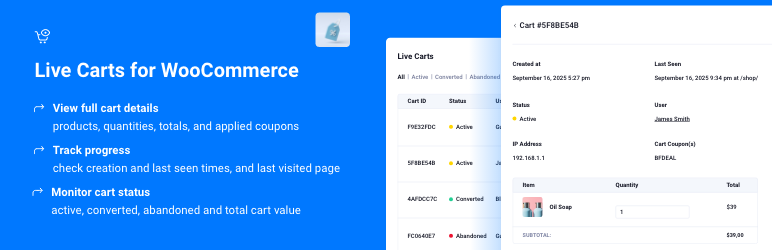
The Live Carts plugin by BerryPress extends WooCommerce by adding real-time tracking of all customer shopping carts within your WordPress admin. It provides a complete list of customer carts, including their status (active, abandoned, or converted) and total value. Clicking a cart ID reveals more details, including all products and quantities in the cart.
Optionally, the plugin can display a cart ID on the frontend, visible to the customer. The admin interface supports searching for carts based on this ID. This allows store support to look up a customer cart if the customer provides their cart ID.
The plugin also calculates some basic cart statistics at Analytics > Carts, with date filtering based on the cart creation date.
Features
- List real-time and past carts
- Filter cart list by status (Active/Converted/Abandoned)
- See the name of the logged-in user (if any) associated with each cart
- See cart updates instantly as items are added, removed, or quantities change
- See the most recent URL that each cart was loaded on
- View a list of products in the cart and the total cart value, along with the coupon code that has been added to the cart, if any
- View cart revision history – See all changes to cart contents over time (added, removed, quantity changes)
- Search for carts by unique cart ID
- Optionally display the cart ID on the frontend to easily match to a cart record in the backend
- Optionally disable collection of IP addresses and/or last visited URLs in this plugin’s cart database
- Automatically archive older cart records
- Get cart conversion rate, cart abandonment rate, and average cart value metrics for a specified period of time (under Analytics > Carts)
- Cart data collected by this plugin is stored in custom database tables to avoid cluttering default WordPress tables
- Built-in extensibility via filter and action hooks
Get Pro Features
Upgrade to Live Carts Pro on BerryPress and unlock powerful tools to manage and recover customer carts more effectively:
Core Pro Features:
- 🛒 Edit cart contents in the backend – Easily adjust products, quantities, or remove items directly from the admin.
- 🔗 Generate cart recovery URLs – Create secure one-click links customers can use to restore their carts.
- 🧾 Convert a cart to an order with one click – Turn any cart into a completed order instantly.
- 🔍 Advanced cart filtering – Filter carts by product, customer, or min/max cart value for precise analysis.
- 📧 Recovery Emails (Coming Soon) – Automated email campaigns for abandoned cart recovery with customizable timing and discount coupons.
Additional Pro Settings:
Role Exclusions
Do not track carts for specific user roles (e.g., administrators, shop managers)Custom IP Header
Specify HTTP header for IP detection (for Cloudflare, proxies: X-Forwarded-For, CF-Connecting-IP, etc.)Cart Revision Toggle
Enable or disable cart change history tracking to save database space if not neededProduct Weight Display
View total and per-item product weight in cart details for shipping calculationsCustom Abandoned Timing
Define how many hours of inactivity mark a cart as abandoned (default: 2 hours)Custom Archiving
Change how many days of inactivity before carts are archived (default: 30 days)
Take full control of your WooCommerce carts with BerryPress Live Carts Pro.
Documentation
Explore the full Live Carts documentation.
You may also like these plugins
BerryPress has built a range of powerful plugins for WooCommerce and WordPress. Check out some of our favorites below — and don’t forget to leave a ⭐⭐⭐⭐⭐ review to help others in the community discover them!
- Ninjalytics — Report, analyze, and visualize your store’s data to gain actionable insights for growth, support operations, and satisfy customers!
- Export Order Items for WooCommerce — Export detailed order data for every sale in your WooCommerce store. Simplify fulfillment, create accounting reports in just a few clicks, and download CSV files for easy sharing and compatibility.
- Inline Image Upload for BBPress — Add a TinyMCE WYSIWYG editor to BBPress forums and enable inline image uploads, so users can easily attach and display images within their posts.
- PhotoBerry Studio — Create beautiful, customizable product photo galleries directly in your WordPress dashboard.
- Automatic Product Categories — Available as a free version and Pro. Automatically assign products to categories based on custom rules, saving you time and keeping your store organized.
- Customer Address Change Notification for WooCommerce — Get instant notifications when customers update their shipping or billing address, helping you stay on top of changes and prevent delivery issues.
To view BerryPress’s premium WordPress plugins and themes, visit our WordPress products catalog page.
Enjoy!
Schermafbeeldingen


Installatie
This plugin can be installed under Plugins > Add New Plugin, either by searching for the plugin title or by downloading the plugin zip file and uploading it via the Upload Plugin feature.
FAQ
How can I report security bugs?
You can report security bugs through the Patchstack Vulnerability Disclosure Program. The Patchstack team helps validate, triage and handle any security vulnerabilities. Report a security vulnerability.
Beoordelingen


Bijdragers & ontwikkelaars
“Live Carts for WooCommerce: Track Real-Time, Abandoned, and Converted Carts!” is open source software. De volgende personen hebben bijgedragen aan deze plugin.
Bijdragers
“Live Carts for WooCommerce: Track Real-Time, Abandoned, and Converted Carts!” is vertaald in 1 locale. Dank voor de vertalers voor hun bijdragen.
Interesse in ontwikkeling?
Bekijk de code, haal de SVN repository op, of abonneer je op het ontwikkellog via RSS.
Changelog
1.2.4 2025-01-23
- Fix: unschedule cron event on plugin deactivation
- Fix: duplicated revisions are stored
- Add: Limit of carts with revisions to 100 for performance
- Miscellaneous improvement(s)
1.2.3 2025-01-13
- Fix migration for large tables
1.2.2 2025-01-08
- Move “Live Carts” menu item to BerryPress
- Update Tested up to
- Add new hooks for Pro version extensibility
- Miscellaneous improvement(s)
1.2.1 2025-12-27
- Add: remove bulk action
- Add: display cart revisions
1.2.0 2025-12-19
- Change the way carts data is stored to custom post type. (This is a significant change. We strongly recommend creating a full backup before updating.)
- Live carts tracking improvements
1.1.6 2025-12-10
- Show the default category in the rules
1.1.5 2025-11-1
- Display product attributes in Cart items
1.1.4 2025-10-21
- Add – Settings hooks for Pro version extensibility (phplugins_live_carts_settings_general, phplugins_live_carts_save_settings)
- Fix – Escape exception message in cart creation error
- Fix – Add translator comment for placeholder in upgrade message
- Changes to berrypress_admin_page_display_above_header hook
1.1.3
- Add addons tab
- Update info about pro version
- Update readme, assets
1.1.2
- Fix user link
- Add a “Settings Page” link to the plugin list page
1.1.1
- Fix user links
1.1.0
- Redesign
- Keep the user ID and IP address up to date to keep cart assigned if the user logs in
- Don’t allow viewing archived carts
- Add product thumbnail to cart view
1.0.12
- Added one-time schema migration to change column type to TEXT for longer content.
- Updated product link generation.
1.0.11
- Fix database error and issue with cart contents not updating
1.0.10
- Improve compatibility with woocommerce-paypal-payments plugin
1.0.9
- Fix PHP warnings when no cart exists
- Database query improvement
1.0.8
- Add hooks to improve extensibility
1.0.7
- Fix fatal error after upgrade from version 1.0.5
1.0.6
- Add separate plugin settings page
- Add option not to save site visitor IP addresses
- Add feature to record the last frontend URL that the cart was seen on (can be disabled in plugin settings)
- Add tracking of coupons in carts
- Add color indicators to cart status column for quick status recognition
- Add WooCommerce as plugin dependency
1.0.5
- Add additional permissions checks for admin functionality
1.0.4
- Fix: The admin stylesheet was not being loaded
- Change cart IDs to be random instead of sequential
- Display the cart ID in the cart details admin page
- Add option to display the cart ID in the frontend (to make it easier to identify a specific customer cart in the backend)
1.0.3
- Fix: The cart value wasn’t displaying in the carts list
- Fix: Missing escaping on cart view page
- Add a User column to the carts list
- Hide the cart contents table on the cart view page when there are no contents to show
1.0.2
- Fix: Various Exceptions may not have been caught successfully
- Add debug mode (enable under WooCommerce > Live Carts; the log is saved in this plugin’s directory)
- Add additional Exception and Error handling for 3 critical WooCommerce hooks
1.0.1
- Add Analytics functionality
- Miscellaneous improvement(s)
1.0.0
- Initial release

