

Beschrijving

Header en footer scripts
Beschrijving
An essential WordPress plugin to easily insert scripts and styles (like Google Analytics, CSS, etc.) into your website’s header and footer.
Looking for a way to add Google Analytics, Facebook Pixel, or custom tracking code to your website’s header or footer?
Header and Footer Scripts is a simple yet powerful plugin that lets you inject code—such as Google Analytics, custom CSS, Facebook Pixel, and chat widgets—directly into your site’s header (<head>) or footer.
No bloat, no ads. This lightweight plugin simply does what it says: inserts code into your header and footer efficiently.
All you have to do is add the appropriate HTML code.
Don’t forget to wrap your code with proper tags.
<script type="text/javascript"> YOUR JS CODE HERE </script> Or for CSS:
<style type="text/css"> YOUR CSS CODE HERE </style> Why use this plugin:
- Insert scripts globally into the header and footer of your entire website.
- Supports all script types including HTML, JavaScript, and CSS.
- Add specific scripts to the header of individual posts or pages.
- To insert code to Custom Post Type [New Feature].
The plugin should be compatible with WooCommerce.
What it does not offer
- You can’t insert/execute PHP codes.
Almost all WordPress themes support this “Header and Footer Scripts” plugin. If the codes are not appearing in your site [ask for support] or look at your theme file if they have standard wp_head and wp_footer hooks.
Important Links
For further information you are welcomed to follow these links:
Schermafbeeldingen
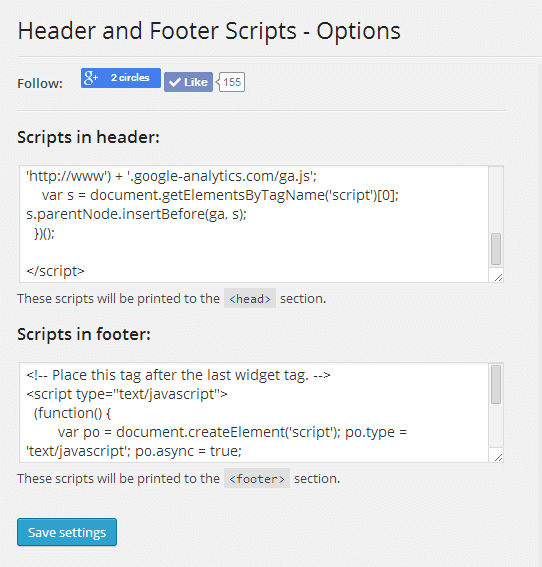
Access this page from Dashboard --> Settings --> Header and Footer Scripts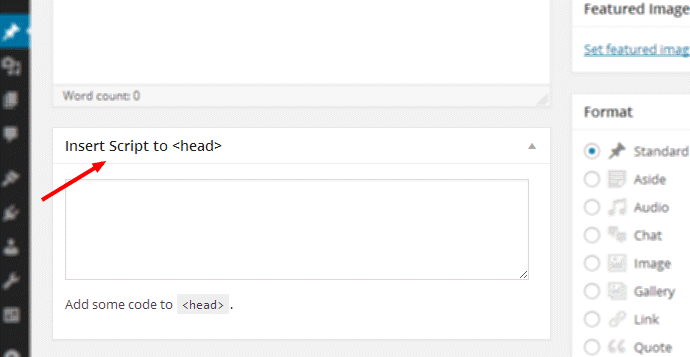
This box will appear below the compose box on posts and pages. If not please refer to [our docs][4] if it’s not there.


Installatie
There is nothing special about installation of this plugin. It is as simple as uploading the plugin files to your plugins directory.
Upload the plugin to /wp-content/plugins and activate. OR Search “Header and Footer Scripts” from WP Dashbard --> Plugins --> Add New then hit Install and then activate.
Once the plugin is activated you will see “Header and Footer Scripts” menu item under settings of WordPress dashboard. Also a meta box on Post and Page edit page.
FAQ
Q. How could I access support and troubleshoot problem?
A. I couldn’t handle wp.org forums on regular basis. You are suggested to visit GitHub Wiki for more updated plugin documentation and troubleshoot your problem.
Q: Is there any paid version of the plugin available?
A. Nope, There is none. If you need more feature send us feedback or feature request.
Beoordelingen


Bijdragers & ontwikkelaars
“Header en footer scripts” is open source software. De volgende personen hebben bijgedragen aan deze plugin.
Bijdragers

“Header en footer scripts” is vertaald in 12 localen. Dank voor de vertalers voor hun bijdragen.
Vertaal “Header en footer scripts” in je eigen taal.
Interesse in ontwikkeling?
Bekijk de code, haal de SVN repository op, of abonneer je op het ontwikkellog via RSS.
Changelog
2.4.2
- Fix: Resolved critical issue where scripts added to per-post meta box were not saving.
- Fix: Corrected CodeMirror editor rendering (borders, height) and gutter visibility (line numbers) in meta box.
- Improvement: Updated English copy throughout the plugin for better clarity and professionalism.
- New: Added Hindi (hi_IN) translation.
- New: Included language template (.pot) and translation files.
2.4.1
- New Feature: Added “Clean on Uninstall” option to allow users to remove all data upon deletion.
- Fix: Resolved issue where sidebar was not loading on settings page due to deprecated constant.
- Improvement: Enhanced WPCS compliance with comprehensive DocBlocks and formatting fixes.
- Improvement: Added strict sanitization to settings authentication to resolve Plugin Check warnings.
2.4.0
- Internal: Refactored codebase to “Jamify HFS” naming standards (
jamify_hfs_prefix) while maintaining full backward compatibility. - New Feature: Added support for wp_body_open hook to insert scripts immediately after body tag.
- New Feature: Added Syntax Highlighting for script editors in settings page.
- Improvement: Modernized permission system to use ‘unfiltered_html’ capability.
- Improvement: Added settings to allow Authors and Contributors to add scripts.
- Improvement: Added admin notice for backward compatibility migration.
2.3.1
- Security: Hardened nonce implementation with static action names.
- Security: Added strict sanitization for access level settings.
- Security: Improved input validation with isset() checks and wp_unslash().
- Security: Replaced FILE menu slug to prevent path exposure.
- Security: Added security warning for privilege delegation.
- New: Added uninstall.php for clean database removal.
- Fix: Added proper ABSPATH checks to all files.
- Improvement: Added phpcs:ignore comments for intentional raw output.
2.3.0
- Fix: Stored Cross-Site Scripting (XSS) vulnerability.
- New Feature: Add minimum capability required to add scripts to posts.
2.2.1
- Updated readme.txt.
2.2.0
- New feature: Now set priority to sitewide script.
- Fix: Monoscript font for text area.
- Improved readme.txt.
- Reverted to PHP v5.6 as many people can’t move to latest one.
2.1.1
- Fixed a bug causing singular post type scripts to appear in archives.
- Compatibility checked upto WordPress 5.2.2
- Now require PHP v7.0 at least.
2.1.0
- Support to Custom Post Type (CPT).
- Improved ReadMe
2.0.1
- Uniform Coding style.
- Improved Translatable strings.
- Fixed Links
- Code Cleanup
2.0.0
- Visual Improvements.
- better directory structure.
1.3.4
- Fixed variable undefined notice
1.3.3
- Started using PHP5 style construct
1.3.2
- Fixed https issue
1.1.0
- Made for official WordPress Repo.
- Added Single post Header script metabox
- Minor Bug Fixes
1.0.0
- Initial Public Release

