

Beschrijving

Deze plugin is niet getest met de laatste 3 grotere versies van WordPress. Mogelijk wordt het niet meer onderhouden of ondersteund. Ook kunnen er compatibiliteitsproblemen ontstaan wanneer het wordt gebruikt met recentere versies van WordPress.

Anything Order by Terms
Beschrijving
This plugin allows you to arrange any post types and terms with simple drag and drop within the builtin list table on administration screen. Save post order for each term.
Features
- Support for any post types and taxonomies.
- Multiple selection is available.
- Capabilities aware. ‘edit_others_posts’ for post. ‘manage_terms’ for taxonomy.
- No additional column in builtin tables.
- No additional table in database.
- Save post order for each term.
- Woocommerce and Polylang compatibility.
Schermafbeeldingen
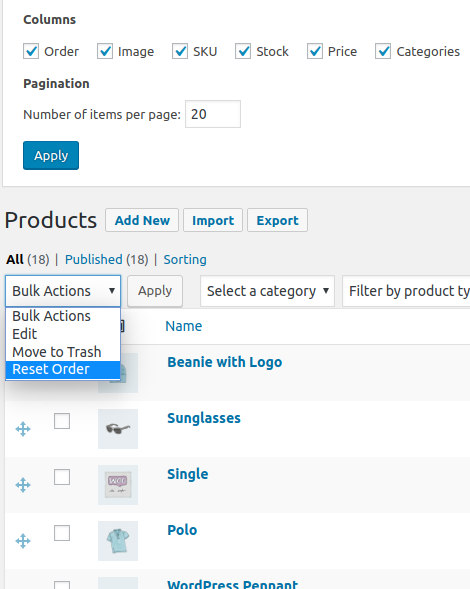
Enable/Disable arrangement with drag and drop on “Screen Options” tab. Reset bulk action. 
Dragging items. Also support custom post type like Woocommerce product. 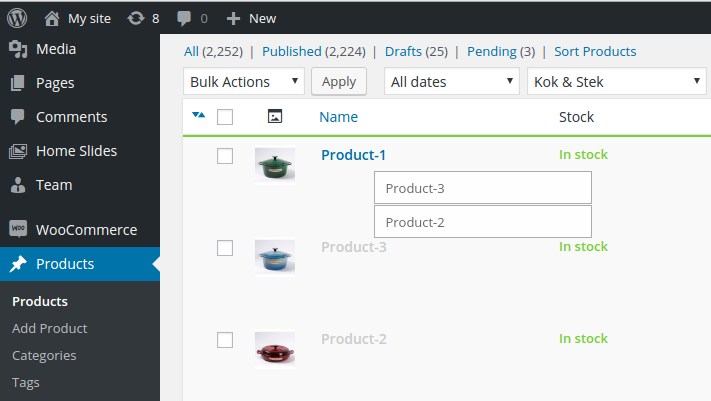
You can select multiple items by Ctrl(or Command on OS X)+Click.


Installatie
- Upload ‘anything-order-by-terms’ to the ‘/wp-content/plugins/’ directory
- Activate the plugin through the ‘Plugins’ menu in WordPress
FAQ
I don’t want some post types to be sortable.
Uncheck the “Order” option in “Show on screen” section on Screen Options tab to disable sorting.
I don’t want terms or post to be sortable.
Use filter. Place in you theme’s function.php file
add_filter('Anything_Order/do_order/Post', '__return_false');oradd_filter('Anything_Order/do_order/Taxonomy', '__return_false');.Why is the post order wrong when using the `get_posts` function?
As you can see from source code function
get_postsdefault setsuppress_filtersparam to WP_Query args. Therefore, filters specified by plugins don’t work. So if you need menu order or order within term add'suppress_filters' => falseto your args.How do I reset the order?
Select the “Reset Order” option in bulk actions select and click “Apply”.
How do I select multiple items?
Ctrl(or Command on OS X)+Click toggle selection state of current item. Shift+Click select items between first selected item on the list and current item.
Beoordelingen


Bijdragers & ontwikkelaars
“Anything Order by Terms” is open source software. De volgende personen hebben bijgedragen aan deze plugin.
Bijdragers

“Anything Order by Terms” is vertaald in 1 locale. Dank voor de vertalers voor hun bijdragen.
Vertaal “Anything Order by Terms” in je eigen taal.
Interesse in ontwikkeling?
Bekijk de code, haal de SVN repository op, of abonneer je op het ontwikkellog via RSS.
Changelog
1.4.0 – 2022-07-08
- Fixed – WordPress 6.0 compatibility.
1.3.10 – 2022-07-06
- Fixed bug with “Woocommerce + Polylang + WP All Import” package.
1.3.9 – 2022-04-22
- Fixed – WordPress 5.7 compatibility.
1.3.8 – 2021-11-11
- Fixed – Conflict with Wicked Folders plugin.
1.3.7 – 2020-11-04
- Changed – WordPress 5.6 and Woocommerce 4.9 compatibility.
1.3.6 – 2020-11-04
- Fixed – Wrong detect current term if Polylang is activated.
1.3.5 – 2020-07-21
- Changed – WordPress 5.4.2 and Woocommerce 4.3.0 compatibility.

