

Beschrijving


Advanced Ads – Ad Manager & AdSense
Beschrijving
The ultimate ad management plugin for WordPress
Advanced Ads is the most comprehensive ad management tool available. It strikes the perfect balance between ease of use and powerful features, trusted by thousands of companies and businesses.
We took the pain out of advertising and made it easy to embed ads, banners, or any other code automatically—all within minutes and without the need for theme file editing. If you are looking for the best plugin for ad management, you have found it.
Manual | Support | Demo | Premium Features
- Usability: Clearly structured interface • Smart workflows for fluid day-to-day operations
- Functionality: Setting the gold standard for the market with outstanding features
- Compatibility: All ad networks • Dedicated integrations with loads of popular plugins and themes
- Expertise: Fast and top-rated support • Approved in publishing and ad optimization since 2009
- Reputation: Recommended by Google • Fully compliant with Google AdSense policies
Wil je weten of er een bepaalde functie is, wat de optimale opzet zou zijn, of hoe je de eisen van je klant kunt realiseren? open een threat in het forum!
Dit is wat onze gebruikers zeggen over Advanced Ads:
We use this plugin to deliver rotating ads on a community news site, and it’s great. We’ve delivered over a million ad impressions since we launched less than a year ago, using a combination of sidebar, top, sticky and in-content placements — both HTML5 ads and images. Advanced Ads makes it easy for our small team to deliver a good experience to our users and our advertisers.
mytown304 on wp.org
Advanced Ads heeft onze oprichter in staat gesteld om te groeien van 0 naar 100 miljoen maandelijkse advertentie impressies. Profiteer vandaag nog van onze ervaring als uitgevers en maak je site te gelde!
Premium Features
This plugin is the lite version of the Advanced Ads plugin that comes with all the features you will ever need to optimize your ads and increase your revenues, including performance tracking, advanced ad targeting, split tests, click fraud protection, lazy loading, background ads, floating ads, popups and sticky ads, full AMP support, adblocker detection, the most comfortable Google Ad Manager integration, and tons more. Click here to purchase the best premium WordPress ad management plugin now!
Advertentiebeheer
- maak en geef onbeperkt advertenties weer
- ad rotation
- plan advertenties en stel starttijd en vervaldatum in
- advertenties richten op inhoud en gebruikersgroepen
- injecteer advertenties automatisch in berichten en pagina’s zonder te coderen
Advertentie types
Kies tussen verschillende advertentietypen waarmee je kunt:
- insert ads and banners from all ad and affiliate networks (e.g., Google AdSense, Amazon Affiliate Program Amazon Associates, BuySellAds, Google Ad Manager, Ezoic, media.net, Booking.com, Tradedoubler, Awin, GetYourGuide, MonetizeMore, The Moneytizer, Infolinks…)
- toegewijde ondersteuning voor alle soorten Google AdSense advertenties, waaronder: tekst en display advertenties, native advertenties (In-article, In-feed, Multiplex ads), automatische advertenties, en automatische advertenties voor AMP
- toon afbeeldingen en afbeelding banners
- maak inhoudsrijke advertenties met de WordPress TinyMCE editor
- HTML, CSS, Javascript of PHP code injecteren
- gebruik shortcodes binnen advertenties (om ook advertenties te leveren vanuit een andere advertentie plugin zoals Ad Inserter, AdRotate, Quick AdSense, Ads for WP, of de Google AdSense plugin WP QUADS)
Display Ads for WordPress
- Advertenties automatisch injecteren via plaatsingen
- gebruik functies om advertenties weer te geven in template bestanden
- use shortcodes to place ads manually
- toon advertenties in de zijbalk en in widgets
- alle advertenties op specifieke pagina’s uitschakelen
- toon een aanpasbaar advertentie label, bijv. “Advertenties” boven elke banner advertentie
- display multiple ads in ad grids (Pro)
Weergave voorwaarden
Show ads based on content. List of all display conditions
- afzonderlijke berichten, pagina’s en andere berichttypen
- berichten per categorie, tags, taxonomieën, auteur, en leeftijd
- archief pagina’s per categorie, tags, taxonomieën
- speciale paginatypes zoals 404, bijlage en voorpagina
- verberg advertenties op secundaire zoekopdrachten (bv. berichten in zijbalken)
- toon of verberg banners binnen de berichten feed
- verberg alle advertenties van specifieke paginatypes, bv. 404 pagina’s, feed
- verberg advertenties voor bots en web crawlers
- posts and pages by contained keywords (keyword targeting) or URL parameters, included in Advanced Ads Pro
Bezoekersvoorwaarden
Advertenties weergeven op basis van voorwaarden gebaseerd op de bezoeker. Lijst met alle bezoekersvoorwaarden
- toon of verberg een banner op basis van het apparaat: mobiel, tablet of desktop
- toon of verberg een banner op basis van toegewezen rol en voor ingelogde bezoekers
- advanced visitor conditions: geolocation, previously visited URL (referrer), user capability, browser language, ad blocker, IP address, browser, and browser width included in Advanced Ads Pro
- ads by time of the day (Pro)
- frequency capping (Pro)
Fantastische plugin en uitstekende ondersteuning
Ik probeerde minstens drie andere advertentie-plugins voor WordPress en ‘Advanced Ads’ is veruit de beste. Niet te vergeten is de uitstekende ondersteuning. De eerste welkome verassingen zijn de uitstekende handleidingen. En tenslotte de praktijkgerichte ondersteuning. Ik weet niet precies hoe hij het doet, maar de snelheid en diepgang van de antwoorden zijn absoluut verbazingwekkend.
djsawyer op wp.org
Advertentie injectie | Plaatsingen
Plaatsingen om advertenties in te voegen op vooraf bepaalde posities in je thema en inhoud. Lijst van alle plaatsingen
- advertenties na een bepaalde alinea, slogan, afbeelding, of ander HTML element
- advertenties bovenaan of onderaan de inhoud van het bericht of pagina
- advertenties vóór het sluiten van de
</head>tag - advertenties in de footer
- Page peel banners
- creëer split tests en A/B tests
- automatische invoeging van alle soorten footer en header, niet alleen reclame
- use the ad server placement to display ads on other sites
- many more ad positions with add-ons
Mobiele apparaten
- target ads to mobile devices, or tablets, or desktops
- toon responsive afbeelding advertenties
- ads only for specific browser sizes Pro
- insert ads on AMP pages AMP Ads add-on
Google AdSense
Verbazingwekkende functies van de krachtigste en gemakkelijkste Google AdSense plugin.
- onbeperkte Google AdSense advertenties banners
- trek advertenties rechtstreeks uit je Google AdSense account
- toon AdSense inkomsten in WP beheer
- verander de instellingen van je Google AdSense advertenties direct vanuit je WordPress backend
- ondersteunt alle Google AdSense advertentietypen, inclusief Google AdSense weergaveadvertenties, native advertenties zoals In-feed advertenties, In-artikel advertenties, Multiplex advertenties, Google AdSense Auto advertenties en Google AdSense Auto advertenties voor AMP
- verander het type en de grootte van AdSense advertenties zonder naar je Google AdSense account te gaan
- verberg standaard Google AdSense advertenties op 404 pagina’s (om te voldoen aan de Google AdSense voorwaarden)
- Google AdSense verificatiecode invoegen voor verificatie en AdSense automatische advertenties
- AdSense Auto advertenties inschakelen op AMP
- eenvoudige Ad Health integratie en Google AdSense overtredingscontroles
- mogelijkheid om de Google AdSense achtergrondkleur te verwijderen
- automatisch gegenereerde ads.txt met de juiste AdSense informatie
- werkt samen met Google Site Kit of kan het vervangen als je zelf je advertentieplaatsingen wilt regelen
- plaats Google AdSense In-feed advertenties gratis In-feed add-on
- fallback ads for unfilled AdSense ad blocks (Pro
- assistant for exact sizes of responsive Google AdSense ads (AMP Ads add-on)
- convert Google AdSense ads into AMP ads automatically (AMP Ads add-on)
Net als j4ckson185 zijn er duizenden gelukkige AdSense gebruikers:
Je app is geweldig, gefeliciteerd! Zelfs Google Adsense stelt voor je app te gebruiken op zijn officiële site, het is verbluffend!
Affiliate Marketing
Easily integrate affiliate marketing with a comprehensive toolkit.
- unlimited affiliate ads and banners
- text link support
- affiliate disclosure
- automatic affiliate ad insertion
- advanced targeting
- dedicated AAWP ad type (Amazon Affiliate WordPress Plugin)
- integrates with other affiliate plugins like Pretty Links, Thirsty Affiliates, Lasso, and many more
- support for all Amazon ad formats
- compatible with all affiliate networks
- link masking and link cloaking (Pro)
- affiliate ad tracking (Tracking add-on)
Ads.txt
- genereert een ads.txt met aangepaste inhoud
- voegt de inhoud voor AdSense automatisch toe aan de ads.txt
Add-Ons
- alle add-ons zijn inclusief prioriteits e-mail ondersteuning
- All Access – includes all available add-ons
- Advanced Ads Pro – powerful tools for ad optimizations: cache-busting, more placements, lazy loading, ad blocker module, ad refresh, click fraud protection, geo targeting, parallax ads and many more
- Tracking – track ad impressions and ad clicks with local methods or Google Analytics
- AMP Ads – make your ads compatible with AMP and convert Google AdSense ads automatically
- Google Ad Manager Integration – a quick and error-free way to load ad units from your Google Ad Manager account without touching any ad codes
- Sticky Ads – increase click rates with fixed, sticky, and anchor ads
- Vaste widget voor WordPress – maak van zijbalk widgets wistgevende sticky advertenties die mee scrollen
- PopUp and Layer Ads – display ads and other content in layers, popups, and interstitials
- Selling Ads – allows you to sell ads on your website fully automated, including payments and advertiser profiles
- Ad Slider – create a simple slider from your ads
- Full Feature List
Advertentie blokker
- basic features to prevent ads from being removed by ad blockers
- voorkom dat ad blockers sites breken waar plugin scripts draaien
- dedicated visitor condition to target ads to users with activated ad blocker
- show alternative content to ad block users and improve the monetization of your website (Pro)
- ad blocker fallback ads (Pro)
- show an overlay to ad blocker users (Pro)
- redirect ad blocker users (Pro)
- learn more in our ad blocker tutorial.
Bedankt dat je ons gemotiveerd houdt met je positieve beoordeling.
Localisaties: Arabisch, Chinees, Kroatisch, Tsjechisch, Deens, Nederlands, Engels, Frans, Duits, Grieks, Hebreeuws, Hongaars, Italiaans, Japans, Noors, Pools, Portugees, Roemeens, Russisch, Slowaaks, Sloveens, Spaans, Turks, Vietnamees
If you have problems with Advanced Ads, please open a new topic in our forums on wordpress.org, or reach out to our premium support, if you have an active license.
Integraties
Advanced Ads integreert met tal van andere plugins:
- BuddyBoss – Hoe integreer je advertenties in BuddyBoss
- BuddyPress – Advertenties toevoegen aan BuddyPress pagina’s
- bbPress – Hoe toon je advertenties op bbPress pagina’s?
- Cookie toestemming, Borlabs Cookies, Complianz, GDPR Cookie toestemming, en andere privacy en toestemming beheer – Hoe advertenties te tonen op basis van bezoekers’ toestemming
- Elementor – How to create and implement ads in Elementor
- GamiPress – How to target ads on GamiPress websites
- Genesis – Genesis Ads toevoeging
- IAB TCF 2.2 consent – verberg advertenties totdat gebruikers hun toestemming geven. Integreren met elke CMP, Quantcast Choices, iubenda, Google Funding Choices, cookiebot, enz.
- LearnDash – How to integrate ads into LearnDash
- MailPoet – Advanced Ads integreren met de MailPoet Nieuwsbrieven plugin
- Paid Memberships Pro – Hoe beheer je advertenties op lidmaatschapssites die Paid Memberships Pro draaien
- Polylang – How to target ads to multiple languages in Polylang
- TranslatePress – How to target ads to multiple languages in TranslatePress
- Weglot – How to target ads to multiple languages in Weglot
- WPBakery Page Builder – Advertenties weergeven met WPBakery Page Builder
- WPML – Afhankelijk van taal verschillende advertenties tonen met WPML
- Youzify – How to integrate ads in Youzify
Schermafbeeldingen
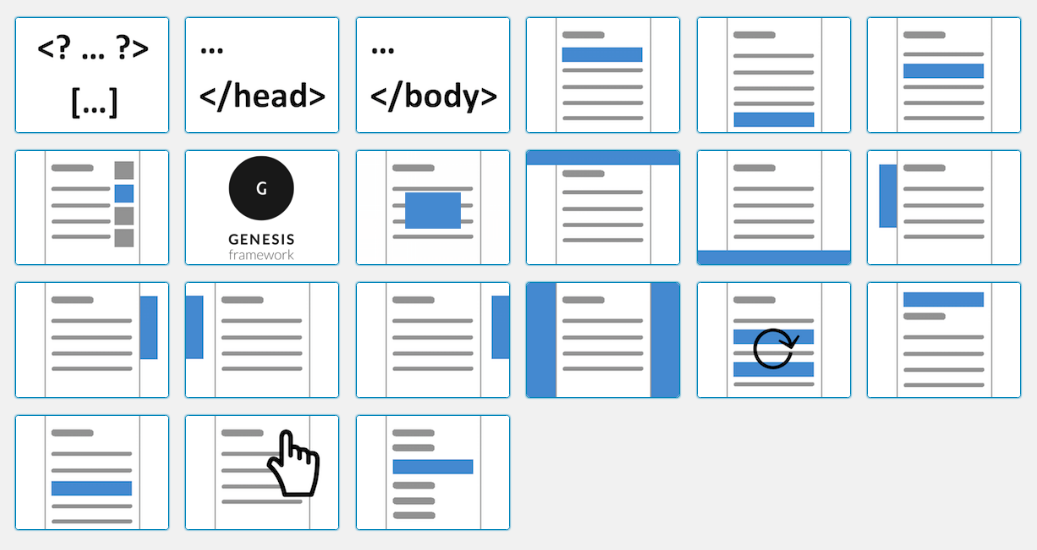
Plaatsingen waarmee je advertenties overal in je site kunt injecteren zonder te hoeven coderen (7 in Advanced Ads + 14 via add-ons). 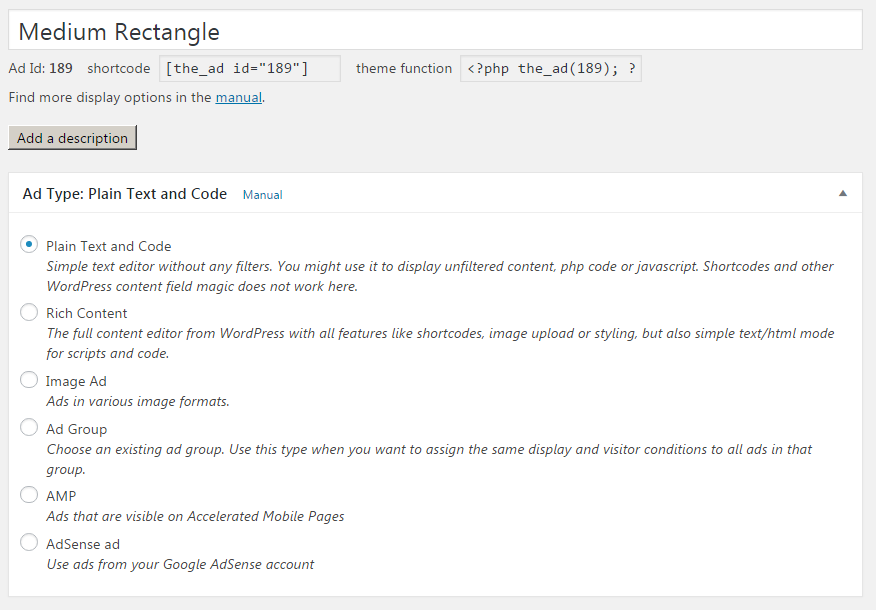
Ondersteuning voor allerlei soorten advertentietypen, inclusief speciale AdSense typen. AMP is inbegrepen in de AMP Ads add-on. 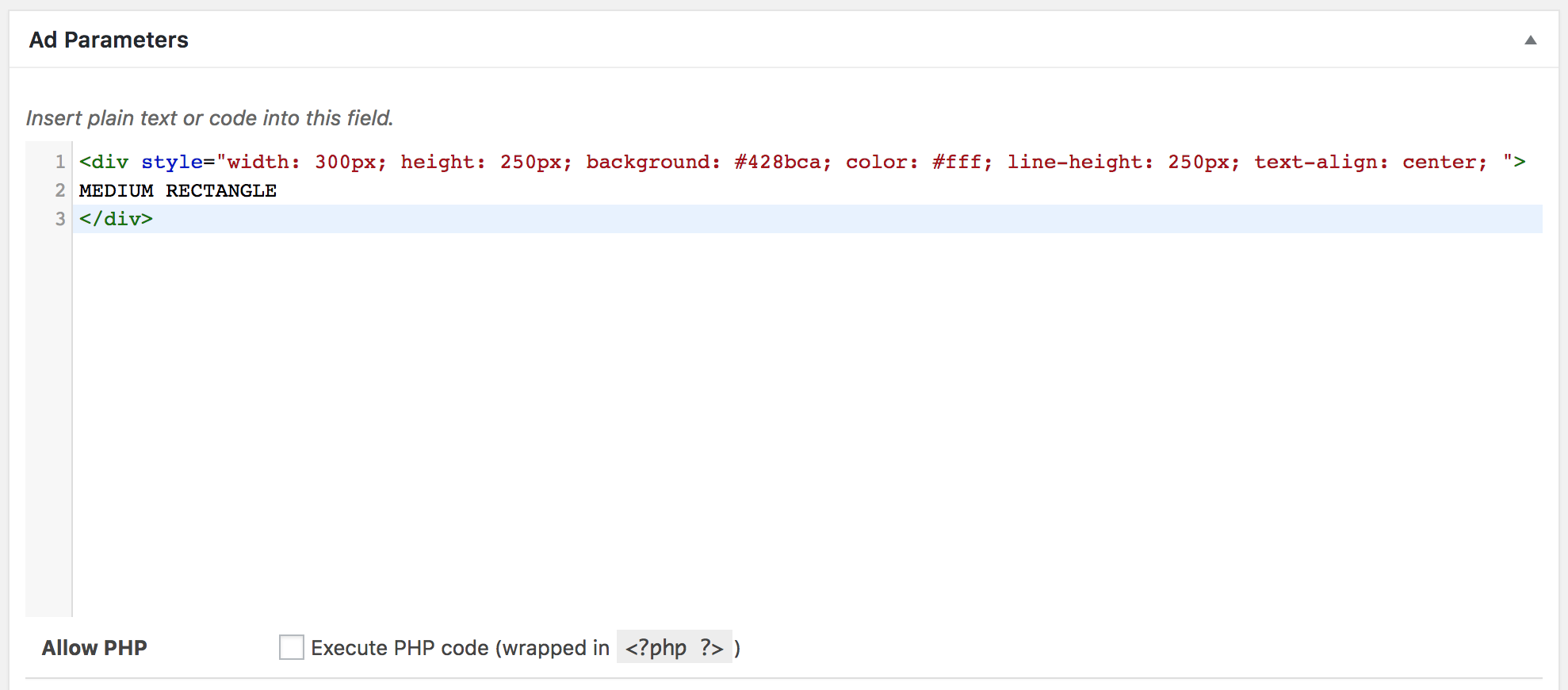
Flexibele advertentie invoer met het advertentietype tekst zonder opmaak en codemarkering. 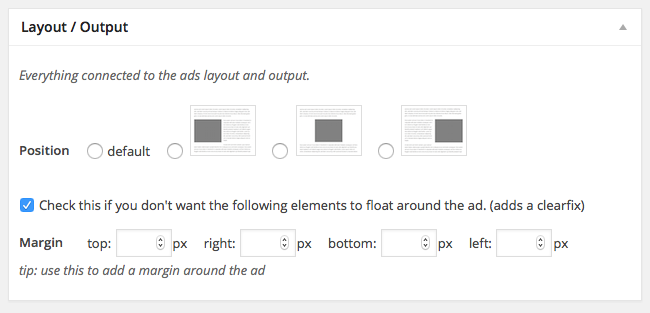
Lijn je advertenties uit binnen de inhoud. 
Dynamisch AdSense advertentie opties veranderen in je WordPress backend. 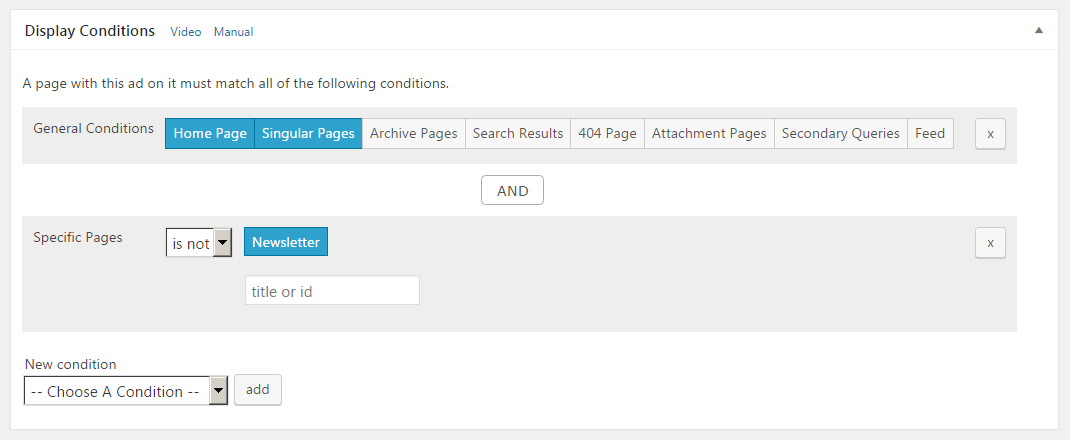
Kies waar je advertenties getoond worden met behulp van vele criteria. 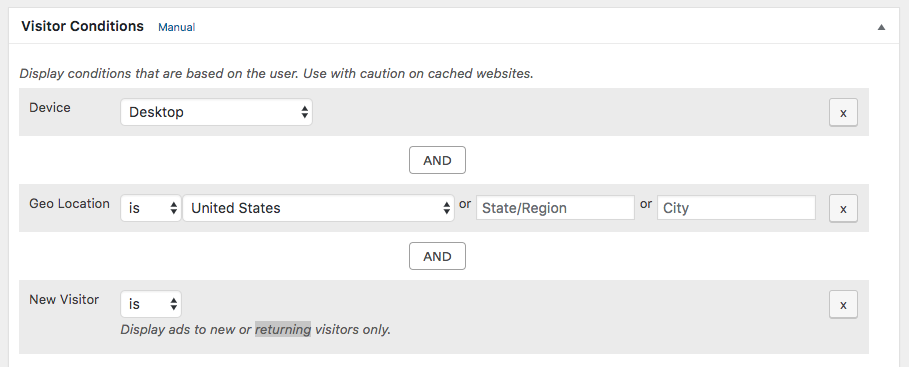
Gebruik verschillende voorwaardes om te kiezen wie advertenties te zien krijgt (basis plugin en nog meer in add-ons). 
Zie AdSense verdiensten in je WP backend 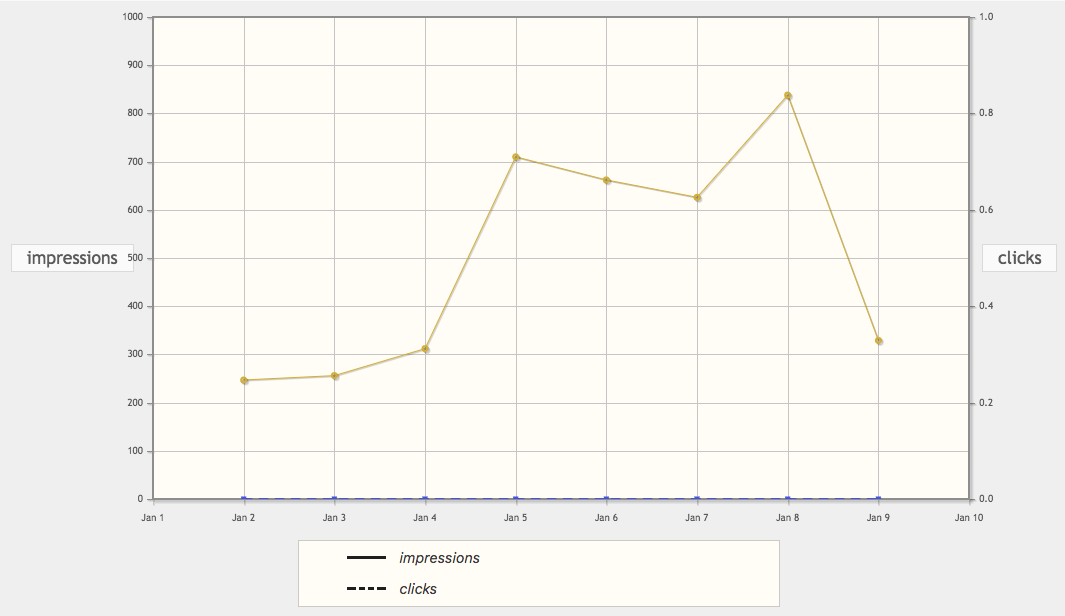
Volg impressies en kliks (Tracking add-on). 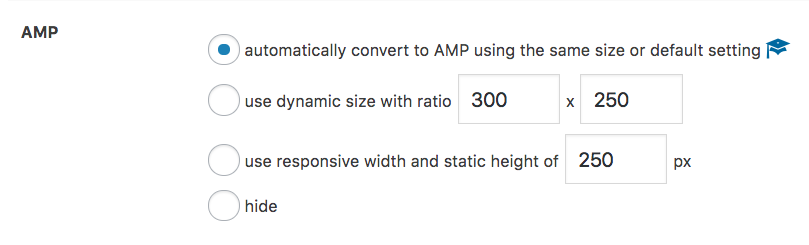
Zet AdSense advertenties automatisch om naar AMP (AMP Ads add-on)


Blokken
Deze plugin heeft 1 blok.
- Advads Gblock
Installatie
Hoe installeer je de plugin en krijg je hem werkend?
Het gebruik van het WordPress dashboard
- Navigeer naar ‘Nieuwe plugin’ in het plugins dashboard
- Zoek naar ´advanced ads´
- Klik op ‘Nu installeren’
- Activeer de plugin op het plugin dashboard
Uploaden in WordPress dashboard
- Navigeer naar ‘Nieuwe plugin’ in het plugins dashboard
- Navigeer naar het ‘Upload’ gebied
- Selecteer
advanced-ads.zipop je computer - Klik op ‘Nu installeren’
- Activeer Advanced Ads in het plugin dashboard
FTP gebruiken
- Download
advanced-ads.zip - Pak de map
advanced-adsuit op je computer - Upload de
advanced-adsfolder naar de folder/wp-content/plugins/ - Activeer Advanced Ads in het plugin dashboard
FAQ
Hoe zet je advertenties op WordPress?
Je kunt Advanced Ads gebruiken om advertenties in je WordPress site in te voegen zonder te programmeren.
Om te beginnen neem je eerst een kijkje bij
- de algemene eerste advertentie handleiding
- AdSense automatische advertenties gebruiken in WordPress
- de AdSense overzichtspagina.
- Worden advertenties niet weergegeven? Kijk hier.
What about my users’ privacy and GDPR compliance?
De plugin beschikt over Privacy instellingen waarmee je toestemming van gebruikers kunt vragen voordat je ze advertenties toont. De functie werkt voor alle advertenties die met de plugin beheerd worden, ook voor AdSense Auto advertenties.
Advanced Ads maakt het mogelijk advertenties te blokkeren tot er toestemming voor weergave gegeven wordt, door één van de Privacy opties in te schakelen.
Ook niet-gepersonaliseerde advertenties kunnen worden geleverd als dat in uw gebied wettelijk is toegestaan.Advanced Ads zelf slaat geen persoonlijke informatie (b.v. een IP adres) op in je database en ook geen cookies in de browser van de bezoeker.
Je kunt meer te weten komen over hoe Advanced Ads en de add-ons omgaan met de gegevens en privacy van je bezoekers op deze pagina.
Welke advertentienetwerken worden ondersteund?
Advanced Ads is compatible with all ad networks and banners from affiliate programs like Awin, Google AdSense, Chitika, Clickbank, CJ Affiliate, Amazon, ShareASale, Impact, Rakuten, Booking.com, GetYourGuide, media.net, and also Google Ad Manager (formerly Google DoubleClick for Publishers, DFP).
You can also use it to insert additional ad network tags into your site’s header or footer without coding to integrate header bidding.
Advanced Ads even provides a dedicated AdSense ad type to leverage this ad network’s specific options.PHP functies en shortcodes
Je kunt functies en shortcodes gebruiken om advertenties en advertentiegroepen weer te geven.
De getallen in dit voorbeeld zijn de ID’s van de elementen.
Gebruik deze shortcodes om een advertentie of advertentiegroep in je bericht/pagina in te voegen.
[the_ad id="24"] [the_ad_group id="5"]Gebruik deze functies om een advertentie of advertentiegroep in te voegen in je template bestand.
<?php the_ad(24); ?> <?php the_ad_group(5); ?>Naast het direct tonen van advertenties en groepen kun je advertentieplaatsingen definiëren en er ofwel een advertentie of een groep aan toewijzen.
[the_ad_placement id="header-left"] <?php the_ad_placement('header-left'); ?>There is no revenue sharing. Advanced Ads doesn’t alter your ad codes in a way that you earn less than you would directly including the ad code in your template. To implement revenue sharing between multiple authors, follow the instructions of this tutorial.
Kan ik advertenties rechtstreeks in mijn themabestanden plaatsen?
Ja. Ik zou een “Handmatige” plaatsing in je themabestanden toevoegen. Daarmee kun je later de getoonde advertenties of groepen veranderen zonder je code opnieuw te veranderen.
Werkt het ook met andere advertentie plugins?
Ja. Advanced Ads kan gecombineerd worden met andere advertentie-plugins.
Gebruik gewoon hun shortcodes in ons “Rich Media” advertentie type om beide functies te combineren.
Werkt o.a. met AdRotate, Ad Inserter, Ad Injection, Quick AdSense, Quick AdSense Reloaded (WPQUADS), Simple Ads Manager, en andere plugins.
als je meer controle over je advertentie opzet wilt kan Advanced Ads samen met Google Site Kit gebruikt worden of er voor in de plaats komen.Is the plugin compatible with PHP 8?
Yes, Advanced Ads supports current PHP versions and has been successfully tested on servers running PHP 8.
Is de plugin compatibel met paginabouwers?
Yes. It works out of the box with all site builders that allow shortcodes or widgets, like Elementor, Divi, SiteOrigin, Beaver Builder, Nimble Page Builder, Pagelayer, and others.
There is also a free add-on to support the WPBakery Page Builder (formerly Visual Composer).Blijven advertenties zichtbaar voor gebruikers met ad block?
Bezoekers die een ad blocker (bv. AdBlock Plus) ingeschakeld hebben zullen geen advertenties zien van bekende externe bronnen (bv. AdSense).
Je kunt die plekken nog steeds winstgevend maken met aangepaste inhoud.Lees meer over ad blockers en de functies die Advanced Ads biedt om daarmee om te gaan op deze pagina.
Ondersteunt de plugin een ads.txt?
Google AdSense en sommige andere netwerken vragen je om een ads.txt aan te leveren. Advanced Ads kan dat bestand automatisch aanmaken met de juiste informatie voor AdSense, als je de ads.txt functie inschakelt in Advanced Ads > Instellingen > Algemeen > ads.txt en je AdSense publisher ID invoert in Advanced Ads > Instellingen > AdSense.
Ik ben een ontwikkelaar. Is de plugin aan te passen?
Ja. Je kunt tal van hooks gebruiken om Geavanceerde advertenties naar je wensen aan te passen.
Beoordelingen


Bijdragers & ontwikkelaars
“Advanced Ads – Ad Manager & AdSense” is open source software. De volgende personen hebben bijgedragen aan deze plugin.
Bijdragers


“Advanced Ads – Ad Manager & AdSense” is vertaald in 32 localen. Dank voor de vertalers voor hun bijdragen.
Vertaal “Advanced Ads – Ad Manager & AdSense” in je eigen taal.
Interesse in ontwikkeling?
Bekijk de code, haal de SVN repository op, of abonneer je op het ontwikkellog via RSS.
Changelog
2.0.16 (December 30, 2025)
- Improvement: PHP 8+ compatibility for the ad expiration cron event
- Improvement: security by allowing only valid sorting options when loading placements
2.0.15 (December 25, 2025)
- Improvement: prevent any PHP execution in shortcode rendered ads to enhance security
- Improvement: handle IP visitor condition by removing extra spaces and line breaks
- Improvement: enhance security by permission check when updating placement item
- Fix: show hierarchical groups metabox in edit ad page
2.0.14 (November 18, 2025)
- Feature: pagination for Groups and Rotations
- Fix: Groups page screen options spacing
2.0.13 (October 20, 2025)
- Fix: Enhance protection against potential unauthorized access in certain frontend requests
2.0.12 (September 23, 2025)
- Improvement: prevent quotation marks in ad codes being escaped with ACF enabled
- Fix: groups now correctly inject ads in header placements
- Fix: remove placements from WPML translation options
2.0.11 (August 27, 2025)
- Fix: backslash disappears in ad code editor
- Fix: deprecated parameters warning
- Fix: avoid crash when restoring posts from other post types
- Fix: extra whitespace being added before headings in rich-content editor
- Fix: ads expiry date works as expected
2.0.10 (July 28, 2025)
- Fix: add null check in display conditions
- Fix: optimize ad handling and performance for MailPoet
- Fix: restore placement in widget dropdown
- Fix: resolve issue with ad blocker detection
- Fix: save pagination display condition in placements
- Fix: duplicate ad labels when using group as ad type
- Fix: append ad to existing group when selecting placement from ad edit screen
2.0.9 (May 21, 2025)
- Improvement: improve amp conditions
- Improvement: Test plugin compatibility with WordPress 6.8.
- Improvement: add capability check in importer
- Improvement: standardize
ADVADS_ADS_DISABLEDcheck - Improvement: null checks before accessing ad properties
- Fix: update failure help link only for Advanced Ads add-ons
2.0.8 (April 28, 2025)
- Improvement: type safety in
add_body_classto prevent issues from third-party filters - Improvement: improve the ad and group relation both way
- Fix: expiry date not updating for ads that already had one set
2.0.7 (April 9, 2025)
- Improvement: optimize MailPoet compatibility
- Fix: force array return in post_updated_messages
- Fix: quick edit for ads ignores tracking options and overwrites content
2.0.6 (April 1, 2025)
- Improvement: redirect to placement list after creating a new placement
- Improvement: remove ad creation message for server type placement
- Improvement: unify admin notifications
- Fix: prevent duplicate revision controls
- Fix: correct order of placement icons
- Fix: open create placement modal when no placements found
- Fix: show the search field when “Show filters permanently” is checked
- Fix: prevent CodeMirror to run on Rich Content ad edit page
- Fix: prevent ‘undefined key’ warning in XML feed
- Fix: use native php get error message function
2.0.5 (March 20, 2025)
- Fix: prevent false unsaved changes notifications for ads
- Fix: prevent errors with certain custom placement types
- Fix: hide discarded notification on the Advanced Ads dashboard
- Fix: prevent an error on the Advanced Ads dashboard
- Fix: correct ad expiry date inconsistencies
- Fix: prevent fatal error on Gutenberg editor
- Fix: restore execute shortcode feature
2.0.4 (March 18, 2025)
- Improvement: add update functionality to ensure receipt of premium updates
- Fix: resolve a fatal error caused by an invalid license
- Fix: prevent ad expiry from changing during save when timezone is not UTC
- Fix: prevent unknown placement types from breaking the page
- Fix: ensure “Execute Shortcodes” function is savable again
- Fix: restore PeepSo placement compatibility for Advanced Ads 2.0
2.0.3 (March 12, 2025)
- Improvement: reflect placement status changes immediately in the placement list
- Improvement: prevent plugin upgrade notice reappearing if already dismissed
- Fix: ensure ad centers when selected
- Fix: restore pagination functionality on ad list page

