

Beschrijving

Deze plugin is niet getest met de laatste 3 grotere versies van WordPress. Mogelijk wordt het niet meer onderhouden of ondersteund. Ook kunnen er compatibiliteitsproblemen ontstaan wanneer het wordt gebruikt met recentere versies van WordPress.

WP Post Visits Wizard
Beschrijving
Quick setup, just install the plugin and the select in the Setting section any of the post types, categories and / or tags you want to manage
Then you will be able to see a new column on each post table showing their current count value
All listings will be sorted as well based on the most visited ones
After installation go to your admin dashboard / Settings / WP Post Visits Wizard and make your selection to work with
Schermafbeeldingen
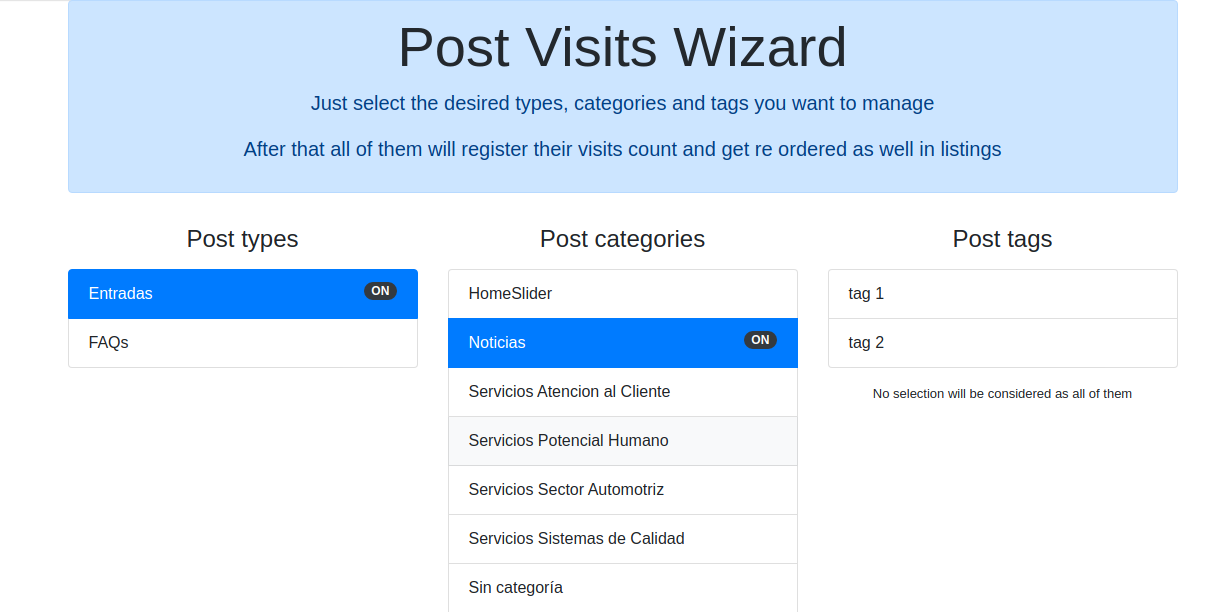
Select any of the POST TYPES you want to manahe with the plugin, and / or their categories, tags as well 
Monitor from your admin dashboard a general view about your results 
Check inside every post the current visit count value 
Display automatically your posts most visited on the top


Installatie
- Either upload the plugin files to the
/wp-content/plugins/wp-post-visits-wizarddirectory, or install the plugin through the WordPress plugins screen directly. - Activate the plugin through the ‘Plugins’ screen in WordPress
Beoordelingen

Bijdragers & ontwikkelaars
“WP Post Visits Wizard” is open source software. De volgende personen hebben bijgedragen aan deze plugin.
Bijdragers
“WP Post Visits Wizard” is vertaald in 2 localen. Dank voor de vertalers voor hun bijdragen.
Vertaal “WP Post Visits Wizard” in je eigen taal.
Interesse in ontwikkeling?
Bekijk de code, haal de SVN repository op, of abonneer je op het ontwikkellog via RSS.
Changelog
1.0.1
- Fix post sorting
1.0
- First plugin version in place

