

Beschrijving
Deze plugin is niet getest met de laatste 3 grotere versies van WordPress. Mogelijk wordt het niet meer onderhouden of ondersteund. Ook kunnen er compatibiliteitsproblemen ontstaan wanneer het wordt gebruikt met recentere versies van WordPress.

WP Permastructure
Beschrijving
In addition to controlling your custom post type permalinks this plugin adds support for using custom taxonomies in your permalink structures as well.
Not only that but you can control the full permalink so the post type slug is not required at the start of the link.
Multiple post types can use the same permalink structure.
Usage
There are 2 ways to use this plugin:
Permalink Settings
The plugin adds fields to the permalinks settings page for any public facing custom post types.
In Code
When registering a post type you can add a value to the rewrite property with the key ‘permastruct’ to define your default permalink structure.
eg:
<?php register_post_type( 'my_type', array( ... 'rewrite' => array( 'permastruct' => '/%custom_taxonomy_name%/%author%/%postname%/' ), ... ) ); ?> Schermafbeeldingen
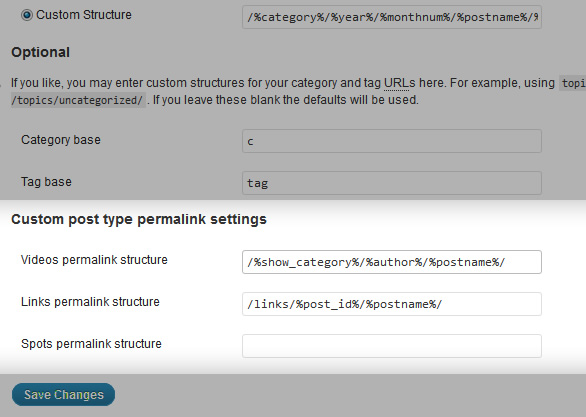
The extended permalink settings panel

Installatie
- You can install the plugin using the auto-install tool from the WordPress back-end.
- To manually install, upload the folder
/wp-permastructure/to/wp-content/plugins/directory. - Activate the plugin through the ‘Plugins’ menu in WordPress
- You should now see input boxes for any custom post types you have on the permalink settings page
FAQ
None so far.
Beoordelingen


Bijdragers & ontwikkelaars
“WP Permastructure” is open source software. De volgende personen hebben bijgedragen aan deze plugin.
Bijdragers

Vertaal “WP Permastructure” in je eigen taal.
Interesse in ontwikkeling?
Bekijk de code, haal de SVN repository op, of abonneer je op het ontwikkellog via RSS.
Changelog
- 1.4.3: Remove
create_functioncalls - 1.4: Handles sample filters without the need for the get post call
- 1.3: Added permalink sanitisation function, current one incorrectly truncated placeholders
- 1.2: Fixed attachment URL rewrites, fixed edge case where permastruct is %postname% only
- 1.1: Fixed problem with WP walk_dirs and using %category% in permalink – overly greedy match
- 1.0: Initial import

