

Beschrijving
Deze plugin is niet getest met de laatste 3 grotere versies van WordPress. Mogelijk wordt het niet meer onderhouden of ondersteund. Ook kunnen er compatibiliteitsproblemen ontstaan wanneer het wordt gebruikt met recentere versies van WordPress.

AL Frontend Publish Editor
Beschrijving
This plugin add frontend editor to your web-site. The plugin is easy to use. Please create empty page for editor, put shortcode [alshc_post_editor] on the created page.
Click to “WP FRONTEND PUBLISH EDITOR” menu in admin console. Follow to the instructions: set users capabilities and select the created page.
Schermafbeeldingen

Frontend editor page view 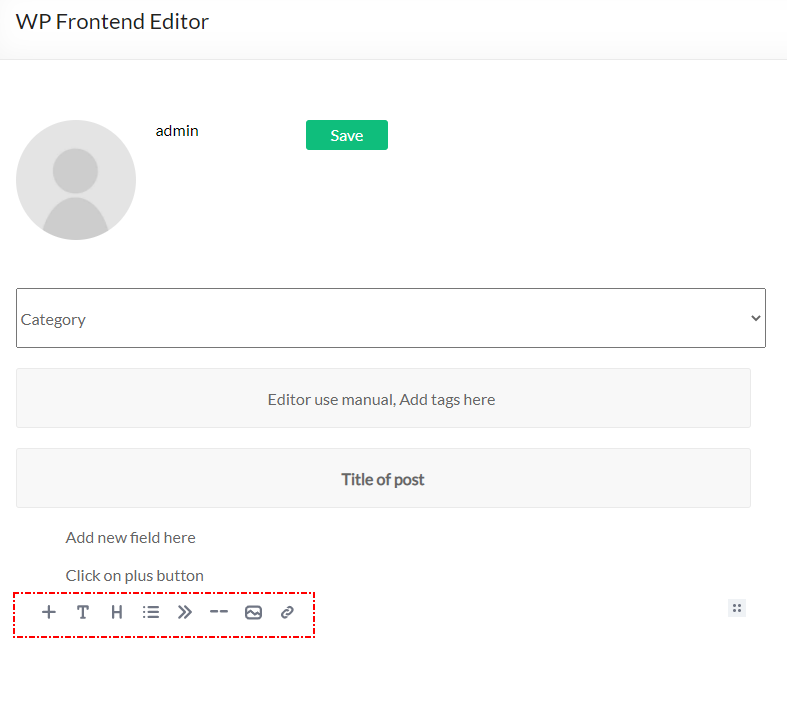
Frontend editor add new block 
Frontend editor change block features 
Backend editor menu item 
Backend editor manual 
Backend editor page selection 
Backend editor user capabilities


Installatie
- Upload plugin folder to the
/wp-content/plugins/directory - Activate the plugin through the ‘Plugins’ menu in WordPress
- Create a page for Editor
- Put shortcode [alshc_post_editor] on the created page
- Open setting page in admin console – “WP FRONTEND PUBLISH EDITOR”
- Follow to instructions:
6.1. Select the created page as Editor page
6.2. Cet users capabilities - Enjoy!
FAQ
What is Editor the plugin based on?
The plugin based on EditorJS (https://editorjs.io/). Based on documentation of the Editor this software is Open Source project. If you are interested in the Editor you can donate for the project.
How can I add blocks to the Editor
The Editor team develope new features for their project so you can update the editor from the project sources (https://editorjs.io/)
If I need any special features
Contact to author of this plugin for commercial support.
Beoordelingen
Er zijn geen beoordelingen voor deze plugin.
Bijdragers & ontwikkelaars
“AL Frontend Publish Editor” is open source software. De volgende personen hebben bijgedragen aan deze plugin.
Bijdragers
“AL Frontend Publish Editor” is vertaald in 1 locale. Dank voor de vertalers voor hun bijdragen.
Vertaal “AL Frontend Publish Editor” in je eigen taal.
Interesse in ontwikkeling?
Bekijk de code, haal de SVN repository op, of abonneer je op het ontwikkellog via RSS.
Changelog
1.0 Initial version.

