

Beschrijving


Custom Payment Gateways for WooCommerce
Beschrijving
This plugin allows you to create an infinite number of custom payment gateways for WooCommerce. After a payment gateway is created, you can edit its instructions and email sent to the customer directly in the WooCommerce payment settings menu.
Features:
♦ Create unlimited custom payment gateways
♦ Edit payment gateway instructions and customer emails in WooCommerce settings
♦ Easy customization of gateway options for customers
♦ Add multiple URLs to ping after an order is created
♦ Simple creation process for new payment gateways
Note: You will need to manually update the order status as the order progresses from On Hold/Processing, as this gateway has no way of tracking the order.
This plugin also includes non-intrusive ads (shown only in the backend) that help support the ongoing development and maintenance of the plugin. Please see our privacy policy for information on data collection.
Schermafbeeldingen

Adding and Editing Screen. A good name, logo and desciption will help the admin to identify this gateway when customising in WooCommerce payment settings. 
A list of all your Custom Payment Gateways. Here you can delete, edit or directly goto payment gateway settings in WooCommerce. 
Custom payment gateway settings in WooCommerce. These settings will to shown to the customer at the appropriate times. 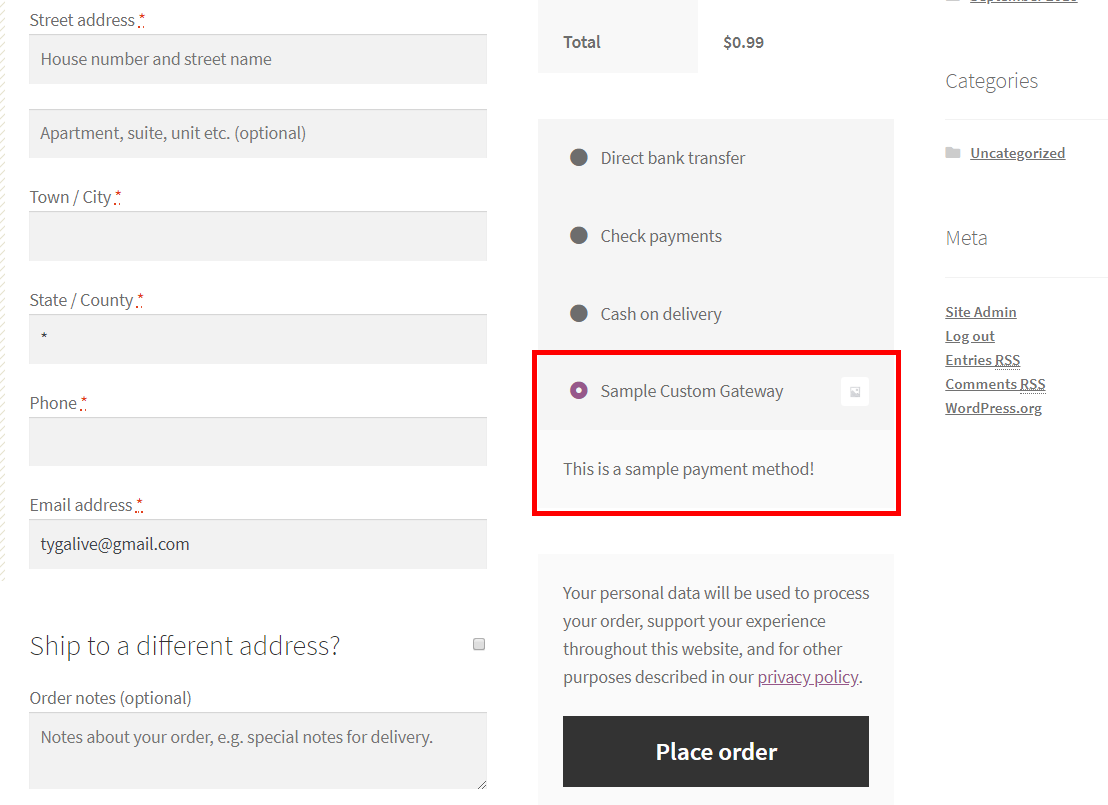
Custom payment gateway displayed to the customer highlighted inside the red rectangle.


Installatie
Automatic installation
The easiest way to install Custom Payment Gateways for WooCommerce is through the automatic installation option. To do this, simply log in to your WordPress dashboard, navigate to the Plugins menu, and click on “Add New.”
In the search field, type “Custom Payment Gateways for WooCommerce,” and click on “Search Plugins.” Once you find our plugin, you can view details such as the rating, description, and the current version. To install the plugin, click on “Install Now,” and let WordPress handle the file transfer for you.
Manual installation
- Download the plugin zip file from the source (such as the WordPress plugin repository).
- Log in to your WordPress dashboard, navigate to the Plugins menu, and click “Add New.”
- Click the “Upload Plugin” button at the top of the page.
- Choose the plugin zip file you downloaded and click “Install Now.”
- Once the installation is complete, click the “Activate Plugin” button.
- You can now access the plugin through “Custom Payment Gateways” option in the admin menu.
FAQ
What is this all about?
This plugin allows you to create custom payment gateways for WooCommerce, including options for adding a logo and customizing email instructions to customers after payment. This makes it easy to add local payment solutions in your area, and you can easily update the order status of the order as the payment process progresses.
So where do I start?
After you install and activate the plugin, a new menu item “Custom Payment Gateways” will appear in the WooCommerce menu in the WordPress admin sidebar. Click on this menu item to create a payment gateway, and then further customize the payment gateway in the WooCommerce payment settings.
Is there a limit on the number of gateways I can create?
Currently, there is no limit. You can create as many custom payment gateways as you need.
Beoordelingen


Bijdragers & ontwikkelaars
“Custom Payment Gateways for WooCommerce” is open source software. De volgende personen hebben bijgedragen aan deze plugin.
Bijdragers
“Custom Payment Gateways for WooCommerce” is vertaald in 1 locale. Dank voor de vertalers voor hun bijdragen.
Vertaal “Custom Payment Gateways for WooCommerce” in je eigen taal.
Interesse in ontwikkeling?
Bekijk de code, haal de SVN repository op, of abonneer je op het ontwikkellog via RSS.
Changelog
1.6.4
- Add WooCommerce Blocks checkout support.
- Optimize package dependencies and remove unused imports.
- Improve TypeScript configuration and type definitions.
- Replace unreliable current() function with array_key_first().
- Add automated version tagging in deployment workflow.
- Update to latest PHP polyfills (7.4-8.5).
1.6.3
- Rename plugin to comply with WooCommerce trademark guidelines.
- Add WooCommerce plugin dependency.
1.6.1 – 1.6.2
- Add support for High-Performance Order Storage.
- Minor Bug Fixes
1.6.0
- Send instructions email for specific order statuses.
1.5.0 – 1.5.10
- Set minimum supported version to 7.3.
- Allow opting in to usage analytics collection.
1.4.0 – 1.4.5
- Allow use of html for gateway instructions and description.
1.3.0 – 1.3.1
- Separate Email instructions from Thank you page instructions in gateway settings.
- Add ability to ping a url after order is completed.
1.2.3
- Add gateway id filter
1.2.0 – 1.2.2
- Add payment proof field
1.1.2 – 1.1.3
- Minor Bug Fixes
1.1.0 – 1.1.1
- Allow setting any supported order status after order is created
1.0.7
- Support WordPress 5.5
1.0.6
- Fix unintended payment gateways limit (thanks to @robertbrow)
1.0.1 – 1.0.5
- Minor Bug Fixes
1.0.0
- Initial release.

