

Beschrijving

Tiny Comment Spam Blocker
Beschrijving
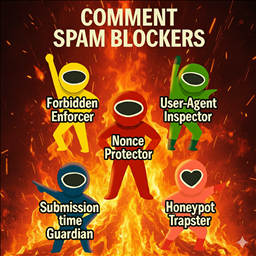
Tiny Comment Spam Blocker is a lightweight yet powerful plugin designed to protect your WordPress comments from spam. It employs five different techniques to detect and block unwanted comments:
- Nonce Verification – Ensures that the comment form submission is genuine.
- Submission Time Check – Blocks comments submitted too quickly to prevent bots.
- Honeypot Field – Hidden field that traps automated spam bots.
- User Agent Validation – Detects suspicious User-Agent strings and blocks them.
- Forbidden Word Filtering – Blocks submissions containing words or phrases from a configurable list within the comment body, email address, or IP address.
- JavaScript-Based Human Interaction Detection – Sets a verification token when mouse movement, scrolling, or touch interaction is detected.
- (Option) Block Non-Japanese Comments – Blocks comments that do not contain Japanese characters (Hiragana, Katakana, or Han/Kanji), primarily targeting machine-translated or foreign spam.
These filters are applied in order: if a comment passes the first check, it proceeds to the second, and so on, until all checks are applied or the comment is blocked.
Additional features:
- Option to log detected spam in a local log file (up to 1.0 MB).
- Optional email notifications when spam is detected.
- Easy settings page in the WordPress admin panel.
Settings
The plugin provides the following settings in the WordPress admin panel:
- Enable Spam Protection – Toggle the spam protection on or off. When disabled, all anti-spam checks are skipped.
- Save Spam Detection Log – Enable or disable logging of detected spam. Logs are saved in a local file up to 1.0 MB within the WordPress uploads directory.
- Notification Email Address – Enter an email address to receive notifications when spam is detected. Leave blank to disable email notifications.
- Minimum Submission Time (seconds) – Set the minimum allowed time between loading the comment form and submitting a comment. Comments submitted faster than this threshold are considered spam.
- Forbidden Words List – Enter one forbidden word, phrase, or IP address per line. Submissions containing these entries in the comment body, email address, or IP address will be blocked. Case is insensitive.
- Example:
viagra
online pharmacy
spam@email.com
164.138.205.72
- Example:
- Block No Japanese Comments – If enabled, this becomes the final check: Comments that contain Japanese characters (Hiragana, Katakana, or Kanji) will be automatically accepted after passing other security checks. Comments without Japanese characters will be blocked.
Arbitrary Section
This plugin is designed to be lightweight and fast, ensuring minimal impact on site performance while providing robust protection against comment spam.
Schermafbeeldingen

Plugin settings page. 
Example of the spam detection log output.


Installatie
Upload via WordPress Dashboard:
– In your WordPress dashboard, go to ‘Plugins’ ‘Add New’.
– Search for “tiny comment spam blocker” and click ‘Install Now’.
– Click ‘Activate’ once the installation is complete.
– Go to Settings Tiny Spam Blocker to configure options.Manual Installation via FTP:
– Download the plugin’s zip file and extract it.
– Connect to your server via FTP and navigate to the “wp-content/plugins/” directory.
– Upload the extracted “quick-translate-pot-po-mo” folder to this directory.
– Go to ‘Plugins’ in your WordPress dashboard and activate the plugin.
– Go to Settings Tiny Spam Blocker to configure options.
FAQ
What is the “Submission Time Check”?
This check measures how long a user takes to fill out the comment form. Bots often submit comments in 1-2 seconds. The default setting blocks submissions faster than 5 seconds, but you can adjust this time threshold in the settings.
How do I enable email notifications?
Enter a valid email address in the Notification Email Address field. Leave it blank if you do not want to send an email.
How large can the log file grow?
The log file is capped at 1.0 MB. When it exceeds this limit, it will be overwritten with an initial message.
Where is the log file saved?
- If logging is enabled, spam attempts are saved to a file named tcsb-log.txt located in a dedicated folder under the WordPress content directory (WP_CONTENT_DIR). The log can be viewed and cleared directly from the plugin’s settings page.
Beoordelingen
Er zijn geen beoordelingen voor deze plugin.
Bijdragers & ontwikkelaars
“Tiny Comment Spam Blocker” is open source software. De volgende personen hebben bijgedragen aan deze plugin.
Bijdragers
Vertaal “Tiny Comment Spam Blocker” in je eigen taal.
Interesse in ontwikkeling?
Bekijk de code, haal de SVN repository op, of abonneer je op het ontwikkellog via RSS.
Changelog
1.4.0
- Added JavaScript to detect human interaction.
1.3.2
- Security fix: Hardened log directory access via .htaccess and index.html.
- Security fix: Randomized log filenames to prevent path guessing.
1.3.1
- Security fix: Moved spam logs to a non-public directory
1.3.0
- Added a new option to block non-Japanese comments.
1.2.1
- Fix a minor bug
1.2.0
- Added IP address to forbidden word checks.
- The detection message has been modified.
1.1.0
- Extend forbidden word checks from comments to email addresses as well.
- The log has been made more detailed.
1.0.0
- Initial release.
- Five anti-spam techniques implemented.
- Logging and optional email notifications added.

