

Beschrijving


Single Taxonomy Selector
Beschrijving
Single Taxonomy Selector provides an intuitive interface for selecting taxonomy terms in WordPress. It offers the ability to:
- Select a single parent term.
- Select one or multiple child terms under the chosen parent.
- Ensure only one term selection at a time, similar to radio buttons.
- Customize selection modes to suit your content management needs.
- Set options via an easy-to-use options page.
This plugin is perfect for use cases where structured and controlled taxonomy term selection is necessary, such as categorizing content, filtering, or organizing hierarchical taxonomies.
For more information, visit BPOTech.
Features
- Supports all hierarchical taxonomies
- Allows selection of one or more different terms
- You can select 1 parent term and 1 child term or 1 parent term and multiple child terms.
- Various selection modes for flexible control.
- Easy-to-configure options page.
- Seamless integration with custom taxonomies.
- User-friendly interface.
- Works with Classic Editor.
Schermafbeeldingen
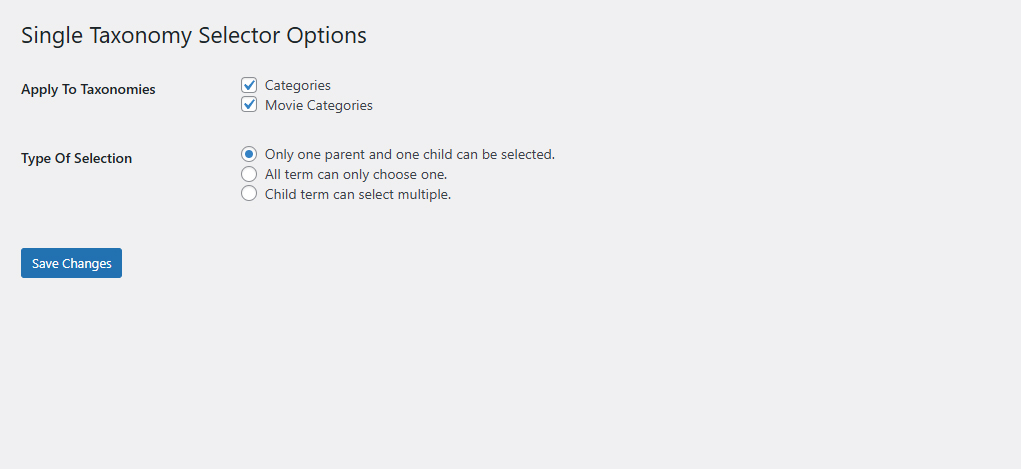
Options in admin 
Select 1 parent 1 child in category 
Select 1 parent multiple child in category


Installatie
- Download the plugin ZIP file.
- In your WordPress admin panel, go to “Plugins > Add New”.
- Click “Upload Plugin” and select the ZIP file.
- Click “Install Now” and then “Activate”.
- Go to “Settings > Single Taxonomy Selector” to configure the plugin.
FAQ
How do I set up the plugin?
After activating the plugin, go to the plugin’s settings page under “Settings > Single Taxonomy Selector”. Configure your desired taxonomy and selection modes.
Can I select multiple parent terms?
No, the plugin enforces single parent term selection to maintain a clear hierarchical structure.
Does this work with custom taxonomies?
Yes, the plugin fully supports custom taxonomies.
Beoordelingen
Er zijn geen beoordelingen voor deze plugin.
Bijdragers & ontwikkelaars
“Single Taxonomy Selector” is open source software. De volgende personen hebben bijgedragen aan deze plugin.
Bijdragers
Vertaal “Single Taxonomy Selector” in je eigen taal.
Interesse in ontwikkeling?
Bekijk de code, haal de SVN repository op, of abonneer je op het ontwikkellog via RSS.
Changelog
1.1.1
- Improved term selection logic.
1.0.0
- Initial release.

