

Beschrijving


Redirection Manager
Beschrijving
Redirection Manager is a powerful redirect management plugin designed for both classic WordPress sites and Headless WordPress setups, perfect for developers building modern frontends with Next.js, Nuxt.js, React, and other JavaScript frameworks.
Note: The plugin WPGraphQL (https://wordpress.org/plugins/wp-graphql/) is required for GraphQL functionality.
Key Features
Global Redirect Management:
– Intuitive admin interface to add, edit, and delete redirects
– Support for 301 (Moved Permanently), 308 (Permanent Redirect), and 410 (Gone) status codes
– Advanced search and filtering by status code
– Pagination support for large redirect lists
– CSV export functionality for backup and migration
– Automatic URL normalization for consistency
Post-Level Redirects:
– Meta box on all public post types (posts, pages, custom post types)
– Set redirects directly from the post editor
– Supports 301, 308, and 410 redirects at the post level
– Automatic handling during template_redirect
Content Management:
– Related content detection – automatically identifies posts/pages/terms associated with redirect URLs
– Quick access to edit or view related content
– Option to trash content when creating redirects
– Support for WooCommerce products
GraphQL Integration:
– Fetch all global redirects via GraphQL query
– Post-level redirect fields (redirectType, redirectUrl) on all post types
– Perfect for headless CMS implementations
– Optimized for frontend frameworks
Developer-Friendly:
– Clean, well-documented code following WordPress coding standards
– Custom database table for optimal performance
– AJAX-powered admin interface
– Full security with nonce verification and capability checks
– Extensible architecture
Supported Redirect Types
- 301 – Moved Permanently: Traditional permanent redirect with destination URL
- 308 – Permanent Redirect: Modern permanent redirect that preserves HTTP method
- 410 – Gone: Indicates content is permanently deleted (no destination URL needed)
Schermafbeeldingen
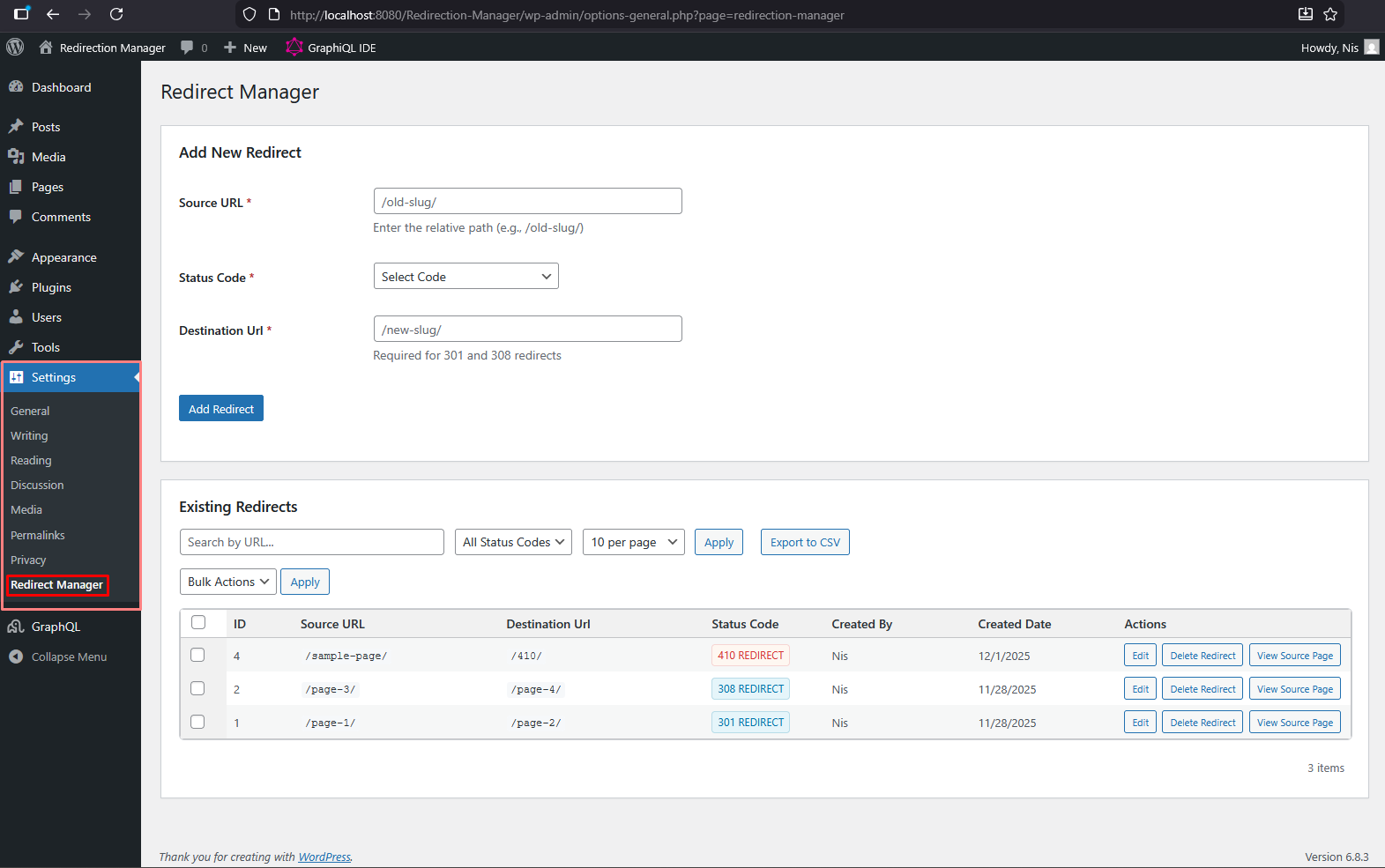
Settings Page: Manage global redirects with search, filtering, and pagination 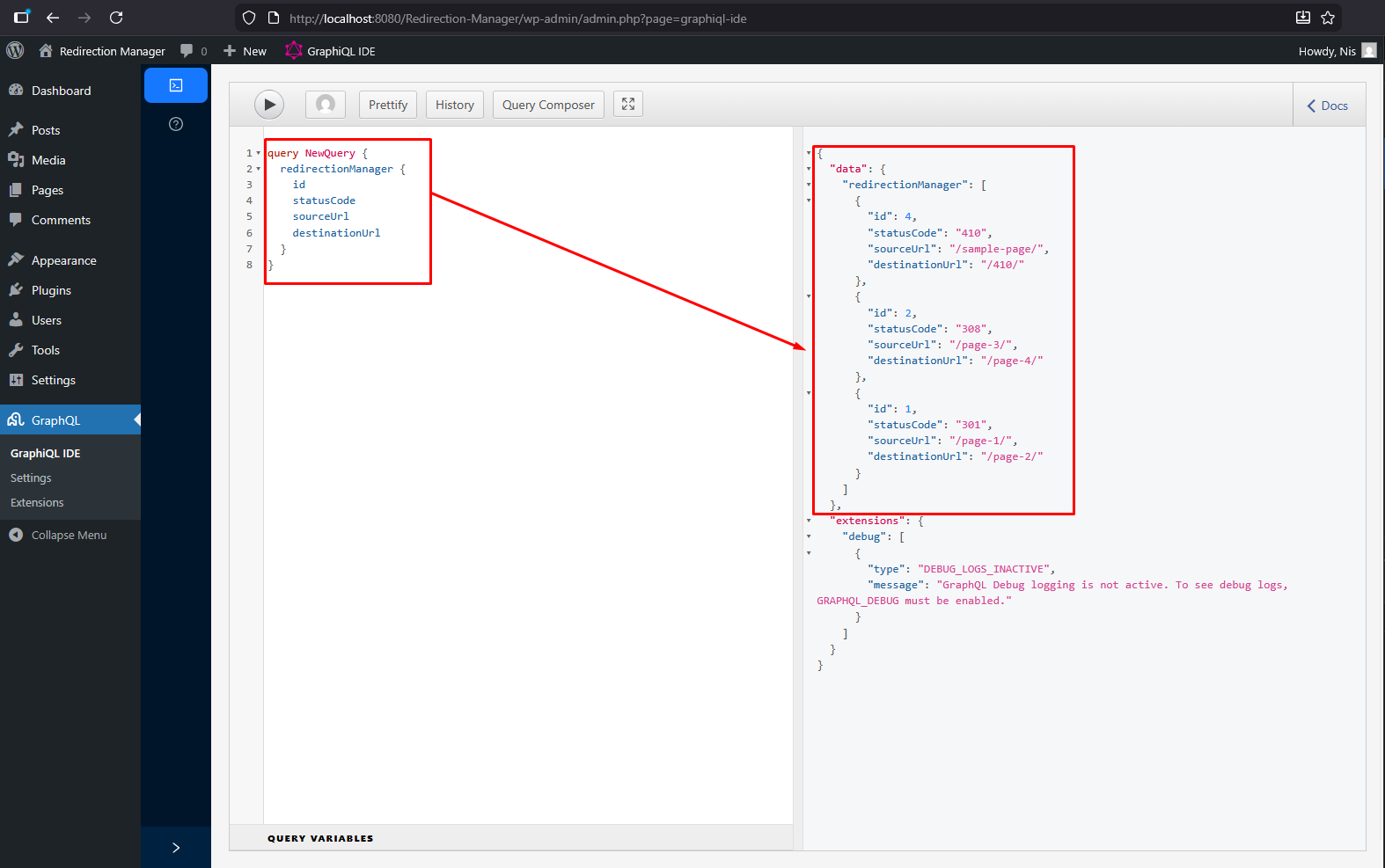
GraphQL Query: Fetch redirects via GraphQL for your headless frontend


Installatie
- Upload the plugin files to the
/wp-content/plugins/redirection-managerdirectory, or install the plugin through the WordPress plugins screen directly. - Activate the plugin through the ‘Plugins’ screen in WordPress.
- Install and activate the WPGraphQL plugin (required for GraphQL functionality).
- Navigate to Settings > Redirect Manager to manage your redirects.
- Optionally, set post-level redirects using the “Redirect Settings” meta box in the post editor.
FAQ
How do I use the redirects on my headless frontend?
Use GraphQL to fetch the redirects from WordPress. Query the
redirectionManagerfield to get all global redirects, or query individual posts withredirectTypeandredirectUrlfields.What’s the difference between 301 and 308 redirects?
Both are permanent redirects. 301 is the traditional redirect that may change POST to GET. 308 is the modern alternative that preserves the HTTP method and request body.
Can I export my redirects?
Yes! Use the “Export CSV” button on the Redirect Manager settings page to download all your redirects as a CSV file.
Does this work with WooCommerce?
Yes! The plugin detects and supports WooCommerce products, allowing you to manage redirects for product URLs.
Can I set redirects for individual posts?
Yes! Version 2.0.0 introduces post-level redirects. You’ll find a “Redirect Settings” meta box in the post editor for all public post types.
Beoordelingen
Er zijn geen beoordelingen voor deze plugin.
Bijdragers & ontwikkelaars
“Redirection Manager” is open source software. De volgende personen hebben bijgedragen aan deze plugin.
Bijdragers
Vertaal “Redirection Manager” in je eigen taal.
Interesse in ontwikkeling?
Bekijk de code, haal de SVN repository op, of abonneer je op het ontwikkellog via RSS.
Changelog
2.0.1
- Resolved an issue affecting the filter options.
2.0.0
- Major Update: Complete rewrite with enhanced features
- Added support for 301 (Moved Permanently) redirects
- Added support for 308 (Permanent Redirect) redirects
- Added support for 410 (Gone) status code
- Introduced post-level redirect meta boxes for all public post types
- Added CSV export functionality for backup and migration
- Implemented advanced URL normalization system
- Added related content detection (posts, pages, terms, WooCommerce products)
- Added content trash management feature
- Enhanced GraphQL integration with post-level fields
- Improved admin interface with search and filtering
- Added pagination support for large redirect lists
- Implemented comprehensive security with WordPress coding standards
- Added creator tracking for redirects
- Improved database schema with indexes for better performance
- Added custom 410 error page template
- Enhanced AJAX handling with better error messages
- Fixed destination URL field visibility for 301 redirects
- Improved code documentation and inline comments
1.0.0
- Initial release
- Basic redirect manager in WordPress admin
- Save redirects in custom database table
- AJAX handling for adding and deleting redirects
- Support for 302 redirects and 404 closures

