

Beschrijving
Quick Toolbar Links
Beschrijving
Note: This is a completely remastered and updated version of the Quick Links plugin originally created by Ecommnet Ltd.
Due to the extensive library of WordPress plugins available, the admin menu can become unwieldy very quickly. Quick Toolbar can help.
Are you constantly digging into menus and sub menus to access the same admin and plugin links? Using Quick Toolbar you can add them as Quick Links to the admin toolbar at the top of every admin page, giving you easy access to the pages you frequently use.
Along with adding admin and plugin links, Quick Toolbar gives you the option of adding custom links to the toolbar.
Summary of Features
- Add admin and plugin links to the admin toolbar.
- Add custom links to external pages to the admin toolbar.
- Toolbar links are visible on the front-end to logged in users.
- Links are not displayed if the current user doesn’t have the correct permissions.
- Enhanced security with nonces and proper data sanitization.
- Fully compatible with modern WordPress and PHP versions.
- Improved accessibility with ARIA attributes.
- Better jQuery compatibility for WordPress 5.5+.
Future Additions
- User and role specific links.
- Editing custom links.
- Rearranging links in the toolbar.
- ‘Add to Quick Toolbar’ button on all admin pages.
Schermafbeeldingen

Screen shot of the toolbar with your Quick Links. 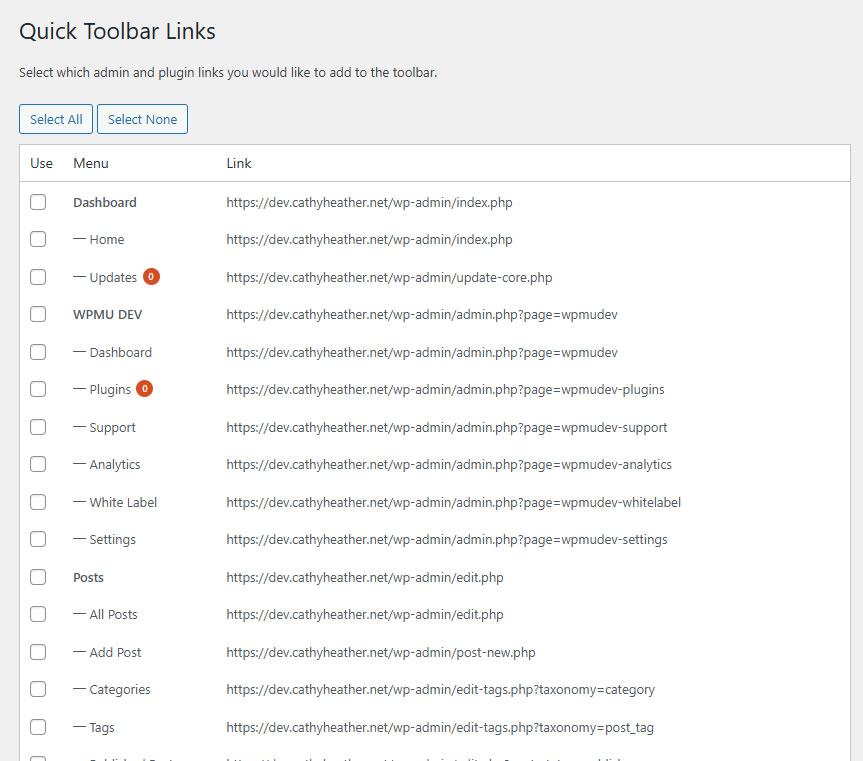
Screen shot of the options page for adding existing admin and plugin links. 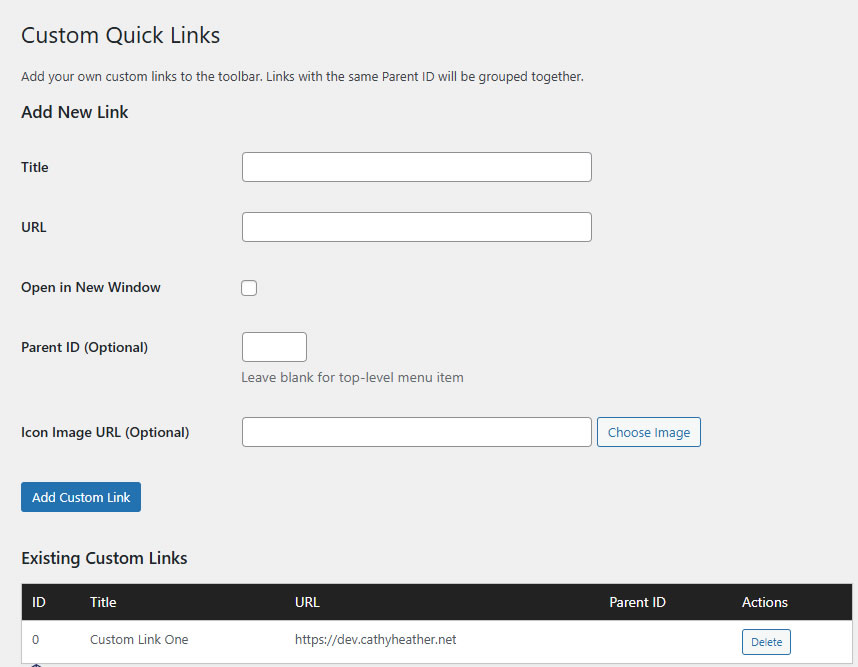
Screen shot of the options page for adding custom links.


Installatie
This section describes how to install the plugin and get it working.
- Unzip package contents
- Upload the “
quick-toolbar” directory to the “/wp-content/plugins/” directory - Activate the plugin through the “
Plugins” menu in WordPress - Add your links by going to “
Quick Toolbar“. - Enjoy your new toolbar.
FAQ
Is this plugin compatible with the latest WordPress?
Yes! Version 1.0.0 has been completely updated to be fully compatible with WordPress 6.7 and PHP 8.x.
Will my existing settings be preserved when updating?
Yes, your existing toolbar links and custom links will be preserved when updating to the new version.
Is this plugin secure?
Yes, the updated version includes proper nonces, data sanitization, and escaping to ensure security best practices are followed.
Beoordelingen
Er zijn geen beoordelingen voor deze plugin.
Bijdragers & ontwikkelaars
“Quick Toolbar Links” is open source software. De volgende personen hebben bijgedragen aan deze plugin.
Bijdragers


Vertaal “Quick Toolbar Links” in je eigen taal.
Interesse in ontwikkeling?
Bekijk de code, haal de SVN repository op, of abonneer je op het ontwikkellog via RSS.
Changelog
1.0.0
- Major update for modern WordPress compatibility (6.x)
- Added PHP 7.4/8.x compatibility
- Security improvements: Added nonces to all forms
- Security improvements: Proper data sanitization and escaping
- Updated jQuery code for WordPress 5.5+ compatibility
- Fixed deprecated function usage
- Improved unique ID generation for toolbar items
- Added proper text domain for translations
- Enhanced accessibility with ARIA attributes
- Added “Select All/None” buttons for better UX
- Better error handling for AJAX operations
- Code cleanup and optimization
- Updated minimum requirements
0.4
- Fixing a bug that removes other plugins from the menu
- Adding Published, Draft, Pending and Trashed Quick Links to Posts, Pages and Custom Post Types
0.3
- Responsive compatibility
0.2
- Adding Icons to the Quick Toolbar links
- Prefixing stylesheet to avoid conflict
0.1
- First version of the plugin

