

Beschrijving

Deze plugin is niet getest met de laatste 3 grotere versies van WordPress. Mogelijk wordt het niet meer onderhouden of ondersteund. Ook kunnen er compatibiliteitsproblemen ontstaan wanneer het wordt gebruikt met recentere versies van WordPress.

onepay Payment Gateway For WooCommerce
Beschrijving
This Payment Gateway For WooCommerce extends the functionality of WooCommerce to accept payments from Visa, MasterCard, AMEX, & Lanka QR using onepay payment Gateway. onepay Payment Gateway for WooCommerce makes your website ready to use inorder to accept Visa, MasterCard, AMEX & Lanka QR on your e-commerce store in a safe way. onepay is most widely used payment gateway to process payments online and accepts Visa, MasterCard, Discover and other variants of cards.
Schermafbeeldingen
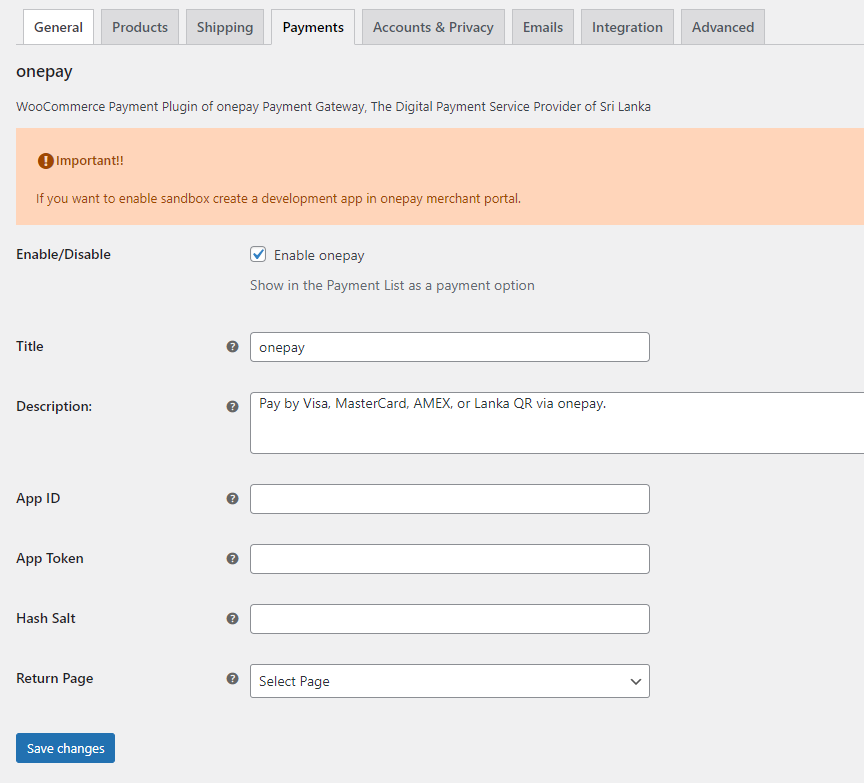
onepay configuration on WooCommerce payement settings 
onepay checkout page 
onepay payment gateway


Installatie
- Download the plugin zip file
- Login to your WordPress Admin. Click on Plugins > Add New from the left hand menu.
- Click on the Upload option, then click Choose File to select the zip file from your computer. Once selected, press OK and press the Install Now button.
- Activate the plugin.
- Open the settings page for WooCommerce and click the Payments tab.
- Click on the sub tab for onepay
- Configure your onepay settings. See below for details.
Configure the plugin
To configure the plugin, go to WooCommerce > Settings from the left hand menu, then click Payments from the top tab. You should see
onepay as an option at the top of the screen. Click on it to configure the payment gateway.
You can select the radio button next to onepay from the list of payment gateways available to make it the default gateway.
- Enable/Disable :- check the box to enable onepay Payment Gateway.
- Title:- allows you to determine what your customers will see this payment option as on the checkout page.
- Description :- controls the message that appears under the payment fields on the checkout page. Here you can list the types of cards you accept.
- App ID :- enter your App ID here. You will get this in your onepay merchant portal (https://merchant-v2.onepay.lk/#/login).
- App Token :- enter your App Token here. You will get this in your onepay merchant portal (https://merchant-v2.onepay.lk/#/login).
- Hash Salt :- enter your Hash Salt here. You will get this in your onepay merchant portal (https://merchant-v2.onepay.lk/#/login).
- Return Page : – select the return page. Page to redirect the customer after payment.Leave as (select page) to redirect to thank you page.
**Click on Save Changes for the changes you made to be effected.
FAQ
What Do I Need To Use The Plugin ?
- You need to have the WooCommerce plugin installed and activated on your WordPress site.
- You need to open a merchant account on onepay
How I can TEST the Payment ?
You need to create a development app in the merchant portal.
Following TEST card can be used to test your integration.
- Card No : 4508750015741019
- Expiry Date : 01/39
- CCV : 100
Beoordelingen


Bijdragers & ontwikkelaars
“onepay Payment Gateway For WooCommerce” is open source software. De volgende personen hebben bijgedragen aan deze plugin.
Bijdragers
Vertaal “onepay Payment Gateway For WooCommerce” in je eigen taal.
Interesse in ontwikkeling?
Bekijk de code, haal de SVN repository op, of abonneer je op het ontwikkellog via RSS.
Changelog
1.1.3
Security fix: Fixed unauthorized order status modification vulnerability. Improved hash verification to include secret key. Removed insecure public callback endpoint. Added proper validation and error handling.
1.1.1
Updated onhold error
1.1.0
Block based support
1.0.4
HPOS compatibility
1.0.3
Encryption update
1.0.2
Version update
1.0.1
USD payments release
1.0.0
Initial plugin release

