

Beschrijving


Murls Discounts – Flexible Discounts for WooCommerce
Beschrijving
Murls Discounts is a free WooCommerce plugin that allows store owners to automatically apply discounts when customers select specific payment methods during checkout.
The plugin supports percentage-based and fixed amount discounts, with customizable discount labels per payment gateway. Discounts are applied dynamically, without requiring coupons, creating a fast, clean, and professional checkout experience.
Murls Discounts works seamlessly with Classic Checkout and the modern Block Checkout, and is fully compatible with WooCommerce tax settings and rounding. Its scalable architecture allows future expansion for additional discount rules and advanced configurations.
Tested Environments
- Lowest: PHP 7.4, WP 6.3, WooCommerce 7.0.0 – Backward compatibility
- Middle: PHP 8.1, WP 6.5, WooCommerce 7.0.0 – Current standard
- Highest: PHP 8.2, WP 6.9, WooCommerce 10.4.3 – Latest features / modern hosts
Notes
- Fully tested in Classic Checkout and Block Checkout.
- Compatible with WooCommerce 7.0.0 and above.
- Works on PHP 7.4 8.2.
Features
- Automatic discounts based on selected payment gateways
- Apply percentage discounts per payment gateway
- Apply fixed amount discounts per payment gateway
- Display clear discount messages above the order total, communicating the benefit of each payment method
- Supports multiple discounts at the same time
- Fully compatible with Classic Cart & Checkout and Block Cart & Checkout
- Works seamlessly with WooCommerce tax and rounding settings
- Easy-to-use admin interface under the WooCommerce menu for adding/editing discounts
- Translation-ready, PHPCS/WPCS compliant, and scalable for large stores
Schermafbeeldingen

Admin settings page inside WooCommerce 
Admin interface showing fixed discount type with a custom discount label 
Admin interface showing percentage discount type with a custom discount label 
Discount applied at Cart page 
Fixed Discount applied at checkout (Classic Checkout) 
Percentage Discount applied at checkout (Classic Checkout) 
Fixed Discount applied at checkout (Block Checkout) 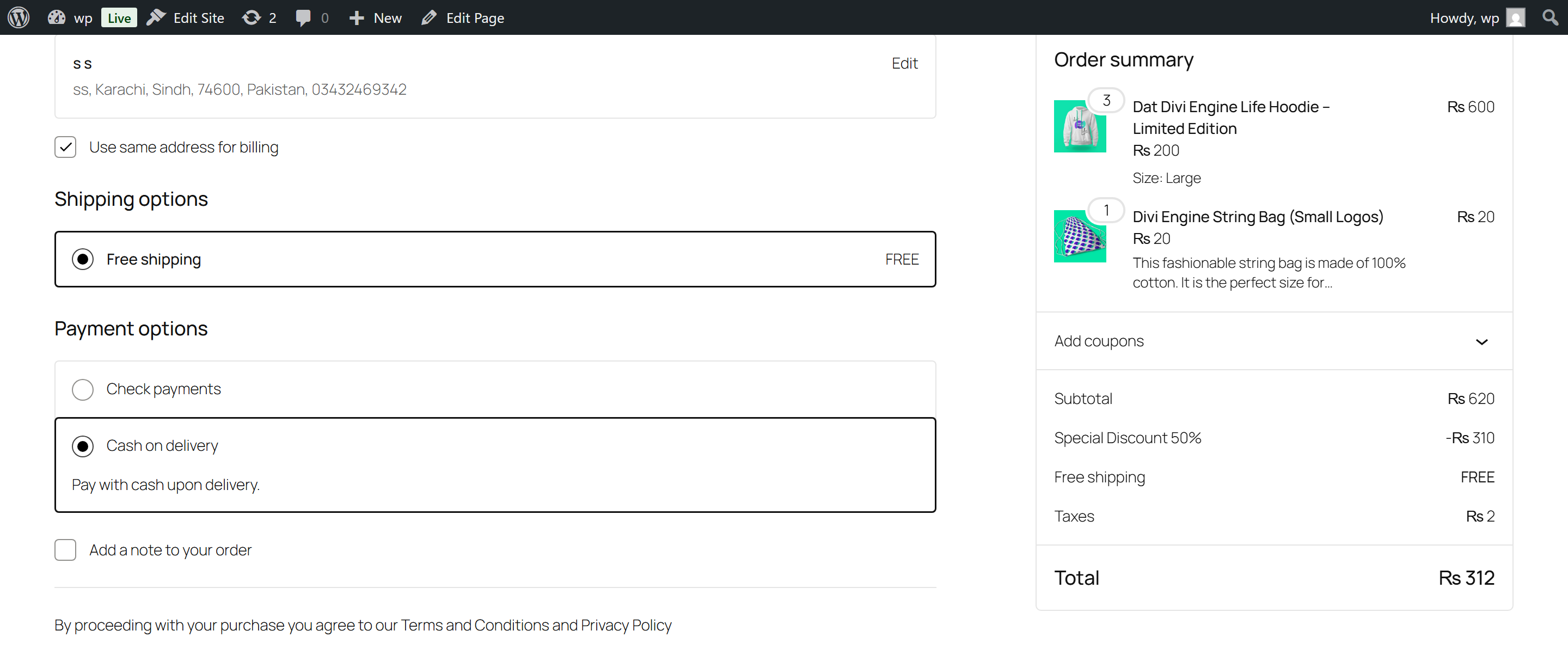
Percentage Discount applied at checkout (Block Checkout) 
Backend admin panel: Adding a payment-based discount message and enabling/disabling it 
Payment-based discount message displayed above the order total 
Payment-based discount message displayed above the order total


Installatie
- Upload the
murls-discountsfolder to/wp-content/plugins/ - Activate the plugin via the Plugins menu
- Go to WooCommerce Murls Discounts
- Configure discount percentages and fixed amounts per payment gateway
- For video tutorials, visit: https://murls.co/murls-discounts/
FAQ
What are the minimum requirements?
Murls Discounts supports the following minimum versions:
PHP: 7.4 or higher
WordPress: 6.3 or higher
WooCommerce: 7.0 or higherCan I set different discounts for multiple WooCommerce payment gateways?
Yes. Each payment gateway can have its own fixed or percentage discount. Discounts are applied automatically at checkout, without requiring coupons, and you can display clear discount messages above the order total for each gateway.
Does Murls Discounts work with all payment gateways?
Yes. Any payment gateway registered in WooCommerce is supported, including popular options like PayPal, Stripe, and offline payments such as Cheque or Cash on Delivery or any other payment gateway.
Can I use this plugin with WooCommerce Block Checkout?
Absolutely. Murls Discounts fully supports both Classic WooCommerce Checkout and the modern Block Checkout experience, as well as Classic and Block Carts.
How are taxes calculated with discounts?
Discounts are applied to the cart subtotal. Taxes are calculated automatically by WooCommerce based on your store’s tax settings. Totals may vary slightly depending on rounding rules and tax configuration.
Can I customize discount messages for each payment method?
Yes. You can add clear, descriptive payment-based discount messages from the WooCommerce admin panel. These messages communicate to customers what discount they will receive if they choose a specific payment method, helping improve checkout clarity and conversion.
Beoordelingen
Er zijn geen beoordelingen voor deze plugin.
Bijdragers & ontwikkelaars
“Murls Discounts – Flexible Discounts for WooCommerce” is open source software. De volgende personen hebben bijgedragen aan deze plugin.
Bijdragers
Vertaal “Murls Discounts – Flexible Discounts for WooCommerce” in je eigen taal.
Interesse in ontwikkeling?
Bekijk de code, haal de SVN repository op, of abonneer je op het ontwikkellog via RSS.
Changelog
1.3.0
- Tested with WordPress 6.3–6.9
- Tested with PHP 7.4–8.2
- WooCommerce 7.0.0–10.4.3 compatibility confirmed
- General code and compatibility improvements
1.2.0
- New: Added payment-based discount messages displayed above the order total for each payment method
- New: Messages work in Classic Cart & Checkout and Block Cart & Checkout
- New: Admin panel allows adding and enabling/disabling discount messages
- Improvement: Updated plugin UI to clearly show payment-based messages in backend
1.1.1
- Fix: Missing JS file and folder in 1.1.0 release
1.1.0
- Added Fixed Discount option
- Added Custom Discount label
- Updated plugin UI/UX
- PHPCS/WPCS compliance fixes
1.0.0
- Initial release

