

Beschrijving


Freemius for WordPress
Beschrijving
Freemius for WordPress is a powerful WordPress plugin that allows you to transform any block-based button into a Freemius checkout button. This makes it easy to integrate Freemius payment processing into your WordPress site with minimal effort.
https://www.youtube.com/watch?v=MTOuIBGan7E
Key features
- Convert any block button to a Freemius checkout button
- Seamless integration with Freemius payment processing
- Customizable checkout experience
- Works with all block-based themes and plugins
Roadmap
- Support for Pricing tables.
- Better support to measure analytics.
- Dedicated Settings page.
- Testimonials (from the API).
Schermafbeeldingen
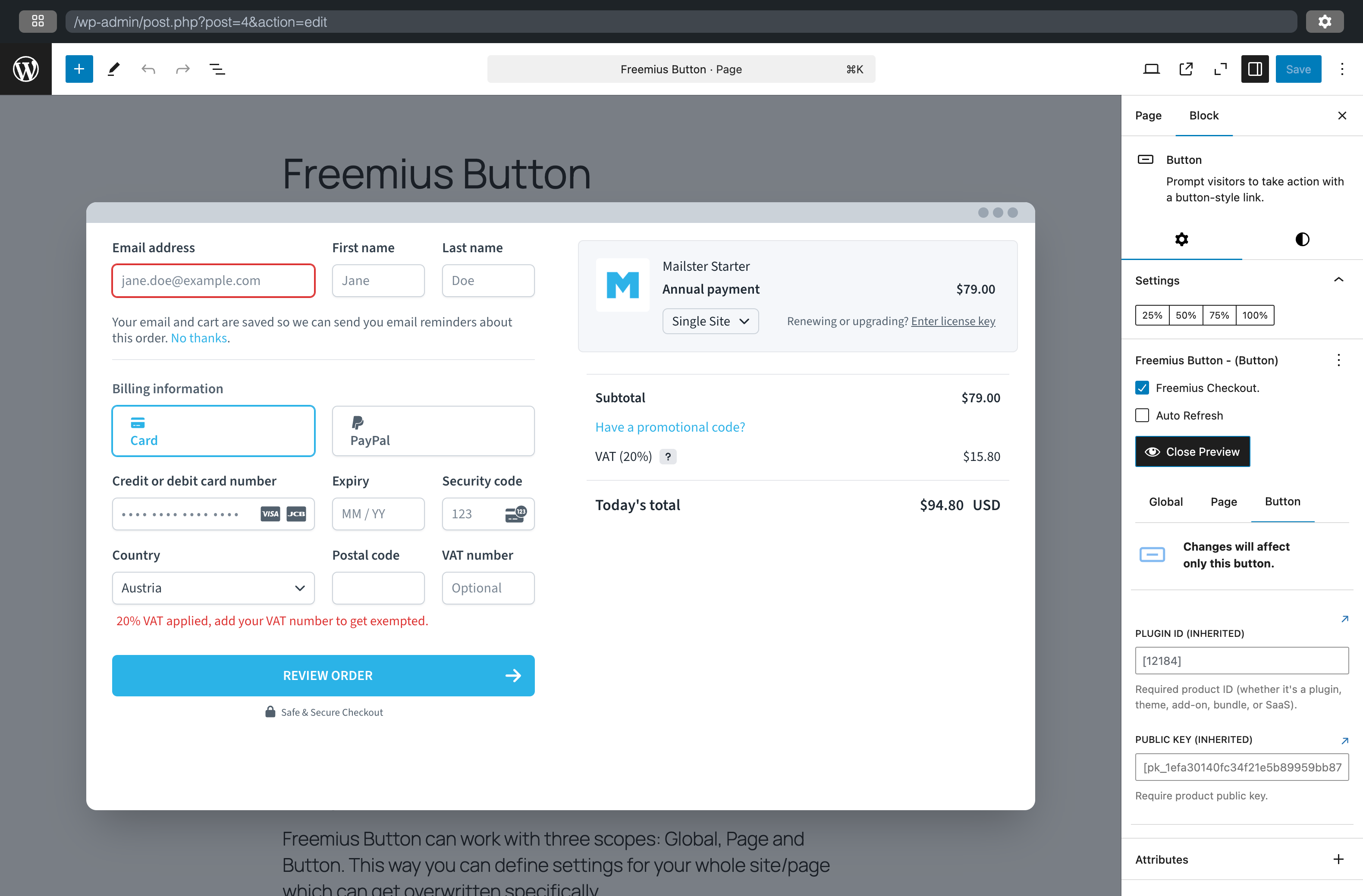
Button block settings with Freemius checkout option

Blokken
Deze plugin heeft 1 blok.
- Freemius Modifier Change the scope of the current block.
Installatie
- Upload the plugin files to the
/wp-content/plugins/freemiusdirectory, or install the plugin through the WordPress plugins screen directly - Activate the plugin through the ‘Plugins’ screen in WordPress
- Place a button via the block editor into your page/post
- Enable Freemius checkout in the button settings
- Configure your product details and the button will automatically handle the checkout process.
FAQ
Simply add a button block to your page or post, then enable the Freemius checkout option in the button settings. Configure your product details and the button will automatically handle the checkout process.
Can I customize the checkout experience?
Yes, you can customize various aspects of the checkout process through the plugin settings, including product details, pricing, and checkout flow.
Is this plugin compatible with my theme?
The plugin works with any WordPress theme that supports the block editor (Gutenberg). It’s designed to be compatible with all modern WordPress themes and plugins.
Where do I find the offical Freemius documentation?
Beoordelingen


Bijdragers & ontwikkelaars
“Freemius for WordPress” is open source software. De volgende personen hebben bijgedragen aan deze plugin.
Bijdragers

Vertaal “Freemius for WordPress” in je eigen taal.
Interesse in ontwikkeling?
Bekijk de code, haal de SVN repository op, of abonneer je op het ontwikkellog via RSS.
Changelog
0.4.2
- fixed: missing import for MappingSettings
- updated: dependencies
0.4.1
- fixed: missing import in useMapping hook
- improved: support for button tag in the button block (WordPress 6.9)
- updated: Tested up to: 6.9
- updated: dependencies
0.4.0
- Feature: Added support for multiple products – you can now manage and configure multiple Freemius products
- Feature: Added “Get Started” tab in settings with helpful video tutorial
- Improved Setup: Plugin now automatically redirects to settings page after activation
- Enhanced Product Management: Better product-specific configuration and data handling
- Enhanced Security: Improved API token handling and authentication
- Better User Experience: Cleaner interface with improved error messages
- Breaking Change: Simplified authentication – no longer requires
public_keyparameter - Performance: Faster loading and improved plugin performance
- Bug Fixes: Various improvements and fixes for better stability
0.3.0
- Major Feature: Added pricing table functionality with dynamic plan display
- Breaking Change: Complete refactoring of Freemius settings and API structure
- Enhanced modifier functionality with improved data handling
- Added new Freemius API health management and error handling
- Improved blueprint configuration with updated landing page and plugin URLs
- Added new hooks and stores for better state management
- Enhanced checkout flow with better customization options
- Updated dependencies and improved performance
- Refactored codebase structure with new component organization
- Added support for advanced pricing modifiers and billing cycles
0.2.1
- Added popout editor for code fields
0.2.0
- changed deprecated argument “plugin_id” to “product_id” (breaking change)
0.1.9
- Added support for WordPress 6.8
- Improved button customization options
- Bug fixes and performance improvements
0.1.8
- Enhanced checkout flow
- Added new customization options
- Fixed compatibility issues
0.1.7
- Improved error handling
- Added support for custom checkout fields
- Performance optimizations
0.1.6
- Initial public release
- Basic Freemius checkout integration
- Core functionality implementation
0.1.0
- Initial development release

