

Beschrijving
Ga naar de inhoud 


Lees alle 7 beoordelingen
Fr Address Book For Woocommerce
Beschrijving
The address book contains the customer’s default billing and shipping addresses, and any additional addresses that they frequently use when placing an order. This will speed up the checkout process.
Schermafbeeldingen

Addresses page without addresses yet 
Addresses page 
Edit address 
Checkout page 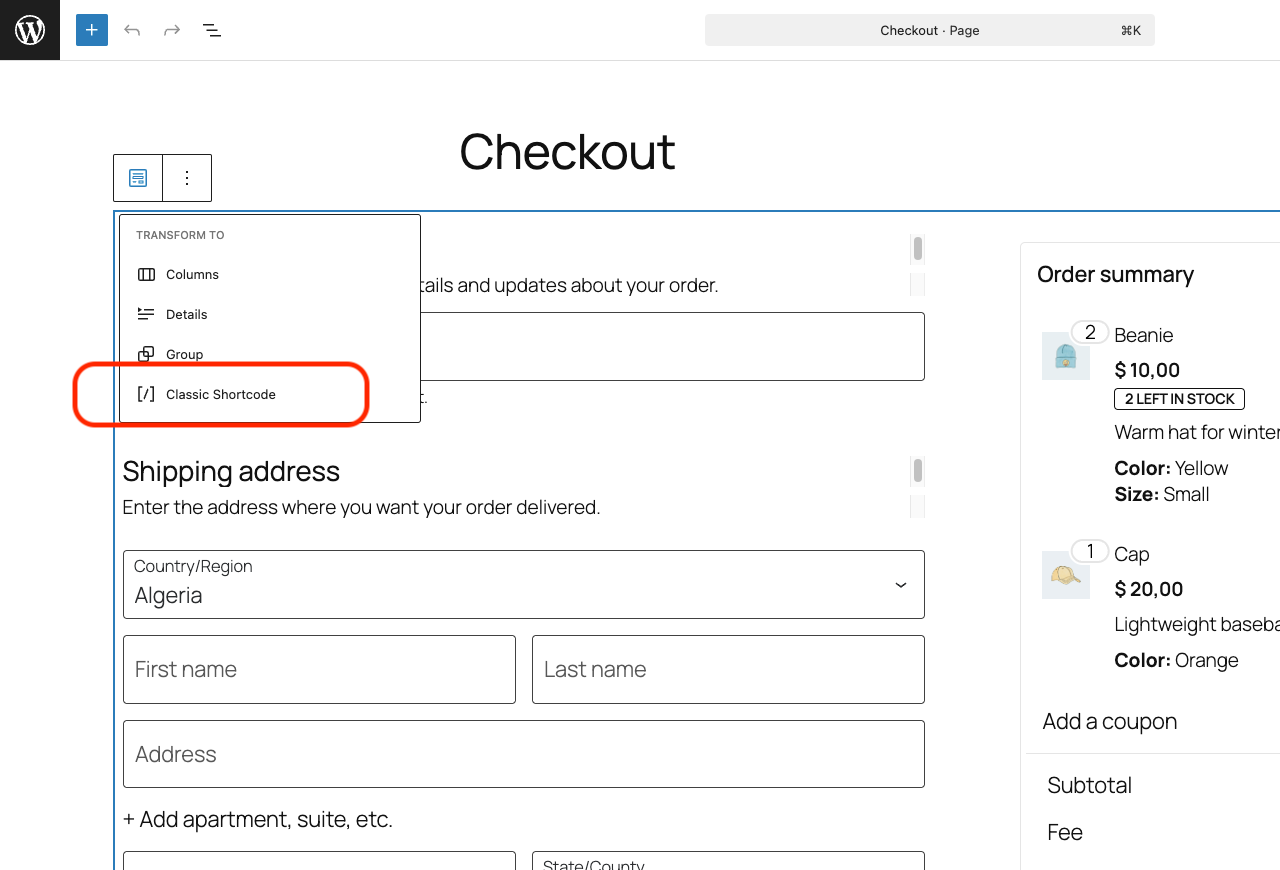
Switching to "Classic Shortcode"


Installatie
- Upload
fr-address-book-for-woocommercefolder to the/wp-content/plugins/directory - Activate the plugin through the Plugins menu in WordPress
- Go to WooCommerce → Settings → Accounts & Privacy → Address book to configure the plugin.
Note: this plugin does not support Block Editor, you need to use [woocommerce_checkout] shortcode.
- Go to Pages → Checkout
- Open the Block Transform menu
- Choose "Classic Shortcode"
FAQ
Uninstallation Instructions
Deactivate and delete the plugin through the Plugins menu in WordPress.
Does it provide a feature to checkout with multiple shipping address?
No.
Beoordelingen
16 mei 2025 1 reactie
Adding Address works but it doesn’t show saved address on checkout page
16 mei 2024 1 reactie
Exactly what I needed 🙂 Thank u soooo much!
11 september 2022 1 reactie
After testing several, this plugin is the simplest and most effective. Nothing to say, works perfectly. There was just a very little translation problem “address name” was not part of the .pot, but it has been fixed here in the topic “Address Name” The available version has not been updated with this change
19 juni 2020 1 reactie
Thank you buddy. You saved my time and this plugin working perfectly.
26 maart 2020 1 reactie
This is exactly what I was looking for.
1 februari 2020 1 reactie
liked the way screenshots are shown, but doesn’t work at all. doesn’t even display existing addresses. Update: the plugin didn’t work for me, so, I gave 1 star, so that others don’t need to waste their time on non-functional plugins. but the plugin author is responsive, so, increasing my rating 1 to 4 stars. Other plugin worked for me, so, I didn’t have time to diagnose. Thanks anyways.
Bijdragers & ontwikkelaars
“Fr Address Book For Woocommerce” is open source software. De volgende personen hebben bijgedragen aan deze plugin.
Bijdragers
“Fr Address Book For Woocommerce” is vertaald in 6 localen. Dank voor de vertalers voor hun bijdragen.
Vertaal “Fr Address Book For Woocommerce” in je eigen taal.
Interesse in ontwikkeling?
Bekijk de code, haal de SVN repository op, of abonneer je op het ontwikkellog via RSS.
Changelog
1.2.9
- Fix to ensure address fields are properly cleared after deletion.
1.2.8
- Fix address details not populating for old accounts.
1.2.7
- Declare HPOS compatibility.
1.2.6
- Add hooks to the add-address.php template.
1.2.5
- Fix phone data get removed when used as the shipping address.
1.2.4
- Update translation template.
- Fix compatibility issue with
woocommerce-extra-checkout-fields-for-brazilplugin.
1.2.3
- Fix order total not recalculated when post code changed.
- Use WooCommerce address if no addresses have been created yet.
1.2.2
- Fix the select address field is not displayed on Elementor editor.
- Fix address options are encoded with HTML entities on WooCommerce 4.2.2.
1.2.1
- Fix address not saved for new customers who create the account at checkout.
1.2.0
- Add option to give each addresses a name.
1.1.1
- Fix missing endpoints after saving permalink settings.
1.1.0
- Add option to set the maximum number of addresses.
- Add support for Twenty Nineteen theme.
- Fix unselected addresses get deleted after place order on WooCommerce 3.5.0 or newer.
1.0.0
- Released.

