

Beschrijving

Enable bbPress for Block Themes
Beschrijving
Enables bbPress for a full site editing WordPress block theme, fixing WSoD (White Screen of Death).
What problem does it solve?
❓ Do you want to use bbPress plugin, but it does not display on your website?
❓ Do you see WSoD when visiting bbPress forum pages?
❓ Do you want to edit bbPress templates?
❓ Are you using a full site editing WordPress block theme?
If you answered yes to these questions, you’re in luck.
Enable bbPress for Block Themes plugin fixes White Screen of Death for bbPress screens/views when you are using a WordPress block theme.
What the plugin does not do?
- Plugin does not provide CSS styles for bbPress to look good with your theme.
Design is very specific thing to each theme. If you want to style your bbPress appearance, use custom CSS code in Styles section of Site Editor, or use other means, such as 3rd party plugins.
You may especially need to style form fields, buttons and pagination.
- Plugin does not provide blocks to tweak bbPress views to your liking.
bbPress plugin contains no blocks you can use to create custom forum layouts (as of February 2025).
However, in Site Editor you can edit “bbPress content” template. This template is used to display all bbPress content. (If you enable block editor for bbPress post types, you can further edit additional templates.)
Got a question or suggestion?
In case of any question or suggestion regarding this plugin, feel free to ask at support section, or at GitHub repository issues.
Schermafbeeldingen
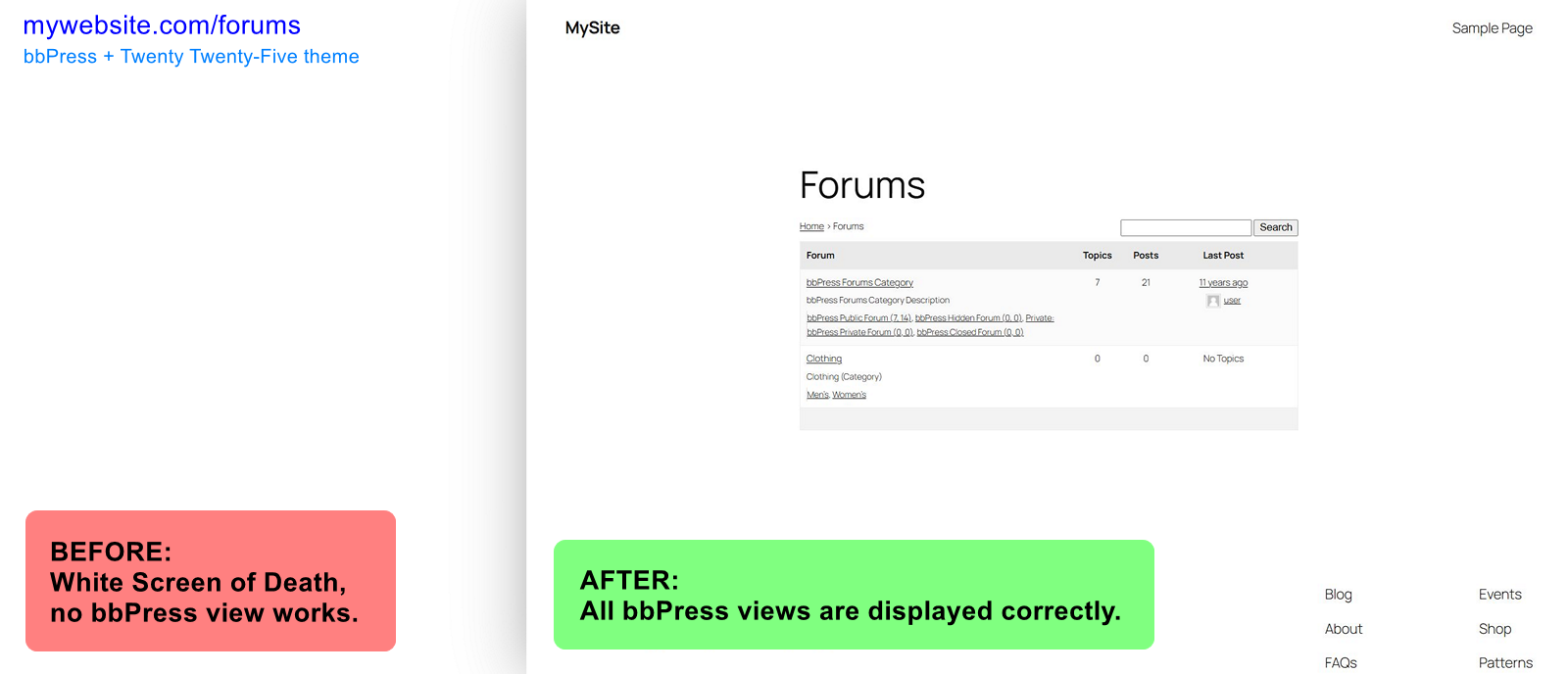
bbPress forums archive: before and after. Using Twenty Twenty-Five theme.

Installatie
First you need to install and activate bbPress plugin, and use a block theme, such as Twenty Twenty-Five.
Automatic installation:
- Navigate to Plugins Add New Plugin and search for
Enable bbPress for Block Themes. - Once the plugin is displayed in the list, click the “Install Now” button, then “Activate” button.
Manual installation:
- Download the plugin to your computer.
- Then unzip Enable bbPress for Block Themes plugin download file and upload
enable-bbp-block-themefolder into the…/wp-content/plugins/directory on your website server. - Activate the plugin through the Plugins menu in WordPress admin area.
Plugin works immediately after activation.
Additionally, you can enable block editor for bbPress post types in Settings Forums “Block Theme Compatibility” section.
FAQ
How does it work?
First, this plugin works only if:
– you are using a block theme,
– and bbPress plugin is active.The plugin modifies template hierarchy for bbPress content, adding compatibility with block themes. It also fixes bbPress content display in Post Content block.
Plugin also provides “bbPress content” template you can edit in Site Editor. (Make sure to use Post Content block in the template as bbPress uses it for displaying its views. Even for bbPress archives!)
By default bbPress uses your theme’s Page template to display its content. However, providing this new “bbPress content” template is adding a new layer of flexibility.It also allows enabling block editor for bbPress post types, for additional modifications to bbPress templates in Site Editor.
bbPress looks ugly, help!
Design is very specific thing to each theme. Please understand this plugin does not provide any CSS styles for bbPress.
If you want to style your bbPress appearance, use custom CSS code in Styles section of Site Editor, or use other means, such as 3rd party plugins.
You may especially need to style form fields, buttons and pagination.
Tip: If you want to make bbPress content different width from the other content on your website, you can either edit “bbPress content” template in Site Editor, or apply this custom CSS:
.bbpress { --wp--style--global--content-size: 45rem; }.Are there any blocks I can use?
No, this plugin does not provide any blocks.
As of February 2025, bbPress plugin does not provide any blocks either, but you can use its shortcodes in Shortcode block.
Can I edit bbPress template?
Yes. The plugin provides dedicated “bbPress content” template in Site Editor.
This template displays all bbPress content and is derived from your theme’s Page template. You can modify it to provide dedicated bbPress views without affecting your pages.
(Make sure to use Post Content block in the template as bbPress uses it for displaying its views. Even for bbPress archives!)
Additionally, after enabling block editor for bbPress post types in Settings Forums “Block Theme Compatibility” section of your WordPress admin, you can modify other bbPress templates in Site Editor.
Where can I find options?
Settings Forums “Block Theme Compatibility” section in your WordPress admin.
In plugin options you can enable block editor for bbPress post types, which allows tweaking bbPress content templates in Site Editor.
Beoordelingen


Bijdragers & ontwikkelaars
“Enable bbPress for Block Themes” is open source software. De volgende personen hebben bijgedragen aan deze plugin.
Bijdragers
“Enable bbPress for Block Themes” is vertaald in 1 locale. Dank voor de vertalers voor hun bijdragen.
Vertaal “Enable bbPress for Block Themes” in je eigen taal.
Interesse in ontwikkeling?
Bekijk de code, haal de SVN repository op, of abonneer je op het ontwikkellog via RSS.
Changelog
Please see the changelog.md file for details.

