

Beschrijving
Deze plugin is niet getest met de laatste 3 grotere versies van WordPress. Mogelijk wordt het niet meer onderhouden of ondersteund. Ook kunnen er compatibiliteitsproblemen ontstaan wanneer het wordt gebruikt met recentere versies van WordPress.

Drag To Share
Beschrijving
“Drag to share” is the newest trend in social sharing. Just drag an image and drop it into any social website to share the whole page in real time. This plugin is basically a similar effect release by Meebo.com and used by big players like Mashable.
The plugin was developed on the source files created by Dan Wellman. Read more here: http://net.tutsplus.com/tutorials/javascript-ajax/drag-to-share
The credits for some of the design elements of this plugin goes to Bogdan Pop: http://www.bogdan-pop.com
The plugin complies to GNU General Public License, except the mascot which is copyrighted!
For more about this plugin visit http://www.adrian-apan.com/blog/wordpress-plugin-drag-to-share
Schermafbeeldingen
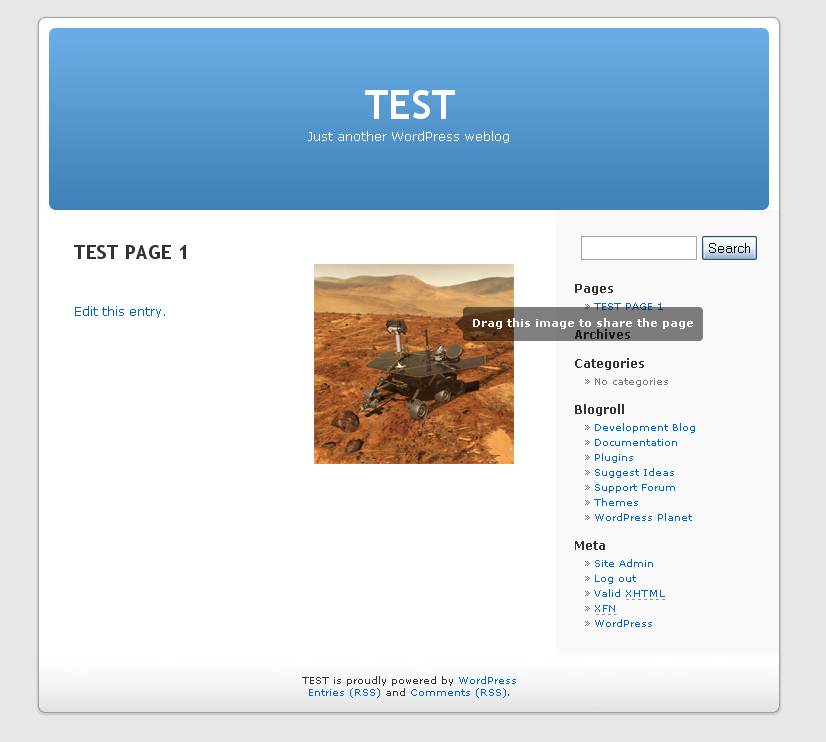
screenshot-1.png 
screenshot-2.png


Installatie
- UnZip and Upload ‘drag-to-share.zip’ to the ‘/wp-content/plugins/’ directory
- Activate the plugin through the ‘Plugins’ menu in WordPress
- Place the image which you want to have the “Drag and Share” effect between <div class="ui-draggable"> and </div>
FAQ
- 1. Where should look for troubleshooting?
If you need help in customizing this plugin or you just simple encounter problems please visit the plugin’s official page at http://www.adrian-apan.com/blog/wordpress-plugin-drag-to-share
Beoordelingen
Er zijn geen beoordelingen voor deze plugin.
Bijdragers & ontwikkelaars
“Drag To Share” is open source software. De volgende personen hebben bijgedragen aan deze plugin.
Bijdragers
Vertaal “Drag To Share” in je eigen taal.
Interesse in ontwikkeling?
Bekijk de code, haal de SVN repository op, of abonneer je op het ontwikkellog via RSS.
Changelog
1.0.0
- First stable version of the plugin.

