

Beschrijving
Deze plugin is niet getest met de laatste 3 grotere versies van WordPress. Mogelijk wordt het niet meer onderhouden of ondersteund. Ook kunnen er compatibiliteitsproblemen ontstaan wanneer het wordt gebruikt met recentere versies van WordPress.

Disable Toolbar
DoorBeschrijving
This humble plugin adds an option in Settings > General that controls who sees the WP Toolbar when viewing your site.
You can turn the Toolbar on or off per user role.
Note that this controls the public, front-end version of your site. When viewing the dashboard, the toolbar always appears.
How is this different from other plugins that do similar things? It’s smaller, cleaner, and doesn’t add any unnecesary settings pages. It’s also smart enough to hide the Toolbar option on user profiles if that user is already restricted from seeing the toolbar.
Schermafbeeldingen
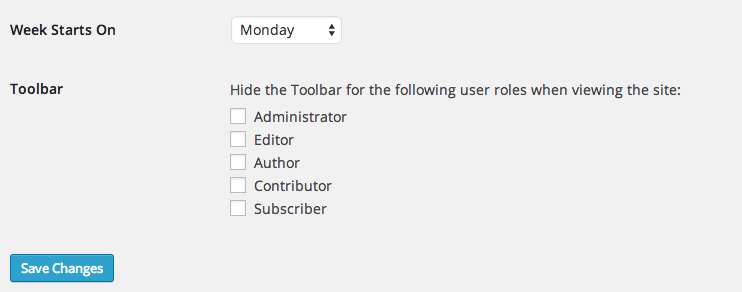
The Disable Toolbar option in Settings > General

Installatie
Automatic Install
- Log into your WordPress dashboard and go to Plugins → Add New
- Search for “Disable Toolbar”
- Click “Install Now” under the Disable Toolbar plugin
- Click “Activate Now”
Manual Install
- Download the plugin from the download button on this page
- Unzip the file, and upload the resulting
disable-toolbarfolder to your/wp-content/pluginsdirectory - Log into your WordPress dashboard and go to Plugins
- Click “Activate” under the Disable Toolbar plugin
FAQ
- Installation Instructions
Automatic Install
- Log into your WordPress dashboard and go to Plugins → Add New
- Search for “Disable Toolbar”
- Click “Install Now” under the Disable Toolbar plugin
- Click “Activate Now”
Manual Install
- Download the plugin from the download button on this page
- Unzip the file, and upload the resulting
disable-toolbarfolder to your/wp-content/pluginsdirectory - Log into your WordPress dashboard and go to Plugins
- Click “Activate” under the Disable Toolbar plugin
Beoordelingen


Bijdragers & ontwikkelaars
“Disable Toolbar” is open source software. De volgende personen hebben bijgedragen aan deze plugin.
Bijdragers
Vertaal “Disable Toolbar” in je eigen taal.
Interesse in ontwikkeling?
Bekijk de code, haal de SVN repository op, of abonneer je op het ontwikkellog via RSS.
Changelog
1.0
- Initial release.
Meta
- Versie 1.0
- Laatst geüpdatet 8 jaar geleden
- Actieve installaties 2.000+
- WordPress versie 3.1 of nieuwer
- Getest t/m 4.9.28
- Taal
- Tags
- Geavanceerde weergave

