

Beschrijving


Custom Animations for Bricks
Beschrijving
Custom Animations for Bricks is a lightweight plugin that lets you easily add custom CSS animations to your Bricks Builder sites. Through a simple admin interface, you can define animation keys, labels, and full CSS code (including @keyframes and .brx-animate- classes). These animations then appear in the Bricks Interactions panel’s “Start animation” dropdown, allowing seamless integration with triggers like viewport entry or mouse hover.
Key Features:
* User-friendly form to add/edit/delete animations with validation for Bricks compatibility.
* Live search and sort in the animations table for quick management.
* Preview modal with dark/light mode toggle to test animations right in the admin (replays on mode switch).
* Enqueues CSS only on frontend (skips Bricks editor for performance).
* Stores animations securely in WordPress options—no database tables needed.
This plugin requires the Bricks theme to be active and has been tested with Bricks Builder version 2.0.2.
Schermafbeeldingen
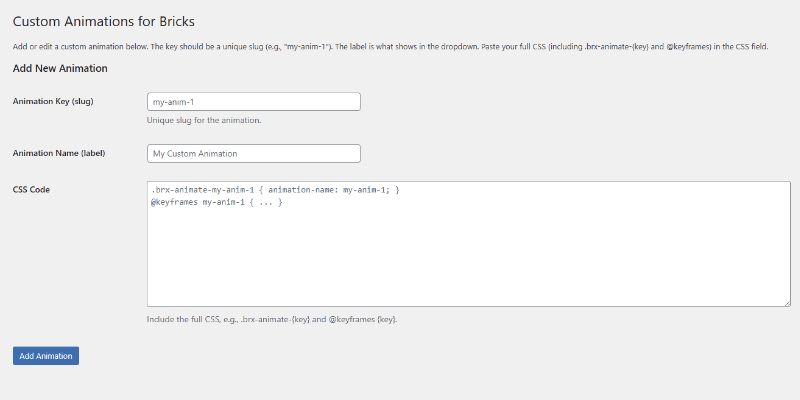
The admin form for adding or editing custom animations, with validation and descriptions. 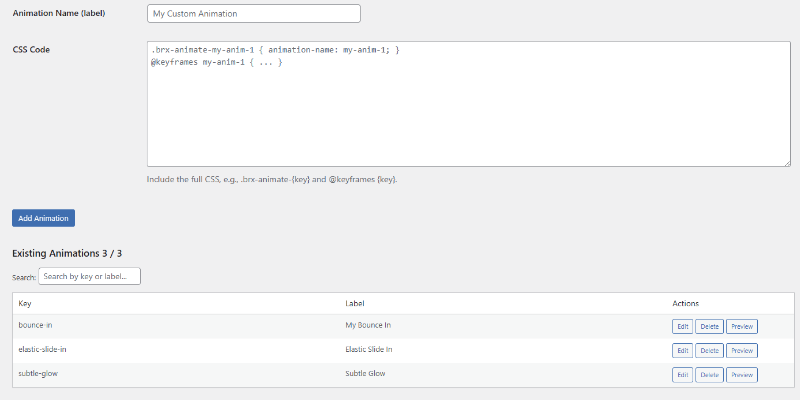
The existing animations table with live search, sort, and actions (Edit, Delete, Preview). 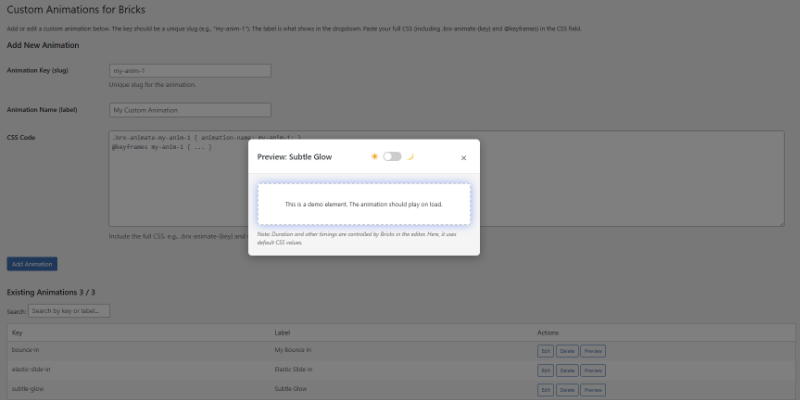
The preview modal showing the animation in action, with dark/light mode toggle for testing contrast. 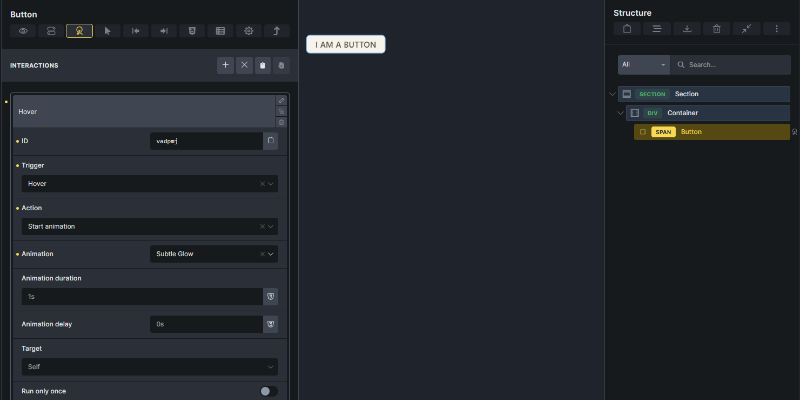
The Bricks editor Interactions panel, showing a custom animation (e.g., Subtle Glow) selected as the Action after choosing a trigger.


Installatie
- Download the plugin ZIP from the WordPress repository.
- In your WordPress admin, go to Plugins > Add New > Upload Plugin and select the ZIP.
- Activate the plugin.
- Ensure the Bricks theme is installed and active (tested with version 2.0.2).
- Navigate to Bricks > Custom Animations in the admin menu to start adding animations.
FAQ
Does this plugin require Bricks Builder?
Yes, it integrates directly with Bricks’ animation system and requires the Bricks theme to be active. It has been tested with Bricks Builder version 2.0.2.
How do I add a custom animation?
- Go to Bricks > Custom Animations.
- Fill in the key (slug, e.g., “my-glow”), label (display name), and CSS (full block with .brx-animate-{key} and @keyframes).
- Click Add Animation.
- In the Bricks editor, select an element > Interactions > Start animation > Choose your new option.
Why isn’t my animation showing in the preview?
Ensure your CSS includes an
animation-duration(e.g., 2s) for the preview fallback—Bricks overrides this in the editor. Test with the modal’s dark/light toggle for contrast.Is it performant?
Yes—minimal overhead (<50ms load, 1-2 queries). CSS enqueues only on frontend; no global assets.
Can I export/import animations?
Not yet—future updates may add this. For now, back up via Tools > Export > All content (options included).
Beoordelingen
Er zijn geen beoordelingen voor deze plugin.
Bijdragers & ontwikkelaars
“Custom Animations for Bricks” is open source software. De volgende personen hebben bijgedragen aan deze plugin.
Bijdragers
Vertaal “Custom Animations for Bricks” in je eigen taal.
Interesse in ontwikkeling?
Bekijk de code, haal de SVN repository op, of abonneer je op het ontwikkellog via RSS.
Changelog
1.1.15
- Class name updated from CustomAnimationsBricks to CUSTANIMFORBX_CustomAnimationsBricks.
1.1.14
- Prefix Update, CSS Enqueue, Inline CSS in Preview
1.1.13
- Only loads animation CSS on pages where animations are used, boosting performance.
- Fixed code standard issues for better compatibility and security.
- Improved animation detection for Bricks Builder pages and templates.
- Added secure debugging for developers (requires WP_DEBUG).
1.1.12
- Added ABSPATH guard to prevent direct access.
- Define plugin constants to reference paths/URLs safely.
1.1.11
- Fixed minor JS issue in preview modal for smoother animation replay.
1.1.10
- Improved nonce validation for edit/delete actions.
1.1.9
- Aggressively hide checkbox in toggle for full invisibility.
1.1.8
- Simplified plugin name to “Custom Animations for Bricks”.
- Ensured icon colors swap reliably on mode change.
1.1.7
- Fixed icon alignment in toggle (sun left, moon right, no overlap).
- Dynamic color transitions for icons (yellow active, gray inactive).
1.1.6
- Added icons to toggle with fade effects.
- Prevented modal close on toggle click.
1.1.5
- Replay animation on dark/light toggle.
- Modern CSS toggle switch (no icons initially).
1.1.4
- Toggle switches modal body background only (demo box stays light).
- Fixed toggle closing modal.
1.1.3
- Added dark/light mode toggle to preview modal (starts light).
1.1.2
- Darker demo background in preview for better glow contrast.
1.1.1
- Added Preview button with modal demo and CSS injection.
1.1.0
- Fixed search hiding form elements.
1.0.9
- Live dynamic search with count updates and clear button.
1.0.8
- Overhauled search to client-side filtering.
1.0.7
- Fixed form key field naming bug.
1.0.6
- Added edit functionality, search/sort, and CSS validation.
1.0.5
- Menu under Bricks with unique slug.
1.0.4
- Nested under Bricks > Settings.
1.0.3
- Standalone menu to avoid redirects.
1.0.2
- Admin menu priority fix.
1.0.1
- Fixed Bricks theme check and CSS output.
1.0.0
- Initial release.

