

Beschrijving
Deze plugin is niet getest met de laatste 3 grotere versies van WordPress. Mogelijk wordt het niet meer onderhouden of ondersteund. Ook kunnen er compatibiliteitsproblemen ontstaan wanneer het wordt gebruikt met recentere versies van WordPress.

Convert Address to Google Maps Link
Beschrijving
NORMAL LINKS:
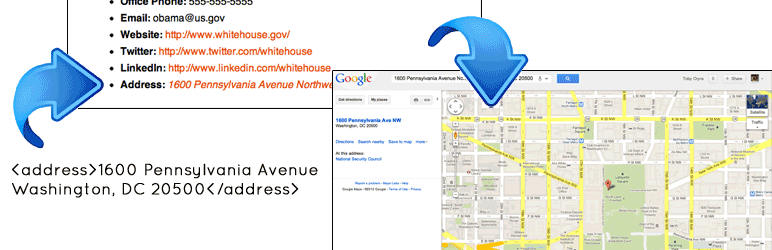
This simple plugin converts addresses in “<address></address>” tags into links that open a Google Map in a new window. It also converts any address in a “.address” class into a Google Map link that opens in a new window.
NOTE: You need to put the address inside the <address></address> html tag or within an html element with the .address class for this plugin to work. For example, you would need to write the following into your code: <address>3 Abbey Rd, London NW8 9AY, United Kingdom</address> OR <span class=“address”>3 Abbey Rd, London NW8 9AY, United Kingdom</span> OR <div class=“address”>3 Abbey Rd, London NW8 9AY, United Kingdom</div>
IFRAME LINKS:
If you want to display the Google Map in an iframe, just use the .address-iframe class in your markup. For example, <div class=“address-iframe”>3 Abbey Rd, London NW8 9AY, United Kingdom</div> (Thanks to Mike Jasper for this idea and code!)
FYI: This plugin is great for themes with custom fields that supply the address, but is probably not too useful for themes that don’t, because you’ll need to enter the text view to add the appropriate html markup. Thanks!
Finally, many many thanks to Mike Jasper , who wrote the javascript that powers this plugin. I merely repackaged his code.
Schermafbeeldingen

Using the ‘address-iframe’ class 
Using the html5 ‘ 


Installatie
- Unzip and upload the php file to your wordpress plugin directory
- Activeer de plugin
FAQ
- Where is the settings page?
There are no settings for this plugin.
- This isn’t working.
Make sure you put the address inside the
<address></address>html tag or inside an html element with theaddressclass. This is required.
Beoordelingen


Bijdragers & ontwikkelaars
“Convert Address to Google Maps Link” is open source software. De volgende personen hebben bijgedragen aan deze plugin.
Bijdragers
Vertaal “Convert Address to Google Maps Link” in je eigen taal.
Interesse in ontwikkeling?
Bekijk de code, haal de SVN repository op, of abonneer je op het ontwikkellog via RSS.
Changelog
1.2
- Added support for ‘.address-iframe’ class
1.1
- Added support for ‘.address’ class
1.0
- Eerste release

