

Beschrijving
Deze plugin is niet getest met de laatste 3 grotere versies van WordPress. Mogelijk wordt het niet meer onderhouden of ondersteund. Ook kunnen er compatibiliteitsproblemen ontstaan wanneer het wordt gebruikt met recentere versies van WordPress.

Basic URL ShortCodes
Beschrijving
Sometimes you want to put the base URL (that of the blog, or that of the active template) in your content editor. Times when the template customising isn’t quite flexible enough.
With this plugin you can use [home_url] to output the base URL of the blog (as set in your Settings). Or, you can use [theme_url_template] to output the URL of the active template. And You can use the [UPLOAD_URL] to output the URL of the upload folder.
For example <img src="[UPLOAD_URL]/2022/02/test.png /> in your editor might output <img src="https://localhost/wp-demo/wp-content/uploads/2022/02/test.png" /> (if http://localhost/wp-demo is what you have configured as your blog URL in Settings).
The supported short codes are as follows:
* [home_url] – the configured blog URL (set in Settings). E.g. http://localhost/wp-demo
* [theme_url_template] – the URL of the active template. E.g. http://localhost/wp-demo/wp-content/themes/mytheme
* [UPLOAD_URL] – the URL of the upload folder. E.g. http://localhost/wp-demo/wp-content/uploads
License
This plugin uses the GPLv3 license.
Schermafbeeldingen
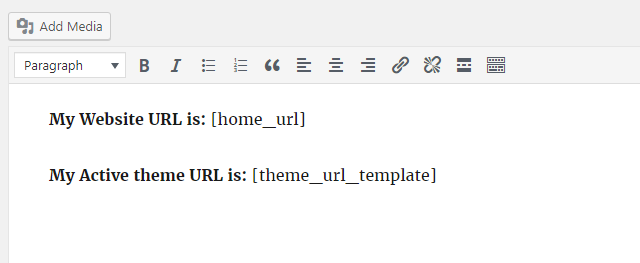
Sample short code use. 
Rendered output.


Installatie
Use WordPress Add New Plugin feature, searching “BASIC URL ShortCodes”, or download the archive and:
- Unzip the archive on your computer
- Upload
basic-url-shortcodesdirectory to the/wp-content/plugins/directory - Activate the plugin through the ‘Plugins’ menu in WordPress
- Use shortcode & enjoy
FAQ
There are no FAQs at this time. Feel free to suggest some!
Beoordelingen


Bijdragers & ontwikkelaars
“Basic URL ShortCodes” is open source software. De volgende personen hebben bijgedragen aan deze plugin.
Bijdragers
Vertaal “Basic URL ShortCodes” in je eigen taal.
Interesse in ontwikkeling?
Bekijk de code, haal de SVN repository op, of abonneer je op het ontwikkellog via RSS.

