

Beschrijving


Back To Top Block
Beschrijving
The Back to Top Block adds a customizable button that allows users to smoothly scroll back to the top of your page. Perfect for long-form content and improved user experience.
Key Features:
- Customizable Button Text – Change the text to match your site’s language or style
- Optional Icon Display – Show or hide the up arrow icon
- Custom Icon Support – Upload your own icon to match your site’s design
- Smooth Scrolling – Elegant animation when scrolling to top
- Reduced Motion Support – Respects user’s motion preferences
How it Works
Simply add the block to your page or post where you want the back-to-top button to appear. The button will automatically handle scrolling to the top of the page when clicked, with smooth animation for users who haven’t enabled reduced motion preferences.
Schermafbeeldingen
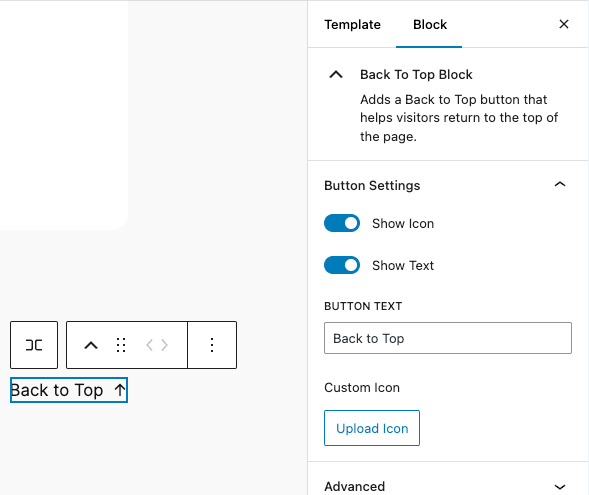
Block settings panel showing customization options for the Back to Top button

Blokken
Deze plugin heeft 1 blok.
- Back To Top Block Adds a customizable Back to Top button that helps visitors return to the top of the page.
Installatie
- Upload the plugin files to the
/wp-content/plugins/back-to-top-blockdirectory, or install the plugin through the WordPress plugins screen directly. - Activate the plugin through the ‘Plugins’ screen in WordPress
- Use the Block Editor to add the Back to Top Block to your pages
FAQ
Yes, you can:
* Show/hide the arrow icon
* Show/hide the button text
* Change the button text
* Upload a custom iconDoes it work with all themes?
Yes, the block is designed to work with any WordPress theme that supports the block editor.
Is it accessible?
Yes, the block is built with accessibility in mind, including proper ARIA labels and keyboard navigation support.
Beoordelingen
Er zijn geen beoordelingen voor deze plugin.
Bijdragers & ontwikkelaars
“Back To Top Block” is open source software. De volgende personen hebben bijgedragen aan deze plugin.
Bijdragers
Vertaal “Back To Top Block” in je eigen taal.
Interesse in ontwikkeling?
Bekijk de code, haal de SVN repository op, of abonneer je op het ontwikkellog via RSS.
Changelog
1.0.3
- Added server-side attribute sanitization for improved security
- Enhanced icon URL validation to prevent external URLs
- Added extensibility hooks for developers
- Improved button text validation logic
- Added error handling for older browsers
1.0.2
- Improved focus management after scroll
- Minor accessibility enhancements
1.0.1
- Initial release
- Basic button functionality
- Customization options for text and icon
- Custom icon upload support
- Smooth scrolling implementation

