

Beschrijving

AlphaListing
Beschrijving
Display posts, pages, and terms alphabetically in a Rolodex-, catalog-, or directory-style list with the AlphaListing plugin!
This plugin includes a block and shortcode for the list, along with a widget for linking to the list from any location on a site. If a letter has no associated pages, the widget will display the letter unlinked, while the list page will omit the letter entirely.
Show posts from any single or multiple post types, including built-in posts and pages. Post types from plugins like WooCommerce products are also supported. Alternatively, display terms such as categories or tags.
This plugin is based on the original A-Z Listing by Lucy (formerly Dani) Llewellyn, which is no longer maintained. Custom templates built for the original plugin may not work reliably with this version. For the most up-to-date example template, see the example template.
Documentation
Comprehensive documentation is now available:
Schermafbeeldingen
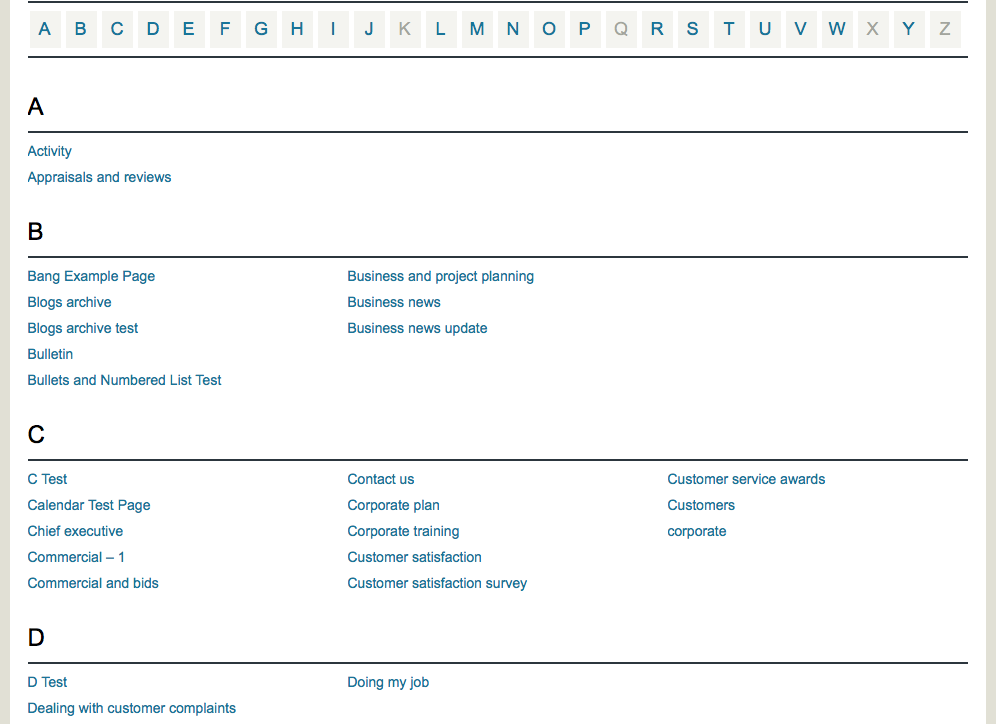
An example of the index listing page 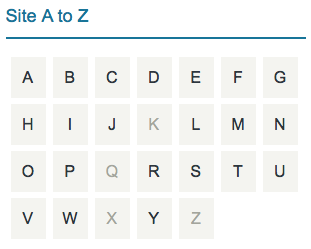
The Widget is shown here


Blokken
Deze plugin heeft 1 blok.
- AlphaListing
Installatie
This section describes how to install the plugin and get it working.
Requirements
- PHP 8.0 or higher is required.
- The plugin requires mbstring to be enabled in the PHP installation. Without this feature, the plugin may behave unexpectedly or fail.
Instructions
- Upload the
alphalistingfolder to the/wp-content/plugins/directory. - Activate the plugin through the “Plugins” menu in WordPress.
- Use the AlphaListing block in the (Gutenberg) block editor or the
[alphalisting]shortcode on the desired page or post. - (Optional) Add the A-Z Site Map widget to a sidebar.
Beoordelingen


Bijdragers & ontwikkelaars
“AlphaListing” is open source software. De volgende personen hebben bijgedragen aan deze plugin.
Bijdragers
Vertaal “AlphaListing” in je eigen taal.
Interesse in ontwikkeling?
Bekijk de code, haal de SVN repository op, of abonneer je op het ontwikkellog via RSS.
Changelog
4.3.7
- Bugfix: harden column layout attribute sanitization.
- Bugfix: fix parent selector attribute wiring in block editor.
- Bugfix: harden widget update sanitization.
- Bugfix: fix get_item_meta to handle plural item prefixes.
- New: add exclude post and term IDs fields to the block settings.
4.3.6
[alphalisting exclude-terms]now accepts explicit term listings and consistently filters by numeric term IDs for reliable exclusions.- Fixed
alphalisting_cache()so template tags instantiate the namespaced query class without fatal errors. - Improved pagination to keep multi-page queries from skipping items and restored the unknown “#” bucket in edge cases.
- Added an ASCII fallback when
mbstringis unavailable so basic listings still render correctly. - Code improvements covering additional internal cleanups.
4.3.5
- Bugfix: fix critical error issues caused by namespaced functions in the files within the functions directory.
- Bugfix: correct the conditional logic inside the
get_the_item_object()function of theQueryclass by changing the checks forposttopostsandtermtoterms.
4.3.4
- Add namespace AlphaListing to all necessary PHP files.
4.3.3
- Bugfix: fix widget name not displaying on Widgets page.
- Bugfix: fix widget autocomplete input fields.
- Remove hardcoded twente URLs.
- Remove the minor version from the “Tested up to” value in the readme.txt.
- Move inline CSS style as style attribute in the template files.
- Add permission callback to register_rest_route.
- Remove load_plugin_textdomain as it is no longer necessary.
- Prevent direct file access to plugin files.
4.3.2
- Bugfix: Fix the listing order under grouped letters so that items are now correctly sorted alphabetically in ascending order.
- Update packages and fix deprecation warnings
Previous
This plugin is based on the original A-Z Listing by Lucy (formerly Dani) Llewellyn. The last version released by Lucy was 4.3.1. Starting from version 4.3.2, this plugin has diverged from the original A-Z Listing. For the full release history, including Lucy’s releases, refer to the changelog.md file.

