

Beschrijving

AFI – The Easiest Integration Plugin
Beschrijving
Verbind elk WordPress formulier of evenement met meer dan 200 apps — zonder code. Verzend leads, bestellingen en aanmeldingen naar je CRM, e-mail of spreadsheets in een paar minuten.
Overview
AFI is a powerful WordPress integration plugin that automatically connects your website forms and user activities to your essential business tools. Whether you need to sync form submissions to your CRM, add new customers to email marketing lists, or track user data in spreadsheets, AFI eliminates manual data entry and ensures information flows seamlessly between your WordPress site and the platforms you rely on.
Perfect for businesses of small and medium sizes, AFI requires no coding knowledge and can be configured in minutes, making it an essential tool for marketers, sales teams, and business owners who want to streamline their workflows and improve data accuracy.
Key Benefits
Eliminate Manual Data Entry: Automatically sync form submissions and user activities to your business tools
Increase Conversion Rates: Ensure leads are instantly captured in your CRM and marketing platforms
Improve Data Accuracy: Remove human error from data transfers between systems
Save Time: Set up once and let AFI handle ongoing integrations automatically
Scale Your Operations: Connect unlimited forms to unlimited platforms with flexible routing options
Core Features
Universal Form Support
Connect almost all WordPress form plugin including Contact Form 7, WPForms, Elementor Pro Forms, Gravity Forms, Ninja Forms, and 70+ other popular form builders and plugins.
Smart Data Mapping
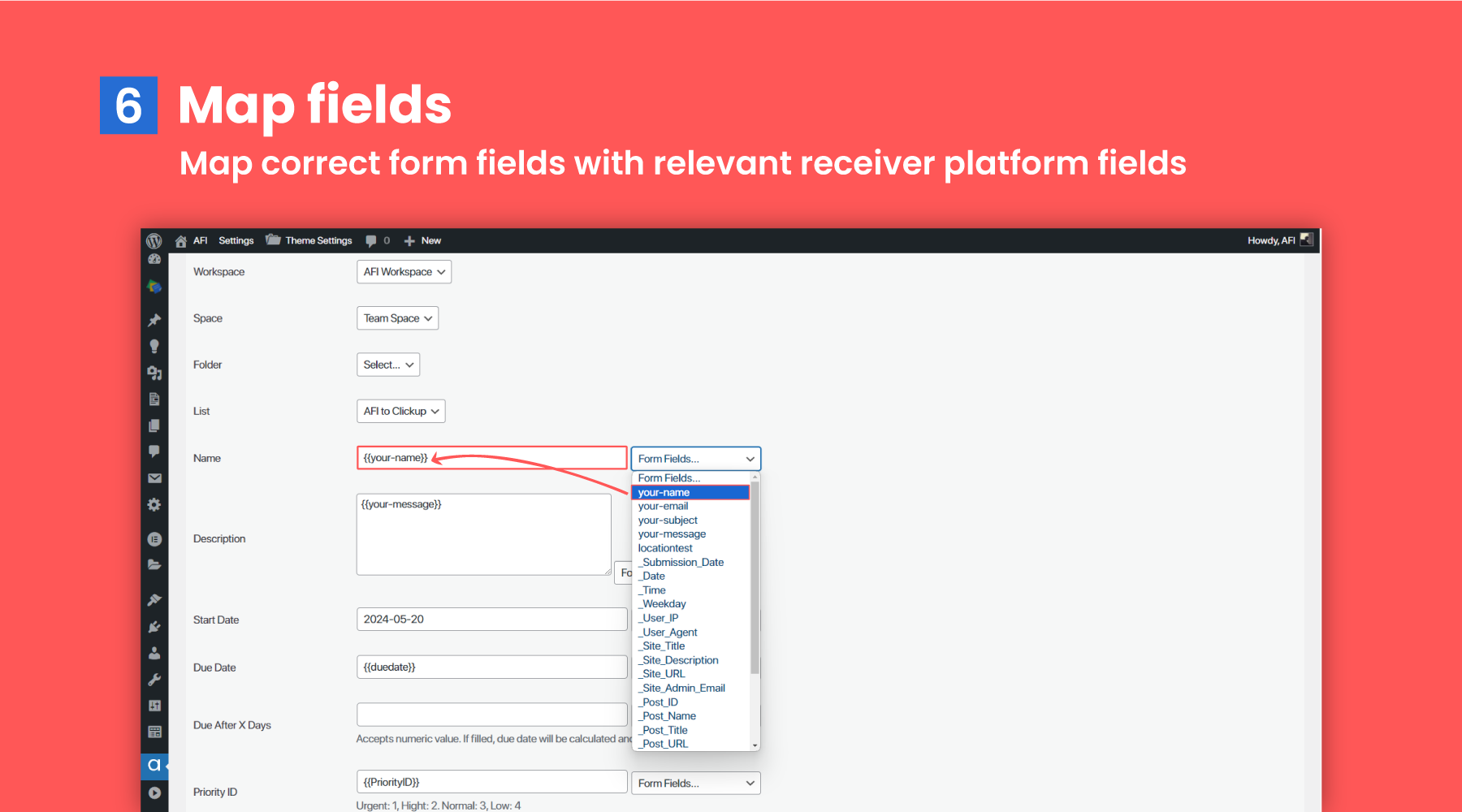
Map form fields to destination platform fields with support for static text combination and dynamic field population.
Conditional Logic
Control when data is sent using conditional rules. Send data only when specific criteria are met.
System Integration Tags
Access dynamic system information including timestamps, IP addresses, user details, and site information using special tags like {{_date}}, {{_user_ip}}, and {{_site_title}}.
Activity Logs
Monitor all data transfers with detailed logs that show successful submissions, errors, and allow for manual data correction and resending when needed.
Multisite Support
Full compatibility with WordPress multisite installations for enterprise deployments.
[Website] [Documentation] [Tutorial Videos]
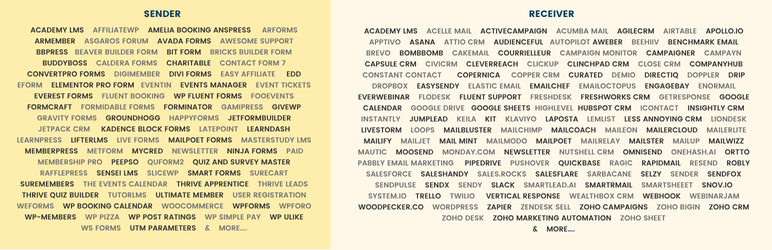
SENDER PLATFORMS (TRIGGER)
The following plugins work as a sender platform.
Academy LMS
Advanced Coupons
AffiliateWP
Amelia Booking
AnsPress
Appointment Hour Booking
ARForms
ARMember
Asgaros Forum
Avada Forms
Awesome Support
bbPress
Beaver Builder Form
Bit Form
Bookly
Breakdance Builder Form
Bricks Builder Form
BuddyBoss
BuddyPress
Caldera Forms
CartFlows
Charitable
Contact Form 7
ConvertPro Forms
Cool FormKit
Crowdsignal Forms
DigiMember
Divi Forms
Easy Affiliate
Easy Appointments
Easy Digital Downloads
eForm
Elementor Pro Form
Event Espresso Decaf
Eventin
Events Manager
Event Tickets
Everest Forms
Fluent Affiliate
Fluent Booking
FluentCart
Fluent Forms
FooEvents
FormCraft
Formidable Forms
Forminator (Forms only)
GamiPress
GiveWP
Gravity Forms
Groundhogg
Happyforms
JetFormBuilder
Jetpack CRM
Kadence Blocks Form
LatePoint
LearnDash
LearnPress
LifterLMS
Live Forms
MailPoet Forms
MasterStudy LMS
MemberPress
Metform
myCred
Newsletter
Ninja Forms
Paid Membership Pro
PeepSo
QuForm2
Quiz and Survey Master
RafflePress
Sensei LMS
SliceWP
Smart Forms
SureCart
SureMembers
The Events Calendar
Thrive Apprentice
Thrive Leads
Thrive Quiz Builder
TutorLMS
Ultimate Member
User Registration
weForms
WP Booking Calendar
WPForms
wpForo
WP-Members
WP Pizza
WP Post Ratings
WP Simple Pay
WP ULike
WooCommerce
WS Form
UTM Parameters You can also grab and send UTM variables. Just activate the feature from the plugin’s settings page. Now use tags like {{utm_source}}, {{utm_medium}}, {{utm_term}}, {{utm_content}}, {{utm_campaign}}, {{gclid}}, etc.
Premium Version Features.
- All form fields
- Inbound Webhooks
RECEIVER PLATFORMS (ACTION)
Academy LMS
Acelle Mail – Creates contacts and adds them to lists. Pro license required for custom fields and tags.
ActiveCampaign – Create contacts, add them to lists or automations, and manage deals and notes. Pro license required for custom fields.
Acuity Scheduling
Acumbamail
Agile CRM – Create contacts, deals, and notes. Pro license required for tags and custom fields.
Airtable – Creates new row to selected table.
Apollo.io
Apptivo
Asana – Allows to create a new task. Custom fields are support in the AFI Pro version.
Attio CRM
Audienceful
Autopilot – Create/update contacts and add them to lists. Pro license required for custom fields.
AWeber – Create contacts and subscribe them to lists. Pro license required for custom fields and tags.
beehiiv – Create new subscriber to a selected publiction.
Benchmark Email – Create contacts and subscribe them to lists. Pro license required for custom fields.
BombBomb
Brevo – Create subscribers and add them to lists. Pro license required for custom fields and multilingual support.
Cakemail – Courrielleur
Campaigner – Subscribe to list.
Campaign Monitor – Create contacts and subscribe to lists. Pro license required for custom fields.
Campayn
Capsule CRM – Add parties, opportunities, cases, and tasks. Pro version required for tags and custom fields.
CiviCRM – Add contacts.
CleverReach – Subscribe to list.
ClickUp – Create tasks. Requires a Pro license to add tags and custom fields.
ClinchPad CRM – Creates new Leads, including organization, contact, note, product, etc.
Close CRM – Adds a new lead and contat. The Pro version supports custom fields.
CompanyHub – Creates basic contact.
Constant Contact – Create new contacts and subscribe them to lists. Pro license required for custom fields and tags.
Copernica
Copper CRM – Create companies, persons, and deals. Pro version required for custom fields and tags.
Curated – Add subscriber.
Customer.io – Add people.
Demio – Register people to webinar.
DirectIQ – Create contacts and add them to mailing lists.
Doppler
Drip – Subscribe new contacts to campaigns and workflows. Pro version required for custom fields.
Dropbox – Upload file.
EasySendy – Subscribe new contacts. Pro license required for custom fields.
Elastic Email – Subscribe new contacts. Pro license required for custom fields.
Emailchef
Emailit
EmailOctopus – Subscribe new contacts. Pro license required for custom fields.
EngageBay – Create contacts and subscribe them to lists. Pro license required for custom fields.
Enormail
EverWebinar – Add registrant to webinar.
Flodesk – Add subscriber.
Fluent Support – Create ticket.
FollowUpBoss – Add contacts.
Freshdesk – Create contact, ticket.
Freshworks CRM (Freshsales) – Create accounts, contacts, and deals with custom fields.
GetResponse – Create subscribers and add them to mailing lists. Pro version required for custom fields and tags.
Google Calendar – Create new events on a selected Google Calendar using provided data.
Google Drive – Upload file.
Google Sheets – Create a new row in a selected sheet with submitted form or WooCommerce order data. Pro version supports separate rows for each WooCommerce order item.
HighLevel – Create leads, contacts, opportunities.
Hubspot CRM – Create new contacts in HubSpot CRM with custom fields. Pro version supports companies, deals, tickets, tasks, and more.
iContact
Insightly – Create organizations, contacts, and opportunities with basic fields. Pro version supports custom fields and tags.
Instantly – Add lead.
Intercom – Add contacts.
Keila
Kit – Create contacts and subscribe them to sequences or forms. Pro license required for custom fields and tags.
Klaviyo – Add contacts and subscribe them to lists. Pro license required for custom properties.
Laposta
lemlist – Create contacts and add them to campaigns.
Less Annoying CRM
LionDesk – Create contacts. Pro version supports tags and custom fields.
Livestorm – Add people to event session.
Loops – Subscribe to list.
MailBluster – Create new leads. Pro license required for custom fields and tags.
Mailchimp – Create contacts, manage subscriptions to lists and groups, and unsubscribe from lists. Pro license required for custom/merge fields and tags.
Mailcoach
Maileon – Adds new subscriber.
Mailercloud – Add new subscribers to selected lists. Pro license required for custom fields.
MailerLite – Add contacts and subscribe them to groups. Pro license required for custom fields.
MailerLite Classic – Add contacts and subscribe them to groups. Pro license needed for custom fields.
Mailify – Create contacts and subscribe them to lists. Pro license required for custom fields.
Mailjet – Create contacts and add them to lists. Pro license required for custom fields.
Mail Mint – Subscribe to list.
Mailmodo
MailPoet – Add contact to list.
Mailrelay – Subscribe to group.
Mailster – Subscribe to list.
MailUp – Subscribe to list.
MailWizz – Create contacts and add them to lists. Pro plugin supports custom fields.
Mautic – Create contacts. Pro license required for custom fields.
Moosend – Create contacts and add them to lists. Pro license required for custom fields.
Monday.com – Create item to board.
Newsletter – Subscribe to list.
Nimble
Nutshell CRM – Add account, contact.
Omnisend – Create contacts. Pro license required for custom fields and tags.
Onehash.ai – Create new leads, contacts, and customers with this plugin.
Ortto – Create contacts. Pro license required for tags and custom fields.
Pabbly Email Marketing – Create subscribers and add them to lists. Pro license required for custom fields.
Pipedrive – Create organizations, people, deals, notes, and activities with custom fields. Pro license required to add new leads.
Pushover – Send push messages to Android, iOS, and Desktop devices.
Quickbase
Ragic
Rapidmail – Subscribe to list.
Resend – Add contact.
Robly – Add or update subscribers. Pro license required for custom fields and tags.
Salesforce – Add lead, account, contact, opportunity, case.
Saleshandy
Sales.Rocks – Add contacts and subscribe them to lists.
Salesflare – Create organizations, contacts, opportunities, and tasks.
Sarbacane
Selzy – Subscribe to lists. Pro version supports custom fields and tags.
Sender – Subscribe to group.
SendFox Subscribe to lists. Pro version supports custom fields.
SendPulse – Subscribe to lists.
SendX – Create new contact.
Sendy – Subscribe them to lists. Pro license required for custom fields.
Slack – Send channel messages.
Smartlead.ai
SmartrMail
Smartsheet – Create new rows.
Snov.io – Subscribe to list. Pro license required for custom fields.
SuiteDash
System.io – Subscribe to list.
Trello – create cards in Trello.
Twilio – Send customized SMS.
Vertical Response – Create contacts in specific lists. Pro license required for custom fields.
Wealthbox CRM – Create contacts. Pro license required for tags and custom fields.
Webhook – Send data to any webhook URL. Pro version supports custom headers, bodies, and methods (GET, POST, PUT, DELETE) for API integration with token or Basic auth.
WebinarJam – Add registrant to webinar.
Woodpecker.co – Create subscribers. Pro license required for custom fields.
WordPress – Create new post.
Zapier – Sends data to Zapier webhook.
Zendesk
Zendesk Sell
Zoho Bigin – Create contacts, companies, pipelines, tasks, notes, and more. Pro license required for custom fields.
Zoho Books
Zoho Campaigns – Create subscribers and add them to lists. Pro license required for custom fields.
Zoho CRM – Create leads, contacts, accounts, deals, tasks, meetings, calls, products, campaigns, vendors, cases, and solutions. Pro license required for custom fields.
Zoho Desk
Zoho Marketing Automation
Zoho People
Zoho Sheet – Add rows.
Schermafbeeldingen
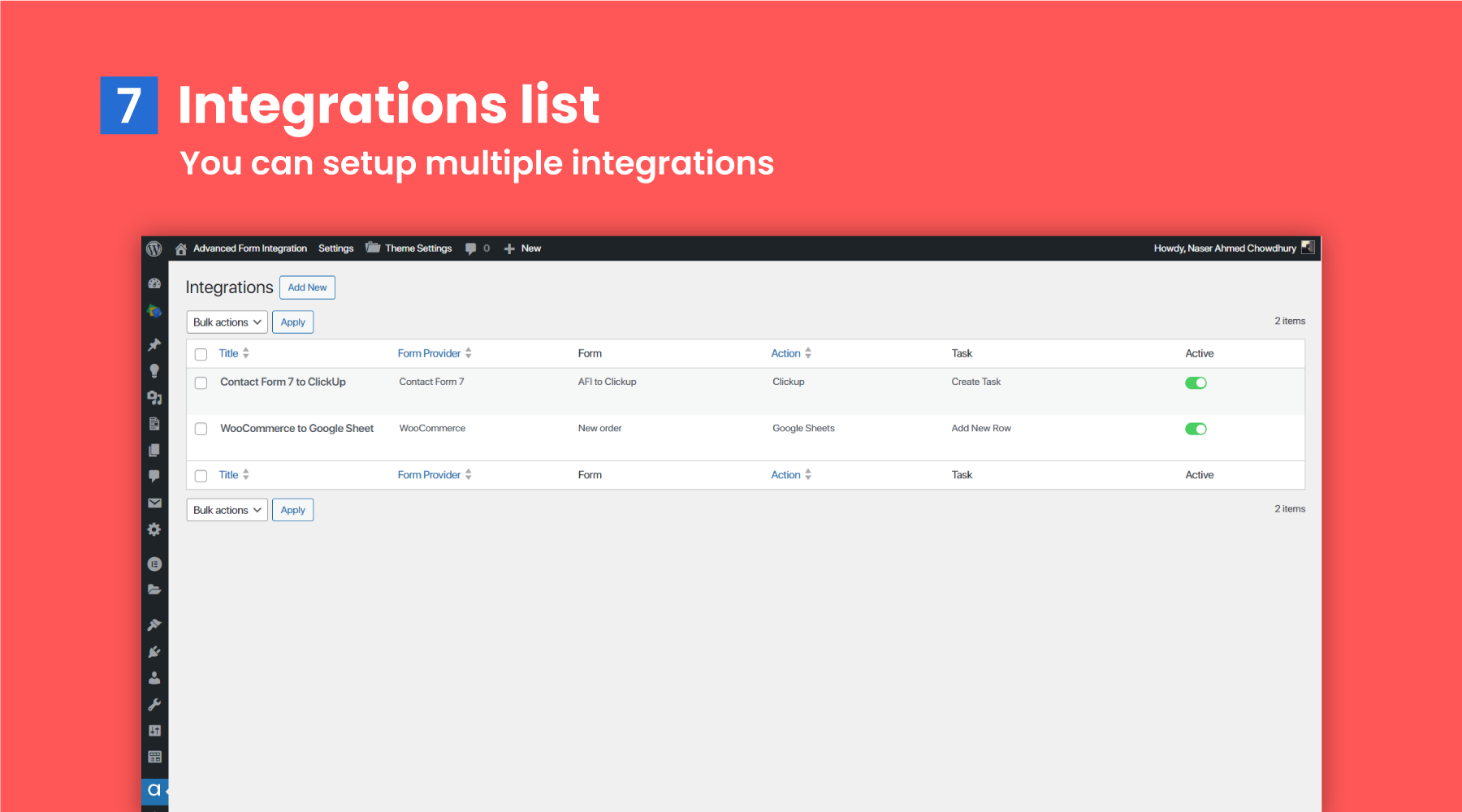
All integrations list 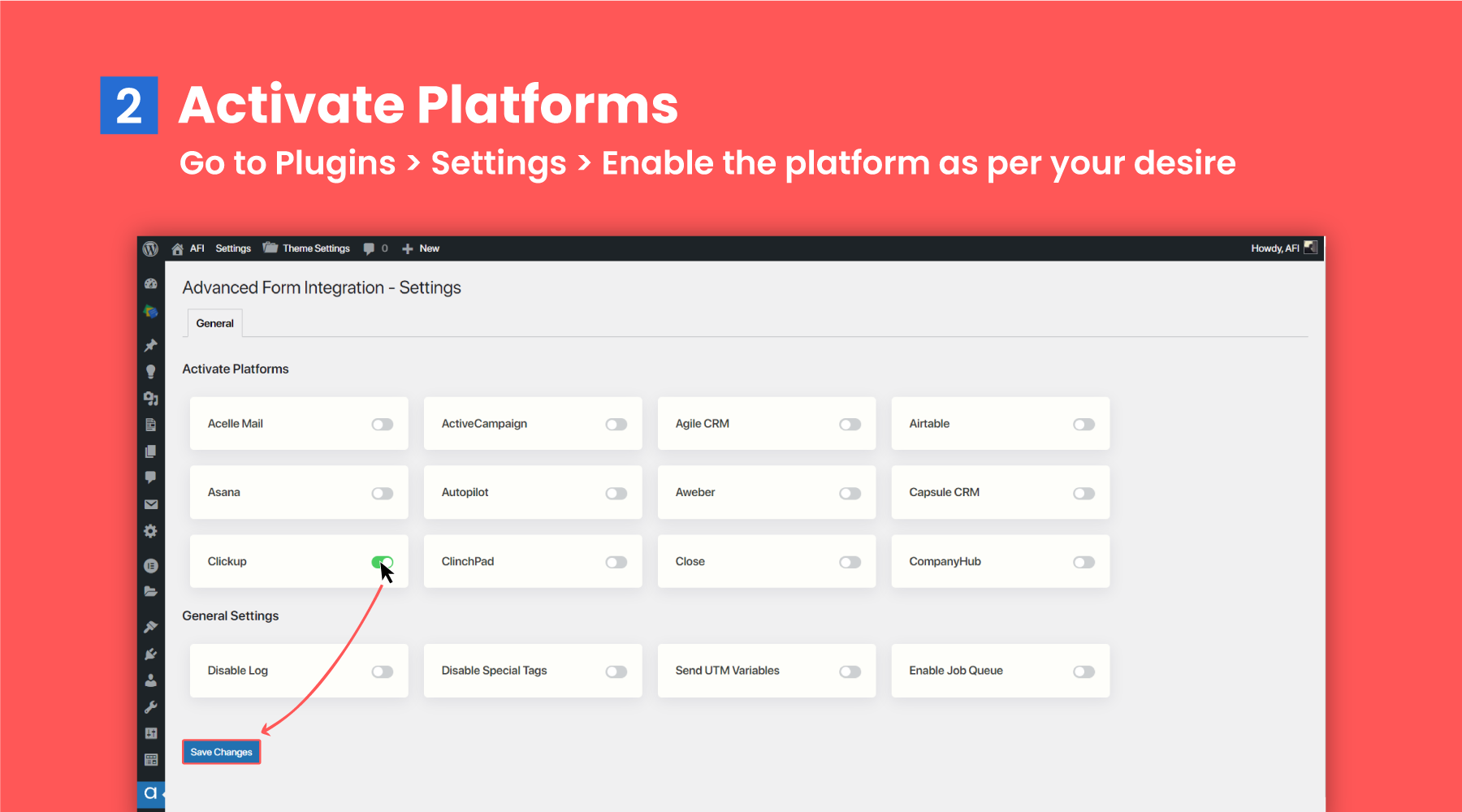
Instellingenpagina 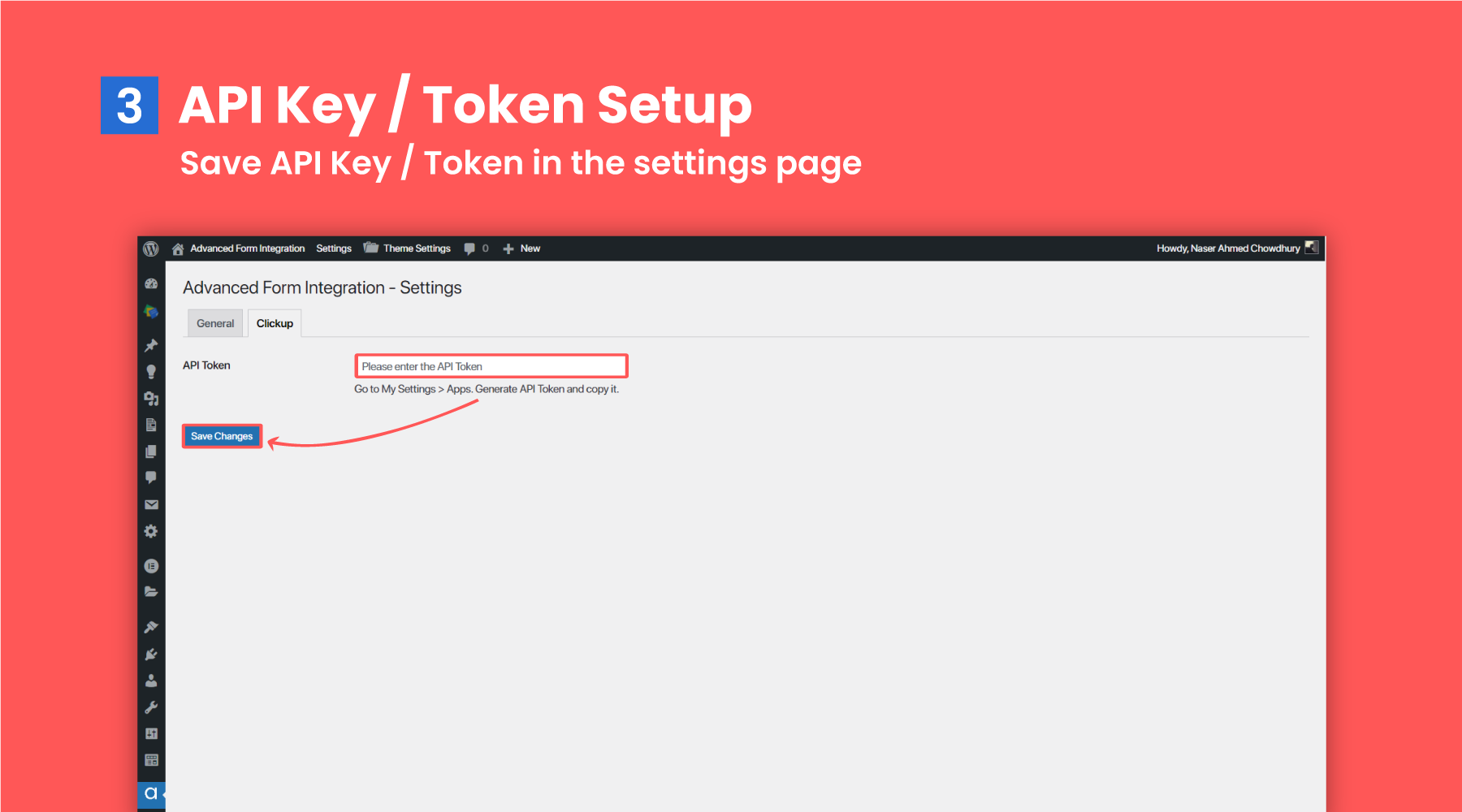
New integration page 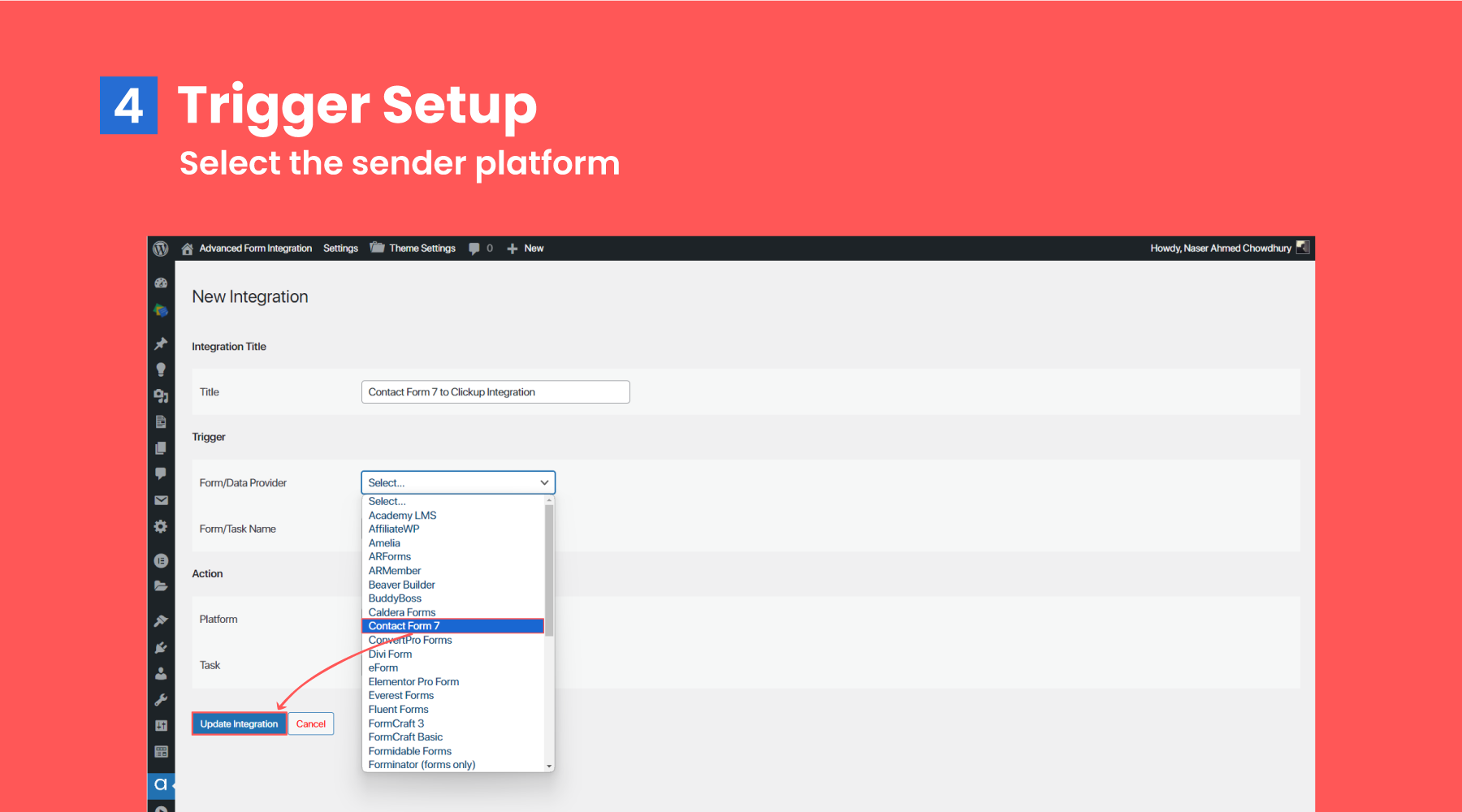
Conditional logic 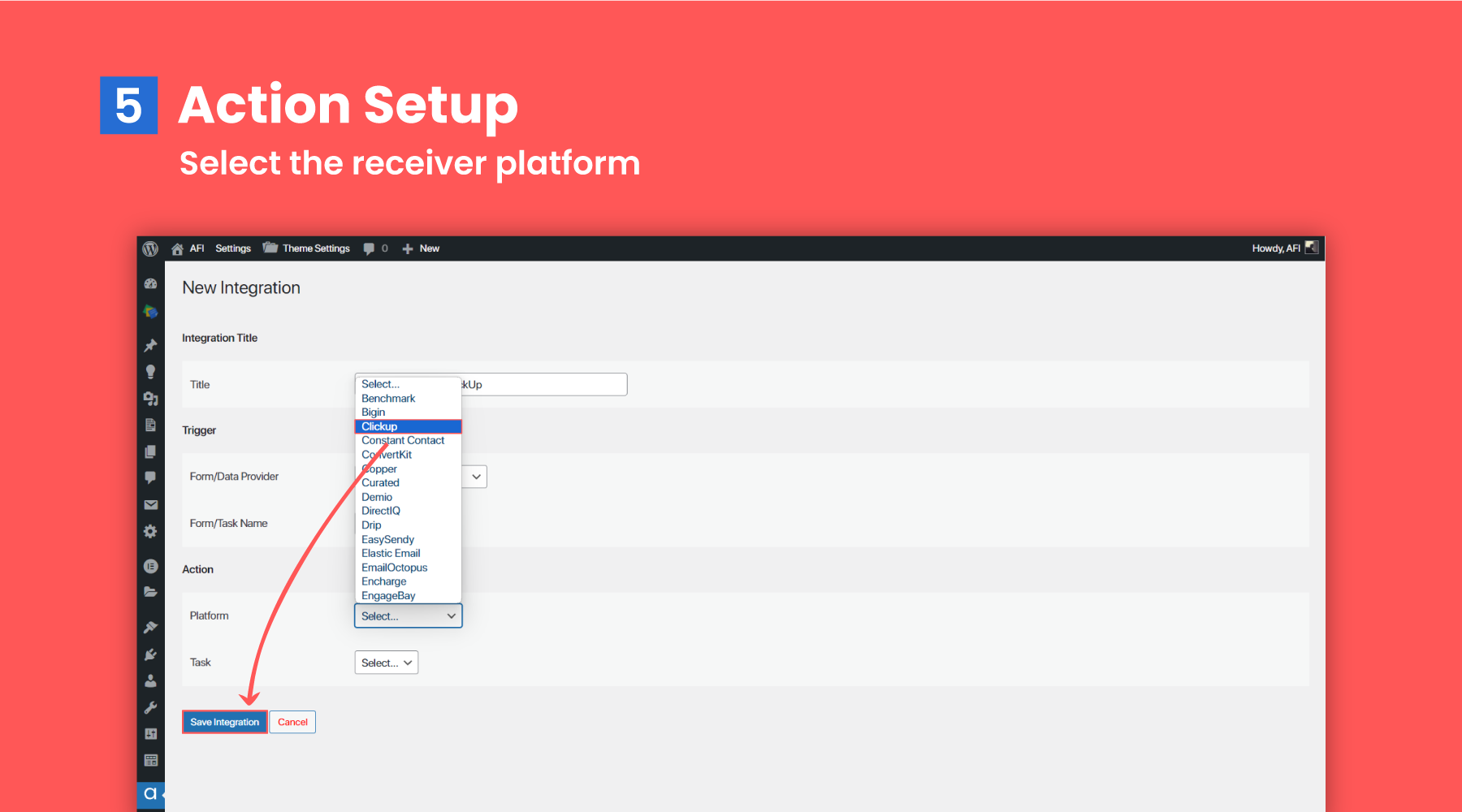


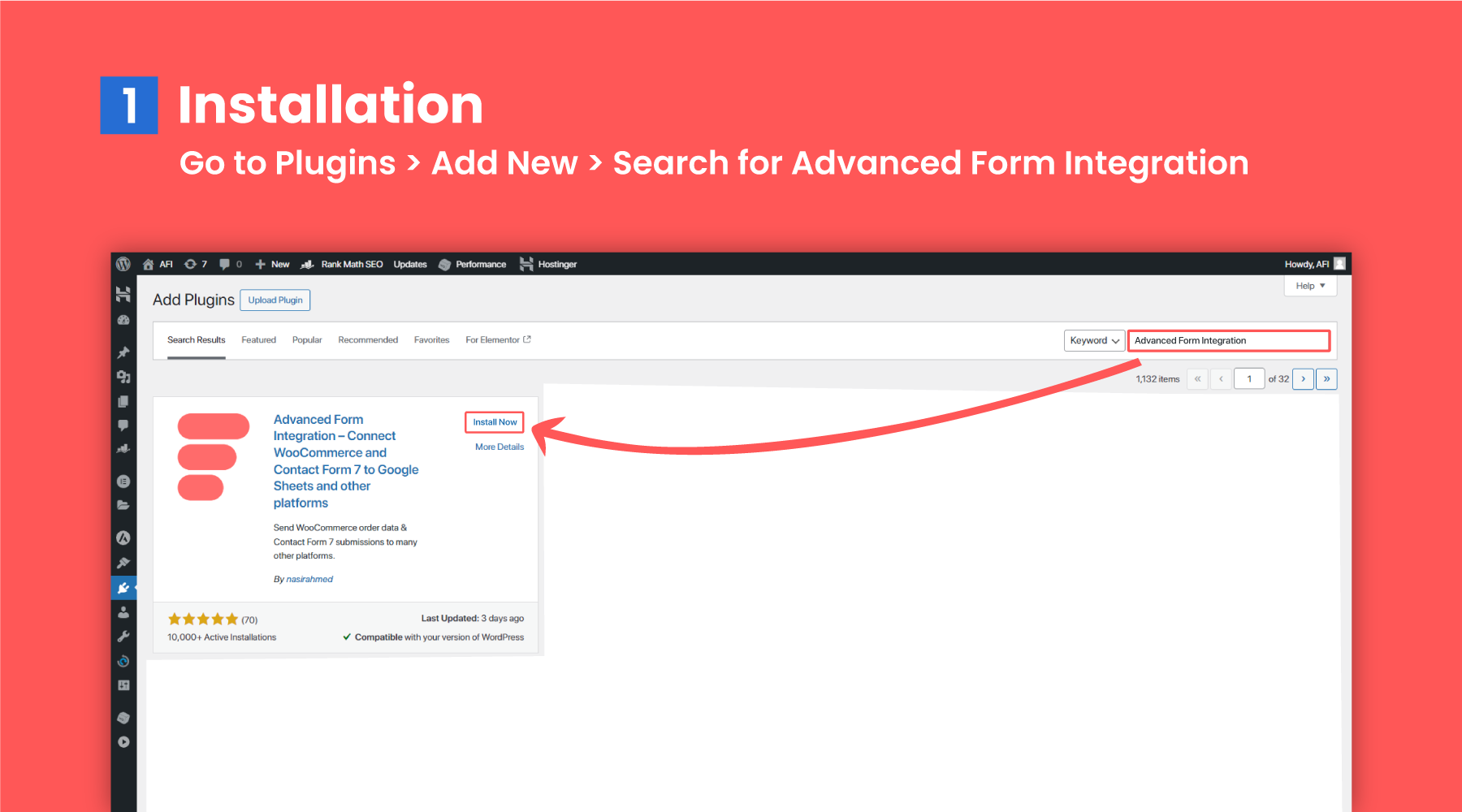
Installatie
Automatic Install From WordPress Dashboard
- log in to your admin panel
- Navigate to Plugins -> Add New
- Search Advanced Form Integration
- Click install and then active.
Manual Install
- Download the plugin by clicking on the Download button above. A ZIP file will be downloaded.
- Login to your site’s admin panel and navigate to Plugins -> Add New -> Upload.
- Click choose file, select the plugin file and click install
FAQ
If authorization is broken/not working for some reason, try re-authorizing. Please go to https://myaccount.google.com/permissions, remove app permission then authorize again from plugin settings.
Please check the permalink settings in WordPress. Go to Settings > Permalinks > select Post name then Save.
Do I need to map all fields while creating integration?
No, but required fields must be mapped.
Can I add additional text while field mapping?
Sure, you can. It is possible to mix static text and form field placeholder tags. Placeholder tags will be replaced with original data after form submission.
How can I get support?
For any query, feel free to send an email to support@advancedformintegration.com.
Beoordelingen


Bijdragers & ontwikkelaars
“AFI – The Easiest Integration Plugin” is open source software. De volgende personen hebben bijgedragen aan deze plugin.
Bijdragers


Vertaal “AFI – The Easiest Integration Plugin” in je eigen taal.
Interesse in ontwikkeling?
Bekijk de code, haal de SVN repository op, of abonneer je op het ontwikkellog via RSS.
Changelog
= 1.126.0 [2026-01-14]
* [Added] CartFlows as trigger
* [Added] Cool FormKit as trigger
* [Added] Crowdsignal Forms as trigger
* [Added] Easy Appointments as trigger
* [Added] Fluent Affiliate as trigger
= 1.125.0 [2025-12-22]
* [Added] Zoho Books as action
* [Added] Zoho People as action
* [Updated] Google Sheets integration
* [Updated] Zoho CRM integration
* [Updated] Zoho Sheet integrtion
* [Updated] Zoho Desk integration
* [Updated] Zoho Campaigns integration
= 1.124.0 [2025-12-11]
* [Added] Acuity Scheduling as action
* [Updated] Aweber Integration
* [Updated] Brevo Integration
* [Updated] Klaviyo Integration
* [Updated] Zoho CRM Integration
= 1.123.0 [2025-11-27]
* [Added] Advanced Coupons as trigger
* [Added] Appointment Hour Booking as trigger
* [Added] Bookly as trigger
* [Added] Breakdance Builder Form as trigger
* [Added] BuddyPress as trigger
= 1.122.0 [2025-11-04]
* [Added] Zendesk as action
* [Added] Eventin trigger updated
= 1.121.0 [2025-10-22]
* [Added] Event Espresso as trigger
* [Added] FluentCart as trigger
* [Added] Tawk.to Live Chat as trigger
1.120.0 [2025-09-09]
- [Added] Intercom as action
- [Added] FollowUpBoss as action

