

Beschrijving
Deze plugin is niet getest met de laatste 3 grotere versies van WordPress. Mogelijk wordt het niet meer onderhouden of ondersteund. Ook kunnen er compatibiliteitsproblemen ontstaan wanneer het wordt gebruikt met recentere versies van WordPress.

Accredible LearnDash Add-on
Beschrijving
The “Accredible LearnDash Add-on” allows you to issue credentials, certificates, and badges to your students when they complete your course. Accredible credentials are:
- Easy to design with our drag and drop certificate builder
- Shareable, transferable, verifiable, and OpenBadge compliant
- Blockchain secured
- Easily shared on LinkedIn with just 1 click
Your course content is valuable, and your learners are proud to share their achievements. Make is easy for them.
Note: You will need an Accredible account to use this add-on. Check out our many features to see if this is right for you. You will also need the LearnDash plugin v3.6 or higher installed.
For instructions to set up this add-on, visit our Help Center.
Schermafbeeldingen
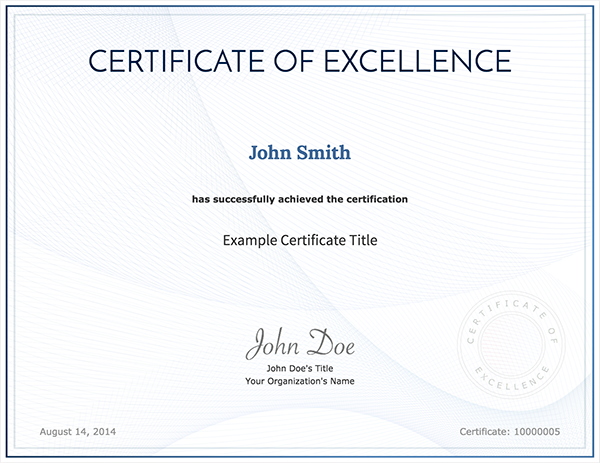
Digital Certificate 
Digital Open Badge 
Auto-issuance page 
Issuance logs page 
Responsive certificate designs 
Marketing click throughs and impressions 
Example Google certificate.


Installatie
- Visit https://accredible.com to obtain an API key.
- Install, activate and configure the LearnDash plugin in WordPress.
- Install and activate the Accredible LearnDash Add-on plugin in WordPress.
- Go to the plugin settings, input your API key and select the server region of your Accredible account.
- Ensure if the settings page says “Integraion is up and running“.
Auto issuance configuration:
- Go to the ‘Auto Issuance’ page in the WordPress admin menu.
- Click the ‘New Configuration’ button.
- Select a trigger of credential issuance, a target resource such as a course for course completion, and an Accredible group to issue credentials to.
- Click the ‘Save’ button.
FAQ
How do I get an API key?
Visit https://accredible.com to obtain a free API key.
Which server region should I select?
If the domain of your Accredible account is
eu.dashboard.accredible.com, you need to select “EU”. Otherwise, please select “US”.Where should I report issues or bugs?
You can report any issues or bugs on our project GitHub site.
Beoordelingen
Er zijn geen beoordelingen voor deze plugin.
Bijdragers & ontwikkelaars
“Accredible LearnDash Add-on” is open source software. De volgende personen hebben bijgedragen aan deze plugin.
Bijdragers
Vertaal “Accredible LearnDash Add-on” in je eigen taal.
Interesse in ontwikkeling?
Bekijk de code, haal de SVN repository op, of abonneer je op het ontwikkellog via RSS.
Changelog
1.0.13
Bump Tested up to version to 6.6
1.0.12
Fix groups autocomplete
1.0.11
Bump Tested up to version to 6.1
1.0.10
Fix course listing being limited to 5
1.0.9
Add auto issuance for lesson completion.
1.0.8
Fix pagination for Issuance Logs.
1.0.7
Improve auto issuance form with sidenav.
1.0.6
Improve group search logic and auto issuance delete UX.
1.0.5
Improve auto issuance form UX/UI.
1.0.4
Add validations to models and improve UI.
1.0.3
Add a dialog behaviour and Accredible issuer info.
1.0.2
Add icon and banner images.
1.0.1
Sanitize all inputs from the request parameters.
1.0.0
Initial version.

