

Beschrijving

Deze plugin is niet getest met de laatste 3 grotere versies van WordPress. Mogelijk wordt het niet meer onderhouden of ondersteund. Ook kunnen er compatibiliteitsproblemen ontstaan wanneer het wordt gebruikt met recentere versies van WordPress.
Xtrad Viewer
Beschrijving
The Xtra Viewer WordPress plugin allows you to edit and display 3D Scenes on WordPress pages.
A 3D Scene can be anything from a simple 3D Text headline, a true 3D Slider, or a full 3D Scene.
All scenes are fully responsive as they are generated dynamically.
The viewer uses WebGL, via the three.js library to display the scenes. This is supported by most modern browsers and devices such as tablets and smart phones. The scene will default to a static image if no support is detected.
The viewer comes with nine predefined templates which can be modified bj the viewer.
Compatibility
The plugin has been tested with WordPress 4.9.8 and 5.3 and is fully compatible with both. However, if you are using the new block editor you will currently need to manually insert shortcodes.
Schermafbeeldingen
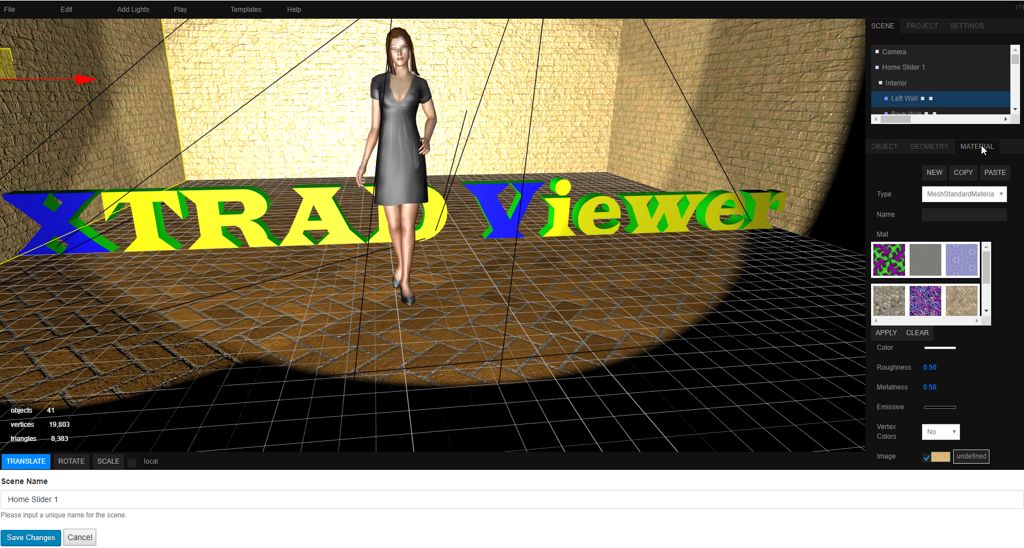
This shows the Xtrad Viewer in modifying mode. 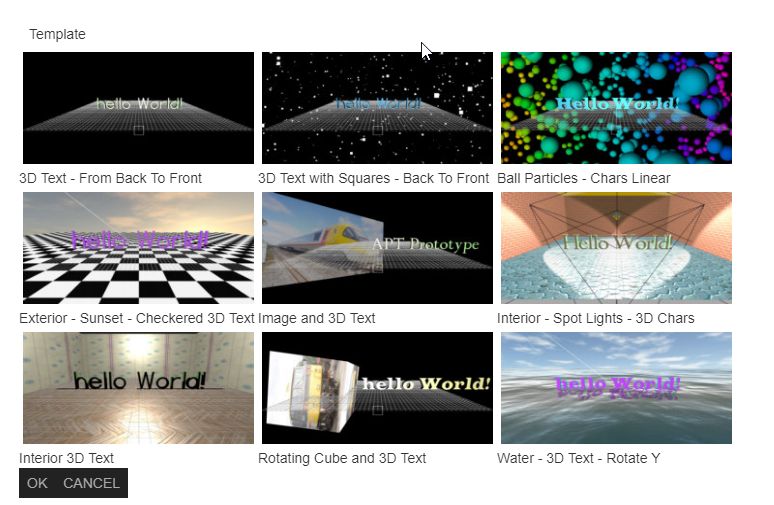
This shows the nine predefined templates provided by the Xtrad Viewer.


Installatie
Either use the builtin ‘Add New Plugin’ within WordPress.
Or
Upload xtrad-viewer.zip to the /wp-content/plugins/ directory and extract the zip contents.
then activate the plugin.
It is recommended that you view the ‘Quick Start Guide’ before you start using the viewer.
FAQ
- Does Xtrad Viewer work on Internet Explorer
Internet Explorer can display 3D scenes but has major issues when modifying a template. It is recommended that you use any alternative browser for modifying templates.
- Xtrad Viewer and the Wordfence Security Plugin
Wordfence aggressively checks all insertions in the SQL database. The Xtrad Viewer uses the database to store blobs of data which increase in size as the 3D Scenes get more complex. The time that Wordfence takes to check these scenes is sufficient to exceed their timeout when the scenes are larger than a certain size.
Beoordelingen
Er zijn geen beoordelingen voor deze plugin.
Bijdragers & ontwikkelaars
“Xtrad Viewer” is open source software. De volgende personen hebben bijgedragen aan deze plugin.
Bijdragers
Vertaal “Xtrad Viewer” in je eigen taal.
Interesse in ontwikkeling?
Bekijk de code, haal de SVN repository op, of abonneer je op het ontwikkellog via RSS.
Changelog
1.3.1
Parameters added to Orbit Control and compatibilty with WordPress 5.3.
1.2.0
Three.js library updated to r104 and compatibilty with WordPress 5.2.
1.1.0
Initial Version

