

Beschrijving
Deze plugin is niet getest met de laatste 3 grotere versies van WordPress. Mogelijk wordt het niet meer onderhouden of ondersteund. Ook kunnen er compatibiliteitsproblemen ontstaan wanneer het wordt gebruikt met recentere versies van WordPress.

WPPG
Beschrijving
WPPG is a special plugin enabling WordPress to be used with a PostgreSQL database. Redevelop from PG4WP plugin.
Github: https://github.com/qodrorid/wppg
WPPG gives you the possibility to install and use WordPress with a PostgreSQL database as a backend.
It works by replacing calls to MySQL specific functions with generic calls that maps them to another database functions and rewriting SQL queries on the fly when needed.
If you want to use this plugin, you should be aware of the following :
– WordPress with WPPG is expected to be slower than the original WordPress with MySQL because WPPG does much SQL rewriting for any page view
– Some WordPress plugins should work ‘out of the box’ but many plugins won’t because they would need specific code in WPPG
You shouldn’t expect any plugin specific code to be integrated into WPPG except for plugins shipped with WordPress itself (such as Akismet).
Schermafbeeldingen
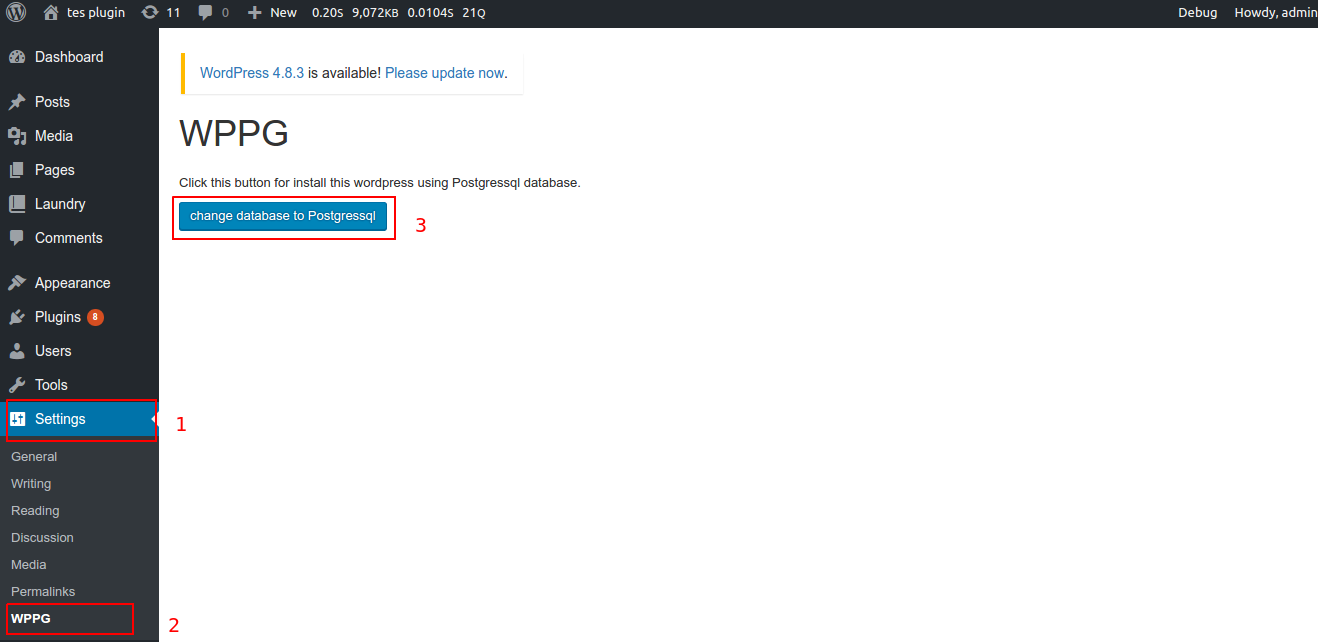
/assets/screenshot-1.png 
/assets/screenshot-2.png


Installatie
- Install and active postgress db in Settings > WPPG > change database to Postgressql
- Create database and user in your Postgressql
- open your terminal in linux
- sudo su – postgress
- psql
- create database your_database;
- create user your_user with password ‘your_password’;
- grant all privileges on database your_database to your_user;
- \q for exit
- Update your wp-config.php file
FAQ
- Installation Instructions
- Install and active postgress db in Settings > WPPG > change database to Postgressql
- Create database and user in your Postgressql
- open your terminal in linux
- sudo su – postgress
- psql
- create database your_database;
- create user your_user with password ‘your_password’;
- grant all privileges on database your_database to your_user;
- \q for exit
- Update your wp-config.php file


Bijdragers & ontwikkelaars
“WPPG” is open source software. De volgende personen hebben bijgedragen aan deze plugin.
Bijdragers
Vertaal “WPPG” in je eigen taal.
Interesse in ontwikkeling?
Bekijk de code, haal de SVN repository op, of abonneer je op het ontwikkellog via RSS.

