

Beschrijving

Deze plugin is niet getest met de laatste 3 grotere versies van WordPress. Mogelijk wordt het niet meer onderhouden of ondersteund. Ook kunnen er compatibiliteitsproblemen ontstaan wanneer het wordt gebruikt met recentere versies van WordPress.

WP Remove Query Strings From Static Resources
Beschrijving
As it’s name, it will remove query string from static resources. Static resources are JavaScript, CSS files. It improves speed of WordPress website. And also it improves speed score in website testing tools like Pingdom, GTmetrix, PageSpeed and YSlow.
Benefits of removing query strings
It is a part of search engine optimization. So it will improve ranking of your website in search engines. And also it will improve speed score in website testing tools. it improves performance of your website and bring more website visitors.
Schermafbeeldingen
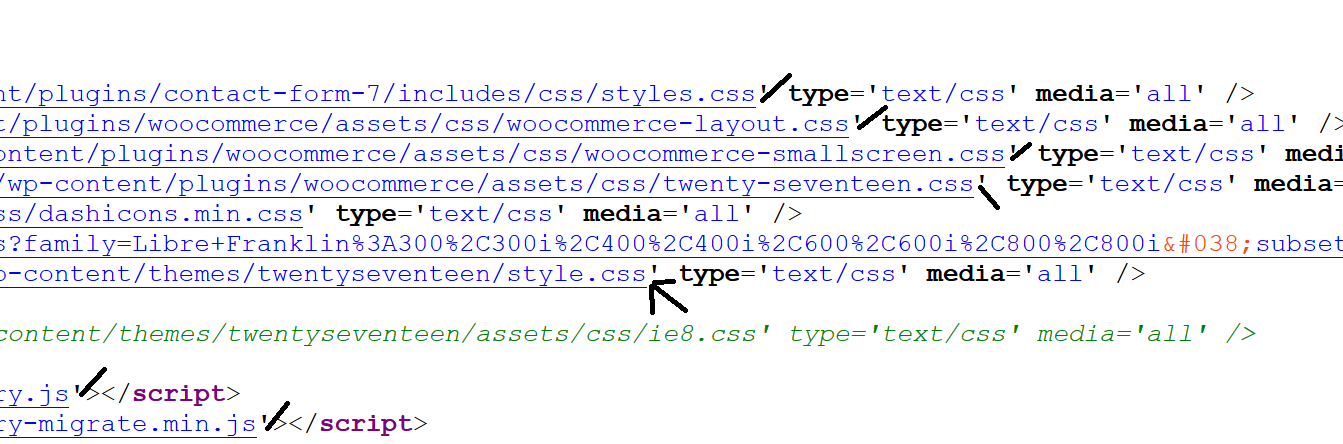
Code View

Installatie
There are 3 different ways to install any WordPress plugin including WP Remove Query Strings From Static Resources.
Simplest: Using WordPress Dashboard
- Open Dashboard of your WordPress website and then add new plugin page here: Dashboard > Plugins > Add New.
- Now search for ‘WP Remove Query Strings From Static Resources’.
- Click ‘Install Now’
- Activate the plugin on the Plugin dashboard
Uploading on Dashboard
- Download plugin zip file from: https://wordpress.org/plugins/wp-remove-query-strings-from-static-resources/
- Now open Dashboard and then add new plugin page here: Dashboard > Plugins > Add New.
- Now click on ‘Upload Plugin’ button.
- Click on ‘Browse…’ to select downloaded zip file. Now simply install and activate it.
Uploading using FTP
- Download plugin zip file from: https://wordpress.org/plugins/wp-remove-query-strings-from-static-resources/
- Extract this zip file to find folder ‘wp-remove-query-strings-from-static-resources’
- Now upload ‘wp-remove-query-strings-from-static-resources’ folder inside plugins directory here: ‘–WP-ROOT–/wp-content/plugins/’
- Now open Dashboard and then plugins page. Find this plugin and activate it.
FAQ
Where are plugin options?
This plugin does not have any option. It will stat working after plugin activation. And it will stop working after deactivation.
Will it works for my website?
Yes, it works for all WordPress websites.
I need support
Please create support topic Here
Beoordelingen


Bijdragers & ontwikkelaars
“WP Remove Query Strings From Static Resources” is open source software. De volgende personen hebben bijgedragen aan deze plugin.
Bijdragers
“WP Remove Query Strings From Static Resources” is vertaald in 1 locale. Dank voor de vertalers voor hun bijdragen.
Vertaal “WP Remove Query Strings From Static Resources” in je eigen taal.
Interesse in ontwikkeling?
Bekijk de code, haal de SVN repository op, of abonneer je op het ontwikkellog via RSS.
Changelog
1.8
- Remove additional class
1.7
- Added additional class
1.6
- Tested for WP 6.6
1.5
- Tested for WP 6.3
1.4
- Compatibility WP 6.0
1.3
- 23 Feb, 2019
- Text improved
- Increase Version
1.2
- 3 July, 2017
- Code improved
1.1
- 3 July, 2017
- Compatibility issue
1.0
- 29 June, 2017
- First Release

