

Beschrijving
Ga naar de inhoud

eDarpan: Website Protection
Beschrijving
eDarpan: Website Protection provides complete security for your website content. It helps prevent plagiarists from copying your text and images.
Key Features:
* Disable Keyboard Shortcuts: Blocks Ctrl+C, Ctrl+X, Ctrl+V, etc.
* Disable Text Selection: Prevents highlighting of text.
* Disable Right Click: Blocks the context menu.
* SEO Friendly: Search engines can still crawl your site.
Schermafbeeldingen
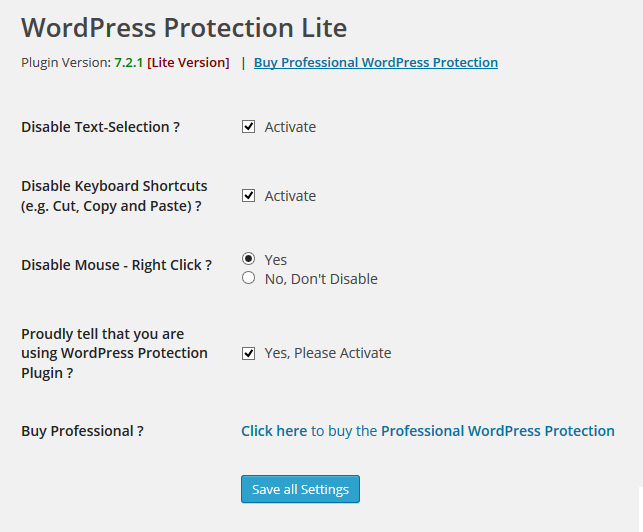
Settings Page

Installatie
- Upload ‘wordpress-protection’ folder to the
/wp-content/plugins/directory. - Activate the plugin through the ‘Plugins’ menu in WordPress.
- Go to eDarpan > Website Protection to configure settings.
Beoordelingen
Er zijn geen beoordelingen voor deze plugin.
Bijdragers & ontwikkelaars
“eDarpan: Website Protection” is open source software. De volgende personen hebben bijgedragen aan deze plugin.
Bijdragers
Vertaal “eDarpan: Website Protection” in je eigen taal.
Interesse in ontwikkeling?
Bekijk de code, haal de SVN repository op, of abonneer je op het ontwikkellog via RSS.
Changelog
- Version : 9.1 : Added Multi-Language Support
- Version : 9.0 : Compliance Update (Renamed from WordPress Protection), Contributor Update, and Modern Architecture Refactor.
- ver : 8 : Made compatible with latest Browsers and WordPress latest version 4.7.5
- ver : 7.2.1 : Added Plugin Logo Assets and checked for compatibility till the WordPress 4.0 + updated secure path to the author website
- ver : 7.2 : JS Conflicts Resolved as few WordPress Customers reported which they experienced on newer WordPress versions
- ver : 7.0 : Bugs fixed.
- ver : 6.0 : Added compatibility with latest browser versions. Removed the conflicting option.
- ver : 5.0 : Added feature for blocking common copycat’s keyboard shortcuts
- ver : 4.0 : Added Settings link, Asset banner, Compact Code to load plugin faster to the Admins. Little UI Changes, to provide a better look and feel
- ver : 3.0 : jQuery conflict resolved, more user-friendliness added, install and use in 2 minutes, footer alignment bug fixed
- ver : 2.0 : As per request from many users, now Admins will see an Option on their admin panel, if the plugin is not configured
- ver : 1.0 : New Release

