

Beschrijving


Order on Mobile for WooCommerce
Beschrijving
Why use Order on Mobile for WooCommerce?
- Boost Conversions: Remove friction from the checkout process. A simple “Order on WhatsApp” button encourages impulse buys and quick inquiries.
- Direct Communication: Start a conversation immediately. Answer questions, negotiate prices, or upsell products in real-time.
- Seamless Integration: Adds a beautiful, customizable button to your Product and Cart pages that works perfectly with your existing theme.
- Flexible Control: You decide where the button appears, what the message says, and whether to replace standard “Add to Cart” functionality.
Free Version Features
- WhatsApp Button on Product Page: Instantly let users send product details to your WhatsApp number.
- WhatsApp Button on Cart Page: Allow customers to send their entire cart content in a single message.
- Variable Product Support: Accurate pricing and details for product variations.
- Customizable Messages: Pre-fill the WhatsApp message to make it easy for customers to hit “Send”.
- Hide Price/Add to Cart: strict control over the buying process—perfect for “Call for Price” or catalog-mode stores.
Unlock More with the PRO Version 🚀
Take your sales strategy to the next level with automation and enhanced customization!
PRO Features:
- Auto-Redirect After Checkout: Seamlessly guide users to WhatsApp after a standard WooCommerce checkout to confirm orders or payment.
- Dynamic Message Templates: Use smart tags (e.g., {order_id}, {total}, {customer_name}) to create professional, automated messages.
- Elementor Widget: Drag and drop WhatsApp buttons anywhere on your site.
- Device Visibility Control: Show the button only on mobile devices to target your specific audience.
- Priority Support: Get faster help when you need it.
More Plugins by Us
Discover other plugins to enhance your WordPress experience: WordPress Plugins
Learn WordPress Tips
Visit our blog for expert WordPress insights: WordPress Tips
Plugins Suggestions?
We’d love to hear from you! plugins@eduardovillao.me
Schermafbeeldingen
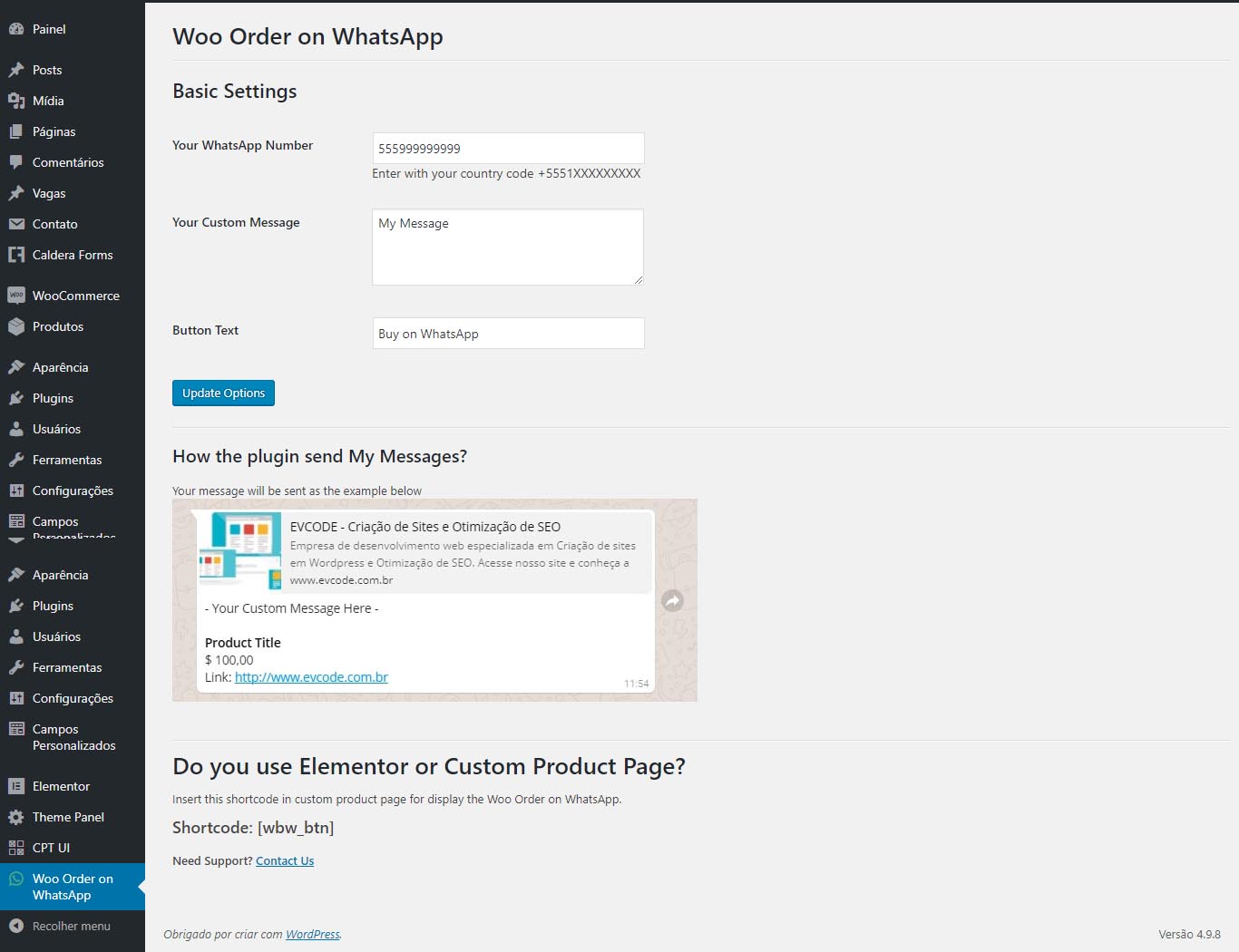
Order on Mobile for WooCommerce admin panel 
Button in Woocommerce Product Page


Installatie
- Upload the plugin files to the
/wp-content/plugins/woo-order-on-whatsappdirectory, or install the plugin through the WordPress plugins screen directly. - Activate the plugin through the ‘Plugins’ screen in WordPress.
- Go to the “Order on Mobile for WooCommerce” settings page.
- Enter your phone number and other information to configure the plugin.
Beoordelingen


Bijdragers & ontwikkelaars
“Order on Mobile for WooCommerce” is open source software. De volgende personen hebben bijgedragen aan deze plugin.
Bijdragers
“Order on Mobile for WooCommerce” is vertaald in 2 localen. Dank voor de vertalers voor hun bijdragen.
Vertaal “Order on Mobile for WooCommerce” in je eigen taal.
Interesse in ontwikkeling?
Bekijk de code, haal de SVN repository op, of abonneer je op het ontwikkellog via RSS.
Changelog
2.8.1
- Added: Telemetry system to improve plugin support and understand usage patterns.
- Changed: General code improvements and refactoring for better performance and maintainability.
- Changed: Optimized API request handling for better reliability.
2.8.0
- Changed: Refactored front-end JavaScript to Vanilla JS (removed jQuery dependency).
- Changed: Improved code architecture by refactoring button classes.
- Fix: Corrected broken PHP logic and missing methods for variable product fields.
- Changed: Updated versioning to align with the Pro version.
2.4.2
Changed: small code improvements and compatibility.
2.4.1
Changed: code improvements.
2.4
Changed: PHP minimum version required change to 7.4.
Changed: code improvements.
Changed: settings UI/UX improvements.
Changed: optimize build version of assets.
Changed: improve development experience with code standards and other settings.
2.3.4
Changed: compatibility with WordPress 6.7.
Changed: code improvements.
2.3.3
Changed: compatibility with WordPress 6.5.
Changed: code improvements.
2.3.2
Changed: compatibility with WordPress 6.3.
2.3.1
Fix: error on cart page when edit with Elementor editor.
2.3
Changed: compatibility with WordPress 6.2.
2.2
Changed: compatibility with WordPress 6.1.
2.1
Changed: compatibility with WordPress 6.0.
2.0
- Change: code improvements to support pro version.
- Added: new options template.

