

Beschrijving


VigIA – AI Crawler Activity Analytics & Control
Beschrijving
VigIA (Spanish for “lookout” or “watchman”, incorporating “IA” – Spanish for “AI”) is a comprehensive WordPress plugin that tracks, analyzes, and helps you control AI crawler activity on your website.
What does VigIA do?
- Tracks AI crawlers visiting your site (GPTBot, ClaudeBot, PerplexityBot, and 50+ others)
- Provides detailed analytics with charts, statistics, and exportable reports
- Blocks unwanted crawlers via PHP (403 response)
- Manages robots.txt rules for AI crawlers with compliance monitoring
- Sends email alerts about crawler activity (daily, weekly, or monthly)
- Generates llms.txt files to help AI systems understand your site
- Exposes abilities for AI agents and automation tools (WordPress 6.9+)
Key Features
Analytics Dashboard
* Total visits, unique crawlers, and pages crawled statistics
* Timeline chart with daily breakdown
* Category distribution (AI Training, AI Search, AI Assistant, Data Scraper)
* Top crawlers and most crawled pages tables
* Recent activity log with filters
* Period comparison functionality
* CSV export
Crawler Blocking
* Block crawlers via PHP with 403 Forbidden response
* Quick block dropdown in analytics dashboard
* Manage blocks from Extras page
* Works on any server (Apache, Nginx, LiteSpeed, etc.)
Robots.txt Management
* Add Disallow rules for AI crawlers
* Visual preview of your robots.txt
* Compliance monitoring: see which crawlers ignore your rules
* One-click blocking for non-compliant crawlers
* Works with both physical and virtual robots.txt
Email Alerts
* Daily, weekly, or monthly reports
* Three detail levels: Minimal, Normal, Complete
* Non-compliant crawler warnings
* Activity comparison with previous period
LLMs.txt Generator
* Select content by post type with one click
* Filter by taxonomies (categories, tags, custom)
* Manual include/exclude with AJAX search
* Exclude by URL patterns (wildcards supported)
* SEO plugin integration (auto-exclude noindex content)
* Auto-regeneration (daily, weekly, monthly)
* Robots.txt integration (add llms.txt and llms-full.txt references)
* Generate llms.txt and llms-full.txt files
* Full content or excerpt mode
* Compatible with Yoast SEO, Rank Math, All in One SEO, SEOPress, and The SEO Framework
Supported AI Crawlers
VigIA monitors 50+ AI crawlers including:
- OpenAI: GPTBot, OAI-SearchBot, ChatGPT-User
- Anthropic: ClaudeBot, Claude-Web, Claude-SearchBot
- Google: Google-Extended, GoogleOther, Gemini-Deep-Research
- Perplexity: PerplexityBot, Perplexity-User
- Meta: Meta-ExternalAgent, FacebookBot
- Microsoft: BingBot
- ByteDance: Bytespider
- Amazon: Amazonbot
- Apple: Applebot-Extended
- And many more…
Privacy Focused
VigIA stores visitor data locally in your WordPress database. No data is sent to external servers.
Abilities API
VigIA is one of the first WordPress plugins to implement the Abilities API introduced in WordPress 6.9. This API allows AI agents, automation tools, and external systems to discover and interact with VigIA’s functionality in a standardized, secure way.
What are Abilities?
Abilities are self-contained units of functionality that VigIA exposes through WordPress’s central registry. Each ability has defined inputs, outputs, and permissions, making it easy for automation tools to understand and use them.
Available Abilities
VigIA registers the following abilities:
Analytics
vigia/get-crawler-stats– Get statistics about AI crawler visits (total visits, unique crawlers, pages crawled)vigia/get-top-crawlers– Get a ranked list of most active AI crawlersvigia/get-top-pages– Get the most crawled pages on your site
Blocking
vigia/get-blocked-items– List all blocked crawlers and IP addressesvigia/block-crawler– Block a crawler by User-Agent patternvigia/unblock-crawler– Remove an existing block
Robots.txt
vigia/get-robots-rules– Get current AI crawler rules in robots.txtvigia/add-robots-disallow– Add a Disallow directive for a crawlervigia/remove-robots-rule– Remove a robots.txt rule
Use Cases
- Automated monitoring: AI agents can query crawler statistics and alert you to anomalies
- Reactive blocking: Automation tools can block crawlers that repeatedly ignore robots.txt
- External dashboards: Aggregate data from multiple WordPress sites with VigIA installed
- WP-CLI integration: Future command-line access through the Abilities API
- n8n / Make workflows: Build custom automation flows using VigIA’s abilities
Requirements
The Abilities API requires WordPress 6.9 or later. On older WordPress versions, VigIA works normally but abilities are not available.
Support
Need help or have suggestions?
Love the plugin? Please leave us a 5-star review and help spread the word!
About AyudaWP
We are specialists in WordPress security, SEO, and performance optimization plugins. We create tools that solve real problems for WordPress site owners while maintaining the highest coding standards and accessibility requirements.
Schermafbeeldingen
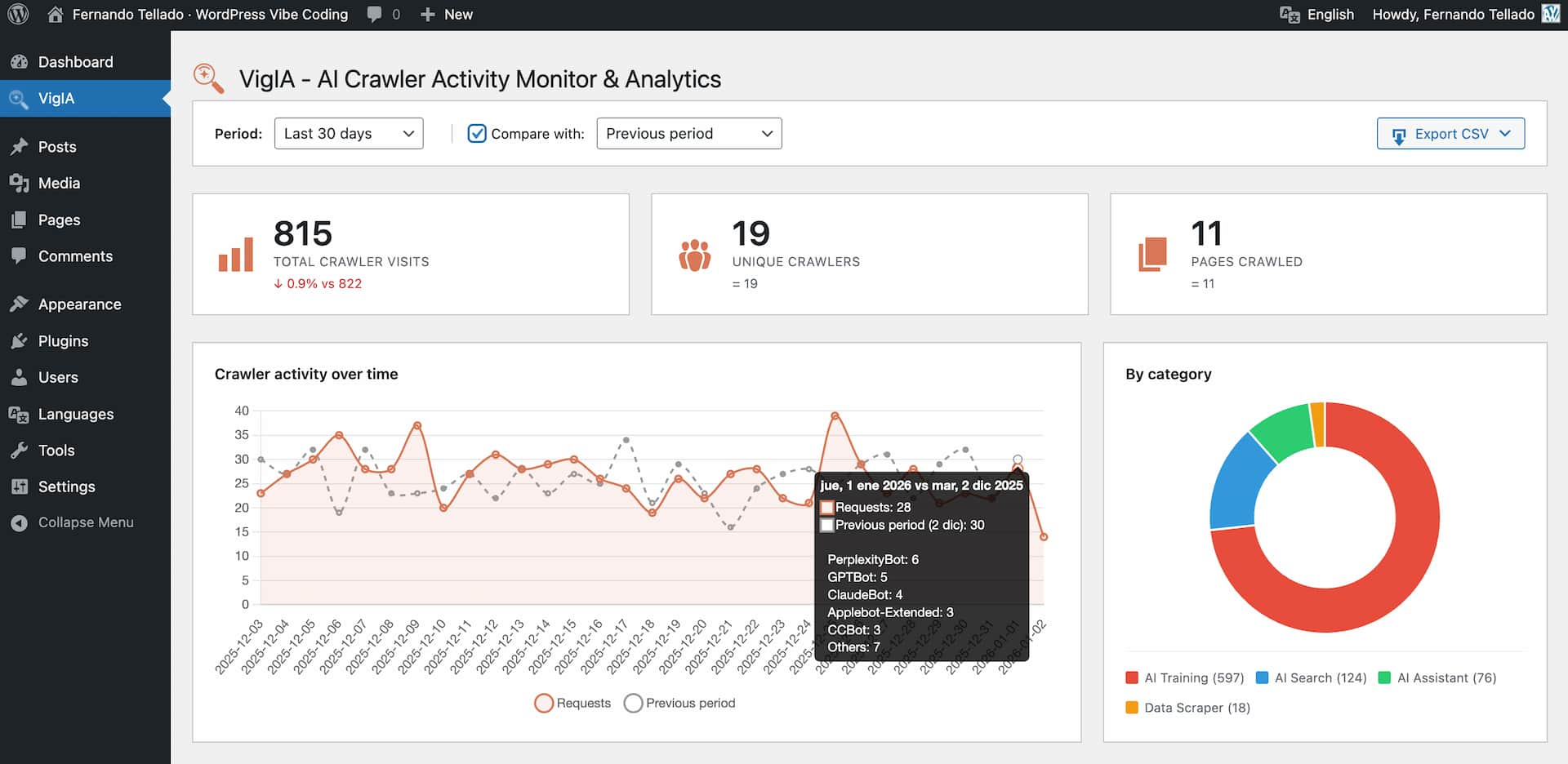
Main analytics dashboard with charts and statistics 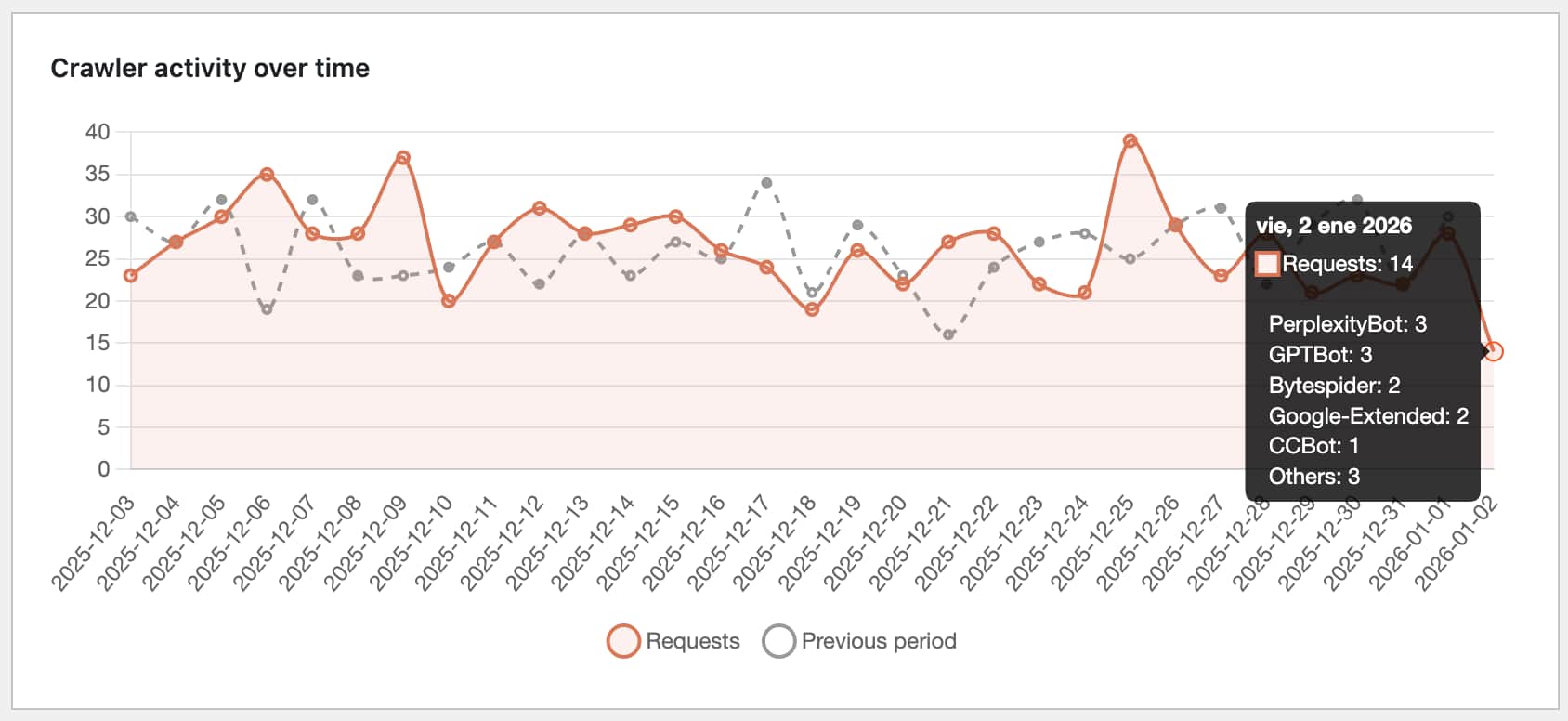
Timeline showing crawler activity over time 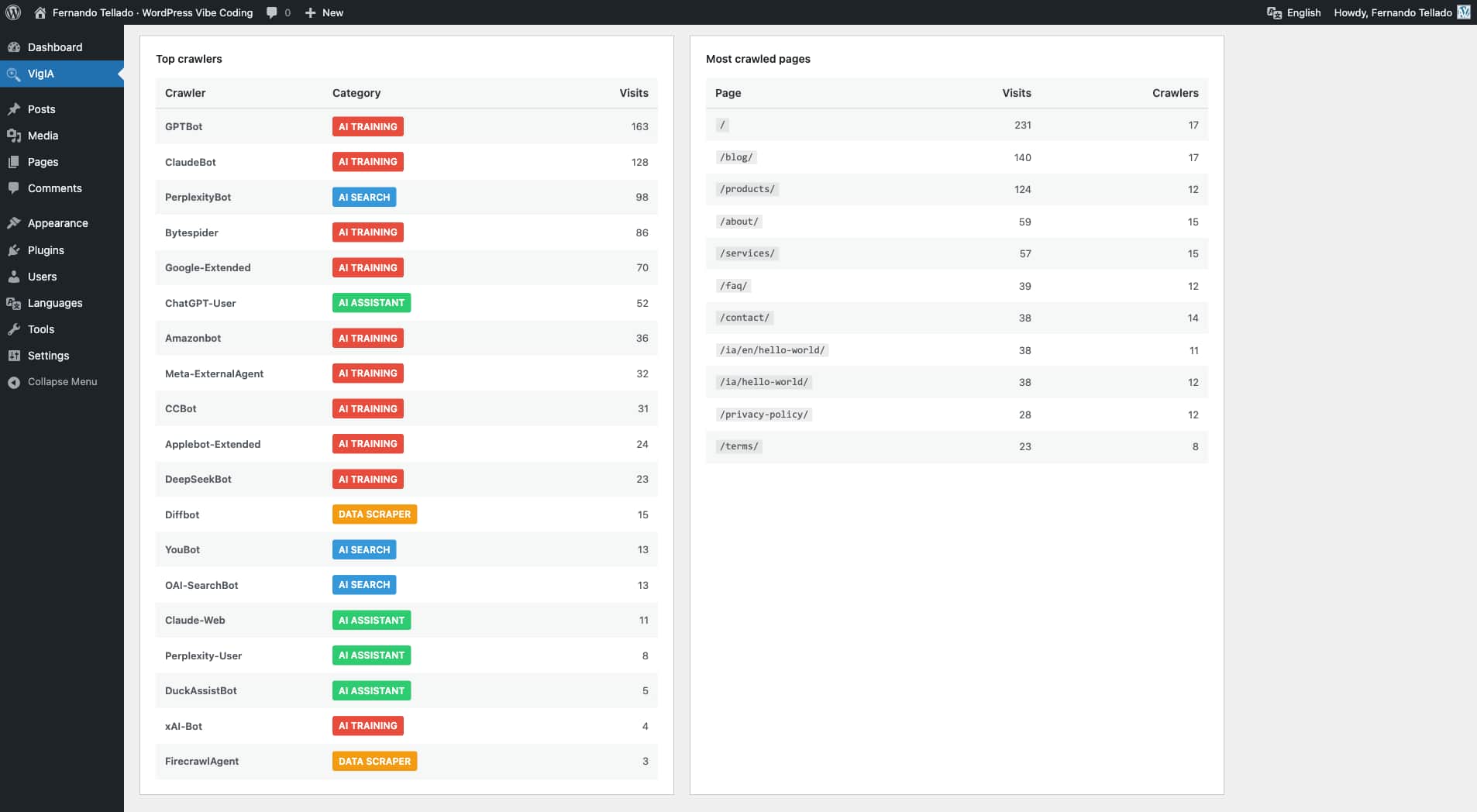
Top crawlers and most crawled pages tables 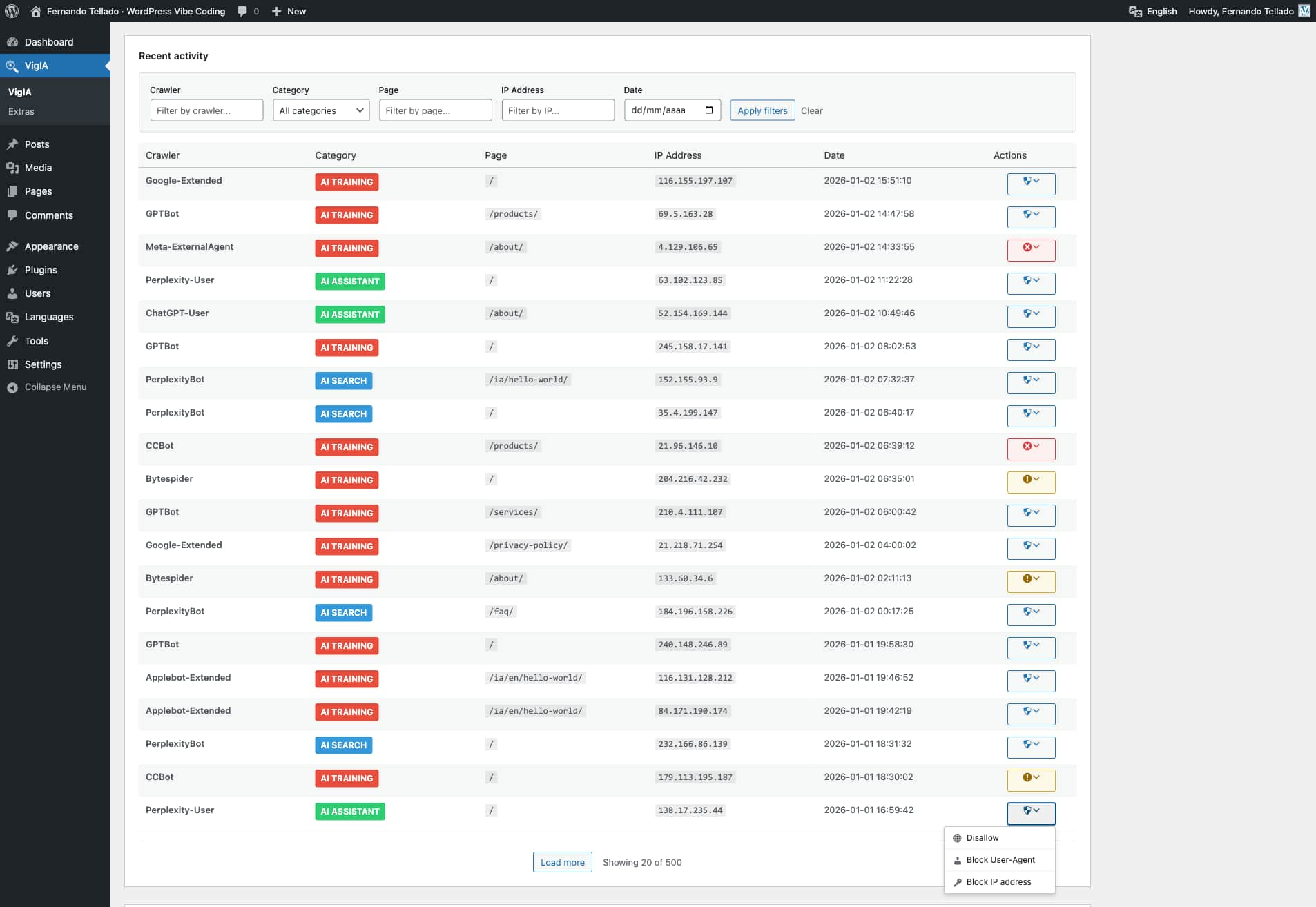
Recent activity log with filtering 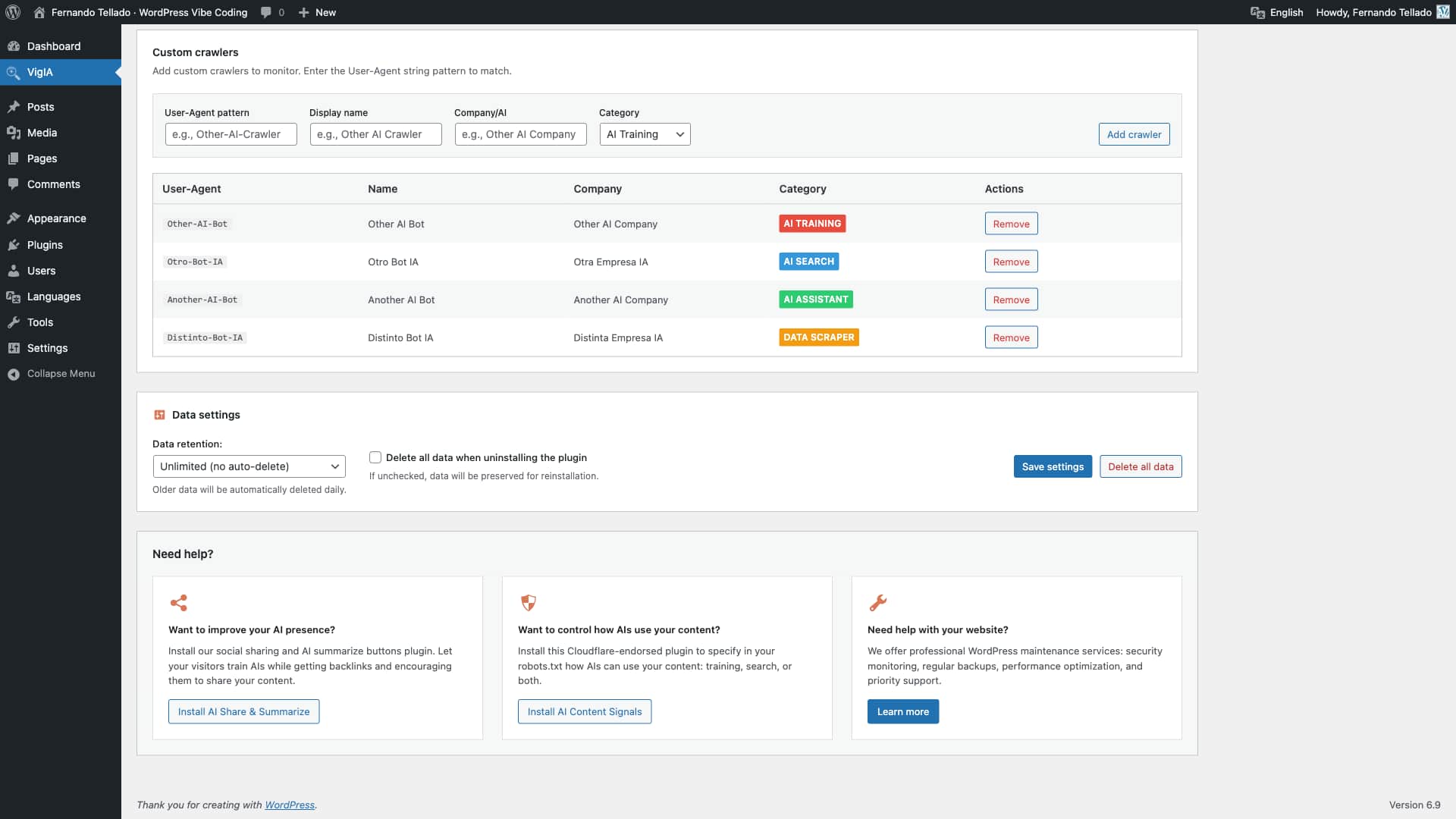
Custom crawler configuration 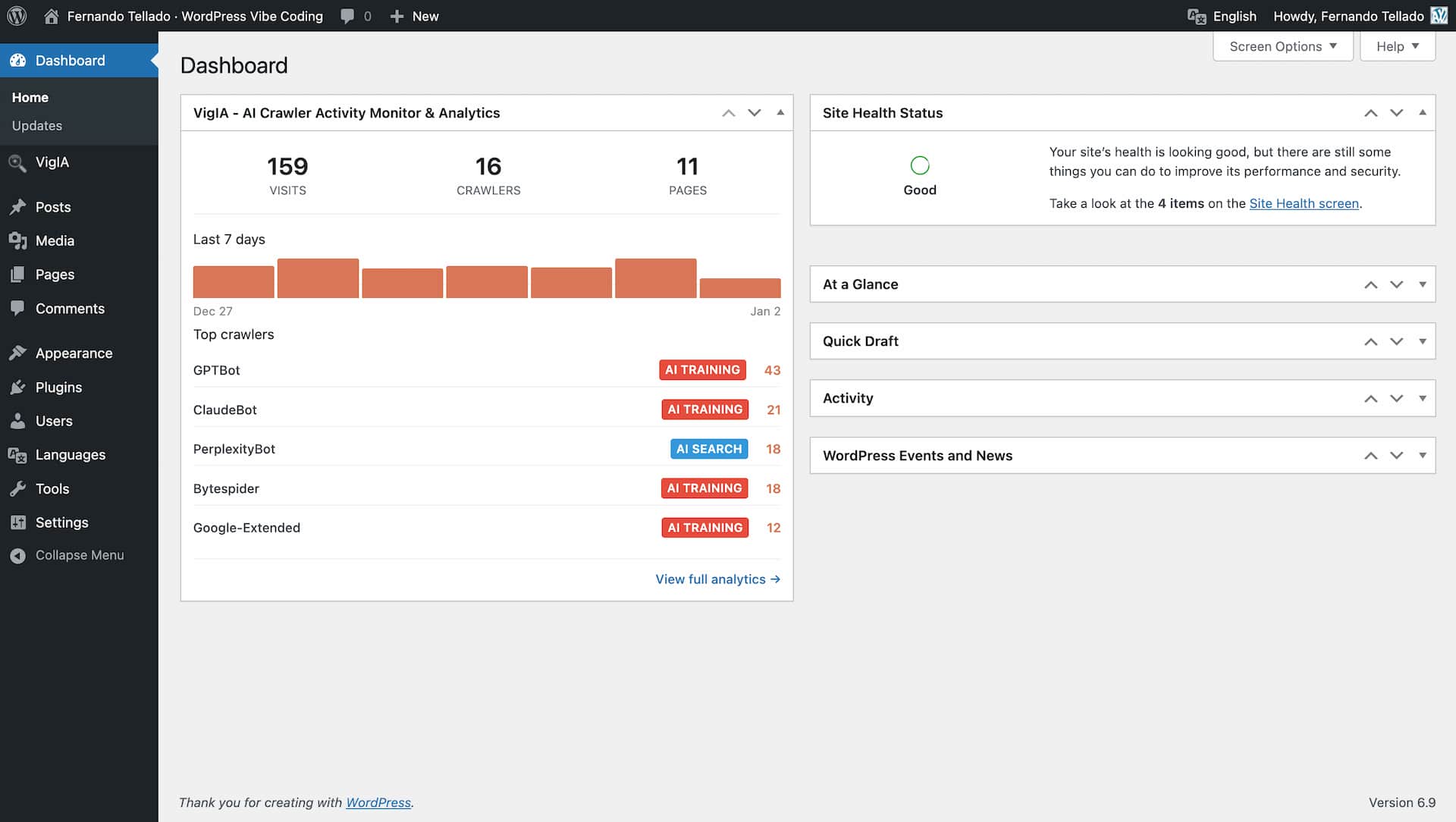
Dashboard widget 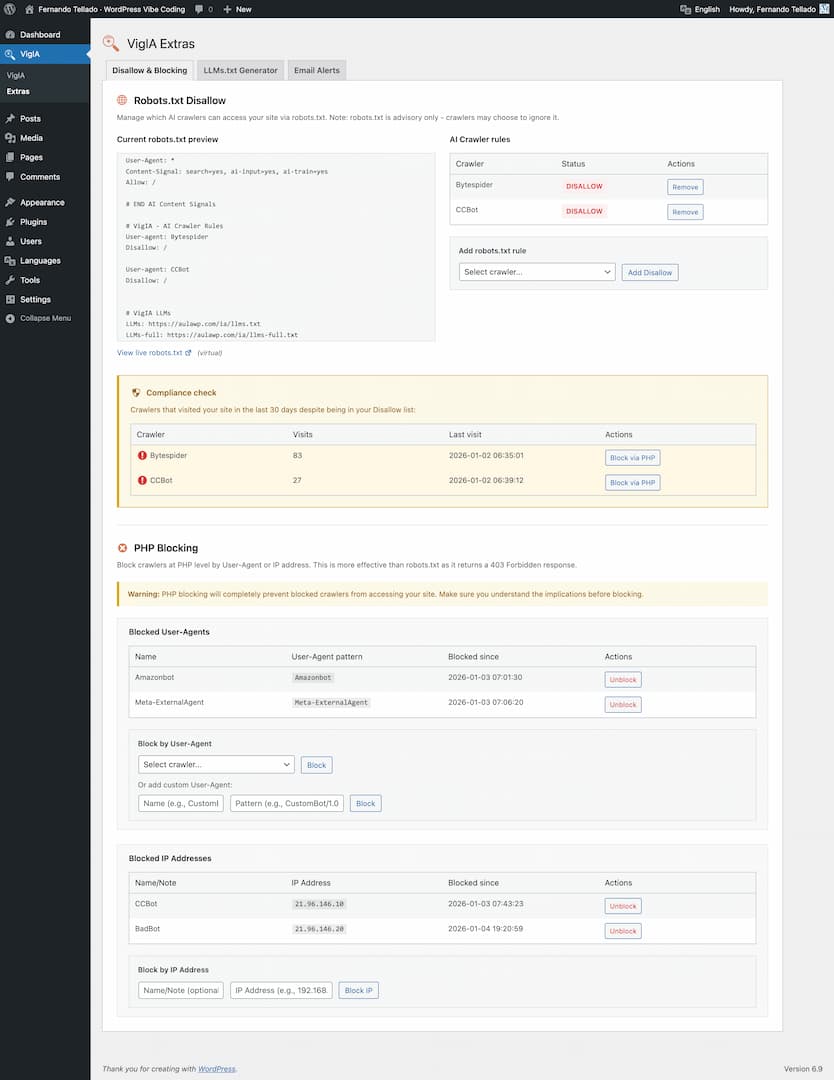
Extras page – Robots.txt management and blocking 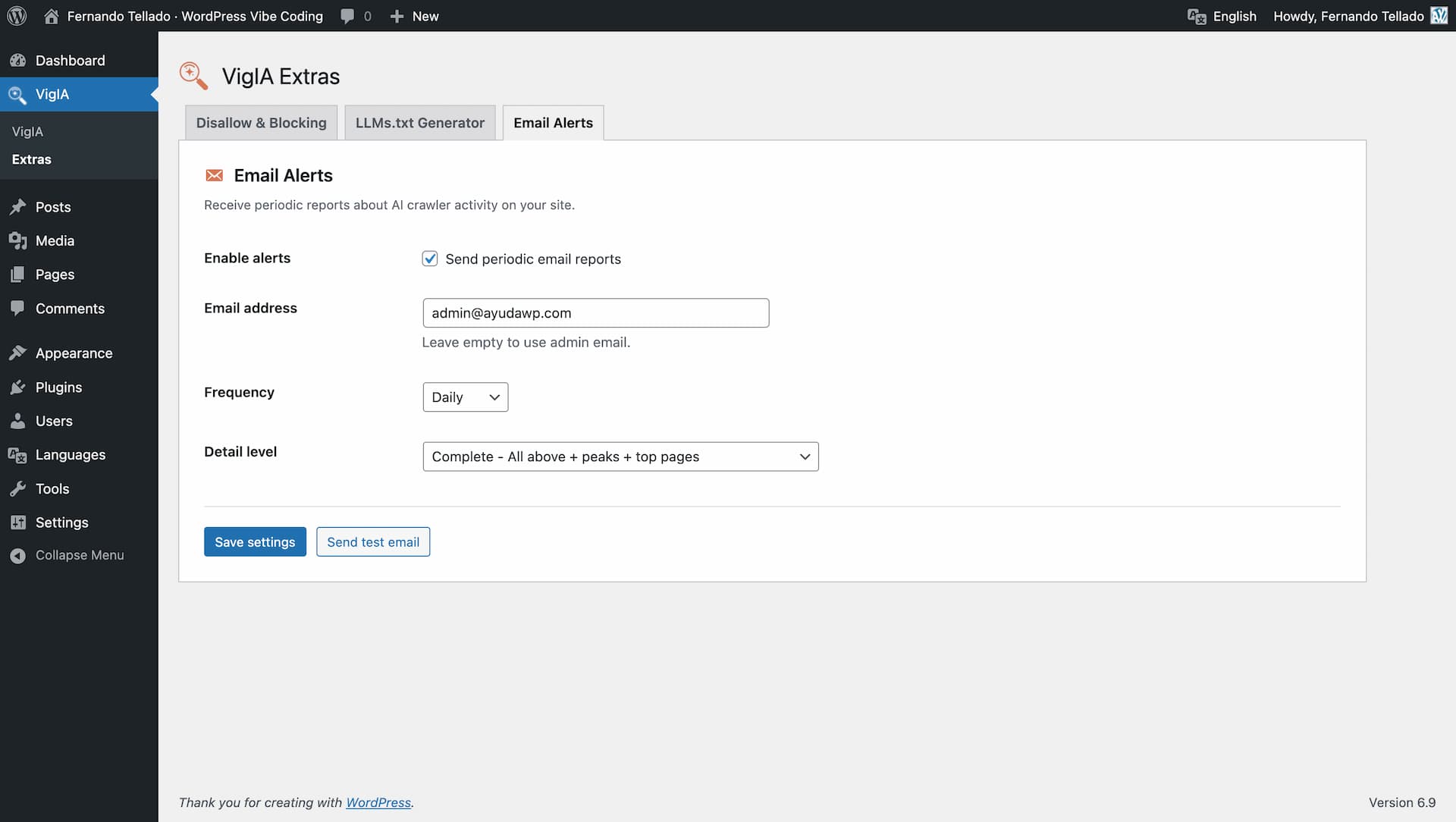
Extras page – Email alerts configuration 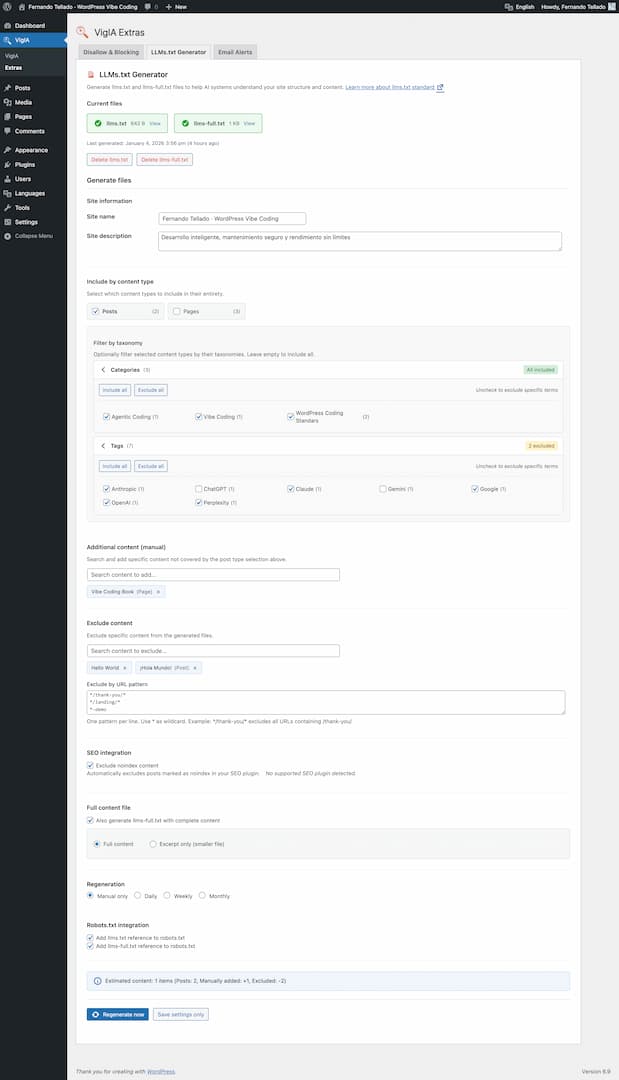
Extras page – LLMs.txt generator with content type selection


Installatie
- Upload the plugin files to
/wp-content/plugins/vigia/or install through the WordPress plugins screen - Activate the plugin through the ‘Plugins’ screen in WordPress
- Navigate to VigIA in the admin menu to view your AI crawler analytics
- Configure blocking rules and alerts in VigIA > Extras
FAQ
Does this plugin slow down my site?
No. VigIA adds minimal overhead by checking the User-Agent string on each request. The check is very fast and only writes to the database when an AI crawler is detected.
What’s the difference between robots.txt blocking and PHP blocking?
Robots.txt is advisory – crawlers should respect it but may choose to ignore it. PHP blocking returns a 403 Forbidden response, effectively preventing access regardless of whether the crawler respects robots.txt.
Will blocking crawlers affect my SEO?
Blocking AI training crawlers (like GPTBot or ClaudeBot) will not affect traditional search engine rankings. However, blocking AI search crawlers might affect how your content appears in AI-powered search results.
Can I add custom crawlers to monitor?
Yes! In the main analytics page, scroll down to “Custom crawlers” and add your own User-Agent patterns to track.
Where is the data stored?
All data is stored in your WordPress database in a custom table (
wp_vigia_visits). No data leaves your server.What is llms.txt?
The llms.txt file is a standard for helping AI systems understand your website’s content and structure. It provides a machine-readable overview of your site that AI can use to better represent your content. Learn more at llmstxt.org.
Which SEO plugins are supported for noindex detection?
VigIA supports automatic noindex detection from: Yoast SEO, Rank Math, All in One SEO, SEOPress, and The SEO Framework.
What is the Abilities API?
The Abilities API is a new feature in WordPress 6.9 that allows plugins to expose their functionality in a standardized way. This enables AI agents, automation tools, and external systems to discover and use plugin features programmatically. VigIA implements 9 abilities for analytics, blocking, and robots.txt management.
Beoordelingen


Bijdragers & ontwikkelaars
“VigIA – AI Crawler Activity Analytics & Control” is open source software. De volgende personen hebben bijgedragen aan deze plugin.
Bijdragers

“VigIA – AI Crawler Activity Analytics & Control” is vertaald in 1 locale. Dank voor de vertalers voor hun bijdragen.
Vertaal “VigIA – AI Crawler Activity Analytics & Control” in je eigen taal.
Interesse in ontwikkeling?
Bekijk de code, haal de SVN repository op, of abonneer je op het ontwikkellog via RSS.
Changelog
1.4.0
- NEW: WordPress Abilities API integration (requires WordPress 6.9+)
- NEW: 9 abilities for AI agents and automation tools
- NEW: Analytics abilities: get-crawler-stats, get-top-crawlers, get-top-pages
- NEW: Blocking abilities: get-blocked-items, block-crawler, unblock-crawler
- NEW: Robots.txt abilities: get-robots-rules, add-robots-disallow, remove-robots-rule
- NEW: Custom ability category “AI Crawler Analytics” for better discoverability
- Improved: Graceful degradation for WordPress versions below 6.9
1.3.0
- NEW: Period indicator in dynamic section titles (timeline, categories, crawlers, pages)
- NEW: “Load more” pagination in Top crawlers and Top pages tables (10 items per load, up to 100)
- NEW: Showing counter display (e.g. “Showing 10 of 47”)
- Improved: Plugin recommendation boxes now available on Extras page
- Fixed: Shortcodes from page builders and common plugins now display as clean text in llms.txt files
1.2.9
- Fixed: robots.txt Disallow rules now work correctly with physical robots.txt files (Yoast SEO and other plugins that create physical files)
- Improved: AI crawler rules are now synced to physical robots.txt automatically when adding or removing rules
1.2.8
- Fixed: UTF-8 encoding issues in llms.txt and llms-full.txt files (special characters like accents now display correctly in all browsers)
1.2.7
- Fixed: “Learn more” link is now translatable
1.2.6
- Fixed: LLMs.txt Generator now correctly adds robots.txt references when saving and generating
- Improved: Simplified LLMs.txt Generator to single “Save and generate” button for clearer workflow
- Updated: “Learn more” link now points to AyudaWP documentation
1.2.5
- Fixed: Responsive layout issues with charts and content boxes overflowing on smaller screens
- Improved: Better breakpoint handling for stats grid and charts adaptation
1.2.4
- Fixed: Renamed duplicate “VigIA” submenu to “Analytics” for better navigation clarity
1.2.3
- Fixed: Activation notice now properly dismisses when closed on the plugins page
1.2.2
- Improved: Added PHPCS ignore comments for intentional direct database queries (cache bypass)
- Improved: Added translator comments for all placeholder strings in LLMs generator
1.2.1
- Fix: LLMs.txt generator now correctly handles taxonomy filters for each post type
- Fix: Taxonomy filters (categories, tags) no longer incorrectly exclude pages or other post types
- Fix: Resolved object cache conflicts on hosts with Memcached/Redis (SiteGround, etc.)
- Fix: Settings now persist correctly after saving and regenerating
- Fix: Robots.txt references only added when llms files actually exist
- Fix: Robots.txt integration reads fresh data bypassing object cache
- Improved: Added “Save settings” button to save options without generating files
- Improved: Direct database queries for settings to avoid cache inconsistencies
- Improved: Better boolean normalization for checkbox values
1.2.0
- NEW: Redesigned LLMs.txt generator with improved content selection
- NEW: Select content by post type (posts, pages, custom post types)
- NEW: Filter content by taxonomies (categories, tags, custom taxonomies)
- NEW: Manual include with AJAX-powered search
- NEW: Manual exclude with AJAX-powered search
- NEW: Exclude content by URL patterns with wildcard support
- NEW: SEO plugin integration – auto-exclude noindex content
- NEW: Supported SEO plugins: Yoast, Rank Math, AIOSEO, SEOPress, The SEO Framework
- NEW: Auto-regeneration options (daily, weekly, monthly)
- NEW: Add llms.txt and llms-full.txt references to robots.txt
- Improved: Scalable architecture for sites with thousands of posts
- Improved: Better UI/UX for content selection
1.1.1
- Fix: Version dump to improve texts.
1.1.0
- NEW: PHP-based crawler blocking (403 Forbidden response)
- NEW: Robots.txt management for AI crawlers
- NEW: Compliance monitoring (detect crawlers ignoring robots.txt)
- NEW: Email alerts system (daily/weekly/monthly reports)
- NEW: LLMs.txt and llms-full.txt file generator
- NEW: Extras page with all new management tools
- NEW: Quick block dropdown in crawlers table
- Improved: Block actions directly from analytics dashboard
1.0.0
- Initial release
- AI crawler detection and tracking
- Analytics dashboard with charts
- CSV data export
- Custom crawler support
- Dashboard widget

