

Beschrijving
Ga naar de inhoud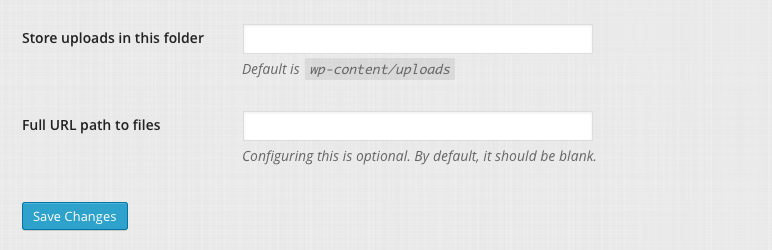


Lees alle 12 beoordelingen
Deze plugin is niet getest met de laatste 3 grotere versies van WordPress. Mogelijk wordt het niet meer onderhouden of ondersteund. Ook kunnen er compatibiliteitsproblemen ontstaan wanneer het wordt gebruikt met recentere versies van WordPress.
Upload Url and Path Enabler
Beschrijving
WordPress 3.5 removes the setting fields to change the media upload path and url. This plugin enables them again. Note that as long as your fields are not empty, you can disable this plugin.
Schermafbeeldingen

The medias settings page.

Installatie
- Extract the plugin folder from the downloaded ZIP file.
- Upload the
upload_url_path_enablerfolder to your wp-content/plugins/ directory. - Activate the plugin from the “Plugins” page.
FAQ
None.
Beoordelingen
1 oktober 2024
Tiny, but great tool!
17 februari 2021
I wonder why wordpress do not have already this option, it is a great plugin!
24 februari 2019
The easiest and fastest way to change the upload folders in a blink without messing around with the config file or even phpmyadmin. Meanwhile an old but still a flawlessly working plugin.
22 juli 2018
Modifies the paths of all existing uploads making them unusable.
3 september 2016
I tried the wp-config.php define('UPLOADS', 'wp-content/example'); trick and, while it did save new uploads to the desired folder, images/thumbs were not available, because in media library the new path was concatenated onto the original path — the new path as shown was wrong anyway (slashes got removed), so it wouldn’t have worked regardless. I also tried a different plugin to change/hide URLs and protect the wp site from anonymous direct access to files, which means it allowed for changing default paths. That didn’t work, but this simple one does. Thanks!
3 september 2016
thanks !
Bijdragers & ontwikkelaars
“Upload Url and Path Enabler” is open source software. De volgende personen hebben bijgedragen aan deze plugin.
Bijdragers
Vertaal “Upload Url and Path Enabler” in je eigen taal.
Interesse in ontwikkeling?
Bekijk de code, haal de SVN repository op, of abonneer je op het ontwikkellog via RSS.
Changelog
1.0.4
- 2016/04/03
- Tested with WP 4.5.
- Fixed a bug with a translation since WP 4.4.
- Small code quality improvements.
1.0.3
- 2013/03/03
- Small code readability improvements.
- Added plugin URL.
1.0.2
- 2013/09/14
- Removed a line in the plugin informations that could prevent proper activation.
1.0.1
- 2013/09/13
- Small security fix.
1.0
- 2013/01/26
- First public release

