

Beschrijving


Truncate Comments
DoorBeschrijving
Truncate Comments is a plugin that hides a part of a long comment under a “Read more” link that, when clicked, reveals the hidden part of the comment. The plugin provides the functionality of Amazon.com comments.
If you liked my plugin, please rate it.
The plugin uses jQuery Collapser by Aakash Chakravarthy.
Schermafbeeldingen
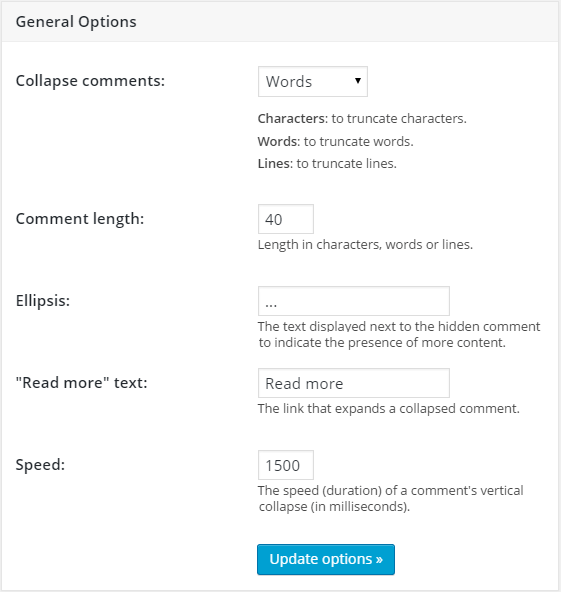
The plugin settings page. 
Example of a hidden comment.


FAQ
Installation Instructions
- Visit «Plugins\Add New».
- Search for «Truncate Comments».
- Install and activate the plugin.
- That’s all.
Plugin settings are available in «Settings\Truncate Comments».
How to style a “Read more” link using CSS?
Add the following code to the style.css file of your theme.
.commentMoreLink { color:red!important; }The link will become red (just an example).
Does the plugin support localization?
Yes, please use translate.wordpress.org.
Beoordelingen


Bijdragers & ontwikkelaars
“Truncate Comments” is open source software. De volgende personen hebben bijgedragen aan deze plugin.
Bijdragers
“Truncate Comments” is vertaald in 2 localen. Dank voor de vertalers voor hun bijdragen.
Vertaal “Truncate Comments” in je eigen taal.
Interesse in ontwikkeling?
Bekijk de code, haal de SVN repository op, of abonneer je op het ontwikkellog via RSS.
Changelog
2.00
- minor bug fixes
- added “Hide” button.
1.04
- minor bug fixes
1.03
- removed PHP notices.
1.02
- removed the bundled languages in favour of language packs from translate.wordpress.org.
1.01
- added German translation (thanks to ezkay).
1.00
- first public version.
Meta
- Versie 2.00
- Laatst geüpdatet 9 maanden geleden
- Actieve installaties 90+
- WordPress versie 3.0 of nieuwer
- Getest t/m 6.8.3
- PHP versie 5.3 of nieuwer
- Talen
- Tags
- Geavanceerde weergave

