

Beschrijving


TinyPNG – JPEG, PNG & WebP image compression
Beschrijving
The best & easiest image compression plugin for WordPress. Speed up your website by compressing and converting your images with TinyPNG for WordPress. Improve your websites’ performance by significantly reducing file sizes without noticeable quality loss. Support for WebP, AVIF, JPG and PNG formats.
Start optimizing your images today to boost SEO, improve your PageSpeed scores, save bandwidth and enhance your website’s user experience.
Why TinyPNG?
- Next-gen format conversion, convert images to WebP and AVIF for even smaller files (NEW)
- Smart compression algorithm, reduce image file sizes without visible quality loss
- Broad format support, supports AVIF, WebP, PNG, animated PNG (APNG) and JPG.
- Automatic image compression, compresses new images on upload.
- Bulk optimization, optimize your full media library in just one click.
- Individual image control, optimize a single image straight from your media library.
- Preserve meta-data, choose to retain copyright metadata, creation date and GPS location in your original images.
- Resize large images, automatically resize huge image uploads by setting a maximum width and/or height for more reasonable browser display.
- Custom thumbnail optimization, choose which image size should be processed.
- Advanced background processing, optimization run quietly in the background to speed up your workflow.
- Multisite support, use one API key across all sites.
- Detailed statistics, see how much file size you have saved by compressing your Media Library
- George the Panda, our lovely mascot brings joy and hugs.
- and much more…
Convert to next-gen formats like AVIF and WebP
With the TinyPNG WordPress plugin, you can easily convert your images to next-gen formats like AVIF and WebP. AVIF and WebP are modern image formats designed for the web. They are often smaller in size than older formats like JPEG and PNG, while keeping excellent image quality.
- WebP images are 25–34% smaller than JPEG (lossy) according to Google.
- AVIF can reduce image size by up to 50% compared to JPEG, often even beating WebP in compression.
Google’s PageSpeed Insights and other tools strongly recommend serving images in AVIF or WebP. Most modern browsers (like Chrome, Firefox, Edge, and Safari) now fully support WebP and AVIF. That means you can safely serve these formats to most of your visitors.
With the TinyPNG WordPress plugin, your images can be automatically converted to AVIF or WebP when you upload them. No extra steps are required.
Optimaliseer al je afbeeldingen
You can bulk optimize your existing JPEG, PNG, and WebP images all at once by going to Media > Bulk TinyPNG. Clicking on the big button will start compressing and converting, when needed, all unoptimized images in your media library.
If you have more images than your free credits allow, the tool will show you an estimated cost to optimize your entire library. If you are interested, you can upgrade your account to the paid plan and optimize the full library all in one go. Prefer to stay on the free plan? No problem! The bulk optimization tool will simply process images until your free limit is reached.
Compress for performance
The Tinify optimization engine is more than just compression. It is built to deliver the best image performance for the web, without sacrificing visual quality. Here’s how it helps:
- Toon JPEG afbeeldingen sneller door progressieve JPEG encodering.
- Kleurprofielen worden automatisch geconverteerd naar standaard RGB kleur.
- Convert CMYK to RGB to save more space and add compatibility.
Compatibility
The TinyPNG plugin is fully compatible with WordPress Multisite. Next to this, TinyPNG for WordPress works smoothly with most themes and plugins. Here is a list of the popular plugins that have been tested to work smoothly with TinyPNG.
- WPML
- WooCommerce
- WP Retina 2x
- WP Offload
Ga aan de slag
Install this plugin and follow the instructions to set up your account. No payment details are required.
Learn more about the plugin with these step-by-step tutorials:
- How to set up the TinyPNG WordPress plugin?
- How to compress existing images with the WordPress plugin?
Pricing
You get 500 credits per month at no cost.
With a regular WordPress installation, you can compress roughly 100 images per month. Please note that converting images to AVIF or WebP uses an additional credit per image size. This means with the conversion feature enabled, you can roughly compress and convert 50 images per month for free.
The exact number depends on how many thumbnail sizes are generated by your theme or plugins. You can choose which of the generated thumbnail sizes should be optimized by going to Settings > TinyPNG page. You can upgrade to a paid plan to remove the limit and compress as many images as you like.
Need more?
Upgrade to a paid plan to remove the limit and compress as many images as you want. To view the pricing details, visit: tinify.com/developers/pricing
Privacy
At Tinify, we take your privacy seriously. Only you have access to the uploaded images. All images are stored for a maximum of 48 hours, after which they will be deleted forever.
Neem contact op
Heb je vragen of feedback? Laat het ons weten! Neem contact met ons op via support@tinypng.com of vind ons op X: @tinypng.
Meewerken
Wil je helpen? Bekijk de Tinify WordPress plugin op GitHub.
Schermafbeeldingen
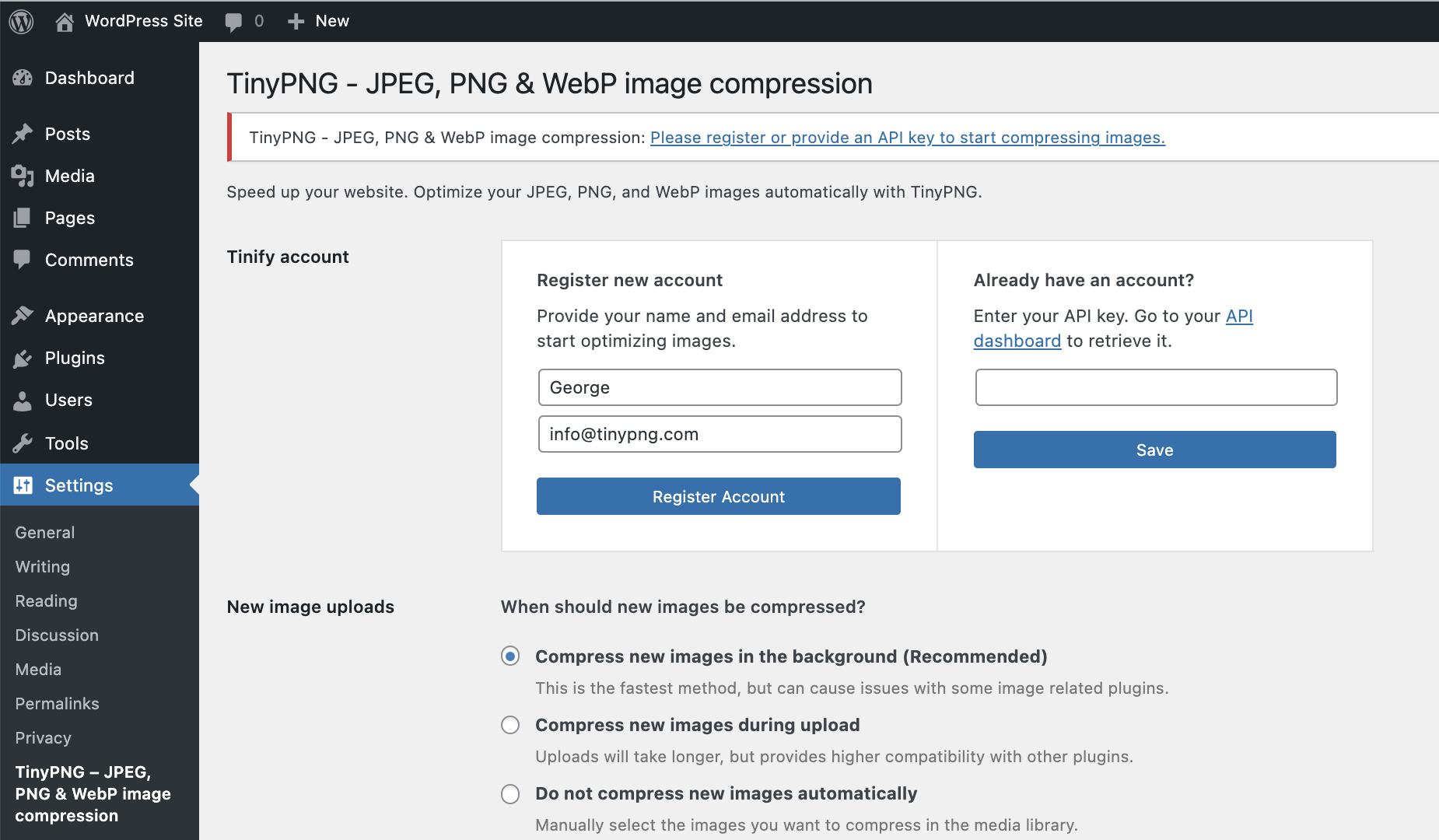
Registreer een nieuw account of vul je huidige API-sleutel in. Kies vervolgens de afmetingen die je wilt optimaliseren en verdere keuzes zoals schalen en bewaren van metadata in je originale afbeeldingen. 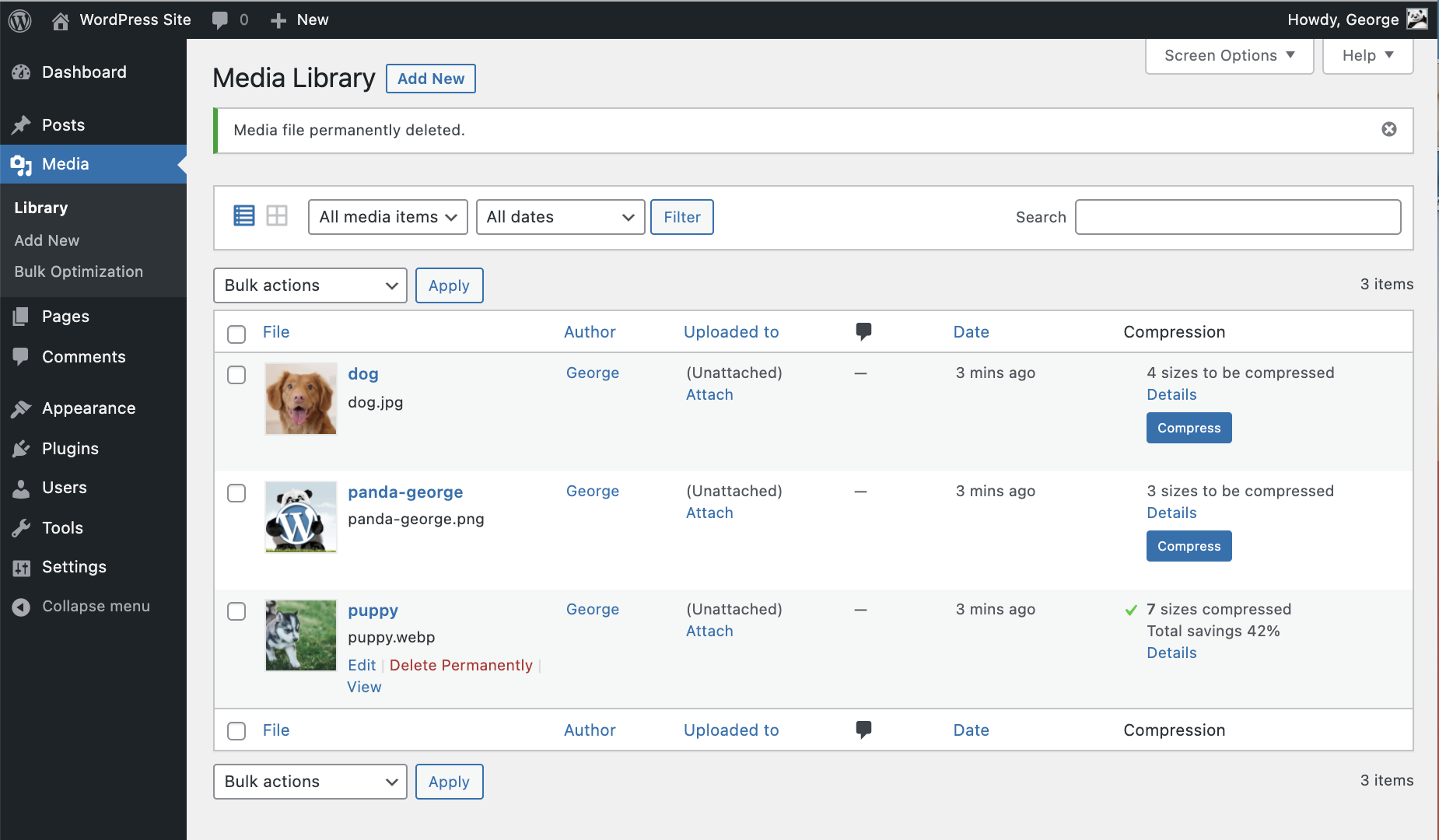
In de mediabibliotheek lijstweergave kan je de besparingen op je afbeeldingen bekijken. 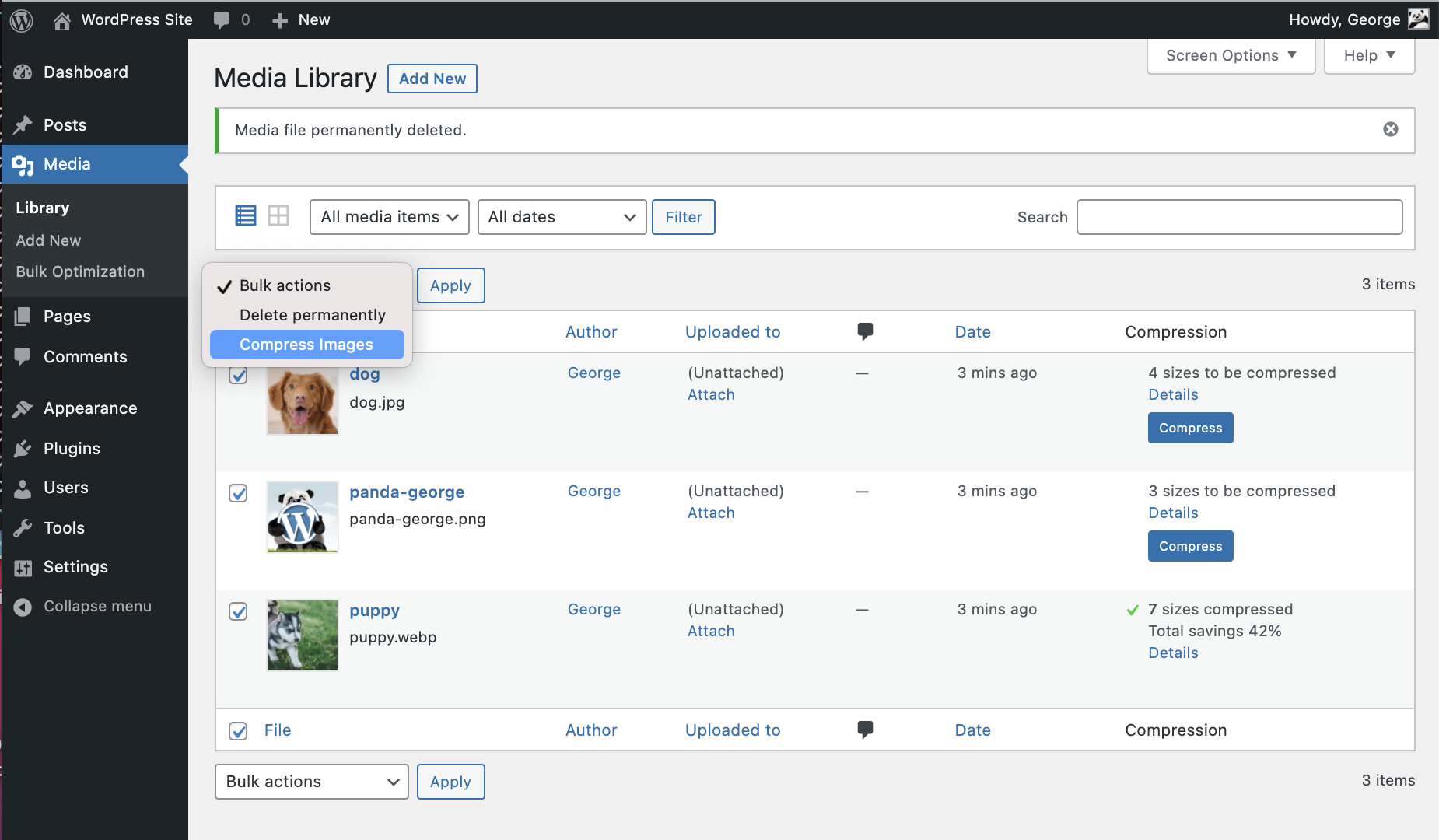
Vanuit de mediabibliotheek kan je individuele afbeeldingen comprimeren en met de bulkactie drop-down snel meerdere afbeeldingen tegelijk optimaliseren. 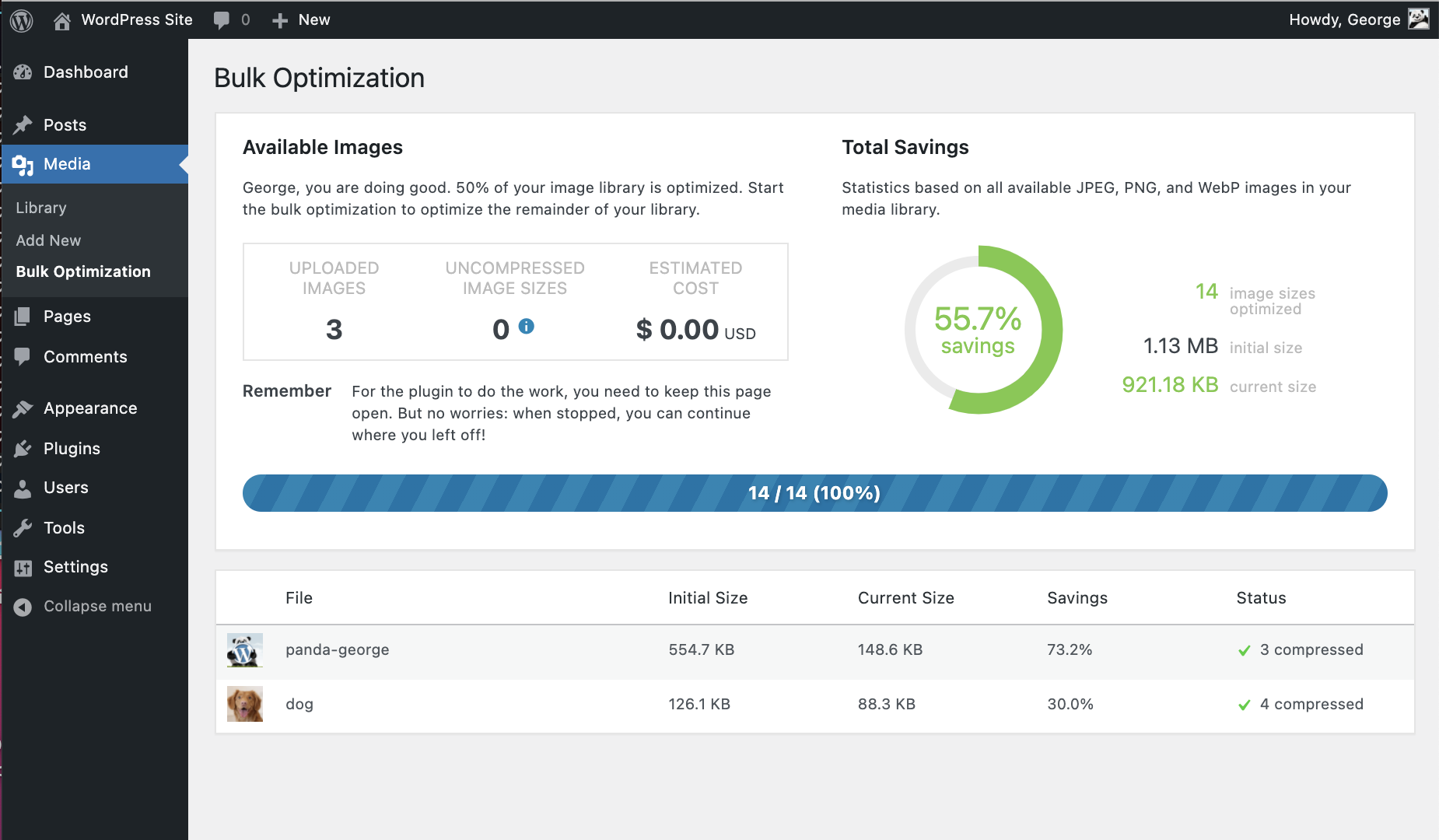
Last but not least kun je ook Bulk TinyPNG gebruiken om je hele WordPress site te optimaliseren.


Installatie
Vanuit je WordPress dashboard
- Open Plugins > Nieuwe plugin.
- Search for ’tinypng’ and press the ‘Install Now’ button for the plugin named ‘TinyPNG – JPEG, PNG & WebP image compression’ by ‘TinyPNG’.
- Activeer de plugin op je Plugins pagina.
- Ga naar de Instellingen > TinyPNG pagina en registreer een nieuw account.
- Of vul de API-sleutel in van https://tinypng.com/developers.
- Ga naar Media > Bulk TinyPNG en optimaliseer al je afbeeldingen!
Van WordPress.org
- Download the plugin named ‘TinyPNG – JPEG, PNG & WebP image compression’ by ‘TinyPNG’.
- Upload de
tiny-compress-imagesmap naar je/wp-content/plugins/map op je eigen manier (ftp, sftp, scp, etc…) - Activeer de plugin via de Plugins pagina.
- Ga naar de Instellingen > TinyPNG pagina en registreer een nieuw account.
- Of vul de API-sleutel in van https://tinypng.com/developers.
- Ga naar Media > Bulk TinyPNG en optimaliseer al je afbeeldingen!
Optionele configuratie
De API-sleutel kan ook geconfigureerd worden in het wp-config.php bestand, door de volgende PHP code met je API-sleutel toe te voegen.
define( 'TINY_API_KEY', 'YOUR_API_KEY_HERE' ); Once set up you will see a message on the Settings > TinyPNG page. This will work for normal and multisite WordPress installations.
FAQ
Q: Hoeveel afbeeldingen kan ik gratis optimaliseren?
A: In een standaard WordPress installatie kan je ongeveer 100 afbeeldingen per maand gratis optimaliseren. WordPress maakt meerdere thumbnails van je afbeeldingen, welke allemaal individueel geoptimaliseerd worden. Sommige plugins voegen zelf nog meer afmetingen toe, dus zorg dat je de pagina Instellingen > Comprimeer JPEG, WebP & PNG afbeeldingen bekeken hebt voordat je aan de slag gaat met optimaliseren.
Q: How much does it cost to use the plugin?
A: The plugin is free to use, you receive 500 free compressions each calendar month.
If you need to compress more, you can upgrade to the pay-per-compression pricing. You can view the current pricing at tinify.com.
When you use the bulk optimization tool, the plugin will first scan your media library and show you an estimated number of credits needed to optimize all uncompressed images. You can decide whether you want to upgrade your plan or stay within the free limit.Q: Hoe kan ik de 500-limiet verwijderen?
A: Voeg eenvoudig je betaalgegevens toe aan je account dashboard om de limiet te verwijderen. Additionele compressies boven 500 worden dan eenmalig in rekening gebracht aan het einde van elke maand.
Q: Wat gebeurt er met de geoptimaliseerde afbeeldingen als ik de plugin verwijder?
A: Als je de plugin verwijderd blijven de geoptimaliseerde afbeeldingen geoptimaliseerd.
Q: Ik kan me niet herinneren dat ik 500 foto’s heb geüpload deze maand maar mijn limiet is al bereikt. Hoe wordt aantal dit berekend?
A: Wanneer je een afbeelding uploadt naar je site, zal WordPress verschillende afmetingen ervan maken (zie Instellingen > TinyPNG). De plugin zal elk van deze afmetingen comprimeren, dus wanneer je 100 afbeeldingen en 5 verschillende afmetingen hebt, zul je 500 compressies uitvoeren.
Q: Is er een maximale bestandsgrootte?
A: Ja, maar die zijn heel ruim! De maximale bestandsgrootte is 500MB en het maximale canvas grootte is 256MP (16000px keer 16000px in elke ratio).
Q: Kan ik dezelfde API sleutel gebruiken voor al mijn websites?
A: Ja, er zijn geen limitaties. Je kan dezelfde sleutel overal toevoegen.
Q: Kan ik mijn API sleutel in de admin verbergen?
A: Ja, je kan je API-sleutel verbergen zodat andere beheerders deze niet kunnen zien. Om dit te doen, moet je de API-sleutel toevoegen in wp-config.php. Bekijk de installatie-instructies voor meer informatie.
Q: Wat gebeurd er als ik mijn maandelijkse limiet bereik?
A: Alles blijft werken, alleen worden nieuw toegevoegde afbeeldingen niet meer geoptimaliseerd. Uiteraard moedigen we iedereen aan om over te gaan naar een betaald abonnement en daarmee bij te dragen aan de hosting- en ontwikkelkosten.
Q: Kan ik alle bestaande afbeeldingen in mijn mediabibliotheek optimaliseren?
A: Ja! Na het installeren van de plugin, ga naar Media > Bulk TinyPNG, en klik op de startknop om alle niet-geoptimaliseerde afbeeldingen in je mediatheek te optimaliseren.
Q: Hoe schakel ik over naar een betaald account?
A: Je kan upgraden naar een betaald account door je betaalgegevens toe te voegen op je account dashboard. Additionele compressies boven 500 worden dan eenmalig in rekening gebracht aan het einde van elke maand.
Q: Does converting to AVIF or WebP use more credits?
A: When the conversion feature is enabled (to convert images to AVIF or WebP), each image will use double the number of credits: one for compression and one for format conversion.
Beoordelingen


Bijdragers & ontwikkelaars
“TinyPNG – JPEG, PNG & WebP image compression” is open source software. De volgende personen hebben bijgedragen aan deze plugin.
Bijdragers
“TinyPNG – JPEG, PNG & WebP image compression” is vertaald in 16 localen. Dank voor de vertalers voor hun bijdragen.
Vertaal “TinyPNG – JPEG, PNG & WebP image compression” in je eigen taal.
Interesse in ontwikkeling?
Bekijk de code, haal de SVN repository op, of abonneer je op het ontwikkellog via RSS.
Changelog
3.6.8
- feat: download logs and diagnostics
- chore: updated phpcs rules and formatting
3.6.7
- Added support for WordPress 6.9
3.6.6
- fix: Improve compatibility with Avada page builder
3.6.5
- fix: prevent picture element when using a page builder
3.6.4
- added a guard to prevent bulk processing to requeue already processed images
3.6.3
- Changed the source priority for picture elements
3.6.2
- Resolved an issue where the amount of parameters were incorrect when rendering a notice.
3.6.1
- Resolved issue where a picture element would be nested within a picture element
3.6.0
- Added a link to leave a review in the bulk and settings page
- Renamed menu title for bulk to “Bulk TinyPNG”
- Renamed menu title for settings to “TinyPNG”
- Resolved warning when library was empty
- Resolved warning when resize options was empty
- New feature to enable converting images to WebP or AVIF
3.5.2
- Removed devdependencies and test files from plug-in
- Fixed a warning when library contained no images
3.5.1
- Will only check local file removal if AS3CF is active
3.5.0
- Support files uploaded through the WordPress REST API
- Removed notification on WooCommerce incompatibility
- Updated Tinify SDK from 1.5.2 to 1.6.2
- Improved support for WP Offload
3.4.6
- Error resolved where Tiny_Helpers was not available
3.4.5
- Error when mb_strimwidth is not available resolved
3.4.4
- CSRF fix, added nonce check
3.4.3
- Removed more deprecated PHP syntax that was triggering a warning message.
- Updated WordPress compatibility
3.4.2
- Removed deprecated PHP syntax that was triggering a warning message.
3.4.1
- Fixed a bug that sometimes prevented failing requests to the Tinify servers from being retried.
3.4
- Correct filesize metadata retrieval for compressed images in WordPress 6.
- Updated WordPress compatibility.
3.3
- You can now optimise WebP images, in addition to JPEG and PNG.
3.2.1
- Fixed bug that caused the original version of images that started with a special character to not be compressed.
- Updated WordPress compatibility.
3.2.0
- Ondersteuning voor WP Retina 2x Pro.
- Meer rechten controles voor extra zekerheid.
- Less resource intensive AJAX requests.
- Fixed CSS issues from Analytify plugin.
- Removed legacy Enhanced Media Library compatibility.
3.1.0
- Remaining free compressions shown in settings page.
- Eenvoudiger manier op een gratis account te upgraden.
- WPML and WPML Media compatibility in collaboration with the authors of WPML. Make sure to upgrade WPML to version 4.1.
- Added a notice to the Bulk Optimization page for free accounts with not enough available free compressions.
- Added a new hook after compression of an image useful for CDN cache flushing.
3.0.1
- Bug verholpen die een probleem veroorzaakte tijdens het registreren van nieuwe accounts.
- No longer use create_function, which is deprecated in PHP 7.2. The plugin no longer supports PHP 5.2.
- Opmerking over incompatibele plug-ins geherformuleerd om verwarring te voorkomen.
3.0.0
- Comprimeer nieuwe afbeeldingen in de achtergrond voor een snellere workflow.
- Turbo-charged Bulk optimalisatie pagina met simultane compressie van afbeeldingen.
- Verbeterd geheugengebruik voor installaties met een extreme mediabibliotheek.
- Detectie van incompatibele plugins.
- Fallback naar fopen als de curl_exec functie uitgeschakeld is.
- Extra meldingen voor WP Offload S3 gebruikers.
- Verschillende kleine fixes en verbeteringen.
2.2.6
- Een bug verholpen bij het comprimeren van bestandstypen anders dan JPEG en PNG waarbij automatisch een thumbnail werd gegenereerd.
2.2.5
- Bug verholpen in de Bulk optimalisatie pagina die soms zorgde dat het werd afgebroken.
- Probleem verholpen dat er toe leidde dat de dashboard widget niet werd geladen.
- Styling bijgewerkt van de dashboard widget voor de nieuwste versie van WordPress.
- Waarschuwing verholpen in de mediabibliotheek indien bepaalde plugins worden gebruikt.
2.2.4
- Bug opgelost met het drop-down menu in de mediabibliotheek.
- Compressielimiet melding wordt nu rechtstreeks gelinked naar je API dashboard.
- Styling bijgewerkt van de dashboard widget.
2.2.3
- Links aangepast om het makkelijker te maken om rechtstreeks naar je API dashboard te gaan.
- Compressieprobleem verholpen voor sommige fopen gebruikers.
2.2.2
- Verbeterde robuustheid in geval er een onverwachte netwerkfout optreedt.
- Verkeerde warschuwing met Sucuri scanner verholpen.
- Compressieprobleem voor fopen gebruikers verholpen.
2.2.1
- Probleem uit v2.2.0 opgelost waarbij alle custom afmetingen niet werden getoond.
- Ondersteuning van afmetingen waarbij de hoogte of breedte niet is opgegeven.
2.2.0
- Nieuwe dashboard widget die de mediabibliotheek besparingen toont.
- Compressie ondersteuning voor medium_large afmetingen.
2.1.0
- Compressie van retina afbeeldingen van WP Retina 2x.
- Een bug verholpen die de API sleutel verwijderde op de settings pagina.
- Probleem verholpen met sommige PHP 7 installaties.
- Probleem met fopen verholpen bij het behouden van metadata.
2.0.2
- Snellere bulkoptimalisatie pagina met minder geheugengebruik (dank aan @esmus).
- XML-RPC error verholpen (met dank aan @ironmanixs, @gingerdog, @quicoto en @isaumya).
2.0.1
- Bug verholpen met zoeken vanaf de admin schermen (dank aan @bapcsuk).
2.0.0
- Volledig nieuwe bulkoptimalisatie pagina.
- Verbeterde detectie van afmetingen met dezelfde bestandsnamen.
- Eenvoudigere account activatie en API-sleutel creatie.
- Fix voor het onderste drop-down menu in de mediabibliotheek.
- Gebruik van de laatste PHP client library voor verbinding met TinyJPG en TinyPNG.
- Fallback voor fopen toegevoegd voor oudere systemen die op PHP 5.2 draaien.
1.7.2
- Toon meer informatie over gecomprimeerde afmetingens in een details popup.
- Compressiedetails toegevoegd aan het afbeeldingenoverzicht.
1.7.1
- Bewaar GPS locaties en aanmaakdatums in de originele JPEG afbeeldingen.
- Keuze om copyright informatie te behouden in je originele PNG afbeeldingen.
- Verbeterde detectie van niet-ondersteunde bestandstypen.
1.7.0
- Keuze om copyright informatie te behouden in je originele JPEG afbeeldingen.
- Proxy ondersteuning voor cURL toegevoegd.
- Ondersteuning voor translate.wordpress.org plugin vertalingen.
1.6.0
- Verbeterde compressie-status in de mediabibliotheek met nieuw detailsvenster.
- Toon totale compressiebesparing op de Media instellingen pagina.
- Comprimeer alle afbeeldingen is verplaatst naar het Media menu.
1.5.0
- Schaal originele afbeeldingen door een maximum breedte en/of hoogte op te geven.
- Ondersteuning voor de mobiele WordPress app (dank aan David Goodwin).
1.4.0
- Indicatie van het aantal afbeeldingen dat per maand gratis te comprimeren is.
- Link naar de Media instellingen pagina vanaf de plugin lijst.
- Verduidelijking dat originele afbeeldingen overschreven worden tijdens het comprimeren.
1.3.2
- Detecteer verschillende thumbnail afmetingen met dezelfde dimensies.
1.3.1
- Mediabibliotheek toont bestanden die gecomprimeerd worden.
1.3.0
- Keuze om in een keer je hele mediabibliotheek te bulk-comprimeren.
- Betere indicatie van afmetingen die gecomprimeerd zijn.
- Detectie van afmetingen die door andere plugins veranderd zijn na compressie.
1.2.1
- Voorkom comprimeren van de originele afbeelding indien het de enige geselecteerde afmeting is.
1.2.0
- Toon of je een geldige API-sleutel hebt ingevuld.
- Toon verbindingsstatus en aantal compressies deze maand.
- Toon een bericht aan beheerders zodra de gratis compressielimiet is bereikt.
- De plugin werkt nu ook wanneer PHP’s parse_ini_file is uitgezet door de webhost.
- Voorkom meldingen als er geen afbeelding afmetingen geselecteerd zijn.
1.1.0
- De API-sleutel kan nu ingesteld worden met de TINY_API_KEY constante in wp-config.php. Dit werkt voor zowel normale als multisite WordPress installaties.
- Zet compressie van de origineel geuploade afbeelding aan of uit.
- Verbeterde weergave van originele afmetingen en gecomprimeerde afmetingen waarbij de totale compressiegrootte in de mediabibliotheek lijstweergave wordt getoond.
1.0.0
- Eerste versie.

