

Beschrijving

Tag Display
Beschrijving
Tag Display allows you to present your WordPress tags using different templates, improving user engagement and navigation.
Choose between three customizable templates:
- Default Template: Clean and modern tag buttons with subtle hover effects.
- Minimal Template: Simple text links separated by commas for a clean look.
- Tag Cloud Template: Tags displayed in a cloud format with varied sizes and rotations.
Features:
– Multiple tag templates for flexible styling.
– Easy shortcode integration: [s7n_tag_display] or [s7n_tag_display template="minimal"].
– Admin settings page for customization.
– Automatic or manual tag display.
– Support for custom taxonomies alongside WordPress tags.
– Optimized for performance and easy to configure.
License
This plugin is licensed under the GPLv2 or later.
Schermafbeeldingen
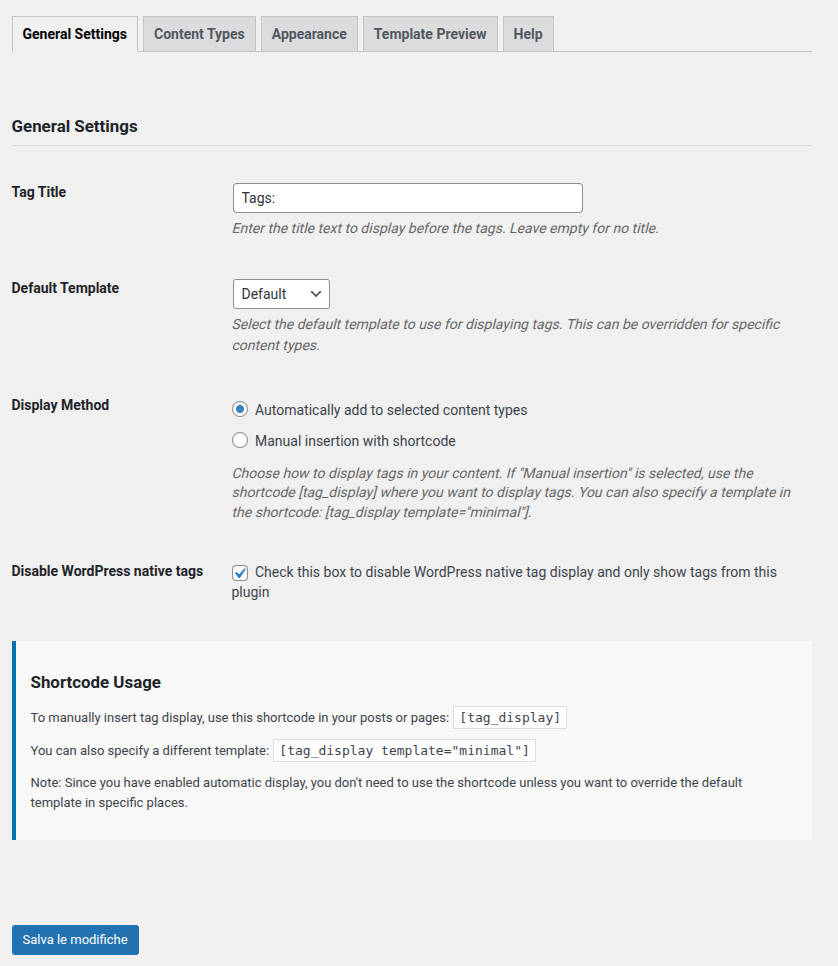
General Settings 
Content Types 
Appearance 
Template Preview 
Help


Installatie
- Upload the
tag-displayfolder to the/wp-content/plugins/directory. - Activate the plugin through the ‘Plugins’ menu in WordPress.
- Go to Settings -> Tag Display to customize your preferences.
- Use the shortcode
[s7n_tag_display]in your posts or pages.
FAQ
How do I use the plugin?
Simply activate the plugin, customize your settings, and use the shortcode
[s7n_tag_display]wherever you want the tags to appear.Can I change the template style?
Yes, you can select between Default, Minimal, and Tag Cloud templates directly from the settings page or via shortcode:
[s7n_tag_display template=”minimal”]Is it compatible with the latest WordPress version?
Yes, Tag Display is regularly updated to ensure compatibility.
Beoordelingen
Er zijn geen beoordelingen voor deze plugin.
Bijdragers & ontwikkelaars
“Tag Display” is open source software. De volgende personen hebben bijgedragen aan deze plugin.
Bijdragers
Vertaal “Tag Display” in je eigen taal.
Interesse in ontwikkeling?
Bekijk de code, haal de SVN repository op, of abonneer je op het ontwikkellog via RSS.
Changelog
1.2.0
- Added support for custom taxonomies.
- Terms from selected custom taxonomies are now displayed alongside WordPress tags.
- Updated templates to use get_term_link() for better compatibility with custom taxonomies.
- Added new admin setting to select which custom taxonomies to include.
1.0.0
- Initial release.
- Added three customizable templates.
- Integrated shortcode support.
- Created admin settings page.

