

Beschrijving
Ga naar de inhoud 


Lees alle 237 beoordelingen
Simple Lightbox
Beschrijving
Simple Lightbox is a very simple and customizable lightbox that is easy to add to your WordPress website.
Kenmerken
Options for customizing the lightbox behavior are located in the Appearance > Lightbox admin menu (or just click the Settings link below the plugin’s name when viewing the list of installed plugins)
- Automatically activate links (no manual coding required)
- Automatically resize lightbox to fit in window
- Customize lightbox with themes
- Mobile-optimized responsive themes included
- Customizable lightbox animations
- Infinitely customizable with add-ons
- Supports WordPress image attachment links
- Supports links in widgets
- Keyboard Navigation
- Display media metadata (caption, description, etc.) in lightbox
- Enable Lightbox depending on Page Type (Home, Pages, Archive, etc.)
- Group image links (play as a slideshow)
- Group image links by Post (separate slideshow for each post on page)
Gebruik
- Insert links to images/image attachments into your posts/pages
That’s it! The image will be displayed in a lightbox automatically.
- For more usage tips, go to Simple Lightbox’s official page
- See Simple Lightbox’s documentation for in-depth information on using and customizing SLB.
Schermafbeeldingen
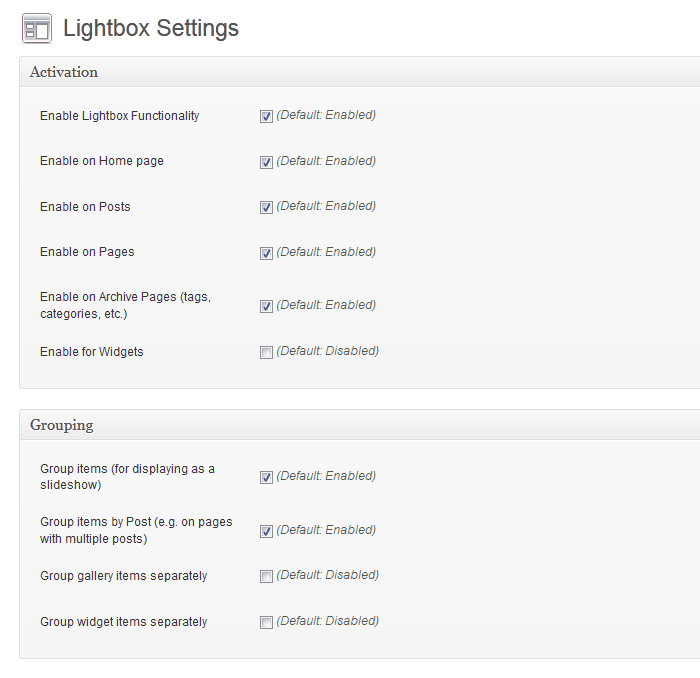
Lightbox Customization Options 
Licht thema 
Donker thema


Installatie
- Installeer en activeer SLB
- Verify that your site’s theme uses the
wp_head(),wp_footer(), &the_content()template tags (standard in any professional theme)
FAQ
Get more information on Simple Lightbox’s official page
Beoordelingen
12 september 2025
Just does not work.
27 november 2024
Couldn’t be simpler. Downloaded, installed, activated and now all my post images open in a lightbox. Brilliant!
17 oktober 2024
I like the simplicity of the plugin and it works with WP native image block. The ability to automatically group single images on a page or post and browse through them in the model box is great.
8 oktober 2024
That’s all I can say: just fab! 😀
31 oktober 2023
So when i first starting using this plugin it was simple (as the title says), i took it further and created a custom gallery using ACF, at first it didnt work but a fast solid response from the developer fixed it all in a few days!! TAHNK YOU!!!
28 juli 2023
Did not work when I used it for the first time using Gutenberg blocks. My mistake was I did not place the Gallery into the WP-content block. Fixed it worked like charm.
Bijdragers & ontwikkelaars
“Simple Lightbox” is open source software. De volgende personen hebben bijgedragen aan deze plugin.
Bijdragers
“Simple Lightbox” is vertaald in 20 localen. Dank voor de vertalers voor hun bijdragen.
Vertaal “Simple Lightbox” in je eigen taal.
Interesse in ontwikkeling?
Bekijk de code, haal de SVN repository op, of abonneer je op het ontwikkellog via RSS.
Changelog
2.9.4
- Optimize: Escape special characters in DOM attributes.
- Update: Confirm WordPress 6.2-6.8 compatibility.
2.9.3
- Hotfix: WordPress 6.1
wp_rand()bug (32-bit platforms) (#974) - Update: Confirm WordPress 6.1 compatibility
- Optimize: Media item cache key generation
- Optimize: Prune build tasks
2.9.2
- Optimize: Symbolic link handing for file/directory paths.
2.9.1
- Fix: Validate hook priority values (Let’s Getz Prioritized)
2.9.0
- Add: Support WebP image format
- Add: Support AVIF image format
- Add: Documentation link to readme file
- Optimize: Code cleanup/refactoring
- Optimize: WPCS validation (Phase 1)
- Optimize: Activate links after all other filters
- Optimize: Plugin metadata retrieval
- Update: Confirm WordPress 6.0 compatibility
- Update: Build dependencies
- Update: GitHub issue templates
2.8.1
- Update: PHP 5.6 Compatibility
- Add: PHPCS configuration
- Add: GitHub Issue templates
2.8.0
- Update: WordPress 5.3+ required.
- Update: PHP 7.2+ required.
- Optimize: Link detection up to 2x faster.
- Optimize: Options data handling.
- Optimize: Default title filtering.
- Optimize: Standardize media item data structure to avoid conflicts with third-party data.
- Optimize: Load only necessary media item properties in browser.
- Optimize: Filter all media items (instead of each individual item).
- Filter Removed:
media_item_properties(single item). - Filter Added:
media_items(all items).
- Filter Removed:
- Fix:
areaelements included in link detection (This is Jim’s Area).

