

Beschrijving


RichText Extension
Beschrijving
RichText Extension adds useful decorating features to gutenberg rich text editor.
Highlighter
Draw a marker on the inline text.
You can set the color, thickness, and opacity of the marker to you can create various marker styles.
Up to four types of settings can be made.
Font size
Change inline text size.
The size is specified as a percentage of the base font size, and up to four types of settings can be made.
Underline
Create underline.
Note: The underline specifications have changed from version 2.0.0. Try clearing the format if existing underlines do not work.
Clear format
Removes all formatting.
Schermafbeeldingen

Setting (Highlighter) 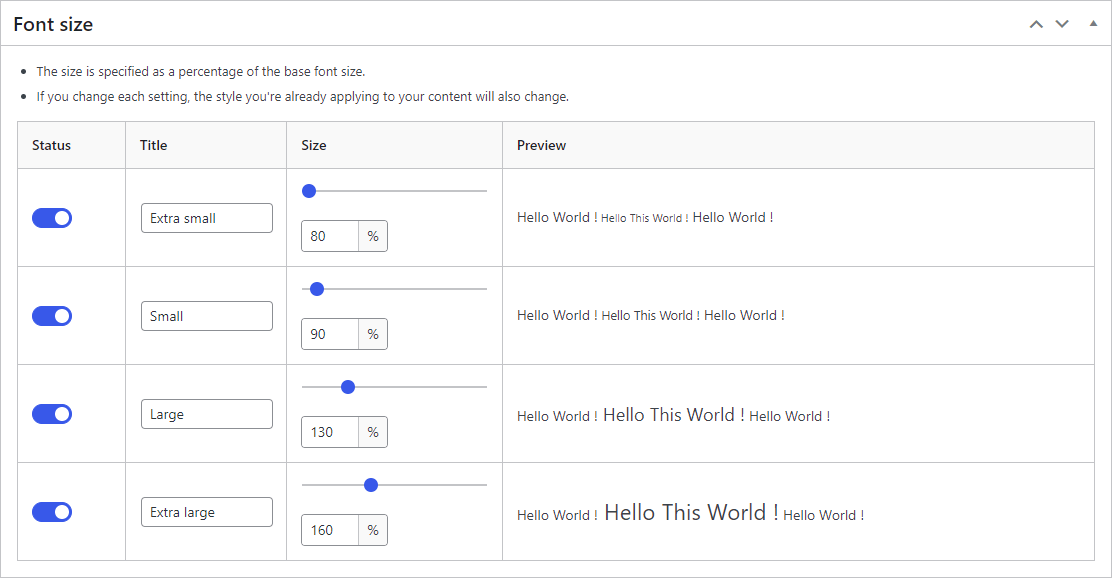
Setting (Font Size) 
Setting (Others) 
Block Toolbar (Highlighter) 
Block Toolbar (Font Size)


Installatie
- Upload the
add-richtext-toolbar-buttonfolder to the/wp-content/plugins/directory. - Activate the plugin through the \’Plugins\’ menu in WordPress.
Beoordelingen


Bijdragers & ontwikkelaars
“RichText Extension” is open source software. De volgende personen hebben bijgedragen aan deze plugin.
Bijdragers
“RichText Extension” is vertaald in 6 localen. Dank voor de vertalers voor hun bijdragen.
Vertaal “RichText Extension” in je eigen taal.
Interesse in ontwikkeling?
Bekijk de code, haal de SVN repository op, of abonneer je op het ontwikkellog via RSS.
Changelog
2.9.0
- Tested to WordPress 6.9
- Drop support for WordPress 6.6 and 6.7
2.8.0
- Tested to WordPress 6.8
- Drop support for WordPress 6.5
2.7.0
- Tested to WordPress 6.7
- Drop support for WordPress 6.4
2.6.1
- Add missing changelog entry
2.6.0
- Tested to WordPress 6.6
- Drop support for WordPress 6.3
2.5.0
- Tested to WordPress 6.5
- Drop support for WordPress 6.2
- Fix: Can’t disable “Underline” and “Clear format” button
- Fix: Deprecated error in PHP 8.2
2.4.0
- Tested to WordPress 6.4
- Drop support for WordPress 6.0, 6.1
2.3.0
- Tested to WordPress 6.3
- Add: striped style
- Enhancement: Always show preview style on settings page
- Enhancement: Polish icons
- Enhancement: Polish Block Toolbar style
- Enhancement: Polish the settings page style
- Fix: Checkbox values are not updated when saving settings for the first time
- Drop support for WordPress 5.9
- Drop support for PHP 7.3
2.2.0
- Tested to WordPress 6.2
- Enhancement: Narrow spacing between drop-down buttons
- Enhancement: Improve accessibility on the settings page
- Fix: Dropdown buttons are not aligned in WordPress 6.2
- Fix: Default color schema not applied on settings page
2.1.0
- Tested to WordPress 6.1
- Drop support for WordPress 5.6 through 5.8
- Enhancement: Apply admin color scheme to the setting page
- Enhancement: Polish style in the setting page
- Doc: Update banner and screenshot
2.0.0
- Tested to WordPress 6.0
- Change: Underline tag type
- Doc: Add cautionary text about underline
- Doc: Update author name
1.3.0
- Tested to WordPress 5.9
1.2.3
- Clean: update npm packages and build tool
1.2.2
- Clean: Update npm packages
- Remove: Bundled language files
1.2.1
- Doc: Update tested up to
1.2.0
- Tested to WordPress 5.8
- Clean: update npm packages
1.1.9
- Tested to WordPress 5.7
1.1.8
- Clean: Update deploy flow (github actions)
- Fix: Wrong plugin version
- Clean: update npm packages and organize development env
1.1.7
- Clean: Refactoring, Replace deprecated components with recommended ones
- Fix: Problem about installation error in PHP 8
- Tested to PHP 8
1.1.6
- Change: toolbar icon from dashicon to svg icon
1.1.4
- Remove: gulpfile.js
- Clean: Update npm packages, add .wp-env, and refactor the development environment
- Clean: Remove composer.lock and package-lock.json from .gitignore
- Clean: Remove the compiled JS files
- Clean: Remove the compiled CSS files
- Update development setting
- Add: composer
- Delete: package-lock.json
1.1.3
- Doc: Correct a notation error in the translation
1.1.2
- Fix: metabox warning error
1.1.1
- Fix: Problem about uninstallation process
1.1.0
- Remove: activation check
1.0.2
- Fix: Problem that style is not reflected on first installation
- Fix: Problem that preview does not switch when status is changed
1.0.1
- Update: build process
- Update: translation
1.0.0
- Initial release

