

Beschrijving


Restrict Dates Add-On for Gravity Forms
Beschrijving
A simple and nice plugin to add date restrict dynamically in gravity forms default date picker field. If the installation is okay, go to gravity forms dashboard. Add a date field on your form. Open date field and you will see to Enable Restrict date options checkbox. Click that checkbox and configure as you want. And save form. You’re done!
View Pro Demo | Documentation | Buy Pro
Features
- Minimum date set to a current and specific date
- Maximum date set to a current and specific date
- Disable manually input (read-only option)
- Week/Off day disable
- Disable specific dates (new)
- Week start day (new)
Premium Features
- Prevent submission with disabled dates
- Add exceptions date
- Timezone support
- Language Support
- Custom validation text
- Date calculation
- Date modifiers
- Inline Datepicker
- and more…
Requirements
- PHP 5.6
- Gravity Forms 2.5 or 2.8 or latest
Schermafbeeldingen
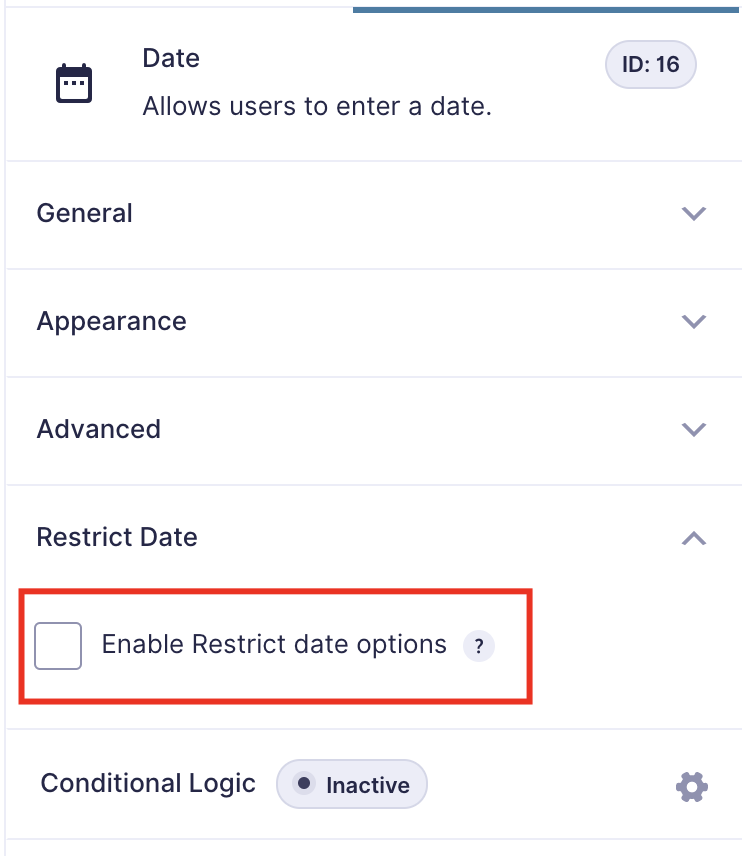
Click to enable restrict date 
You can see all options 
Set options as your requirements


Installatie
Installation is fairly straight forward. Install it from the WordPress plugin repository.
FAQ
Can I disable specific days of the week, like weekends?
Yes. You can disable any weekday (for example, Saturday and Sunday) to prevent users from choosing those dates.
Can I set a minimum and maximum date range?
Absolutely. You can define both a minimum and maximum selectable date. For example, allow only dates from “tomorrow” to “30 days from today.”
Does it support multiple date fields in the same form?
Yes. Each date field can have its own restriction settings — all managed individually within the Gravity Forms editor.
Can I restrict dates globally for all forms?
Currently, restrictions are applied per field of gravity forms.
Does it support inline date picker?
Yes, Its supproted but only in the pro version.
Beoordelingen


Bijdragers & ontwikkelaars
“Restrict Dates Add-On for Gravity Forms” is open source software. De volgende personen hebben bijgedragen aan deze plugin.
Bijdragers

Vertaal “Restrict Dates Add-On for Gravity Forms” in je eigen taal.
Interesse in ontwikkeling?
Bekijk de code, haal de SVN repository op, of abonneer je op het ontwikkellog via RSS.
Changelog
1.2.3
- Update Freemius SDK
- Minor bug fix
1.2.2
- Update Freemius SDK
- Minor bug fix
1.2.1
- Add start day of calendar
- Add Freemius SDK
- Release Pro version
1.2.0
- Disable specific dates
- Fix bugs
1.1.0
- Add week/off day disable option
1.0.0
- Initial Release

