

Beschrijving


PW WooCommerce Exclude Free Shipping
Beschrijving
Laten we zeggen dat je klant de volgende producten in hun winkelwagen heeft:
- Papieren vliegtuig
- Speelkaarten box
- Een vleugelpiano
Je biedt “gratis verzending voor bestellingen van meer dan $50” aan, maar je geeft aan dat er enkele beperkingen gelden.
Natuurlijk zal de vleugelpiano behoorlijk wat kosten om te verzenden, dus je wil geen gratis verzending aanbieden bij deze bestelling.
With this plugin, the Grand Piano can be marked “Exclude Free Shipping” which means the user will pay for shipping of this unique item. See screenshots for a visual example.
Works for Simple Products, Variable Products, and even Variations!
I have many products that I need to update. How can I do this quickly?
This plugin is compatible with our PW WooCommerce Bulk Edit Pro plugin.
Quickly update the products that should be excluded from the Free Shipping offer.
Like this free plugin?
Check out our most popular plugin PW WooCommerce Gift Cards.
We also offer many other Free and Premium Plugins to help your WooCommerce store!
Schermafbeeldingen

Standaard is het veld “Gratis verzending uitsluiten” niet aangevinkt. 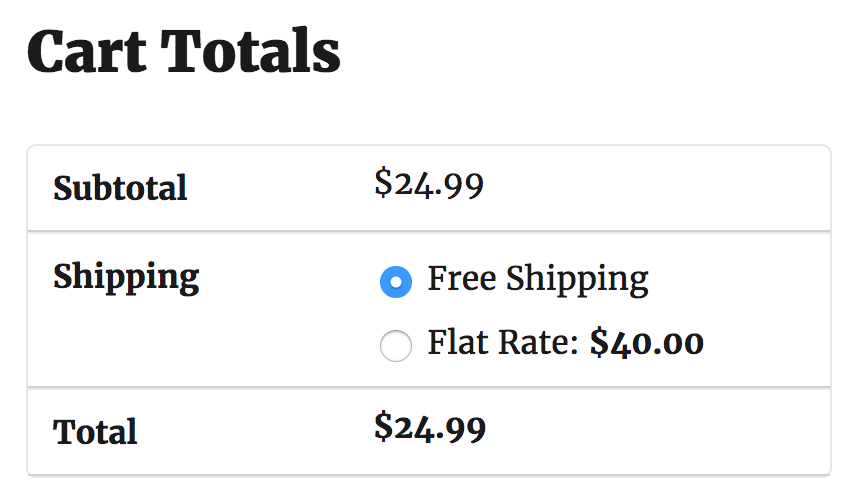
Klanten zullen waarschijnlijk geen verzendkosten willen betalen! 
Het aanvinken van “Uitsluiten van gratis verzending” voorkomt dat je geld verliest. 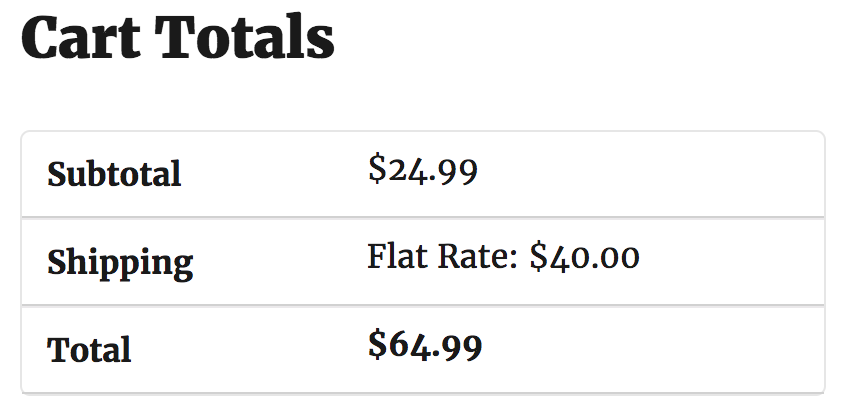
Gratis verzending is niet langer een optie.


Installatie
- Upload the plugin files to the
/wp-content/plugins/pw-woocommerce-exclude-free-shippingdirectory, or install the plugin through the WordPress plugins screen directly. - Activeer de plugin via het ‘Plugins’ scherm in WordPress.
- Navigeer naar een WooCommerce product en open de tab Verzending.
- Check (or uncheck) the “Exclude Free Shipping” checkbox.
FAQ
Can I use PW WooCommerce Bulk Edit to check the Exclude Free Shipping field?
- Ja, en je kunt het hier krijgen: PW WooCommerce Bulk Edit
Beoordelingen


Bijdragers & ontwikkelaars
“PW WooCommerce Exclude Free Shipping” is open source software. De volgende personen hebben bijgedragen aan deze plugin.
Bijdragers
“PW WooCommerce Exclude Free Shipping” is vertaald in 1 locale. Dank voor de vertalers voor hun bijdragen.
Vertaal “PW WooCommerce Exclude Free Shipping” in je eigen taal.
Interesse in ontwikkeling?
Bekijk de code, haal de SVN repository op, of abonneer je op het ontwikkellog via RSS.
Changelog
1.44
- Confirmed compatibility with WordPress 6.9 and WooCommerce 10.4.
1.43
- Compatibility with WooCommerce 10.1.
1.42
- Compatibility with WordPress 6.8 and WooCommerce 9.8.
1.41
- Load translation files in the plugins_loaded event rather than init.
1.40
- Changed hook for loading translations file to avoid warning in WordPress 6.7.
1.39
- Compatibility with WordPress 6.7 and WooCommerce 9.4.
1.38
- Compatibility with WordPress 6.6 and WooCommerce 9.1. Added requirement for WooCommerce plugin to be installed.
1.37
- WooCommerce 9.0 compatibiliteit.
1.36
- Compatibility with WordPress 6.5 and WooCommerce 8.7 Revised tags in readme.txt
1.35
- Confirmed compatibility with WordPress 6.4
Previous versions
- Zie changelog.txt

