

Beschrijving


PushEngage – Web Push notification, WA Automation & Multi-Channel Chat Widget ( WA, Messenger, X, Telegram, TikTok & More)
Beschrijving
Boost engagement, drive repeat traffic, and increase sales with multichannel push notifications and a live chat widget that reach users directly on the web, mobile apps, WhatsApp, and more.
PushEngage is the #1 customer engagement plugin for WordPress and WooCommerce built to help you turn visitors into loyal, high-value customers through chat widgets, WhatsApp, and real-time order updates. Join 25,000+ smart marketers who use PushEngage to power millions of conversations and automated notifications every month.
- Add high-converting multichannel chat widgets to capture leads, resolve doubts instantly, and boost conversions
- Automate WhatsApp Business messages for abandoned carts, order updates, COD verification, promotions, and more
- Send real-time order status notifications for WooCommerce — from confirmation to delivery
- Launch price drop alerts, browse abandonment reminders, and transactional updates across channels
- Send web push notifications using our powerful Gutenberg integration whenever you need an extra channel
New in PushEngage: Multichannel Chat Widgets
Turn your website into a real-time communication center. With the updated PushEngage Chat Widget, you can connect visitors to your business instantly — using the channels they already love.
- WhatsApp: Fast, familiar messaging for global audiences.
- Facebook Messenger: Seamless chats for Meta users.
- Instagram DM & Instagram Page Inbox: Engage directly where customers discover you.
- SMS: Reach customers everywhere, even offline.
- Email: Perfect for longer support conversations.
- Phone Calls: Direct routing to your sales or support team.
- Google Maps & Waze: Help local customers find or contact stores instantly.
- Telegram, Line & Viber: Popular in Asia and Europe.
- X: Public engagement when visibility matters.
- Snapchat & TikTok: Reach younger audiences interactively.
- LinkedIn: Great for B2B lead generation.
- VK (Vkontakte): Take conversations to the Russian market.
- WeChat: Essential for serving the Chinese market.
- Slack & Microsoft Teams: Internal collaboration for advanced workflows.
- Discord: Community-first engagement for gaming and niche audiences.
- Custom Channel: Add any specialized or third-party messaging tool you use.
Capabilities That Convert More Visitors
- Multi-Agent Support: Route conversations to the right team members — sales, support, operations & more.
- Targeting & Personalization: Show specific channels based on location, device type, or visitor behavior.
- Scheduled Availability: Display support availability based on working hours or agent status.
- Analytics & Conversation Tracking: Understand which channels are driving engagement and ROI.
- Fully Customizable UI: Match widget design to your brand identity in minutes.
Why This Matters for Your Business
- 📈 Higher conversion rates — remove friction & let customers pick how they want to talk
- ⚡ Faster support resolution — route conversations to the right team instantly
- 🌍 Global compatibility — reach audiences across countries, cultures & platforms
- 🤝 Stronger relationships — real conversations build real trust
WhatsApp Messaging Automation
Engage your WooCommerce and WordPress users with direct, high-converting WhatsApp messages.
- 🛒 Recover abandoned carts
- 📦 Send order updates and shipping alerts
- 🧾 Trigger payment retries, COD confirmations, review reminders
- 💬 Add a free WhatsApp Click-to-Chat widget to any page
Built for WooCommerce. Works with your WhatsApp Business API.
💡 No SMS fees. No phone numbers to collect. Just better engagement.
The Only WordPress Plugin Built for Multichannel Customer Engagement
PushEngage is a complete customer engagement platform for WordPress and WooCommerce, offering:
- WhatsApp Notifications: Send personalized messages for cart recovery, order updates, and more. Free Click-to-Chat widget included.
- Web Push Notifications: Convert casual visitors into subscribers with 2-click opt-ins. Send campaigns straight from the WordPress editor.
- WooCommerce Push Notifications: Automate order updates, cart recovery, and price drop alerts.
- Mobile App Push Notifications: Reach users on Android, iOS, and cross-platform apps via React Native and Flutter.
- Multichannel Chat widget: Give customers instant support with a unified chat widget featuring 20+ channels and full multi-agent routing.
Don’t want all the channels? While we strongly recommend a multichannel approach to marketing, you’re completely free to pick and choose the channels you want.
Just want WhatsApp? No problem. Need web and app push notifications? We got you. Need everything at once? Just get started.
Our plugin is packed with features to help you:
- Grow your subscriber base with engaging opt-ins.
- Launch push notification campaigns that drive conversions.
- Track performance with advanced analytics and revenue insights.
PushEngage integrates directly with WordPress and helps you:
- Opt-ins aanmaken
- Lanceer web push campagnes
- Vergroot je abonneebestand
- Volg je omzetdoelen
- Manage your audience using advanced segmentation and audience targeting rules
Straight from your WordPress dashboard. You can even create push notifications from your Gutenberg post editor that automatically fetch and map:
- Post Title Notification Title
- Meta Description Notification Text
- Featured Image Notification Image
Plus, you can select a custom audience right inside the Gutenberg editor.
WhatsApp Notifications for WooCommerce
Recover abandoned carts and send transactional updates directly on WhatsApp.
- Cart reminders via WhatsApp
- Order confirmations and shipping alerts
- Werkt naadloos met WooCommerce
All from pre-built campaigns! Just connect your WhatsApp Business API and enable the campaigns.
NOTE: You can send unlimited WhatsApp messages with our paid plans. Unlike SMS, which is super expensive and charges you per message, you only pay a flat fee for the PushEngage platform.
PushEngage for WooCommerce Push Notifications
With PushEngage, setting up WooCommerce push notifications is effortless.
Effortlessly send:
- ✅ Cart & browse abandonment reminders
- ✅ Order confirmations & shipping updates
- ✅ Price drop alerts & inventory notifications
- ✅ Payment retry requests and review reminders
Just turn on the pre-built campaign templates. No coding required.
PushEngage is a multichannel notification system for WordPress and WooCommerce. Engage customers, streamline operations, and automate critical updates with real-time web push notifications, WooCommerce push notifications, and app push notifications.
PushEngage for WooCommerce Store Customers
- Instant Order Updates: Keep customers informed with pre-built notification templates that you can simply turn on with a toggle button.
- Multiple Campaign Types: Send automated WooCommerce push notifications for order confirmations, shipping alerts, product updates, and delivery updates with a single click.
- Cart Abandonment Recovery: Bring back lost shoppers with cart abandonment push notifications, increasing conversions effortlessly.
- Personalized Promotions & Re-Engagement: Send targeted push campaigns to drive repeat visits and sales. You can even send individual notifications for review requests, payment retries, and order updates using pre-built templates.
- Seamless Multichannel Messaging: Customers receive updates via web push, app push, and PWA push notifications.
PushEngage for WooCommerce Store Admins & Teams
- Internal Team Alerts: Automate notifications for new orders, refund requests, and order fulfillment updates.
- Faster Decision-Making: Get real-time alerts for critical order updates. Never lose another sale due to missed internal communications.
- Pre-Built WooCommerce Templates: Save time with ready-made order notifications, and team alerts.
- Seamless Multichannel Coordination: Keep your team in sync with instant internal notifications across multiple devices.
Verzend web, mobiele en web app berichtgevingen om herhaald verkeer & conversies te verhogen
Of je nu een blog, een nieuws site, een reis site, een SaaS site, of een e-commerce site runt, berichtgevingen kunnen je helpen je bedrijf te laten groeien.
Het beste deel van PushEngage’s web push campagnes is dat je het kunt aanpassen om aan elk type bedrijf te voldoen.
Als je een e-commerce site runt, kun je transactie berichtgevingen verzenden om je omzet te verhogen. En als je een blogsite of een media-outlet runt, dan kun je krachtige geautomatiseerde campagnes opzetten om terugkerende lezers, meer advertentie inkomsten, meer weergaven op je sociale media inhoud, en nog veel meer te krijgen.
Je kunt zelfs de betaalde abonnementen op je premium inhoud, merchandise verkopen, conversies op je affiliate aanbiedingen, en meer verhogen.
Hier is een snelle blik op enkele van de meest geavanceerde functies die je moet kennen:
- Push Broadcast – Plan of stuur berichtgeving bezorging naar een aangepast publiek in een paar minuten. Gebruik inkomsten volgen om zicht te houden op je doelen en A/B testing om de prestaties van je campagne te verbeteren.
- Welkomst berichtgevingen – Verstuur geautomatiseerde welkomstberichten naar je berichtgeving abonnees. Verhoog de retentiepercentages en verstuur kortingen en aanbiedingen om je verkopen te verhogen.
- Automatische segmentatie – Snel segmenteren van je berichtgevingsabonnees zodra ze zich abonneren op basis van hun interesses.
- Doelgroep – Maak retargeting berichtgevingen en geavanceerde targeting groepen binnen je doelgroep. Filter je doelgroep op gedrag, engagement en interesses.
- Timezone berichtgevingen – Plan je berichtgeving om automatisch te verzenden wanneer het de meeste impact heeft. Verstuur berichtgevingen in je eigen tijdzone of in de tijdzones van je abonnees met één klik.
- Custom Drip Campaigns – stuur gepersonaliseerde drip berichtgeving om je herhaalde verkeer, betrokkenheid en verkoop te verbeteren. Richt je opnieuw op je klanten en verander ze in loyale superfans.
- Krachtige e-commerce campagnes – je kunt e-commerce berichtgeving gebruiken om je bedrijf snel te laten groeien. Het beste deel van e-commerce berichtgeving is dat ze gemakkelijk op te zetten zijn en vrij eenvoudig voor zelfs startups om te betalen.
En als je het super druk hebt met marketingactiviteiten en je berichtgevingen gewoon wil gebruiken om je nieuwe inhoud te promoten, kun je ook RSS berichtgevingen verzenden. In tegenstelling tot andere berichtgevingen diensten hoef je niet eens een meldingen API te gebruiken.
Nog beter, de PushEngage plugin kan automatisch je WordPress blogcategorieën omzetten in segmenten die je kunt gebruiken om retargeting berichtgevingen te verzenden.
Je kunt je targeting nog verder verfijnen met doelgroepen.
Het coolste deel? Je kunt altijd met ons customer success team praten om je campagnes in te stellen, te volgen en te optimaliseren. En we geven je ook berichtgeving templates die bewezen werken zodat je niets helemaal vanaf nul hoeft te bouwen. Het is super gebruiksvriendelijk.
Het PushEngage dashboard maakt marketing beheersbaar
We built PushEngage to help you create powerful marketing workflows and custom web push notification campaigns without a developer.
Met PushEngage kunt je krachtige marketingcampagnes maken vanuit een eenvoudig dashboard in een paar minuten, zelfs als:
- Je bent geen ontwikkelaar en weet niet hoe je code moet gebruiken om berichtgevingen te sturen
- Je hebt nog nooit berichtgevingen gebruikt en hebt geen idee waar te beginnen
- Je hebt een andere berichtgeving software geprobeerd en de ervaring gehaat
PushEngage heeft krachtige integraties die je toestaan meldingen te verzenden naar elk besturingssysteem, webbrowser en mobiele apparaten.
Maar neem niet zomaar ons woord ervoor. Hier is wat Amanda te zeggen had:
Het is supergemakkelijk te gebruiken, het ondersteuningsteam is behulpzaam en de resultaten zijn indrukwekkend. Vooral als je bedenkt hoe weinig werk het is om ze te bouwen en te verzenden. Ik raad PushEngage ten zeerste aan aan iedereen die een manier wil om klanten te bereiken die snel, betrouwbaar en effectief is.
– Amanda Hyciek, Digital Marketing Strateeg, Wicked Weasel (Bekijk Case Study)
Tijd geteste templates voor berichtgeving campagnes
Weet je niet welke berichtgeving campagnes je nodig hebt en hoe te beginnen? Geen zorgen. We hebben campagne templates in ons dashboard ingebouwd die je kunt gebruiken om te beginnen.
- Selecteer een campagnetype
- Maak je web berichtgevingen
- Selecteer een doelgroep om naar te verzenden
- Verzend/plan je campagne
Zelfs met geavanceerde trigger campagnes, kun je starten met een template die wordt geleverd met voorgebouwde triggers, zodat je ze niet zelf hoeft in te stellen. Het enige wat je hoeft te doen is je bedrijf te laten groeien.
Slimme pagina targeting en gedragsgebaseerde personalisatie
Alle PushEngage pop-up modals worden geleverd met geavanceerde pagina targeting en gedrag gebaseerde personalisatie.
Dit betekent dat je een aangepaste pop-up kunt tonen voor:
- Een specifieke pagina of set van pagina’s van je site
- Verschillende sitebezoekers op basis van hun geolocatie
- Gebruikers die een specifieke link klikken
En nog veel meer!
Je kan zelfs je abonnees automatisch segmenteren wanneer ze je site bezoeken. PushEngage stelt je in staat om aangepaste segmentatie regels te maken. En als je wilt dat je bezoekers op een knop op je site klikken om je te abonneren op je meldingen, kun je klik om te abonneren knoppen maken.
Als je dat wilt, kun je zelfs een abonnementen widget maken waar je bezoekers kunnen kiezen welk soort meldingen ze willen ontvangen.
Dit stelt je in staat om gerichte berichtgevingen te sturen die je meer abonnees, hogere betrokkenheidspercentages en meer verkoop opleveren.
Geavanceerde analytics en A/B testen
PushEngage comes with reliable A/B split testing and accurate analytics without slowing down your site. PushEngage offers far better infrastructure for more accurate results. You get detailed analytics on all your campaigns and optins right from your dashboard.
Wat nog meer is dat je slimme A/B testen kunt maken om een lopende campagne te verbeteren.
Met slimme A/B testen kun je een kleine doelgroep selecteren om je browser meldingen te splittesten en vervolgens de winnende melding naar de rest van je publiek te verzenden.
Notities
PushEngage is zonder twijfel de beste berichtgeving plugin op de markt. Geen enkele andere WordPress melding plugin komt zelfs in de buurt van PushEngage en de functies die het biedt.
We lopen voorop in de wereld van berichtgevingen. Lange tijd was berichtgeving software nergens zo krachtig of flexibel als e-mail marketing software. Met PushEngage verandert dat. En snel!
Ook ben ik de oprichter van verschillende populaire online bedrijven, dus het was voor mij een grote prioriteit om een WordPress berichtgeving plugin te maken die ons kan helpen om onze abonnees & verkopen te laten groeien.
Ik heb het gevoel dat we dat hebben bereikt. Ik hoop dat je geniet van het gebruik van PushEngage.
Bedankt
Syed Balkhi
Schermafbeeldingen

Chat Widget Preview 
Chat Widget Settings 
Add Multiple Agents 
Analytics dashboard 
Gepersonaliseerde marketing via segmentatie 
Opt-in analytics gegevens overzicht 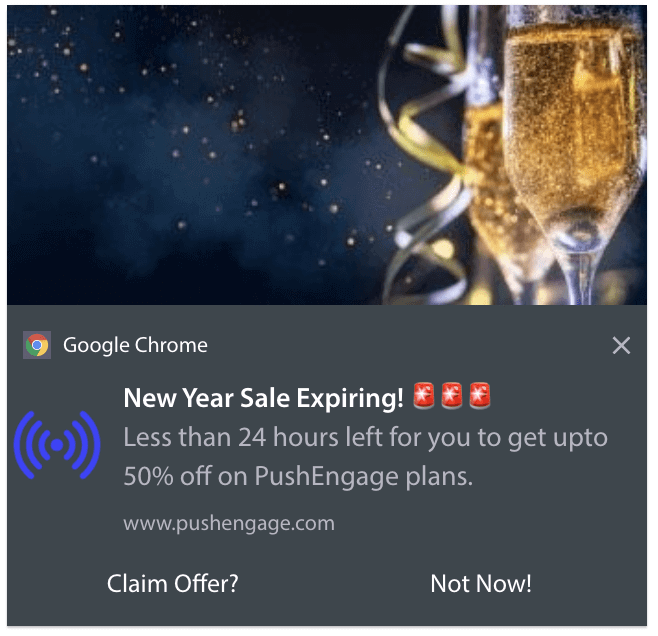
Krachtige berichtgeving voor gebruikersbetrokkenheid 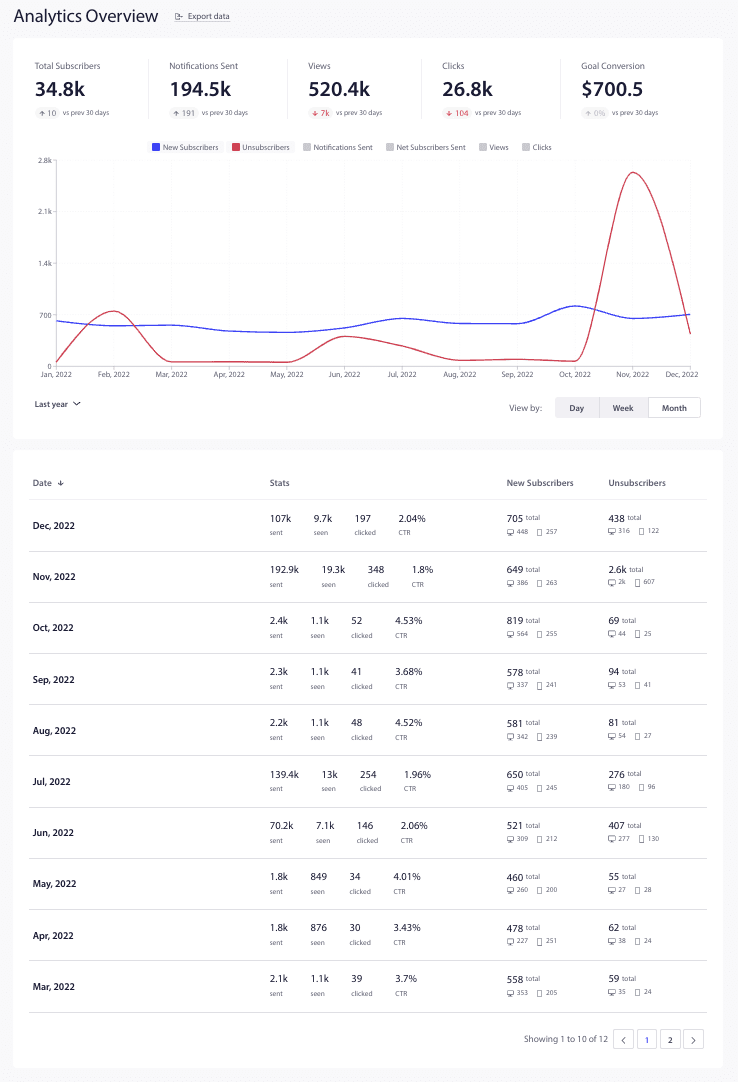
Uitgebreid analytics overzicht voor gedetailleerde inzichten 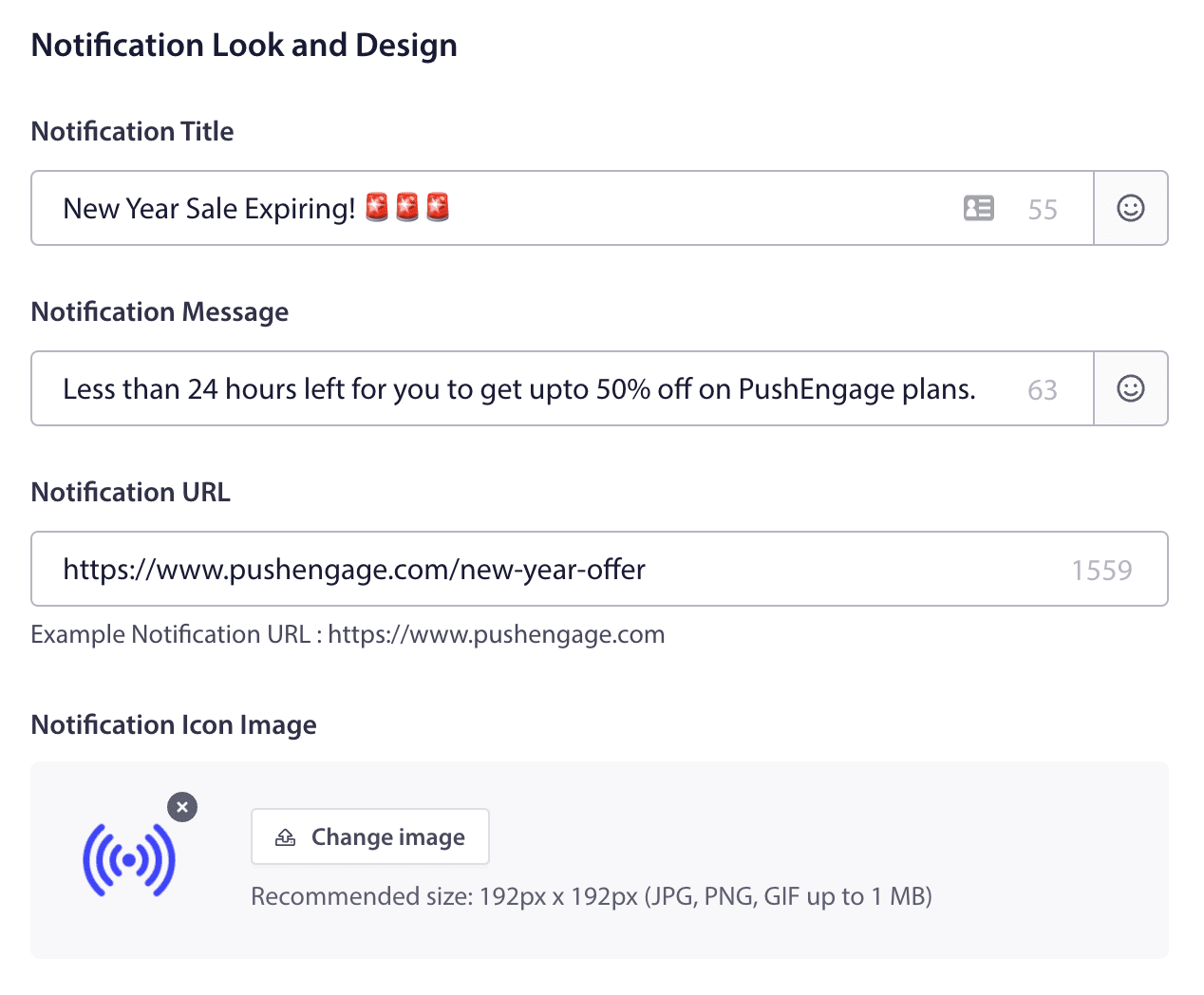
Melding uiterlijk en ontwerp 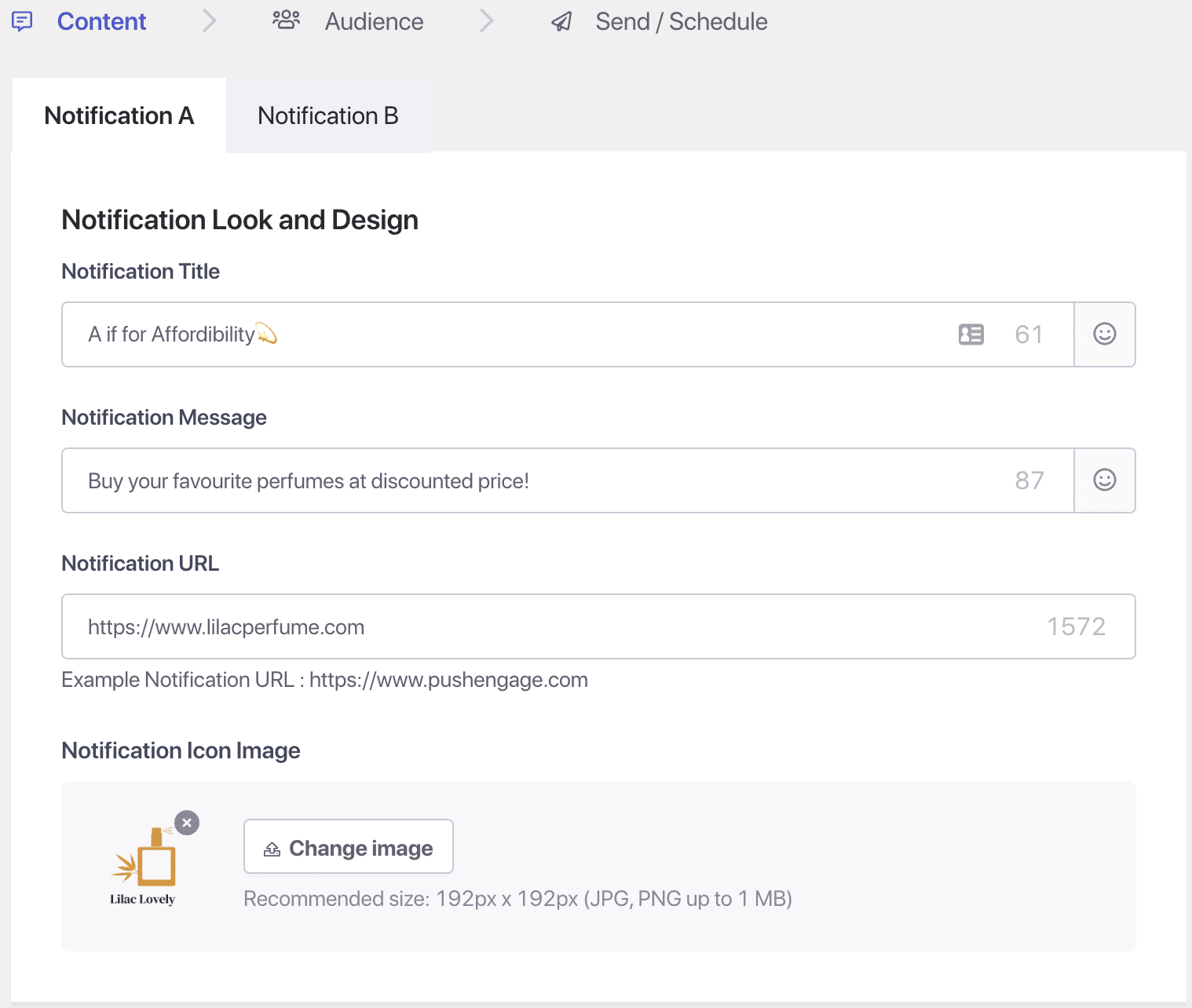
Verhoog gebruikersbetrokkenheid met A/B testen 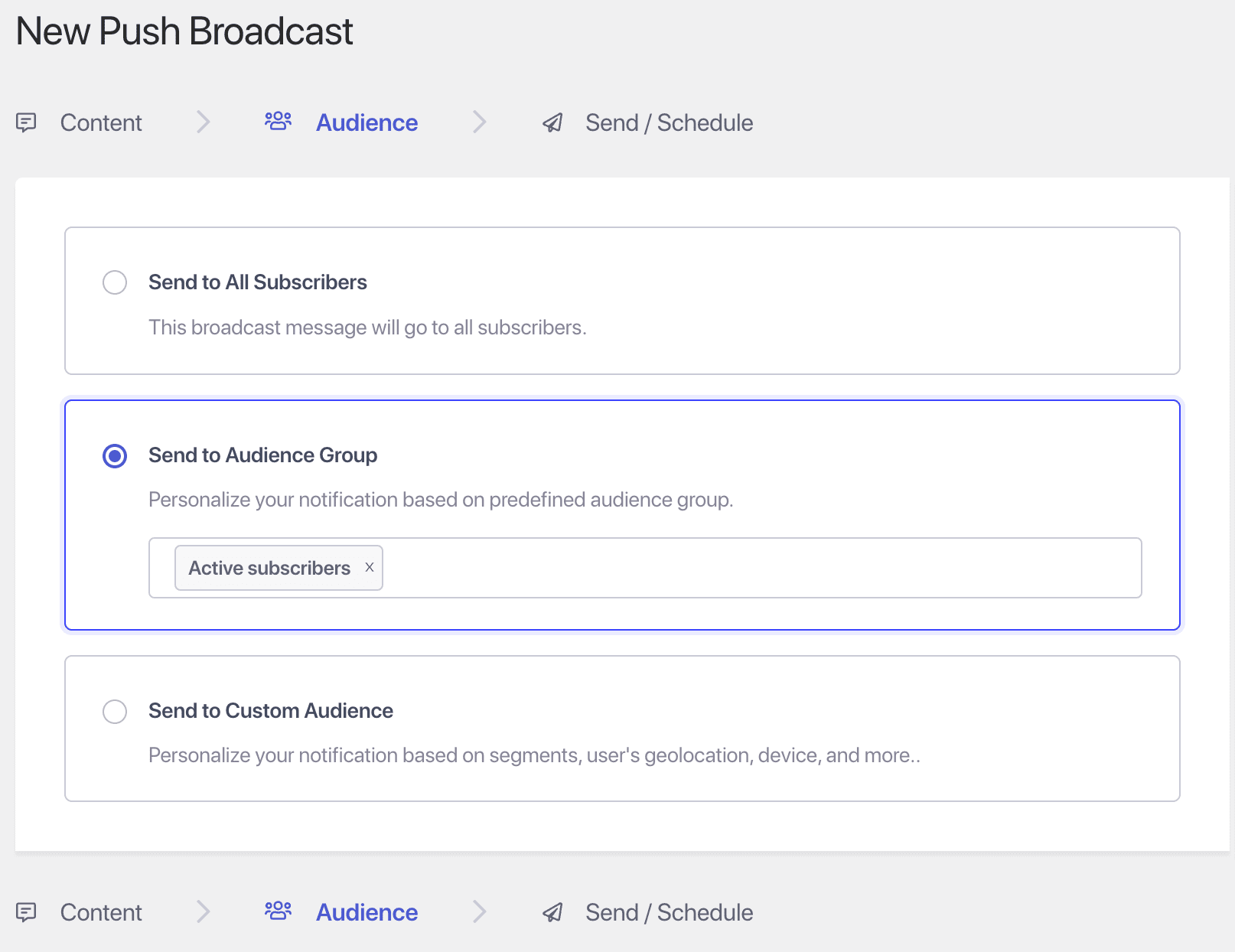
Gerichte campagnes via doelgroep selectie 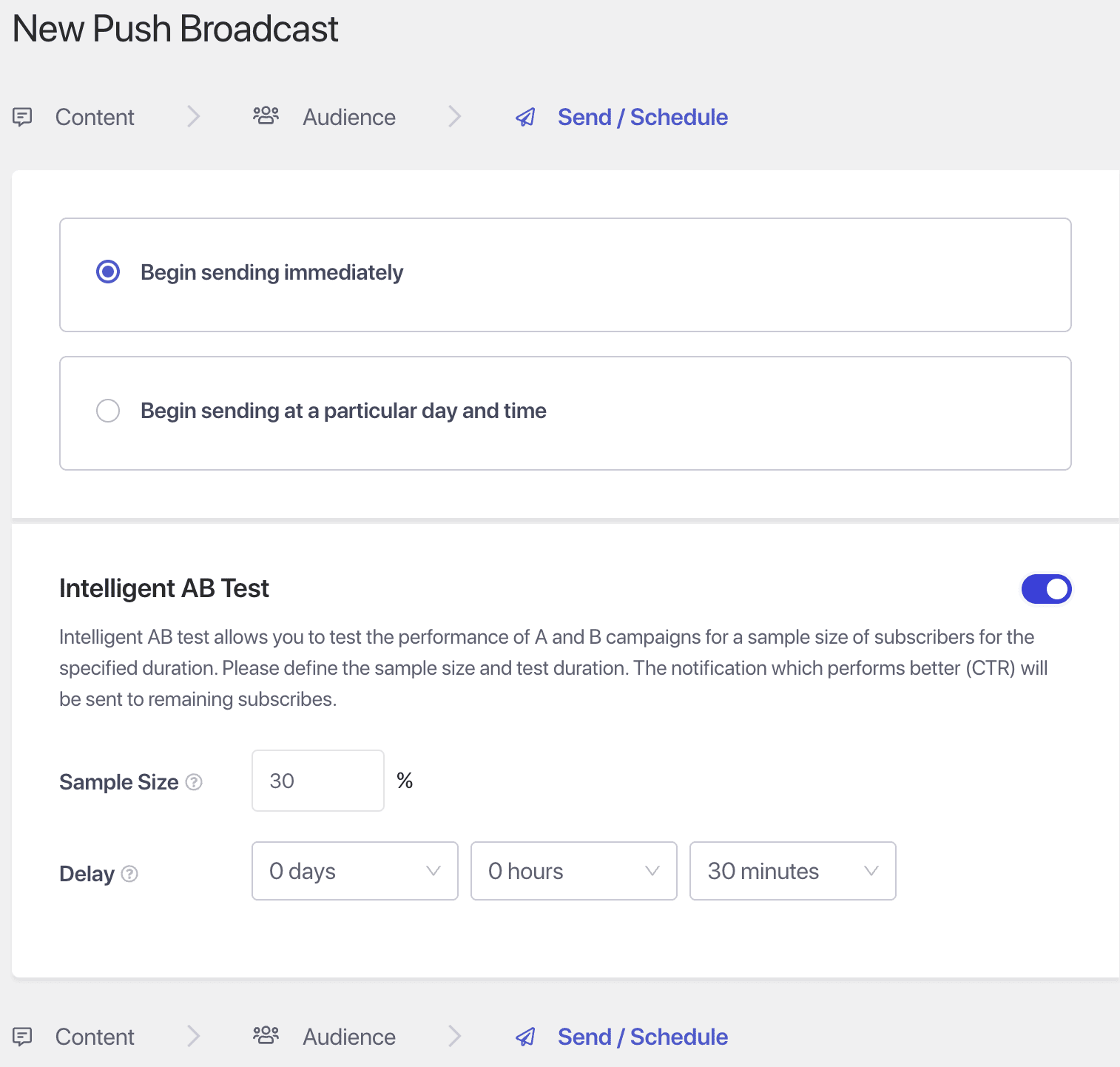
Verzend campagnes op het perfecte moment


Installatie
- Installeer PushEngage berichtgeving via the WordPress.org plugin repository of door de bestanden naar je server te uploaden.
- Activeer de PushEngage plugin vanaf de plugin sectie.
- Navigeer naar de PushEngage tab in je WordPress beheer en verbind je PushEngage account met je WordPress site om abonnement pop-ups te tonen en een abonneebasis op te bouwen.
- Klik op de Campagnes tab om campagnes in te stellen of automatische berichten te versturen bij elke gepubliceerd bericht.
- Wil je meer berichtgeving functies? Upgrade naar PushEngage Business, Premium of Growth plan.
FAQ
Is er een gratis abonnement en wat is inbegrepen?
PushEngage offers a free plan, which includes basic push notification features to help you get started. You also get a chat widget that allows website visitors to send your business a message on one channel out of the 20+ available ones. Paid plans unlock advanced features such as Multi-channel & Multi agent chat widget, WhatsApp Automation, A/B testing, analytics, audience segmentation, and additional customization options to drive higher engagement.
Hoe verhouden berichtgevingen zich tot e-mail voor betrokkenheid?
Berichtgevingen zijn als de Youtube Shorts van de berichten wereld. Het is een ander format en je bereikt vaak hogere betrokkenheidspercentages dan met e-mail, omdat ze berichten direct aan apparaten van gebruikers leveren. Met PushEngage kun je zelfs campagnes automatiseren en doelgroepen segmenteren, wat het gemakkelijk maakt om betrokkenheid te onderhouden zonder constante handmatige input.
Do I need a WhatsApp Business account to send notifications?
Yes. To send WhatsApp notifications using PushEngage, you need a WhatsApp Business API account connected through a verified phone number.
What is the PushEngage chat widget?
The chat widget is a built-in customer support and lead-capture tool that lets you engage visitors in real time, answer questions quickly, and guide them toward conversions.
Can I customize the widget’s appearance?
Yes. You can change colors, welcome text, icons, and positions on the screen to match your site’s branding.
Can I route chats to my team members?
Absolutely. You can assign chats across support reps, set working hours, and configure fallback rules for when your team is offline.
Will the chat widget slow down my site?
No. It’s lightweight, asynchronously loaded, and optimized for WordPress performance best practices.
What types of messages can I send via WhatsApp?
You can send transactional and automated messages including:
- Bestellingsbevestigingen
- Updates over verzending en levering
- Abandoned cart reminders
- COD verification messages
- Payment retry requests
Can I send promotional messages via WhatsApp?
You can send promotional messages only within approved template categories allowed by WhatsApp. These typically require prior opt-in and WhatsApp template approval.
Is WhatsApp messaging available on the free plan?
WhatsApp business messaging automation is not available on the free plan due to third-party costs. The free plan includes a WhatsApp click to chat widget that allows your website visitors to send a message to your business. But that can’t recover lost sales or improve your customer satisfaction with order status updates.
Does this work with WooCommerce?
Yes. Our WhatsApp integration is built specifically for WooCommerce and can be activated with a toggle. You can use pre-built templates or create custom ones.
Hoe stel ik WhatsApp in PushEngage in?
From your PushEngage dashboard:
- Navigeer naar Kanalen » WhatsApp
- Connect your WhatsApp Business API provider (e.g., 360dialog or Meta)
- Configure templates and triggers
- Enable WhatsApp campaigns for WooCommerce events
Can I personalize WhatsApp messages for each customer?
Yes. PushEngage supports dynamic variables such as customer name, order ID, product names, and tracking links for hyper-personalized messages.
What happens if the user doesn’t have WhatsApp?
Messages will only be delivered to users with WhatsApp. If a user doesn’t have WhatsApp, fallback messaging (like web push) is recommended.
Is WhatsApp messaging GDPR-compliant?
Yes. PushEngage ensures you can collect proper consent via opt-in checkboxes and comply with WhatsApp’s template and opt-in policies.
Kan PushEngage meldingen sturen naar zowel desktop als mobiele gebruikers?
Ja, PushEngage ondersteunt meldingen op meerdere platforms, inclusief desktopbrowsers (Chrome, Firefox, Safari, Edge) en mobiele browsers op Android en iOS. Dit zorgt ervoor dat je je publiek op elk apparaat kunt bereiken. Je kunt zelfs mobiele berichtgevingen verzenden zonder een mobiele app.
Biedt PushEngage ondersteuning voor e-commerce campagnes zoals winkelwagen verlaters?
Absoluut! PushEngage heeft krachtige e-commerce functies die speciaal zijn ontworpen voor WooCommerce en andere platforms. Je kunt geautomatiseerde meldingen verzenden voor winkelwagen verlaters, prijsdalingen, voorraad alarmen en blader verlaters om potentiële gemiste verkopen te herstellen.
Hoe behandelt PushEngage analyse en het volgen?
PushEngage bevat ingebouwde analyse om je te helpen bij het monitoren van je campagneprestaties. Je kunt statistieken zoals doorklikratio’s, conversies en inkomsten direct vanaf je dashboard volgen, en zelfs integreren met Google Analytics voor diepere inzichten.
Kan ik PushEngage gebruiken met andere marketinggereedschap?
Ja, PushEngage integreert soepel met veel populaire marketinggereedschap, waaronder Google Tag Manager, Instapage, ClickFunnels en CRM-systemen. Hierdoor kun je naadloze marketingworkflows creëren over verschillende platforms.
Is klantenondersteuning beschikbaar als ik hulp nodig heb?
PushEngage biedt een toegewijd Customer Success team om te helpen met de set-up, probleemoplossing en campagne optimalisatie. Met een betaald abonnement krijg je ook toegang tot prioriteitsondersteuning om ervoor te zorgen dat je het meeste haalt uit je berichtgeving strategie.
Beoordelingen


Bijdragers & ontwikkelaars
“PushEngage – Web Push notification, WA Automation & Multi-Channel Chat Widget ( WA, Messenger, X, Telegram, TikTok & More)” is open source software. De volgende personen hebben bijgedragen aan deze plugin.
Bijdragers

Interesse in ontwikkeling?
Bekijk de code, haal de SVN repository op, of abonneer je op het ontwikkellog via RSS.
Changelog
Meest recente wijzigingen:
4.2.1
- Added a new Chat Widget Analytics feature for tracking widget and Channel Interactions.
- Enhancements in PushEngage WP Admin screens for better visibility and usability.
- Minor bug fixes and performance improvements.
4.2.0
- Added a multichannel Chat widget enabling users to start conversations across multiple platforms.
- Added filter for WooCommerce Order Push Notification dynamic replacement variables.
- Minor bug fixes and performance improvements.
4.1.6
- Added new attributes and subscriber fields UI.
- Added support for using shortcodes in WhatsApp templates.
- Minor bug fixes and performance improvements.
4.1.5
- Added WooCommerce Automation page, new UI for consistency in managing WooCommerce Integrations.
- Added a new tags filter for push broadcast notifications list.
- Added a Separator in the PushEngage admin menu to categorize admin screens and settings.
- Minor bug fixes and performance improvements.
4.1.4.1
- Minor bug fixes and improvements.
4.1.4
- Added a feature that gives the option to use AI-based text generation for notification title and message.
- Minor bug fixes and improvements added to enhance performance.
4.1.3
- Improved onboarding process.
- Improved WooCommerce order notification process.
4.1.2
- Added WhatsApp Notification support for WooCommerce.
- Verbeterde onboarding flow.
4.1.1.1
- Added Onboarding wizard progress tracker in Dashboard.
- Updated the Dashboard Page to highlight WooCommerce Integration features.
- Minor bug fixes and improvements.
4.1.1
- Added Enhancements for the onboarding wizard to save onboarding progress.
- Updated WooCommerce order updates to make it compatible with legacy order table.
4.1.0
- Added new onboarding wizard for new sites that enhances PushEngage setup experience.
- Added WooCommerce Integration to send order updates Push Notifications.
- Enabled Goal tracking feature for free plan users.
- Added Goal tracking support for WooCommerce order update Push Notifications.
- Added Auto push setting in pre-publish checklist of products.
4.0.12
- Updated PushEngage Dashboard screen layout when site is not connected.
- Added conditional load for performance optimization.
- Updated use of PushEngage version constant for admin scripts.
4.0.11
- Geüpdatet, PushEngage WP beheer menupositie voor betere toegang.
- Geüpdatet, integratie submenu om WooCommerce integratie te verbeteren.
- Opgelost, kleine UI bugs in de PushEngage instellingenpagina.
4.0.10
- PushEngage instellingen toegevoegd in de pre-publicatie checklist.
- Verbeterde onboarding flow.
- API-sleutel gemaskeerd op de instellingenpagina.
- Opgelost, een probleem waarbij meldingen voor geplande berichten niet werden verzonden wanneer ze werden gepubliceerd door plugins van derden.
- Opgelost, integratie menu-item actieve toestand stijl.
4.0.9
- Nieuw “Trigger” menu toegevoegd om getriggerde campagnes vanuit de plugin te creëren en te beheren.
- Integratie toegevoegd voor WooCommerce winkelwagen en bladeren verlating campagnes.
- Template voor trigger meldingen toegevoegd voor winkelwagen en bladeren verlatings triggers.
- Ondersteuning toegevoegd voor WooCommerce productcategorieën in doelgroep segment selectie.
- Video bibliotheek link en video documentatie links toegevoegd in plugin.
- Geoptimaliseerde gegevens voor WPCode integratie snippets in PushEngage plugin.
4.0.8.1
- Opgelost JSON coderingsfout in multi-byte stringverwerking voor verbeterde betrouwbaarheid.
- Verbeterde foutafhandeling voor service worker registratie om een naadloze functionaliteit te garanderen.
- Gedetailleerde foutberichten toegevoegd voor probleemoplossing bij het mislukken van het verzenden van meldingen.
4.0.8
- De optie toegevoegd om de WPCode plugin te installeren via het PushEngage plugin dashboard.
- Configureerbare opties geïmplementeerd om browse en winkelwagen verlatingscampagnes te triggeren voor WooCommerce en EDD via WPCode plugin.
- Een instelling toegevoegd om het Pushengage overzicht widget te tonen/verbergen op WP dashboard.
- Geüpdatet pushEngage beheerdersmenu label van “Campagnes” naar “Push uitzendingen”.
4.0.7.1
- De PushEngage abonnement pop-up modal verwijderd van WordPress beheer pagina’s.
4.0.7
- Abonnementbeheer widget toegevoegd.
- Voorbeeld van pop-up modals en widgets verbeterd.
- Plugin beoordeling kennisgeving flow verbeterd.
- Geüpdatete PushEngage sdk init script.
4.0.6
- Push Broadcast templates toegevoegd.
- Beheer toegevoegd voor lege UTM parameters op bericht editor scherm.
- Controles toegevoegd om dubbele melding verzending in de Gutenberg bericht editor scherm te voorkomen.
- Verbeterde standaard service worker implementatie en flow om het probleem te verhelpen.
- Opgelost speciaal karakter coderingsprobleem in de meldingstitel en bericht op bericht editor scherm.
- Opgelost leeg meldingsbericht probleem op bericht editor scherm.
4.0.5.1
- Prestatieprobleem in berichteditor opgelost.
- Melding voorbeeldstijl conflict opgelost.
4.0.5
- Ondersteuning toegevoegd voor het selecteren van berichttypes voor auto push campagnes.
- Ondersteuning toegevoegd voor aangepaste UTM parameters op het bericht editor scherm.
- Windows 11 meldingsvoorbeeld toegevoegd.
- Ondersteuning toegevoegd om het verzenden van meldingen te testen op het bericht editor scherm.
- Web melding voorbeeld iOS toegevoegd.
- Meldingsvoorbeeld toegevoegd op het bericht editor scherm.
- PushEngage menu toegevoegd aan de WordPress toolbar.
- PushEngage overzicht widget toegevoegd om statistieken en recente meldingen weer te geven op het WordPress dashboard.
- Bericht en waarschuwingsbericht toegevoegd om plugin beoordelingen te verzamelen.
- Een snelkoppeling menu widget toegevoegd binnen de PushEngage plugin pagina.
- Een waarschuwingsbericht voor e-mailverificatie toegevoegd in de onboarding flow.
- Plan label tag toegevoegd voor pro functies.
- Beheer bericht en waarschuwingsbericht toegevoegd om service worker toegangsrechten problemen te tonen.
- Windows 10 meldingsvoorbeeld verbeterd.
- Melding voorbeeld macOS Chrome verbeterd.
- Web melding voorbeeld iOS verbeterd.
- PushEngage meta box interface op het bericht editor scherm verbeterd.
- Ontbrekende foutcode in het onboarding fout bericht opgelost.
- De standaard meldingstitel gewijzigd van blogtitel naar berichttitel voor automatische push campagnes.
- De actieknop URL veranderd om optioneel te zijn op het bericht editor scherm.
- Windows 8 meldingsvoorbeeld verwijderd.

