

Beschrijving

Pixabay Media Downloader
Beschrijving
Import royalty-free images, photos, and videos from Pixabay to your Media Library.
Easily search through millions of high-quality, royalty-free photos, illustrations, vector graphics, and videos using keywords.
Preview images and videos, select the ones you love, and import them instantly into your Media Library with just one click.
Say goodbye to manual downloads and uploads.
Key Features:
– Search and download both images and videos from Pixabay
– Advanced filtering options for images (type, orientation, size)
– Video type filtering (film, animation)
– SafeSearch option for family-friendly content
– Enhanced metadata storage for videos (dimensions, views, likes)
– Improved filename generation and collision avoidance
– Preview functionality for both images and videos
– Caching system for faster search results
Schermafbeeldingen
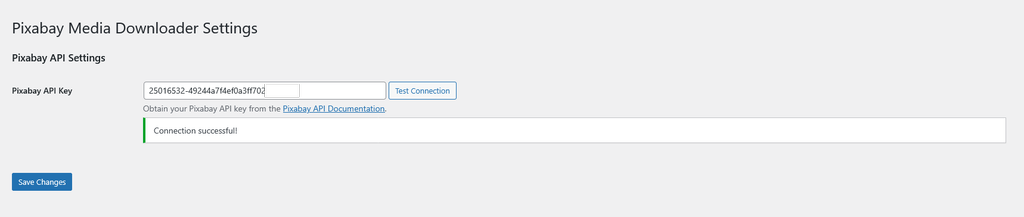
Configuration – Set up your Pixabay API key 
Search – Find images and videos using keywords and filters 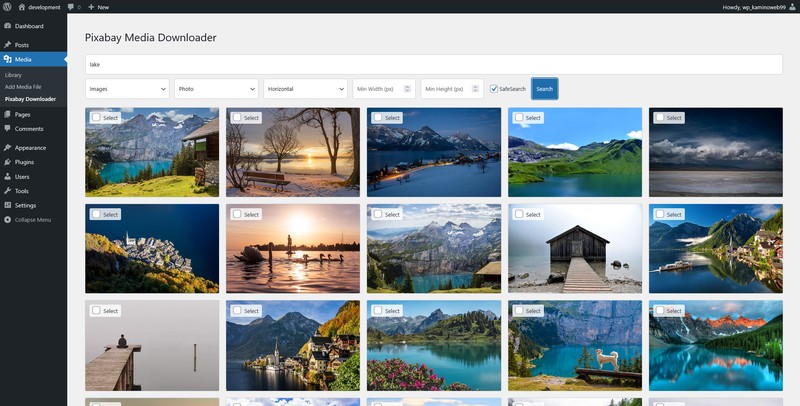
Selection – Preview and select media to download


Installatie
WordPress Admin Method
- Go to your administration area in WordPress
Plugins > Add - Look for
Pixabay Media Downloader(use search form) - Click on Install and activate the plugin
- Navigate to ‘Settings’ -> ‘Pixabay Downloader’ to enter your Pixabay API key
- Go to ‘Media’ -> ‘Pixabay Downloader’ to start searching and downloading media
FTP Method
- Upload the
pixabay-media-downloaderfolder to the/wp-content/plugins/directory. - Activate the ‘Pixabay Media Downloader’ plugin through the ‘Plugins’ menu in WordPress.
- Navigate to ‘Settings’ -> ‘Pixabay Downloader’ to enter your Pixabay API key.
- Go to ‘Media’ -> ‘Pixabay Downloader’ to start searching and downloading images and videos.
FAQ
Q: Where do I get a Pixabay API key?
A: You can obtain a free Pixabay API key by signing up for an account at https://pixabay.com/api/docs/ and following their API documentation.
Q: What image and video sizes can I download?
A: This plugin downloads the large web size images and medium resolution videos provided by the Pixabay API. Images are typically 1920px on the longest side, and videos are available in their original resolution.
Q: Can I use these images and videos for commercial purposes?
A: Yes, Pixabay content is generally free for commercial use. However, always refer to the Pixabay license terms for the most accurate and up-to-date information: https://pixabay.com/service/license/
Q: What video formats are supported?
A: The plugin downloads videos in MP4 format, which is compatible with WordPress. The videos include enhanced metadata such as dimensions, views, and likes from Pixabay.
Q: How do I preview videos before downloading?
A: When searching for videos, you can click on any video thumbnail to preview it before downloading. This helps you ensure you’re downloading the right video for your needs.
Q: What video metadata is stored with downloaded videos?
A: When you download a video, the plugin stores comprehensive metadata including:
– Video dimensions (width and height)
– Number of views on Pixabay
– Number of likes on Pixabay
This metadata is stored with the video in your WordPress Media Library.Q: Is the plugin available in other languages?
A: Yes, the plugin supports internationalization and can be translated into other languages. Translation files can be added to the
/languagesdirectory. The plugin uses the text domainpixabay-media-downloaderfor translations. If you’d like to contribute a translation, you can create .po and .mo files following the existing language file structure.Q: How does the SafeSearch feature work?
A: The SafeSearch feature filters out mature content from your search results. It’s enabled by default to ensure family-friendly content, but you can disable it in the search form if needed.
Beoordelingen

Bijdragers & ontwikkelaars
“Pixabay Media Downloader” is open source software. De volgende personen hebben bijgedragen aan deze plugin.
Bijdragers
Vertaal “Pixabay Media Downloader” in je eigen taal.
Interesse in ontwikkeling?
Bekijk de code, haal de SVN repository op, of abonneer je op het ontwikkellog via RSS.
Changelog
2.4
- Added video download support: Now download royalty-free videos alongside images
- Video preview functionality: Click thumbnails to preview videos before downloading
- Added video and image type search parameters
- Added a “Safe Search” setting, active by default
- Improved file handling: Better filename generation and collision avoidance when downloading media
- Code optimization: Improved sanitization and security measures throughout the plugin
- Updated dependencies: Ensured compatibility with latest WordPress versions up to 6.9
2.2
- Fixed API key test notifications to properly display success and error messages
2.1
- Added video and image type search parameters
- Added a “Safe Search” setting, active by default
2.0
- Added video download support: Now download royalty-free videos alongside images
- Video preview functionality: Click thumbnails to preview videos before downloading
1.5
- API Key Validation: Added a “Test Connection” button on the settings page to verify that the entered API key is valid and working, providing immediate feedback to the user
1.4
- Fixed notice message: Now using wp_kses_post()
- Improved readme.txt with better plugin description
1.3
- Corrected Typos
1.2
- Added orientation filters (horizontal, vertical, any) to the search form
- Added picture size filters (minimum width and height) to refine search results
- Enhanced filename generation to include sanitized search queries and unique image IDs
- Improved responsive design for better usability on various devices
1.1
- Enhanced filename generation to include sanitized search queries and unique image IDs
- Improved error handling and user feedback mechanisms
- Updated UI for better accessibility and responsiveness
1.0
- Initial release

