

Beschrijving


Activity Guard – Complete Security, Activity Log & WooCommerce Analytics Tracker
Beschrijving
Activity Guard is a powerful all-in-one WordPress Activity Log, WooCommerce Events, and Security Plugin designed to track every activity happening on your WordPress website.
It monitors user behavior, admin changes, WooCommerce events and analytics, forum activities, and system-level changes in real time. Whenever a critical change occurs, it instantly sends notifications via the Admin Dashboard, Slack, Telegram, and Email.
🚀 Activity Guard | 📖 Documentation | 💬 Pro Support
Let’s grow, connect, and build together! 🚀
🤝 Join our community on Facebook: Facebook
🎥 Subscribe to our YouTube channel: YouTube
🐦 Follow us on X (Twitter): X / Twitter
This top-rated Activity Log and Security Plugin helps you track user activity in WordPress efficiently. From user login and logout, role changes, plugin activation or deactivation, to tracking and blocking suspicious IP addresses- everything can be managed easily through Activity Guard. As a result, your user log and email log always remain clean, organized, and accessible.
The plugin’s detailed logging system clearly records where the change originated from (IP or source address), who made the change (user or admin), and when it occurred. This makes it a powerful Activity Log plugin with built-in IP address tracking.
It is one of the best WordPress plugins for tracking all changes and plays a vital role in keeping your website secure. Whether you are a site owner, developer, WooCommerce store manager, or an agency, Activity Guard helps you detect threats early, monitor changes accurately, and take immediate action.
Trusted by administrators and security professionals, Activity Guard offers real-time user monitoring, a comprehensive audit log, and advanced WordPress security features. With the built-in User Session Management, you can instantly log off any suspicious user, ensuring maximum protection for your website.
🔝 All Features at a Glance
🔐 Website Security & Advanced Protection
Proactively protect your site against unauthorized access, attacks, and suspicious behavior with layered security controls.📊 Complete Activity Log System
Log every meaningful event across WordPress core, users, content, plugins, themes, and WooCommerce all in one place.🧩 User Tracking & System Logs
Monitor user sessions, role changes, login history, system actions, cron jobs, and background processes.🛎️ Multi-Channel Notifier System
Receive real-time alerts via Slack, Telegram, Email, and Admin Notifications for critical events and security incidents.🛒 WooCommerce Monitoring & Analytics
Includes a full WooCommerce activity log, sales analytics, customer insights, and order behavior tracking.🔍 Plugin Vulnerability Scanner
Detect vulnerable, outdated, abandoned, or risky plugins before they become a threat.📈 WordPress Forum Monitoring
Track forum activities, topic changes, replies, moderation actions, and user interactions.🧱 Firewall with Emergency Shutdown
Instantly block malicious traffic and force-logout active sessions during emergencies.⏱ Cron Job & Downtime Monitoring
Monitor scheduled tasks, detect failures, and get alerts when your site goes down.
🛍️ Perfect for
Enhancing Website Security
Instantly detect suspicious activity on WordPress, block threats, and remotely trigger emergency shutdowns.Admin & Team Management
Learn how to monitor user activity on a WordPress site with detailed audit logs, role tracking, and accountability.Developers & Agencies
Track plugin/theme updates, configuration changes, fatal errors, and debug logs across multiple client sites.Real-Time Activity Logging
Track who changed a WordPress page or post, including edits, deletions, status changes, and metadata updates.WooCommerce Store Owners
Receive alerts for orders, payments, refunds, coupons, stock changes, shipping updates, and customer actions.WooCommerce Incomplete Orders Analytics
Analyze abandoned carts, checkout drop-offs, recovery potential, recovery rate, and customer cart interactions.
🛡️ Advanced Security Features
- IP Blocking (Manual, CIDR, Conditional Rules)
- Emergency shutdown for active user sessions
- Cloudflare Turnstile login protection
- Custom HTTP security headers & WordPress version hiding
- Core file integrity scanner
- Bot detection and automatic blocking
- Disable or restrict XML-RPC
- File Integrity Monitoring (core, plugins, themes)
- 404 error tracking
- Block vulnerability scanners
- Block TOR network access
- Admin dashboard visitor tracking
- Login rate limiting (login log protection)
- Suspicious HTTP request alerts
- Cron job and downtime monitoring
🧱 Plugin Security Scanner
- Automatically scan plugins, themes, and core files for known vulnerabilities
- Detect outdated or insecure plugins
- Flag abandoned or poorly rated plugins
- Confirm compatibility with current WordPress version
- Cross-check issues against multiple vulnerability databases
🔔 Updates and Notifier System
- 🚨 Real-time alerts for Core File Changes via Slack, Telegram, and Email
- 📦 Plugin and theme update alerts with updater name
- 🛍 WooCommerce sales and coupon usage notifications
- 🕒 Incomplete order follow-ups to recover lost sales
- ✏️ Product edits, stock changes, and shipping updates
- 📪 Billing and shipping address modifications
- 🌟 Daily review and 🆘 support notifications
- 📈 Weekly plugin download summaries
- 📝 Page, post, taxonomy updates and deletions (Helps Track who changed a page or post)
- 📬 Track logins, registrations, user role changes (Comprehensive login log)
- 🛠 Admin settings updates and form submission alerts
👨💻 Admin & Developer Tools
- 🔒 Maintenance mode toggle
- 🧭 Menu and widget activity tracking
- 📑 Plugin/theme activation and deactivation logs
- 🧰 Script modification detection
- 🧾 Log all HTTP security header changes
- 📉 Debug logs and fatal error detection
- 📤 Email delivery tracking through detailed email log
- 👀 Form integration alerts (Contact Form 7, Simple Form, more)
📈 Why Choose Activity Guard Over Other Activity Log Plugins?
Activity Guard is your comprehensive solution for Real-time user monitoring WP. With robust Security features, WooCommerce integrations, and Real-time alerts for critical changes, it offers unparalleled functionality compared to other plugins.
- ✅ Rich, intuitive Activity Log with advanced filtering
- 📊 Visual charts and graphs for clear audit log summaries (Easily Generate activity log reports for WordPress)
- ⚡ Real-time Slack and email notifier alerts
- 🛠 Smart automation and developer-friendly tools
- 🔐 Military-grade security features with minimal bloat
- 🛍 Tailored support for WooCommerce events (A must-have WooCommerce activity log)
- 📧 Built-in email log and User Tracking
- 🧘 Clean, modern interface anyone can use
Final Thoughts
Activity Guard is the Best WordPress plugin to track all changes, acting as your all-in-one activity log, notifier, user log, email log, and security plugin designed to keep your WordPress site safe, efficient, and well-monitored.
With real-time alerts, detailed logs, and robust features, you’ll never miss a thing from How to monitor user activity on a WordPress site to site vulnerabilities.
Try Activity Guard today and bring total visibility and WordPress Security to your WordPress site.
Don’t just take our word for it – try Activity Guard yourself and experience the difference!
Secure your WordPress site and stay informed with Activity Guard – your all-in-one solution for Real-time user monitoring WP and WordPress activity log plugin.
Documentation & Support
External services
Slack Webhook Integration
Activity Guard allows you to send notifications of all active actions directly to your Slack workspace using Slack webhooks. This feature enables real-time monitoring of plugin activities.
🔧 Webhook Configuration
The plugin uses the Slack incoming webhook URL you provide to send notifications to your Slack channel.
To set up an incoming webhook for your Slack workspace:
- Create a new app or use an existing one
- Activate Incoming Webhooks for your app
- Add a new webhook to your workspace
- Copy the webhook URL and paste it into the plugin settings
Cloudflare Turnstile
Activity Guard also uses Cloudflare Turnstile to enhance security and prevent spam. For more details, please refer to Cloudflare’s privacy policy.
Plugin Security Scanner
This component checks for known vulnerabilities in installed WordPress plugins by analyzing various public and private data sources. It runs a series of automated security checks and provides recommendations.
Features
- Detects outdated plugins
- Flags abandoned plugins (not updated in over a year)
- Checks WordPress version compatibility
- Warns about low install counts
- Analyzes plugin ratings
- Checks against multiple vulnerability databases
Data Sources
WordPress.org Plugin API
Used to retrieve plugin metadata such as latest version, last updated date, rating, active installs, etc.
📄 Privacy PolicyWPAzleen API (
/wp-json/wpx/v1/plugin-vulnerabilities)
Custom API endpoint to fetch known vulnerabilities for specific plugins and versions.
📄 No sensitive data is transmitted. Private API complies with plugin author’s data policy. Privacy PolicyWPVulnerability.net
Public API used to retrieve CVE-based vulnerability data for WordPress plugins.
📄 Privacy PolicyNational Vulnerability Database (NVD)
Checks against known CVEs using official NVD data.
📄 Privacy Policy
Activity Guard does not collect, store, or transmit any sensitive or personal information to performed the scan. All scans and checks are performed locally using public plugin metadata and vulnerability sources.
Freemius
Activity Guard an renamed version of Notifier to Slack utilizes the Freemius SDK to collect limited telemetry data, only upon the user’s explicit confirmation. This data helps us troubleshoot issues efficiently and improve our product for a better user experience.
🔐 Key Points:
No Data Collected by Default
The Freemius SDK does not collect any data by default. Data collection only begins when the user consents via the admin notice displayed in the plugin interface.User Confirmation Required
Integration of the Freemius SDK does not automatically enable data collection. Data is only gathered after users confirm their consent.Purpose of Data Collection
The collected data is used solely to enhance the user experience, resolve issues more effectively, and improve the plugin’s functionality.
For more details about Freemius and its data practices, please visit their FAQ page.
Additionally, you can review WPAzleen’s privacy policy for further information.
Schermafbeeldingen

Security Dashboard: Monitor all security events in real-time. 
Activity logs. 
Author page. 
Integration module. 
Advanced security settings panel. 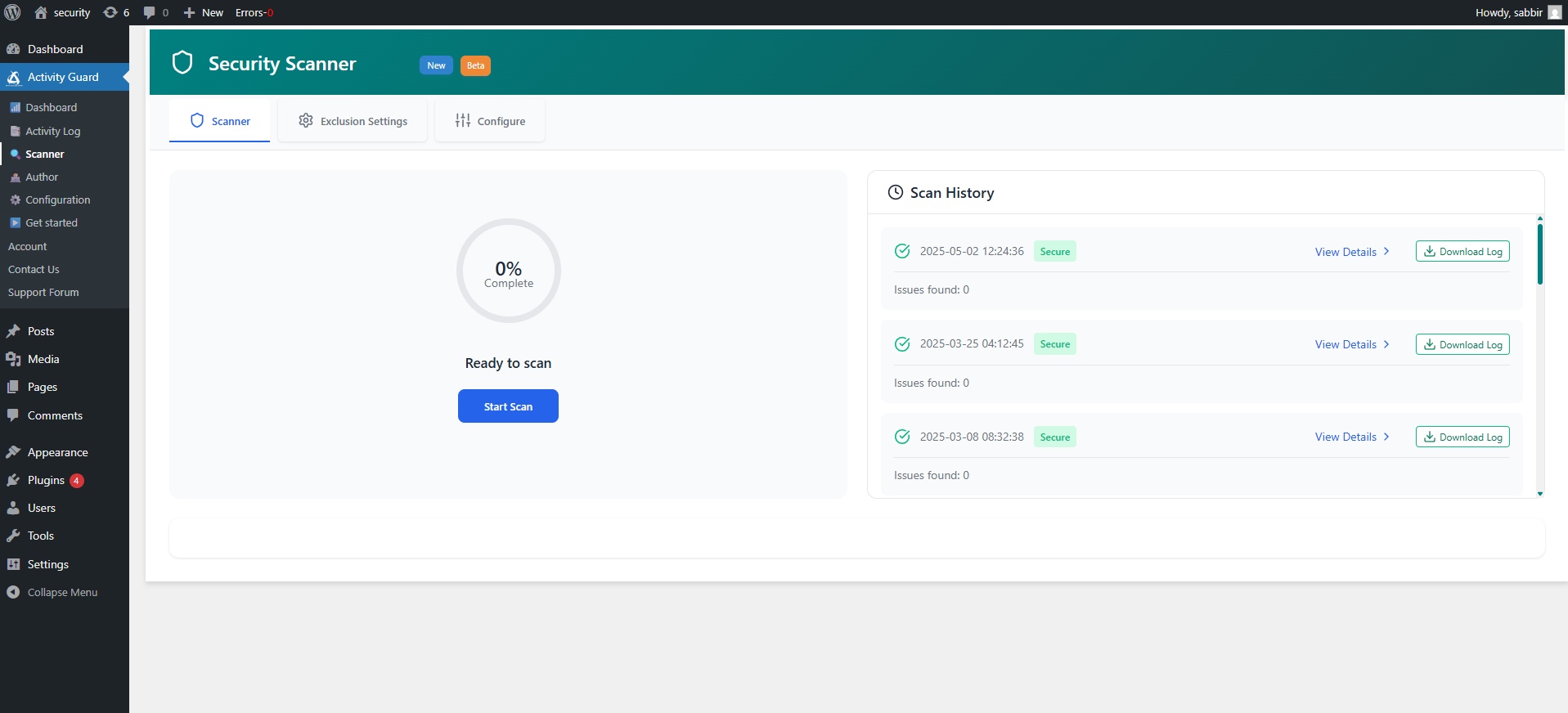
WooCommerce settings panel 
Slack webhok setup 
Slack Response 
Plugin author notifications 


Installatie
You can install the plugin manually or via the WordPress admin panel.
- Upload the Plugin:
– Upload the notifier-to-slack folder to the /wp-content/plugins/ directory.
– Alternatively, install the plugin through the WordPress plugins screen directly.
- Activate the Plugin:
– Navigate to the ‘Plugins’ section in your WordPress admin panel.
– Click ‘Add New’ and search for “Activity Guard By WPAzleen”.
– Click ‘Install Now’ and then activate the plugin.
- Configure Settings:
– Navigate to Activity Guard in the WordPress dashboard.
– Configure your security settings from ⚙️ Configuration, active all notification preferences, and activity tracking options.
FAQ
Q: Is this plugin compatible with WooCommerce?
A: Yes! Activity Guard tracks WooCommerce activities like stock changes, order updates, and coupon usage.
Q: Can I block users with suspicious behavior?
A: Absolutely. Use the manual or conditional IP blocker to secure your site against unwanted visitors.
Q: Do I need coding skills to use this plugin?
A: Not at all! The user-friendly interface makes it easy for anyone to set up and use.
Q: How does Activity Guard enhance my site’s security?
Activity Guard monitors core files, blocks suspicious IPs, detects malicious activities, and provides real-time alerts to keep your site secure from potential threats.
Q: Does it support WooCommerce
A: Absolutely! Activity Guard offers comprehensive WooCommerce tracking and notifications to keep your e-commerce operations smooth and secure.
Q: How quickly can I get started
A: You can get started within a few minutes. Activate the plugin, connect your webhok and set interval then set the plugin slug and you’re ready.
Q: Is Activity Guard compatible with all themes and plugins
A: Yes, Activity Guard is designed to work seamlessly with most WordPress themes and plugins, including popular ones like WooCommerce, Contact Form 7 and FormFlow.
Q: How do I set up the Slack notifications
A: You need to enter your Slack webhook URL in the plugin settings panel. Instructions for generating the webhook URL are provided in the settings panel.
Q: Can I give specific time for notification
A: Yes of course, you can specify any time when you want the notification to appear.
Q: Will this plugin slow down my website
A: No, this plugin has been designed to have minimal impact on website performance.
Q: Is this plugin compatible with all modern browsers
A: Yes, you can use this plugin in all modern browsers (Safari, Chrome, Firefox, Edge, etc) without any issue.
Q: Do I need to know any programming language for using this plugin
A: No. WP activity guard is an easy-to-use plugin and you can use it without any programming knowledge.
Q: What happens if I don’t set up the Slack notifications
A: You will not receive any notifications on Slack, but the plugin will still function normally.
Beoordelingen


Bijdragers & ontwikkelaars
“Activity Guard – Complete Security, Activity Log & WooCommerce Analytics Tracker” is open source software. De volgende personen hebben bijgedragen aan deze plugin.
Bijdragers
Interesse in ontwikkeling?
Bekijk de code, haal de SVN repository op, of abonneer je op het ontwikkellog via RSS.
Changelog
🆕 Version 3.11.0 – 07 Dec 2026
- 🔥 New : Single or Bulk Activity log trash in once Click.
- 🐞 Bug Fixes : Resolved frontend activity tracking ajax error.
- 🐞 Bug Fixes : Maintenance form submission error.
- 🐞 Bug Fixes : Resolved analytics toggle not removed widget from dashboard.
🆕 Version 3.10.6 – 17 Dec 2025
- 🔥 New : SDK updated
- 🛠️ Improvement : Today Sign out UX improved
- 🛠️ Improvement : Emergency Shutdown panel enhanced
🆕 Version 3.10.5 – 12 Nov 2025
-🐞 Bug Fixes : Resolved multiple issues affecting the Visitor Traffic table for smoother data display and improved stability.
🆕 Version 3.10.4 – 09 Nov 2025
💬 Telegram Integration : Stay instantly informed with real-time Telegram alerts! You can now connect your Telegram account to receive immediate activity notifications and security updates directly in your chat.
👀 Enhanced Visitor Traffic Overview (with Disabled Feature Toggle) : The visitor tracking system has been upgraded for better visibility and flexibility. You can now easily monitor detailed visitor logs and disable the tracking feature anytime without impacting site performance.
⚙️ Optimized Backend Script Loading & Performance : Backend processes have been refined to reduce load time and enhance overall system efficiency, providing a smoother and faster admin experience.
🌐 Optimized Frontend Script Loading : Frontend scripts are now lighter and better organized boosting page loading speed and improving the browsing experience for visitors.
For a detailed list of updates, refer to our Changelog.
For older changelog entries, please see the additional changelog.txt file delivered with the plugin.

