

Beschrijving

Deze plugin is niet getest met de laatste 3 grotere versies van WordPress. Mogelijk wordt het niet meer onderhouden of ondersteund. Ook kunnen er compatibiliteitsproblemen ontstaan wanneer het wordt gebruikt met recentere versies van WordPress.

mFloorMap
Beschrijving
This plugin is tailor-made for larger shopping centers, malls, parking lots, marketplaces, etc… to provide floor plan with details for each object on it.
It support separate management of multiple facilities and each facility can contain multiple floors.
Maps can be rendered on page/post using short-codes.
There is two types of short-codes:
- Floor – display only map of specified floor
- Facility – display array of zoomable maps which belongs to specified facility
Placing cursor over region on map will display tool-tip (cloud) with basic information about that object whether clicking on it will open separate page with full text description and attached photo.
Visitor can use “search by tag” functionality to easily find all related objects on map.
Searching controls will highlight all matched objects on all rendered maps.
Performance & UX
Browsing is maximally improved and accelerated by preloading of all basic object details on map(s).
As visitor moves cursor over next object details in cloud are instantly updated, only logo image will dispatch additional HTTP request if it is not cached.
Results of searching also will be instantly displayed because all needed data is already present.
SEO
Separated sub-pages with full text and photo will put name of selected object into “title” and “h1” tags which can be used for branding and promotion of landing pages.
Demo
Demonstration of plugin populated with maps of an shopping mall you can find here.
Schermafbeeldingen

Public page displaying facility with 3 floors, click on image will zoom its map. 
Public page displaying single floor map. 
Public page after click on an mapped object on floor. 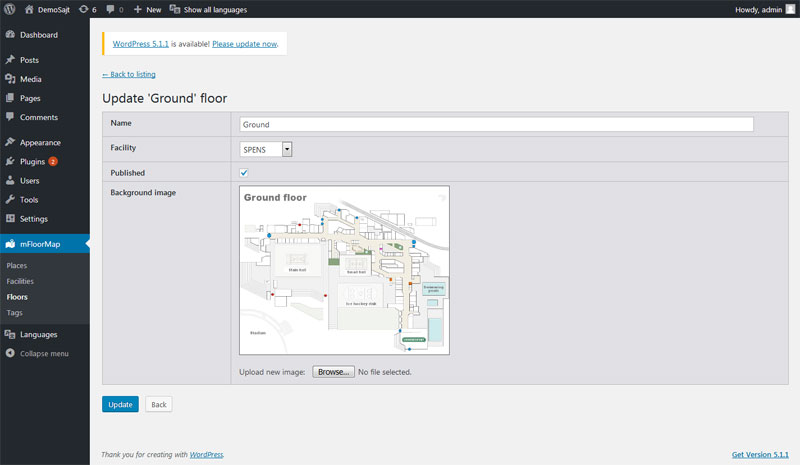
Admin page editing floor settings. 
Admin page editing object (place) settings.


Installatie
- From WordPress dashboard go to “Plugins” > “Add New”, search for “mFloorMap” and click “Install”.
- Activate plugin.
- Installer was automatically created first facility and first floor within in. Now upload image of floormap (plan).
- Create floor objects (places).
- Place short-tags somewhere on page/post to render map(s), something like: [mfloormap-facility id=”1″] or [mfloormap-floor id=”6″].
FAQ
No, combine all maps under same facility and render that facility.
How to remove certain unused details from cloud?
Hook to “mFloorMap-WidgetFacility” or “mFloorMap-WidgetFloor” filters to customize rendering templates.
Beoordelingen
Er zijn geen beoordelingen voor deze plugin.
Bijdragers & ontwikkelaars
“mFloorMap” is open source software. De volgende personen hebben bijgedragen aan deze plugin.
Bijdragers
Vertaal “mFloorMap” in je eigen taal.
Interesse in ontwikkeling?
Bekijk de code, haal de SVN repository op, of abonneer je op het ontwikkellog via RSS.
Changelog
1.0
- First version of plugin ported to WordPress platform.

