

Beschrijving

Deze plugin is niet getest met de laatste 3 grotere versies van WordPress. Mogelijk wordt het niet meer onderhouden of ondersteund. Ook kunnen er compatibiliteitsproblemen ontstaan wanneer het wordt gebruikt met recentere versies van WordPress.

Follow for bbPress
Beschrijving
The Follow for bbPress is a simple following system for bbPress plugin. It provides a very easy and simple way to create a following system for bbPress.
Users can easily follow/unfollow each other and they can see the topics of followings via wall page.
When you activate Follow for bbPress plugin, information and fields related to this plugin are added to users profile page. These infomation and fields include number
of followers, number of following, follow/unfollow button and followers and followers/following links for displaying the followers/following lists.
By clicking on followers/following links, a list of followers (or following) with follow buttons are shown in a popup window and you can also follow other users
via these lists. This plugin gains AJAX method for following/unfollowing users and loading the followers/following lists to improve the performance of your website.
By using [bbpresswall] shortcode you can easily create a wall of the bbpress topics for users. This wall just displays the topics of the users who you follow them.
Requirements:
bbPress plugin
Jquery
Plugin Features
Displaying the topics of the followings via shortcode
Gaining AJAX method
Easy to use
Customizable setting
User follow/unfollow system for bbpress
Displaying followers/following lists.
Plugin Setting
Show Forum: Select yes if you want to show forum title for the topics in the wall section
Show Date: Select yes if you want to show create date of the topics in the wall section
Number of users per load: The information of how many users are loaded when you open or scroll down the followers/following lists
Number of topics per load: How many topics are loaded per request in the wall section
Limit the length of forum title: You can limit the length of forum title (how many words)
Limit the length of topic title: Similar limitation for topic title (how many words)
Limit the length of topic description: You can also limit the length of descriptions for each topic
Users can unfollow X days after following: To prevent frequent follow/unfollow requests by users, you can determine a waiting time for users
If you don’t like to use plugin setting parameters for wall section, you can set them via shortcode attributes.
[bbpresswall] shortcode attributes
show_forum: 1 or 0 for showing or hiding the forum title (Default:1)
show_date: 1 or 0 for showing or hiding the create date of topic (Default:1)
item_limit: How many topics are loaded per request in the wall section (Default:5)
forum_limit: limit the length of forum title (how many words) (Default:5)
title_limit: limit the length of topic title (how many words) (Default:5)
word_limit: limit the length of descriptions for each topic (how many words) (Default:20)
Usage example: [bbpresswall show_forum=”1″ show_date=”0″ word_limit=”50″ item_limit=”10″]
Schermafbeeldingen
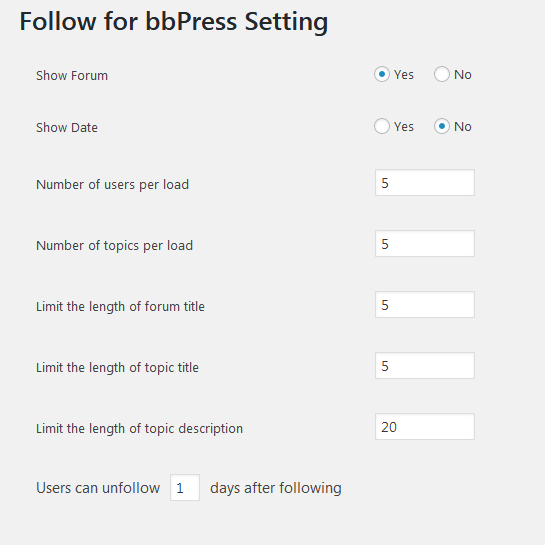
Setting page in admin panel. 
Output in user profile 
Loading the followers list 
Placing shortcode in post/page content 
Display the topics of the following users in the wall section


Installatie
Upload the Follow for bbPress plugin to your blog, Activate it. Before installing this plugin, make sure you have installed bbPress plugin.
FAQ
What’s the shortcode for displaying the followings topics?
The shortcode for displaying the followings topics is [bbpresswall], that accepts some parameters.
For more details, see above description.An example of the shortcode usage:
[bbpresswall show_forum=”1″ show_date=”0″ word_limit=”50″ item_limit=”10″]How to prevent frequent follow/unfollow request?
In setting page, there is an option for determining a wait time for unfollowing users.
Beoordelingen
Er zijn geen beoordelingen voor deze plugin.
Bijdragers & ontwikkelaars
“Follow for bbPress” is open source software. De volgende personen hebben bijgedragen aan deze plugin.
Bijdragers
Vertaal “Follow for bbPress” in je eigen taal.
Interesse in ontwikkeling?
Bekijk de code, haal de SVN repository op, of abonneer je op het ontwikkellog via RSS.
Changelog
1.0
First release

