

Beschrijving
Deze plugin is niet getest met de laatste 3 grotere versies van WordPress. Mogelijk wordt het niet meer onderhouden of ondersteund. Ook kunnen er compatibiliteitsproblemen ontstaan wanneer het wordt gebruikt met recentere versies van WordPress.

Debug Bar List Script & Style Dependencies
Beschrijving
We all know that when we’re add a script or style to WordPress, we should use wp_enqueue_script( $handle, $src, $deps, $ver, $in_footer ) and wp_enqueue_style( $handle, $src, $deps, $ver, $media ) as in:
function themeslug_enqueue_style() { wp_enqueue_style( 'core', 'style.css', array('twentytwelve-style') ); } function themeslug_enqueue_script() { wp_enqueue_script( 'my-js', 'filename.js', array('jquery') ); } add_action( 'wp_enqueue_scripts', 'themeslug_enqueue_style' ); add_action( 'wp_enqueue_scripts', 'themeslug_enqueue_script' ) $deps (dependencies), the handle name and an optional parameter, lets you control when/where your script or style should be added. If $deps is array('jquery'), your script will be loaded after jquery is loaded.
The problem is, which one exists and in which order are they loaded ?
Debug Bar List Script & Style Dependencies, an add-on to Debug Bar, will list the dependencies.
Use
To view the loaded scripts and styles
- Front-end: Go to the front-end, and on the admin bar choose Debug and view Script & Style Dependencies
- Back-end: Go to the back-end, on the admin bar choose Debug and view Script & Style Dependencies
Note, the front-end and back-end loads different scripts and styles. Also, different pages on the front-end and back-end can load different scripts and styles.
Schermafbeeldingen
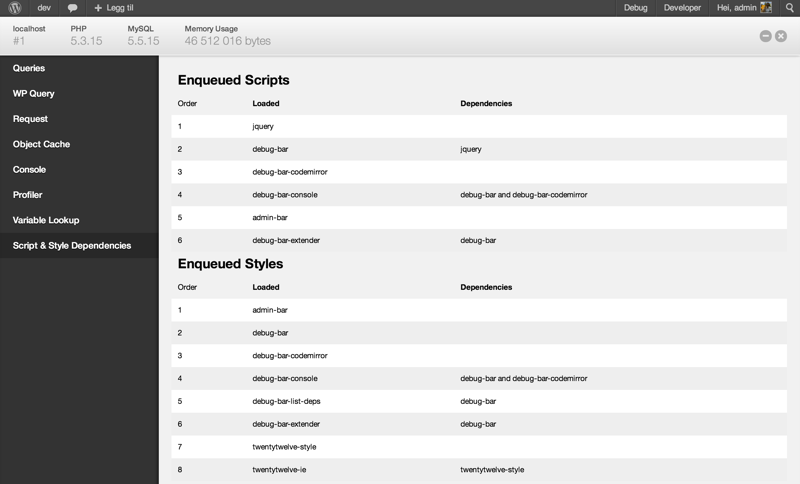
Front-end dependencies 
Back-end dependencies


Installatie
- Copy the ‘debug-bar-list-dependencies’ folder into your plugins folder
- Activate the plugin via the Plugins admin page
Beoordelingen

Bijdragers & ontwikkelaars
“Debug Bar List Script & Style Dependencies” is open source software. De volgende personen hebben bijgedragen aan deze plugin.
Bijdragers

“Debug Bar List Script & Style Dependencies” is vertaald in 4 localen. Dank voor de vertalers voor hun bijdragen.
Vertaal “Debug Bar List Script & Style Dependencies” in je eigen taal.
Interesse in ontwikkeling?
Bekijk de code, haal de SVN repository op, of abonneer je op het ontwikkellog via RSS.
Changelog
1.1.2
- Tested & found compatible with WP 4.7.
1.1.1
- Tested & found compatible with WP 4.6.
1.1
- Minor fix for ‘&’ not being escaped in url’s with query vars.
- Fixed compatibility with the Plugin Dependencies plugin.
- Fixed weird table layout on front-end in combination with Twenty-Sixteen theme.
- Fixed a bug where translations would not be loaded as the language file names were not in sync with the used text-domain.
- Hard-code the text-domain for better compatibility with GlotPress.
- Made loading of text-domain compatible with use of the plugin in the
must-useplugins directory. - General housekeeping.
- Tested & found compatible with WP 4.5.
1.0.6
- Tested with WordPress 3.9. Bumped version number.
1.0.5
- Made text strings translatable, added .pot file and Dutch translation.
- Added minified CSS file.
- Added total counts at the top of the page.
1.0.4.
- Added contributor.
1.0.3
- (Partial) Bugfix for Help tabs broken and missing scripts.
- Fix: duplicate script listings.
- New!: un-obtrusive script/style source line.
- Some other minor adjustments to compensate for the front-end themes.
1.0.2
- Added styling.
1.0.1
- Bugfix, fixed listing of styles and their dependencies.
1.0
- Initial release.

