

Beschrijving


AVIF & WebP Converter
Beschrijving
CompressX is a free, lightweight and simple Webp & AVIF conversion and compression plugin for WordPress websites. It helps you to easily convert JPG and PNG images to WebP and AVIF formats, and compress WebP and AVIF images. The AVIF and WebP conversion is performed locally on the web server.
Core functies
1. Converteer AVIF & Comprimeer AVIF
Convert jpg, png, and WebP images on your WordPress website to AVIF format, and compress AVIF images according to the compression level you set.
If the original image is already in AVIF format which is supported since WordPress 6.5, the original AVIF image will only be compressed.
2. Converteer WebP & Comprimeer WebP
Convert jpg, png images on your WordPress website to WebP format, and compress WebP images according to the compression level you set.
If the original image is already in WebP format which is supported since WordPress 5.8, the original WebP image will only be compressed.
3. Mappen uitsluiten
Selecteer specifieke mappen in je mediabibliotheek en voorkom dat afbeeldingen in deze mappen worden verwerkt.
4. Aangepaste mappen
Selecteer mappen in de map wp-content maar buiten de map Uploads (mediabibliotheek) en verwerk afbeeldingen in deze mappen.
5. Nieuwe afbeeldingen automatisch verwerken
Automatically convert new images uploaded to a WordPress website to WebP/AVIF format and compress WebP/AVIF images upon upload.
6. Automatisch verwijderen van grote afbeeldingen
Verwijder automatisch geconverteerde AVIF/WebP afbeeldingen als ze groter zijn dan de originele afbeeldingen.
7. Originele afbeeldingen terugzetten
Je afbeeldingen worden teruggezet naar hun oorspronkelijke staat en alle AVIF/WebP afbeeldingen en gegevens in de database die door CompressX zijn gegenereerd, worden verwijderd wanneer CompressX wordt verwijderd.
Minimumvereisten om CompressX te gebruiken
- Karakter encoding UTF-8
- PHP versie 7.0
- MySQL versie 4.1
- WordPress 5.8
Schermafbeeldingen
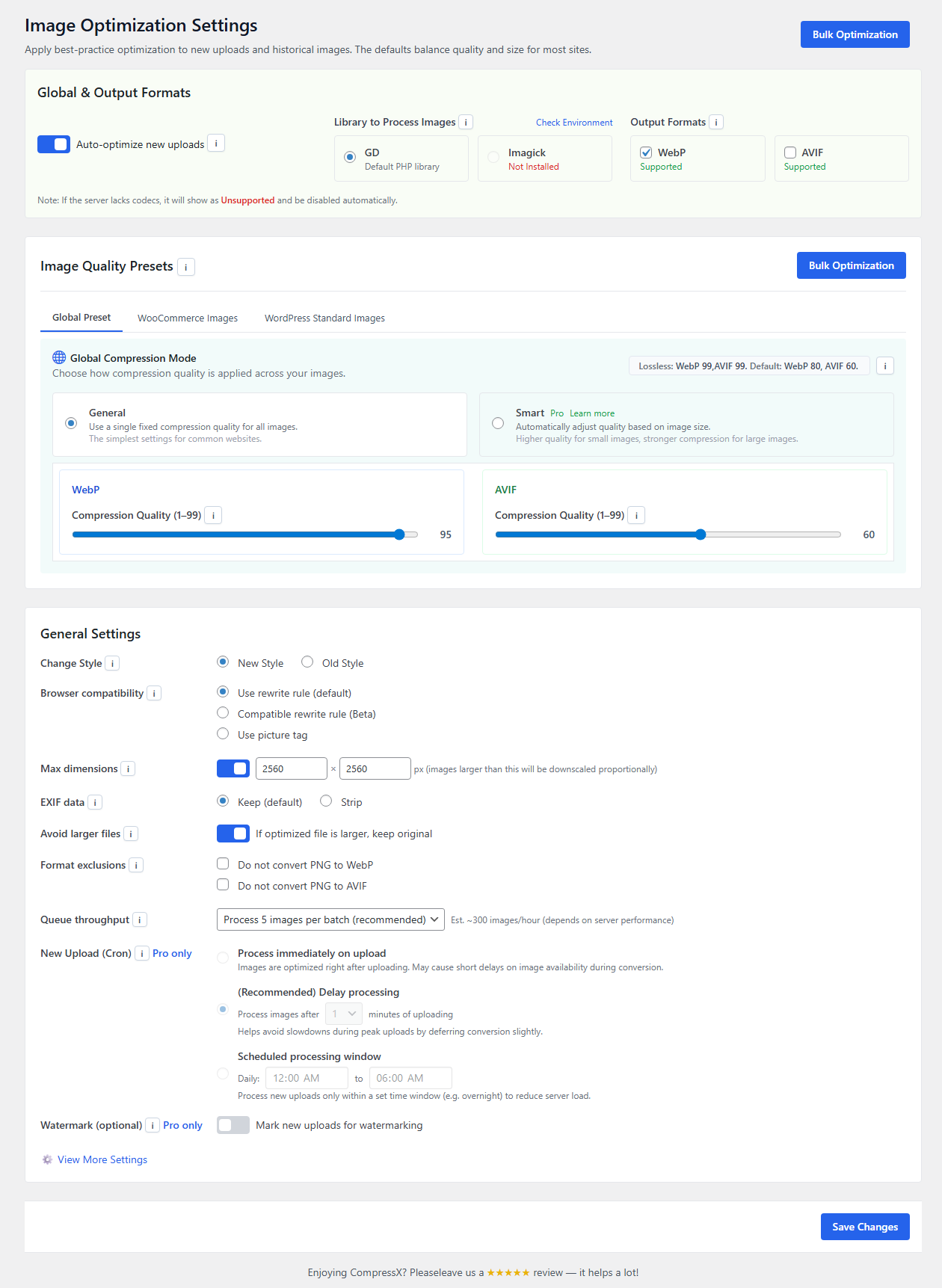
PNG/JPG afbeeldingen converteren naar WebP

Installatie
Installeer CompressX
1. Ga naar het beheer dashboard van je site.↵
2. Navigeer naar het Plugins menu en zoek naar CompressX.↵
3. Wanneer je CompressX gevonden hebt, klik op Nu installeren.↵
4. Klik op Activeren.
FAQ
Wat doet CompressX?
CompressX converts JPG/PNG images on your WordPress website to WebP and AVIF formats, and compress WebP and AVIF images locally, for free!
Converteert CompressX AVIF? Is het een gratis functie?
Ja, CompressX ondersteunt AVIF conversie en compressie, de AVIF conversie en compressiefunctie is helemaal gratis.
Converteert CompressX WebP? Is het een gratis functie?
Ja, CompressX ondersteunt WebP conversie en compressie, de WebP conversie en compressie functie is volledig gratis.
Bieden jullie ondersteuning voor CompressX? Waar?
Yes, absolutely. Whenever you need help, start a thread on the support forum or contact us.
Hebben jullie handleidingen/documentatie om aan de slag te gaan?
Yes, we do. Here is a tutorial for you to quickly get started with CompressX.
Beoordelingen


Bijdragers & ontwikkelaars
“AVIF & WebP Converter” is open source software. De volgende personen hebben bijgedragen aan deze plugin.
Bijdragers
“AVIF & WebP Converter” is vertaald in 11 localen. Dank voor de vertalers voor hun bijdragen.
Vertaal “AVIF & WebP Converter” in je eigen taal.
Interesse in ontwikkeling?
Bekijk de code, haal de SVN repository op, of abonneer je op het ontwikkellog via RSS.
Changelog
0.9.34
- Added a custom database table for saving CompressX image data.
- Fixed some bugs in the plugin code.
- Optimized plugin UI and core code.
0.9.33
- Major update to the plugin user interface.
- Fixed some bugs in the plugin code.
- Successfully tested with PHP 8.5.
- Successfully tested with WordPress 6.9.
0.9.32
- Fixed: Manual image conversions from media library would fail.
0.9.31
- Fixed some bugs in the plugin code.
0.9.30
- Fixed: Custom compression level settings could not be saved.
0.9.29
- Added a compatible rewrite rule option for broader server compatibility.
- Optimized the efficiency of batch scanning, especially for sites with many images.
0.9.28
- Fixed: Incorrect image statistics calculation.
- Added support for image rotation during WebP/AVIF conversion.
- Fixed: Image resizing data could not be updated in the database.
0.9.27
- Refactored the plugin code and optimized the code structure.
- Optimized and reduced CompressX entries in postmeta table.
- Fixed some UI bugs.
0.9.26
- Expanded compatibility to support a wider range of server configurations.
- Added a clear warning about potential AVIF conversion timeouts when using ImageMagick 6.x.
- Enhanced compatibility of .htaccess rewrite rules to accommodate diverse server settings.
- Optimized bulk image processing to skip stuck images.
- Optimized the plugin code.
0.9.25
- Fixed a UI bug.
- Optimized the plugin code.
0.9.24
- Fixed: CDN integration settings could not be saved correctly.
- Optimized the plugin code and UI.
0.9.23
- Added support for conversion of Elementor custom thumbnails size.
- Added support for conversion in media library grid view and image edit page.
0.9.22
- Fixed: Picture tag did not take all sizes in srcset.
- Fixed: Conversion would fail if image’s MIME type did not match the MIME type saved in posts.
- Optimized the plugin UI.
0.9.21
- Added an option of ‘Do not convert PNG to WebP’.
- Added an option to automatically purge cache after manual conversion from media library.
- Optimized the plugin UI.
- Canceled support for grid view of media library. Only list view is supported.
0.9.20
- Optimized process of scanning a large number of images.
- Successfully tested with WordPress 6.7.
0.9.19
- Optimized image scanning method in the bulk processing workflow.
0.9.18
- Opgelost: Standaard compressieniveau voor bulkverwerking was onjuist ingesteld op lossless.
0.9.17
- Added an option of ‘picture tag’ to load WebP and AVIF images.
- Optimized the plugin UI.
- Optimized the plugin code.
0.9.16
- Fixed a UI bug that would appear when folders that do not exist were added to exclusion rules.
- Optimized the plugin code.
0.9.15
- Fixed some bugs in the plugin code.
- Optimized the plugin code.
0.9.14
- Added support for multilanguage translation.
- Added an option to exclude PNG images from conversion.
- Added an option to delete cache control settings from .htaccess file.
- Fixed: WebP images could not be displayed as AVIF after conversion.
- Optimized the plugin UI.
- Optimized the plugin code.
0.9.13
- Added support for Cloudflare CDN.
- Fixed: Settings of ‘auto-resizing large images’ could not take effect.
- Optimized the plugin code.
0.9.12
- Fixed a UI bug where WebP option could not be selected in some cases.
- Fixed: Images would be repeatedly processed when EXIF removal option was enabled.
- Optimized the plugin code.
0.9.11
- Added an option to delete converted images.
- Optimized the plugin UI.
- Fixed some bugs in the plugin code.
- Optimized the plugin code.
0.9.10
- Fixed: Image quality would not be changed after AVIF conversion with Imagick.
- Fixed: Incorrect compression quality with Imagick and Lossless compression level.
- Fixed: Custom compression level would not take effect.
- Optimized the plugin code.
0.9.9
- Added an option to set how many images to process per ajax request.
- Fixed some bugs in the plugin code.
- Optimized the plugin code.
0.9.8
- Added a Debug section.
- Fixed some bugs in the plugin code.
- Optimized the plugin code.
0.9.7
- Fixed the path error of rewrite rules that appeared in some environments.
- Fixed: Some settings could not take effect.
- Fixed some bugs in the plugin code.
- Optimized the plugin code.
0.9.6
- Fixed a bug where AVIF output format could not be enabled.
- Fixed some bugs in the plugin code.
- Optimized the plugin code.
0.9.5
- Fixed a bug in the plugin code.
- Optimized the plugin code.
0.9.4
- Fixed a critical bug in the plugin code.
- Optimized the plugin code.
0.9.3
- Fixed a critical bug in the plugin code.
- Optimized the plugin code.
0.9.2
- Added a check for the case where multiple image optimization plugins are activated.
- Fixed some bugs in the plugin code.
- Optimized the plugin code.
- Successfully tested with WordPress 6.6.
0.9.1
- Initial release. Hello world!

